当前位置:网站首页>STM32 external DHT11 display temperature and humidity
STM32 external DHT11 display temperature and humidity
2022-07-04 03:57:00 【Hua Weiyun】
1 DTH11 Temperature and humidity sensor
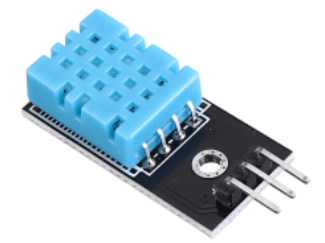
1.1 Data reading protocol
Micro controller MCU And DHT11 Communication and synchronization between , Use single bus data format , Primary communication time 4ms about .
user MCU Send a start signal after ,DHT11 From low power mode to high speed mode , Wait for the end of the host start signal ,DHT11 Send a response signal , Send out 40bit The data of , And trigger a signal acquisition , Users can choose to read some data .
From mode ,DHT11 Receive the start signal to trigger a temperature and humidity acquisition , If no start signal is received from the host ,DHT11 Do not actively collect temperature and humidity . After collecting data, switch to low speed mode .
1.1.1 Start signal
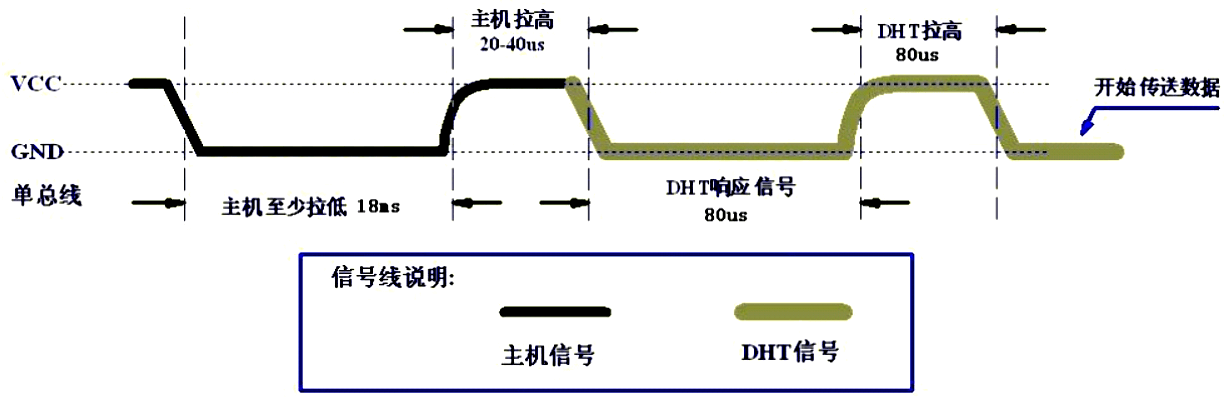
The bus idle state is high ,MCU Pull the bus down and wait DHT11 Respond to ,MCU Pull down the bus must be greater than 18 millisecond , Guarantee DHT11 Can detect the start signal .
DHT11 After receiving the start signal from the host , wait for MCU The start signal is over , And then send 80us Low level response signal .
MCU After sending the start signal , Delay waiting for 20-40us after , Read DHT11 The response signal ,MCU After sending the start signal , You can switch to input mode , Or the average output high power can , The bus is pulled up by a pull-up resistor .
1.1.2 Data digital signal
The bus is low , explain DHT11 Send a response signal ,DHT11 After sending the response signal , Then pull up the bus 80us, Prepare to send data , each bit All the data are based on 50us The low level slot starts , The length of the high level determines that the data bit is 0 still 1.
Numbers 0 And number 1 It means , As shown in the figure below :
Numbers 0:50us After the low level starts ,26-28us High level of Express 0
Numbers 1:50us After the low level starts ,70us High level of Express 1
If the read response signal is high , be DHT11 No response , It is necessary to check whether the line is connected normally .

When the last one bit After the data is transmitted ,DHT11 Pull down the bus 50us, Then, the bus is pulled up by the pull-up resistance and enters the idle state .
1.1.3 Temperature and humidity data format
A complete data transfer is 40bit, High first out . The data is divided into decimal part and integer part , data format :
8bit Humidity integer data
8bit Humidity decimal data
8bit Temperature integer data
8bit Temperature decimal data
8bit The checksum
When the data transmission is correct, the check sum data is equal to “ 8bit Humidity integer data +8bit Humidity decimal data +8bit Temperature integer data +8bit Temperature decimal data ” The end of the result 8 position .
1.2 Hardware wiring
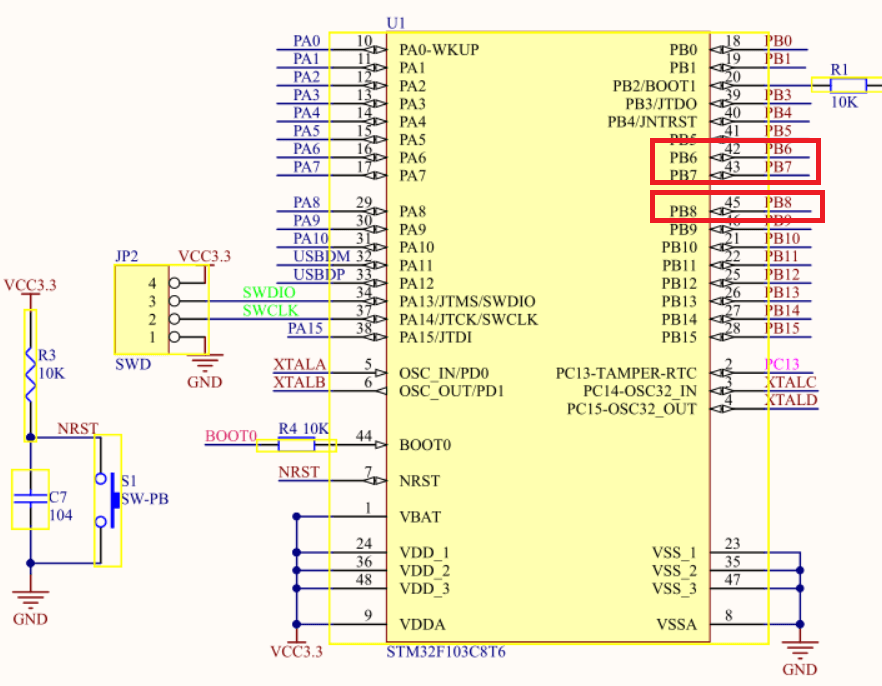
DHT11 Only one line is needed for data reading , I'm using PB8, in addition ,OLED Used to display the value of temperature and humidity , Use IIC signal communication , It uses PB6 and PB7.
2 Programming
according to DHT11 Data reading protocol , Write the corresponding data reading function .
2.1 DHT11 Reset and detect response functions
First of all MCU towards DHT11 Start signal sent , Pull it down 20ms, Pull up again 30us.
u8 DHT11RstAndCheck(void){ u8 timer = 0; __set_PRIMASK(1); // General manager Guan interrupted DHT11_OUT = 0; // Output low level delay_ms(20); // Pull down at least 18ms DHT11_OUT = 1; // Output high level delay_us(30); // pull up 20~40us while (!DHT11_IN) // Wait for the bus to pull down ,DHT11 Will pull down 40~80us As a response signal { timer++; // Count when the bus is pulled down delay_us(1); } if (timer>100 || timer<20) // Determine the response time { __set_PRIMASK(0); // General interruption return 0; } timer = 0; while (DHT11_IN) // wait for DHT11 Release the bus , The duration of the 40~80us { timer++; // Count when the bus is pulled high delay_us(1); } __set_PRIMASK(0); // General interruption if (timer>100 || timer<20) // Detect the high level after the response signal { return 0; } return 1;}2.2 data fetch
MCU towards DHT11 After sending the start signal , You can receive DHT11 The data returned , Read the humidity and temperature at one time .
/* Read one byte of data , Return value - Data read */u8 DHT11ReadByte(void){ u8 i; u8 byt = 0; __set_PRIMASK(1); // General manager Guan interrupted for (i=0; i<8; i++) { while (DHT11_IN); // Wait for low level , Before the data bits 50us Low level slot while (!DHT11_IN); // Wait for high level , Start transmitting data bits delay_us(40); byt <<= 1; // Because of the high position , So move left byt, The lowest point is made up of 0 if (DHT11_IN) // Read the bus level value to byt Lowest middle { byt |= 0x01; } } __set_PRIMASK(0); // General interruption return byt;}/* Read data once , Returns the parameter :Humi- humidity ,Temp- temperature ; Return value : 0- success ,1- Failure */u8 DHT11ReadData(float *Humi, float *Temp){ s8 sta = 0; u8 i; u8 buf[5]; if (DHT11RstAndCheck()) // Detect the response signal { for(i=0;i<5;i++) // Read 40 Bit data { buf[i]=DHT11ReadByte(); // Read 1 Bytes of data } if(buf[0]+buf[1]+buf[2]+buf[3] == buf[4]) // Check success { u8 H_inte = buf[0]; // Humidity integer part data u8 H_frac = buf[1]; // Humidity fractional data u8 T_inte = buf[2]; // Temperature integer part data u8 T_frac = buf[3]; // Temperature fractional data char tmp1[8], tmp2[8]; sprintf(tmp1, "%d.%d",H_inte,H_frac); sscanf(tmp1, "%f", Humi); sprintf(tmp2, "%d.%d",T_inte,T_frac); sscanf(tmp2, "%f", Temp); } sta = 0; } else // The response failed and returned -1 { *Humi = 88; // The response failed and returned -1 *Temp = 88; // The response failed and returned -1 sta = 1; } return sta; }2.3 initialization
Use DHT11 Before , Conduct pin initialization and device initialization .
/*DHT11 Initialization function */u8 DHT11Init(void){ GPIO_InitTypeDef GPIO_InitStructure; RCC_APB2PeriphClockCmd(RCC_APB2Periph_GPIOC,ENABLE);// Can make GPIOC Port clock GPIO_SetBits(GPIOB,GPIO_Pin_8); // Set up PC13 Output high level ,( Setting the pin level first can avoid IO Possible burrs during initialization ) GPIO_InitStructure.GPIO_Pin = GPIO_Pin_8; // Set up DHT11 Data pins ->PC13 GPIO_InitStructure.GPIO_Mode = GPIO_Mode_Out_OD; // Set to open drain output mode GPIO_InitStructure.GPIO_Speed = GPIO_Speed_50MHz; // Set the output rate to 50MHz GPIO_Init(GPIOB, &GPIO_InitStructure); // initialization GPIOC port return DHT11RstAndCheck(); // return DHT11 state }3 test
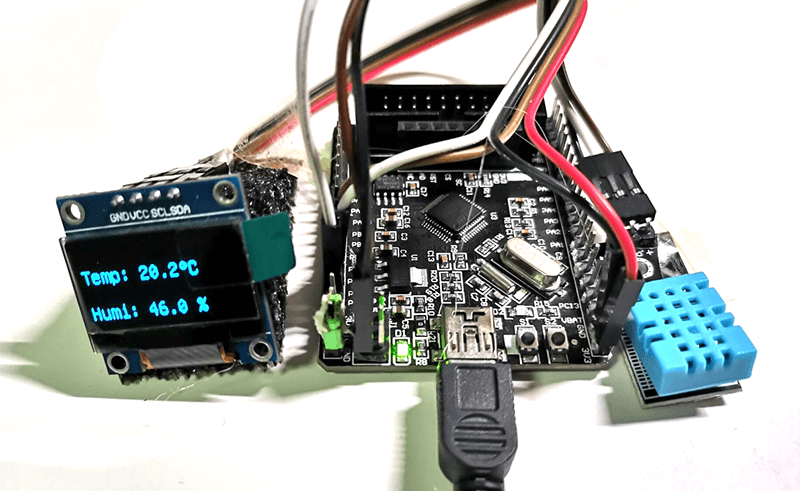
After transplantation U8g2 Library hello_world Make modifications on the routine , Display temperature and humidity on the screen . Notice the small circle in degrees Celsius , I don't know how to show it directly in the form of symbols , I drew a small hollow circle here alone .
int main(void){ delay_init(); // Delay function initialization LED_Init(); // Initialization and LED Connected hardware interface IIC_Init(); u8g2_t u8g2; u8g2Init(&u8g2); u8g2_SetFontMode(&u8g2, 1); u8g2_SetFont(&u8g2, u8g2_font_unifont_t_symbols); DHT11Init(); float Temp = 0; float Humi = 0; char strTemp[32]; char strHumi[32]; while(1) { u8g2_FirstPage(&u8g2); do { //draw(&u8g2); DHT11ReadData(&Humi, &Temp); sprintf(strTemp, "Temp: %.1f C", Temp); sprintf(strHumi, "Humi: %.1f %%", Humi); u8g2_ClearBuffer(&u8g2); u8g2_DrawStr(&u8g2, 0, 30, strTemp); u8g2_DrawCircle(&u8g2, 84, 22, 2, U8G2_DRAW_ALL); u8g2_DrawStr(&u8g2, 0, 60, strHumi); u8g2_SendBuffer(&u8g2); delay_ms(3000); } while (u8g2_NextPage(&u8g2)); }}The test results are as follows :
4 summary
This article introduces how to use STM32 External temperature and humidity DHT11 Realize the reading of temperature and humidity data , And pass OLED Data display .
边栏推荐
- Consul of distributed service registration discovery and unified configuration management
- Solve the problems encountered by the laravel framework using mongodb
- 选择排序与冒泡排序模板
- Which product is better for 2022 annual gold insurance?
- 渗透实战-guest账户-mimikatz-向日葵-sql提权-离线解密
- New year's first race, submit bug reward more!
- 2022-07-03: there are 0 and 1 in the array. Be sure to flip an interval. Flip: 0 becomes 1, 1 becomes 0. What is the maximum number of 1 after turning? From little red book. 3.13 written examination.
- Katalon框架测试web(二十一)获取元素属性断言
- Database SQL statement summary, continuous update
- [database I] database overview, common commands, view the table structure of 'demo data', simple query, condition query, sorting data, data processing function (single row processing function), groupi
猜你喜欢
MySQL maxscale realizes read-write separation

New year's first race, submit bug reward more!
Tcpclientdemo for TCP protocol interaction

Why is it recommended that technologists write blogs?

Jenkins configures IP address access
1289_ Implementation analysis of vtask suspend() interface in FreeRTOS
Management and thesis of job management system based on SSM

MySQL data query optimization -- data structure of index

图解网络:什么是热备份路由器协议HSRP?

Nbear introduction and use diagram
随机推荐
深入浅出对话系统——使用Transformer进行文本分类
支持首次触发的 Go Ticker
Katalon框架测试web(二十六)自动发邮件
Solve the problems encountered by the laravel framework using mongodb
Penetration practice - sqlserver empowerment
SQL statement strengthening exercise (MySQL 8.0 as an example)
Rhcsa day 3
Unity移动端游戏性能优化简谱之 画面表现与GPU压力的权衡
What is the difference between enterprise wechat applet and wechat applet
MySQL maxscale realizes read-write separation
Which product is better for 2022 annual gold insurance?
微信公众号网页授权
Support the first triggered go ticker
Add token validation in swagger
[PaddleSeg 源码阅读] PaddleSeg计算Dice
智慧地铁| 云计算为城市地铁交通注入智慧
ctf-pikachu-CSRF
functools下的reduce函数
Teach you how to optimize SQL
"Implement both software and hardware" to help build a new cloud computing data center