当前位置:网站首页>Crawler learning 5--- anti crawling identification picture verification code (ddddocr and pyteseract measured effect)
Crawler learning 5--- anti crawling identification picture verification code (ddddocr and pyteseract measured effect)
2022-06-27 06:06:00 【lufei0920】
Crawler learning 5— Anti crawl identification image verification code
| name | Environment version | explain |
|---|---|---|
| ddddocr | linux System installation ;python3 edition :3.6.8; command :python3 -m pip install ddddocr; Installed version :ddddocr-1.4.3 | /usr/local/lib/python3.6/site-packages/ddddocr-1.4.3-py3.6.egg/ddddocr/init.py Note the item description in , The recognition effect is good ; See the picture below :  |
| pytesseract | linux System installation ;python3 edition :3.6.8; Need to install tesseract | Recognition effect is generally not recommended |
One 、 utilize ddddocr Example of identification picture verification code
 First installation ddddocr modular :python3 -m pip install ddddocr
	 The installation process is rather tortuous , Always reporting mistakes , Later, it was installed separately according to the associated modules that reported errors , Installation completed .
1、 Sample code
from selenium import webdriver
import time
from PIL import Image,ImageEnhance

import ddddocr

ocr = ddddocr.DdddOcr()

url = " Page to visit "
options = webdriver.ChromeOptions()
options.add_argument("--headless")  #  Turn on interface free mode
options.add_argument('--no-sandbox')
options.add_argument("--disable-gpu")
options.add_argument('--disable-dev-shm-usage')  # linux The above four items need to be set on the .
driver = webdriver.Chrome(chrome_options=options,executable_path='/usr/bin/chromedriver')

driver.get(url)  #  request Url
driver.maximize_window()    #  Full screen display
driver.save_screenshot('m3.png')    #  Screenshot of the entire page , And save as a picture
location = driver.find_element_by_xpath('//*[@id="login"]/div[5]/span')   #  Get the coordinates of the verification code area
# print(location.location)
size = location.size   #  Coordinate size
# print(size)
rangle = (int(location.location['x']),int(location.location['y']),int(location.location['x'] + size['width']),int(location.location['y'] + size['height']))   #  Get the coordinate size of the verification code picture
i = Image.open('m3.png')   #  Open the saved picture by image
imgry=i.crop(rangle)    #  Intercept verification code area
imgry.save('getVerifyCode1.png')   #  Save captcha image
im=Image.open('getVerifyCode1.png')   #  Open the newly intercepted verification code image again
sharpness =ImageEnhance.Contrast(im)     # Contrast enhancement , It is easier to identify the verification code in the picture
#
sharp_img = sharpness.enhance(2.0)
#
sharp_img.save("newVerifyCode1.png")    #  Save the optimized captcha image


with open('newVerifyCode1.png', 'rb') as f:
    img_bytes = f.read()   #  Read the picture
res = ocr.classification(img_bytes)   #  Get the characters in the picture
print(res)
2、 Code demonstration results
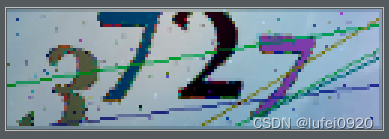

Prove that the obtained verification code information is the same as that in the picture .
Two 、pytesseract Implementation verification code
1、 install pytesseract
python3 -m pip install pytesseract
2、 install tesseract
See... For installation details :https://blog.csdn.net/weixin_44575268/article/details/117258508
3、 Code example
from selenium import webdriver
import time
from PIL import Image,ImageEnhance

import pytesseract

tesseract_cmd = r'/usr/local/bin/tesseract'
pytesseract.pytesseract.tesseract_cmd =tesseract_cmd
url = " Page to visit "
options = webdriver.ChromeOptions()
options.add_argument("--headless")  #  Turn on interface free mode
options.add_argument('--no-sandbox')
options.add_argument("--disable-gpu")
options.add_argument('--disable-dev-shm-usage')  # linux The above four items need to be set on the .
driver = webdriver.Chrome(chrome_options=options,executable_path='/usr/bin/chromedriver')

driver.get(url)  #  request Url
driver.maximize_window()    #  Full screen display
driver.save_screenshot('m3.png')    #  Screenshot of the entire page , And save as a picture
location = driver.find_element_by_xpath('//*[@id="login"]/div[5]/span')   #  Get the coordinates of the verification code area
# print(location.location)
size = location.size   #  Coordinate size
# print(size)
rangle = (int(location.location['x']),int(location.location['y']),int(location.location['x'] + size['width']),int(location.location['y'] + size['height']))   #  Get the coordinate size of the verification code picture
i = Image.open('m3.png')   #  Open the saved picture by image
imgry=i.crop(rangle)    #  Intercept verification code area
imgry.save('getVerifyCode1.png')   #  Save captcha image
im=Image.open('getVerifyCode1.png')   #  Open the newly intercepted verification code image again
sharpness =ImageEnhance.Contrast(im)     # Contrast enhancement , It is easier to identify the verification code in the picture
#
sharp_img = sharpness.enhance(2.0)
#
sharp_img.save("newVerifyCode1.png")    #  Save the optimized captcha image
#
 newVerify = Image.open('newVerifyCode1.png')
#
 mm = pytesseract.image_to_string(newVerify,'eng')
 print(mm)
4、 Sample results
picture :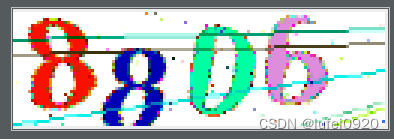
result :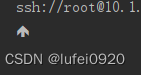
Unrecognized .
边栏推荐
- Two position relay hjws-9440
- Unicast, multicast and broadcast of IP network communication
- C Primer Plus 第11章_字符串和字符串函数_代码和练习题
- JVM overall structure analysis
- 信息系统项目管理师---第七章 项目成本管理
- Altium designer 19 device silk screen label position shall be placed uniformly in batches
- Altium Designer 19 器件丝印标号位置批量统一摆放
- DAST black box vulnerability scanner part 6: operation (final)
- Program ape learning Tiktok short video production
- LeetCode 0086. Separate linked list
猜你喜欢
Thinking technology: how to solve the dilemma in work and life?

Multithreading basic part2

信息系统项目管理师---第七章 项目成本管理

Kubesphere cluster configuration NFS storage solution - favorite
![Navigation [machine learning]](/img/79/8311a409113331e72f650a83351b46.png)
Navigation [machine learning]

树莓派4B上运行opcua协议DEMO接入kubeedge

js实现双向数据绑定

Codeforces Round #802 (Div. 2)

Multithreading basic Part3

Quick personal site building guide using WordPress
随机推荐
Change the status to the corresponding text during MySQL query
[collection] Introduction to basic knowledge of point cloud and functions of point cloud catalyst software
Double position relay jdp-1440/dc110v
JVM对象组成和存储
Wechat applet refreshes the current page
WebRTC系列-網絡傳輸之7-ICE補充之提名(nomination)與ICE_Model
Netease cloud music params and encseckey parameter generation code
Kubesphere cluster configuration NFS storage solution - favorite
LeetCode 0086.分隔链表
Senior [Software Test Engineer] learning route and necessary knowledge points
Implementation of easyexcel's function of merging cells with the same content and dynamic title
汇编语言-王爽 第9章 转移指令的原理-笔记
LeetCode-515. Find the maximum value in each tree row
使用 WordPress快速个人建站指南
Nlp-d62-nlp competition d31 & question brushing D15
C Primer Plus 第11章_字符串和字符串函数_代码和练习题
Sqlsever 字段相乘后保留2位小数
Yaml file encryption
cpu-z中如何查看内存的频率和内存插槽的个数?
数据库-索引