当前位置:网站首页>秒杀系统1-登录功能
秒杀系统1-登录功能
2022-07-03 15:18:00 【ジ你是我永远のbugグ】
学习目标
技术点
这里主要是秒杀业务,没有做前后端分离
如何设计一个秒杀系统
1、秒杀系统解决两个问题
- 并发读
- 并发写
2、秒杀系统的技术要求:
- 高性能
秒杀涉及大量的并发读和并发写,因此支持高并发访问很重要,解决方案:动静分离、热点的发现与隔离、请求的削峰与分层过滤、服务端的极致优化。 - 一致性
有限的商品被大量的请求 ,拍下减库存、付款减库存、预扣等几种扣库存的方式,在大并发下保证数据的准确性。 - 高可用
避免出现考虑不到的情况,还有设计个planB方案,保证系统的高可用和正确性。
spring boot (java8)环境搭建

技术架构:springboot + mybatis-plus + mysql + thymeleaf
1、pom文件
<?xml version="1.0" encoding="UTF-8"?>
<project xmlns="http://maven.apache.org/POM/4.0.0" xmlns:xsi="http://www.w3.org/2001/XMLSchema-instance"
         xsi:schemaLocation="http://maven.apache.org/POM/4.0.0 https://maven.apache.org/xsd/maven-4.0.0.xsd">
    <modelVersion>4.0.0</modelVersion>
    <parent>
        <groupId>org.springframework.boot</groupId>
        <artifactId>spring-boot-starter-parent</artifactId>
        <version>2.7.0</version>
        <relativePath/> <!-- lookup parent from repository -->
    </parent>
    <groupId>com.example</groupId>
    <artifactId>seckill</artifactId>
    <version>0.0.1-SNAPSHOT</version>
    <name>seckill</name>
    <description>Demo project for Spring Boot</description>
    <properties>
        <java.version>1.8</java.version>
    </properties>
    <dependencies>
        <dependency>
            <groupId>org.springframework.boot</groupId>
            <artifactId>spring-boot-starter-thymeleaf</artifactId>
        </dependency>
        <dependency>
            <groupId>org.springframework.boot</groupId>
            <artifactId>spring-boot-starter-web</artifactId>
        </dependency>

        <dependency>
            <groupId>mysql</groupId>
            <artifactId>mysql-connector-java</artifactId>
            <scope>runtime</scope>
        </dependency>
        <dependency>
            <groupId>org.projectlombok</groupId>
            <artifactId>lombok</artifactId>
            <optional>true</optional>
        </dependency>
        <dependency>
            <groupId>org.springframework.boot</groupId>
            <artifactId>spring-boot-starter-test</artifactId>
            <scope>test</scope>
        </dependency>

        <dependency>
            <groupId>com.baomidou</groupId>
            <artifactId>mybatis-plus-boot-starter</artifactId>
            <version>3.4.1</version>
        </dependency>

    </dependencies>

    <build>
        <plugins>
            <plugin>
                <groupId>org.springframework.boot</groupId>
                <artifactId>spring-boot-maven-plugin</artifactId>
                <configuration>
                    <excludes>
                        <exclude>
                            <groupId>org.projectlombok</groupId>
                            <artifactId>lombok</artifactId>
                        </exclude>
                    </excludes>
                </configuration>
            </plugin>
        </plugins>
    </build>

</project>
2、application.yaml 配置文件
其中:使用 springboot默认的数据连接线程池:hikari(嘿卡瑞),号称最快的线程池
spring:
  # thymeleaf关闭缓存
  thymeleaf:
    cache: false

  # MySql数据源配置
  datasource:
    driver-class-name: com.mysql.cj.jdbc.Driver
    url: jdbc:mysql://localhost:3306/secKill?useUnicode=true&characterEncoding=utf-8&useSSL=false
    username: root
    password: 123456

    # 最快的连接池
    hikari:
      # 连接池的名称
      pool-name: DateHikariCP
      # 最小空闲连接数
      minimum-idle: 5
      # 空闲连接存活最大时间 默认600000(10分钟)
      idle-timeout: 1800000
      # 最大连接数 默认10
      maximum-pool-size: 10
      # 从连接池返回的连接自动提交
      auto-commit: true
      # 连接最大存活时间  0代表永久存活,默认 1800000(分钟)
      max-lifetime: 1800000
      # 连接超时时间 默认30000(30秒)
      connection-timeout: 30000
      # 测试连接是否可以的查询语句
      connection-test-query: SELECT 1

# mybatis-plus 配置
mybatis-plus:
  # 配置 Mapper.xml的映射文件路径
  mapper-locations: classpath*:/mapper/*.xml # mybatis SQL 打印(接口方法在的包,不是 mapper.xml所在的包) logging: level: com.example.seckill.mapper: DEBUG
3、在启动类加上mapper包扫描
@MapperScan(“com.example.seckill.mapper”)
好了 写个测试请求 看看项目有木有问题
controller
package com.example.seckill.controller;

import org.springframework.stereotype.Controller;
import org.springframework.ui.Model;
import org.springframework.web.bind.annotation.RequestMapping;
import org.springframework.web.bind.annotation.ResponseBody;

@Controller
@RequestMapping("/my")
public class TestDemo {


    @RequestMapping("/hello")
    public String hello(Model model) {

        model.addAttribute("name","lishuang");
        return "hello";
    }
}
thymeleaf
<!doctype html>
<html lang="en" xmlns:th="http://www.thymeleaf.org">
<head>
    <meta charset="UTF-8">
    <meta name="viewport"
          content="width=device-width, user-scalable=no, initial-scale=1.0, maximum-scale=1.0, minimum-scale=1.0">
    <meta http-equiv="X-UA-Compatible" content="ie=edge">
    <title>测试</title>
</head>
<body>

<p th:text="'hello:'+${name}"></p>
</body>
</html>

ok了
数据库的表信息
CREATE TABLE t_user(
	`id` BIGINT(20) NOT NULL COMMENT '用户ID,手机号码',
	`nickname` VARCHAR(255) not NULL,
	`password` VARCHAR(32) DEFAULT NULL COMMENT 'MD5(MD5(pass明文+固定salt)+salt)',
	`salt` VARCHAR(10) DEFAULT NULL,
	`head` VARCHAR(128) DEFAULT NULL COMMENT '头像',
	`register_date` datetime DEFAULT NULL COMMENT '注册时间',
	`last_login_date` datetime DEFAULT NULL COMMENT '最后一次登录事件',
	`login_count` int(11) DEFAULT '0' COMMENT '登录次数',
	PRIMARY KEY(`id`)
)
COMMENT '用户表';

CREATE TABLE t_goods(
	id BIGINT(20) not NULL AuTO_increment COMMENT '商品ID',
	goods_name VARCHAR(16) DEFAULT NULL COMMENT '商品名称',
	goods_title VARCHAR(64) DEFAULT NULL COMMENT '商品标题',
	goods_img VARCHAR(64) DEFAULT NULL COMMENT '商品图片',
	goods_detail LONGTEXT COMMENT '商品详情',
	goods_price DECIMAL(10,2) DEFAULT '0.00' COMMENT '商品价格',
	goods_stock INT(11) DEFAULT '0' COMMENT '商品库存,-1表示没有限制',
	PRIMARY KEY(id)
)
COMMENT '商品表';

CREATE TABLE `t_order` (
	`id` BIGINT(20) NOT NULL  AUTO_INCREMENT COMMENT '订单ID',
	`user_id` BIGINT(20) DEFAULT NULL COMMENT '用户ID',
	`goods_id` BIGINT(20) DEFAULT NULL COMMENT '商品ID',
	`delivery_addr_id` BIGINT(20) DEFAULT NULL  COMMENT '收获地址ID',
	`goods_name` VARCHAR(16) DEFAULT NULL  COMMENT '商品名字',
	`goods_count` INT(20) DEFAULT '0'  COMMENT '商品数量',
	`goods_price` DECIMAL(10,2) DEFAULT '0.00'  COMMENT '商品价格',
	`order_channel` TINYINT(4) DEFAULT '0'  COMMENT '1 pc,2 android, 3 ios',
	`status` TINYINT(4) DEFAULT '0'  COMMENT '订单状态,0新建未支付,1已支付,2已发货,3已收货,4已退货,5已完成',
	`create_date` datetime DEFAULT NULL  COMMENT '订单创建时间',
	`pay_date` datetime DEFAULT NULL  COMMENT '支付时间',
	PRIMARY KEY(`id`)
)ENGINE = INNODB AUTO_INCREMENT=12 DEFAULT CHARSET = utf8mb4;
COMMENT '订单表'
;

CREATE TABLE `t_seckill_goods`(
	`id` BIGINT(20) NOT NULL AUTO_INCREMENT COMMENT '秒杀商品ID',
	`goods_id` BIGINT(20) NOT NULL COMMENT '商品ID',
	`seckill_price` DECIMAL(10,2) NOT NULL COMMENT '秒杀家',
	`stock_count` INT(10) NOT NULL  COMMENT '库存数量',
	`start_date` datetime NOT NULL  COMMENT '秒杀开始时间',
	`end_date` datetime NOT NULL COMMENT '秒杀结束时间',
	PRIMARY KEY(`id`)
)ENGINE = INNODB AUTO_INCREMENT=3 DEFAULT CHARSET = utf8mb4
COMMENT '秒杀商品表'
;

CREATE TABLE `t_seckill_order` (
	`id` BIGINT(20) NOT NULL AUTO_INCREMENT COMMENT '秒杀订单ID',
	`user_id` BIGINT(20) NOT NULL  COMMENT '用户ID',
	`order_id` BIGINT(20) NOT NULL  COMMENT '订单ID',
	`goods_id` BIGINT(20) NOT NULL  COMMENT '商品ID',
	PRIMARY KEY(`id`)
)ENGINE = INNODB AUTO_INCREMENT=3 DEFAULT CHARSET = utf8mb4
COMMENT '秒杀订单表'
;

-- 添加索引,讲到时在加
ALTER TABLE `seckill`.`t_seckill_order`
ADD UNIQUE INDEX `seckill_uid_gid`(user_id, goods_id) USING BTREE COMMENT '用户ID+商品ID成为唯一索引,';
客户端:PW=MD5(明文+固定Salt)
服务端:PW=MD5(用户输入+随机Salt)
用户端MD5加密是为了防止用户密码在网络中明文传输,服务端MD5加密是为了提高密码安全性,双
重保险
实现登录功能
因为这里用到了 MD5 就需要添加下MD5的相关依赖
<!-- md5 依赖 -->
<dependency>
<groupId>commons-codec</groupId>
<artifactId>commons-codec</artifactId>
</dependency>
<dependency>
<groupId>org.apache.commons</groupId>
<artifactId>commons-lang3</artifactId>
<version>3.6</version>
</dependency>
1、MD5工具类
对密码进行 两次加密 + 盐 此处密码部分可忽略,简单来说就是对密码进行加密 保证安全性,有点复杂,了解即可,不关键。
package com.example.seckill.util;

import org.apache.commons.codec.digest.DigestUtils;
import org.springframework.stereotype.Component;

/** * MD5工具类 */
@Component
public class MD5Util {


    // 加密使用的 --盐
    // 这个salt 和前端的盐进行统一
    private static final String salt = "1a2b3c4d";

    /** * MD5加密 * @param src * @return */
    public static String md5(String src) {

        return DigestUtils.md5Hex(src);
    }

    // 第一次加密
    public static String inputPassToFromPass(String inputPass) {

        String str = salt.charAt(0) + salt.charAt(2) + inputPass + salt.charAt(5) + salt.charAt(4);
        return md5(str);
    }

    //

    /** * 第二次加密:后端的密码到数据库的密码 * * @param formPass 后端接收的密码 * @param salt 存进数据库的 盐 * @return */
    public static String formPassToDBPass(String formPass, String salt) {

        String str = salt.charAt(0) + salt.charAt(2) + formPass + salt.charAt(5) + salt.charAt(4);
        return md5(str);
    }


    /** * 这个是我们后端真正会调用的密码 * @param inputPass * @param salt * @return */
    public static String inputPassToDBPass(String inputPass, String salt) {

        String fromPass = inputPassToFromPass(inputPass);
        String dbPass = formPassToDBPass(fromPass, salt);
        return dbPass;
    }


}
2、mybatis 的逆向工程
3、请求的返回
响应枚举类
package com.example.seckill.common;

/** * 公共返回对象枚举 * * @author: LC * @date 2022/3/2 1:44 下午 * @ClassName: RespBean */

public enum RespBeanEnum {


    //通用
    SUCCESS(200, "SUCCESS"),
    ERROR(500, "服务端异常"),

    //登录模块
    LOGIN_ERROR(500210, "用户名或者密码不正确"),
    MOBILE_ERROR(500211, "手机号码格式不正确"),
    BIND_ERROR(500212, "参数校验异常"),
    MOBILE_NOT_EXIST(500213, "手机号码不存在"),
    PASSWORD_UPDATE_FAIL(500214, "更新密码失败"),
    SESSION_ERROR(500215, "用户SESSION不存在"),


    //秒杀模块
    EMPTY_STOCK(500500, "库存不足"),
    REPEATE_ERROR(500501, "该商品每人限购一件"),
    REQUEST_ILLEGAL(500502, "请求非法,请重新尝试"),
    ERROR_CAPTCHA(500503, "验证码错误,请重新输入"),
    ACCESS_LIMIT_REACHED(500504, "访问过于频繁,请稍后重试"),
    //订单模块5003xx
    ORDER_NOT_EXIST(500300, "订单不存在"),


    ;

    private final Integer code;
    private final String message;

    public Integer getCode() {

        return code;
    }

    public String getMessage() {

        return message;
    }

    RespBeanEnum(Integer code, String message) {

        this.code = code;
        this.message = message;
    }
}
响应信息
package com.example.seckill.common;

/** * 公共返回对象 * * @author: LC * @date 2022/3/2 1:50 下午 * @ClassName: RespBean */
public class RespBean {


    private long code;
    private String message;
    private Object object;

    public static RespBean success() {

        return new RespBean(RespBeanEnum.SUCCESS.getCode(), RespBeanEnum.SUCCESS.getMessage(), null);
    }

    public static RespBean success(Object object) {

        return new RespBean(RespBeanEnum.SUCCESS.getCode(), RespBeanEnum.SUCCESS.getMessage(), object);
    }

    public static RespBean error(RespBeanEnum respBeanEnum) {

        return new RespBean(respBeanEnum.getCode(), respBeanEnum.getMessage(), null);
    }

    public static RespBean error(RespBeanEnum respBeanEnum, Object object) {

        return new RespBean(respBeanEnum.getCode(), respBeanEnum.getMessage(), object);
    }

    public RespBean(long code, String message, Object object) {

        this.code = code;
        this.message = message;
        this.object = object;
    }

    public RespBean() {


    }

    public long getCode() {

        return code;
    }

    public void setCode(long code) {

        this.code = code;
    }

    public String getMessage() {

        return message;
    }

    public void setMessage(String message) {

        this.message = message;
    }

    public Object getObject() {

        return object;
    }

    public void setObject(Object object) {

        this.object = object;
    }
}
3、跳转登录页面
@RequestMapping("/login")
@Controller
@Slf4j
public class LoginController {


    @RequestMapping ("toLogin")
    public String toLogin(){

        return "login";
    }


// @PostMapping("/doLogin")
// public String doLogin(){

//
// }
}
登录页面与 登录的功能实现
<!DOCTYPE html>
<html lang="en"
      xmlns:th="http://www.thymeleaf.org">
<head>
    <meta charset="UTF-8">
    <title>登录</title>
    <!-- jquery -->
    <script type="text/javascript" th:src="@{/js/jquery.min.js}"></script>
    <!-- bootstrap -->
    <link rel="stylesheet" type="text/css" th:href="@{/bootstrap/css/bootstrap.min.css}"/>
    <script type="text/javascript" th:src="@{/bootstrap/js/bootstrap.min.js}"></script>
    <!-- jquery-validator -->
    <script type="text/javascript" th:src="@{/jquery-validation/jquery.validate.min.js}"></script>
    <script type="text/javascript" th:src="@{/jquery-validation/localization/messages_zh.min.js}"></script>
    <!-- layer -->
    <script type="text/javascript" th:src="@{/layer/layer.js}"></script>
    <!-- md5.js -->
    <script type="text/javascript" th:src="@{/js/md5.min.js}"></script>
    <!-- common.js -->
    <script type="text/javascript" th:src="@{/js/common.js}"></script>
</head>
<body>
<form name="loginForm" id="loginForm" method="post" style="width:50%; margin:0 auto">

    <h2 style="text-align:center; margin-bottom: 20px">用户登录</h2>

    <div class="form-group">
        <div class="row">
            <label class="form-label col-md-4">请输入手机号码</label>
            <div class="col-md-5">
                <input id="mobile" name="mobile" class="form-control" type="text" placeholder="手机号码" required="true"
                />
                <!--             取消位数限制          minlength="11" maxlength="11"-->
            </div>
            <div class="col-md-1">
            </div>
        </div>
    </div>

    <div class="form-group">
        <div class="row">
            <label class="form-label col-md-4">请输入密码</label>
            <div class="col-md-5">
                <input id="password" name="password" class="form-control" type="password" placeholder="密码"
                       required="true"
                />
                <!--             取消位数限制            minlength="6" maxlength="16"-->
            </div>
        </div>
    </div>

    <div class="row">
        <div class="col-md-5">
            <button class="btn btn-primary btn-block" type="reset" onclick="reset()">重置</button>
        </div>
        <div class="col-md-5">
            <button class="btn btn-primary btn-block" type="submit" onclick="login()">登录</button>
        </div>
    </div>
</form>
</body>
<script>
    function login() {

        $("#loginForm").validate({

            submitHandler: function (form) {

                doLogin();
            }
        });
    }

    function doLogin() {

        g_showLoading();

        var inputPass = $("#password").val();
        var salt = g_passsword_salt;
        var str = "" + salt.charAt(0) + salt.charAt(2) + inputPass + salt.charAt(5) + salt.charAt(4);
        var password = md5(str);

        $.ajax({

            url: "/login/doLogin",
            type: "POST",
            data: {

                mobile: $("#mobile").val(),
                password: password
            },
            success: function (data) {

                layer.closeAll();
                if (data.code == 200) {

                    layer.msg("成功");
                    console.log(data);
                    document.cookie = "userCookie=" + data.object;
                    window.location.href = "/goods/toList";
                } else {

                    layer.msg(data.message);
                }
            },
            error: function () {

                layer.closeAll();
            }
        });
    }
</script>
</html>

OKOKOOKOKOK
4、登录功能的实现
controller
    @RequestMapping("/doLogin")
    @ResponseBody
    public RespBean doLogin(@Valid LoginRequestParam param){


        log.info("{}",param);

        return userService.doLogin(param);
    }
参数
@Data
public class LoginRequestParam {


    @NotBlank(message = "mobile不能为空")
    @IsMobile
    private String mobile;

    @NotBlank(message = "password不能为空")
    @Length(min = 32,message = "password 长度不对")
    private String password;

}
service
@Service
public class UserServiceImpl extends ServiceImpl<UserMapper, User> implements IUserService {

    @Autowired(required = false)
    UserMapper userMapper;


    @Override
    public RespBean doLogin(LoginRequestParam param) {

        String password = param.getPassword();
        String mobile = param.getMobile();

        User user = userMapper.selectById(mobile);
        if (null == user){

            throw new GlobalException(RespBeanEnum.LOGIN_ERROR);
        }

        if (!MD5Util.formPassToDBPass(password,user.getSalt()).equals(user.getPassword())){

            throw new GlobalException(RespBeanEnum.LOGIN_ERROR);

        }
        return RespBean.success();
    }
}
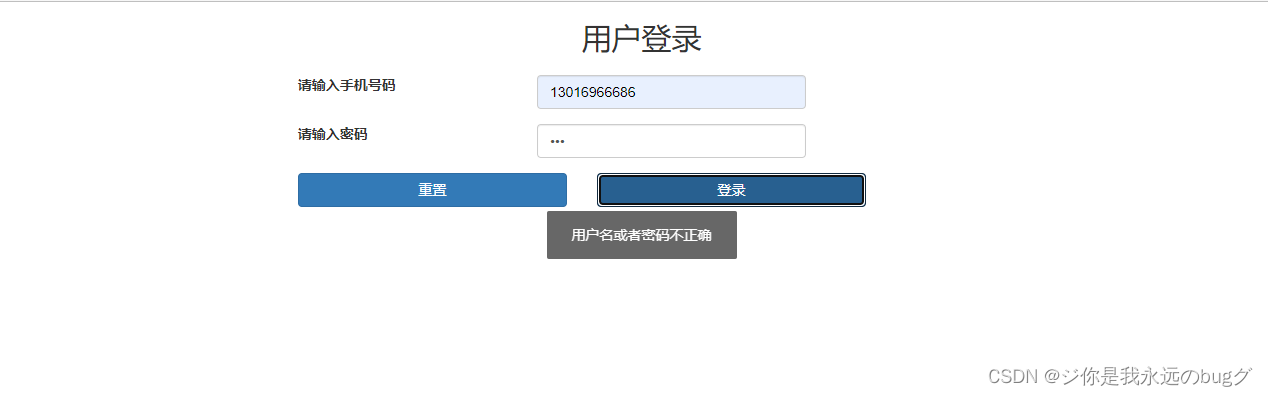
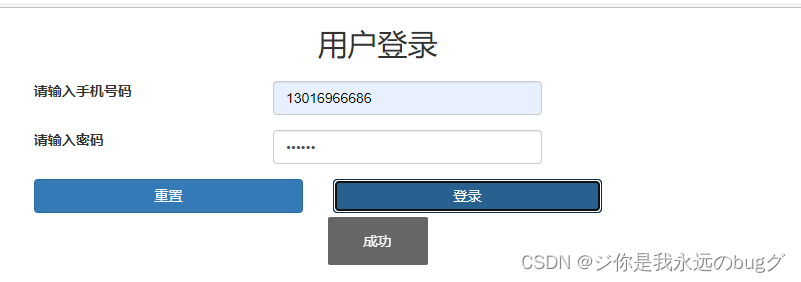
由此可实现登录的异常处理
完善 登录功能,采用 cookie + session 记录用户信息
1、使用 uuid 工具类 创建 cookie 的值
package com.example.seckill.util;

import java.util.UUID;

/** * UUID 工具类 */
public class UUIDUtil {

    public static String uuid() {

        return UUID.randomUUID().toString().replace("-", "");
    }
}
2、 cookie 工具类,对cookie进行操作
package com.example.seckill.util;

import javax.servlet.http.Cookie;
import javax.servlet.http.HttpServletRequest;
import javax.servlet.http.HttpServletResponse;
import java.io.UnsupportedEncodingException;
import java.net.URLDecoder;
import java.net.URLEncoder;

/** * Cookie工具类 * * @author: LC * @date 2022/3/2 5:48 下午 * @ClassName: CookieUtil */
public final class CookieUtil {


    /** * 得到Cookie的值, 不编码 * * @param request * @param cookieName * @return */
    public static String getCookieValue(HttpServletRequest request, String cookieName) {

        return getCookieValue(request, cookieName, false);
    }

    /** * 得到Cookie的值, * * @param request * @param cookieName * @return */
    public static String getCookieValue(HttpServletRequest request, String cookieName, boolean isDecoder) {

        Cookie[] cookieList = request.getCookies();
        if (cookieList == null || cookieName == null) {

            return null;
        }
        String retValue = null;
        try {

            for (int i = 0; i < cookieList.length; i++) {

                if (cookieList[i].getName().equals(cookieName)) {

                    if (isDecoder) {

                        retValue = URLDecoder.decode(cookieList[i].getValue(), "UTF-8");
                    } else {

                        retValue = cookieList[i].getValue();
                    }
                    break;
                }
            }
        } catch (UnsupportedEncodingException e) {

            e.printStackTrace();
        }
        return retValue;
    }

    /** * 得到Cookie的值, * * @param request * @param cookieName * @return */
    public static String getCookieValue(HttpServletRequest request, String cookieName, String encodeString) {

        Cookie[] cookieList = request.getCookies();
        if (cookieList == null || cookieName == null) {

            return null;
        }
        String retValue = null;
        try {

            for (int i = 0; i < cookieList.length; i++) {

                if (cookieList[i].getName().equals(cookieName)) {

                    retValue = URLDecoder.decode(cookieList[i].getValue(), encodeString);
                    break;
                }
            }
        } catch (UnsupportedEncodingException e) {

            e.printStackTrace();
        }
        return retValue;
    }

    /** * 设置Cookie的值 不设置生效时间默认浏览器关闭即失效,也不编码 */
    public static void setCookie(HttpServletRequest request, HttpServletResponse response, String cookieName,
                                 String cookieValue) {

        setCookie(request, response, cookieName, cookieValue, -1);
    }

    /** * 设置Cookie的值 在指定时间内生效,但不编码 */
    public static void setCookie(HttpServletRequest request, HttpServletResponse response, String cookieName,
                                 String cookieValue, int cookieMaxage) {

        setCookie(request, response, cookieName, cookieValue, cookieMaxage, false);
    }

    /** * 设置Cookie的值 不设置生效时间,但编码 */
    public static void setCookie(HttpServletRequest request, HttpServletResponse response, String cookieName,
                                 String cookieValue, boolean isEncode) {

        setCookie(request, response, cookieName, cookieValue, -1, isEncode);
    }

    /** * 设置Cookie的值 在指定时间内生效, 编码参数 */
    public static void setCookie(HttpServletRequest request, HttpServletResponse response, String cookieName,
                                 String cookieValue, int cookieMaxage, boolean isEncode) {

        doSetCookie(request, response, cookieName, cookieValue, cookieMaxage, isEncode);
    }

    /** * 设置Cookie的值 在指定时间内生效, 编码参数(指定编码) */
    public static void setCookie(HttpServletRequest request, HttpServletResponse response, String cookieName,
                                 String cookieValue, int cookieMaxage, String encodeString) {

        doSetCookie(request, response, cookieName, cookieValue, cookieMaxage, encodeString);
    }

    /** * 删除Cookie带cookie域名 */
    public static void deleteCookie(HttpServletRequest request, HttpServletResponse response,
                                    String cookieName) {

        doSetCookie(request, response, cookieName, "", -1, false);
    }

    /** * 设置Cookie的值,并使其在指定时间内生效 * * @param cookieMaxage cookie生效的最大秒数 */
    private static final void doSetCookie(HttpServletRequest request, HttpServletResponse response,
                                          String cookieName, String cookieValue, int cookieMaxage, boolean isEncode) {

        try {

            if (cookieValue == null) {

                cookieValue = "";
            } else if (isEncode) {

                cookieValue = URLEncoder.encode(cookieValue, "utf-8");
            }
            Cookie cookie = new Cookie(cookieName, cookieValue);
            if (cookieMaxage > 0)
                cookie.setMaxAge(cookieMaxage);
            if (null != request) {
    // 设置域名的cookie
                String domainName = getDomainName(request);
                System.out.println(domainName);
                if (!"localhost".equals(domainName)) {

                    cookie.setDomain(domainName);
                }
            }
            cookie.setPath("/");
            response.addCookie(cookie);
        } catch (Exception e) {

            e.printStackTrace();
        }
    }

    /** * 设置Cookie的值,并使其在指定时间内生效 * * @param cookieMaxage cookie生效的最大秒数 */
    private static final void doSetCookie(HttpServletRequest request, HttpServletResponse response,
                                          String cookieName, String cookieValue, int cookieMaxage, String encodeString) {

        try {

            if (cookieValue == null) {

                cookieValue = "";
            } else {

                cookieValue = URLEncoder.encode(cookieValue, encodeString);
            }
            Cookie cookie = new Cookie(cookieName, cookieValue);
            if (cookieMaxage > 0) {

                cookie.setMaxAge(cookieMaxage);
            }
            if (null != request) {
    // 设置域名的cookie
                String domainName = getDomainName(request);
                System.out.println(domainName);
                if (!"localhost".equals(domainName)) {

                    cookie.setDomain(domainName);
                }
            }
            cookie.setPath("/");
            response.addCookie(cookie);
        } catch (Exception e) {

            e.printStackTrace();
        }
    }

    /** * 得到cookie的域名 */
    private static final String getDomainName(HttpServletRequest request) {

        String domainName = null;
        // 通过request对象获取访问的url地址
        String serverName = request.getRequestURL().toString();
        if (serverName == null || serverName.equals("")) {

            domainName = "";
        } else {

            // 将url地下转换为小写
            serverName = serverName.toLowerCase();
            // 如果url地址是以http://开头 将http://截取
            if (serverName.startsWith("http://")) {

                serverName = serverName.substring(7);
            }
            int end = serverName.length();
            // 判断url地址是否包含"/"
            if (serverName.contains("/")) {

                //得到第一个"/"出现的位置
                end = serverName.indexOf("/");
            }

            // 截取
            serverName = serverName.substring(0, end);
            // 根据"."进行分割
            final String[] domains = serverName.split("\\.");
            int len = domains.length;
            if (len > 3) {

                // www.xxx.com.cn
                domainName = domains[len - 3] + "." + domains[len - 2] + "." + domains[len - 1];
            } else if (len <= 3 && len > 1) {

                // xxx.com or xxx.cn
                domainName = domains[len - 2] + "." + domains[len - 1];
            } else {

                domainName = serverName;
            }
        }

        if (domainName != null && domainName.indexOf(":") > 0) {

            String[] ary = domainName.split("\\:");
            domainName = ary[0];
        }
        return domainName;
    }
}
3、校验用户成功后生成 cookie,将cookie 与用户存进 session中
这是就需要 controller 中加上 HttpServletRequest ,HttpServletResponse 两个入参
@RequestMapping("/doLogin")
    @ResponseBody
    public RespBean doLogin(@Valid LoginRequestParam param,HttpServletRequest request,HttpServletResponse response){


        log.info("{}",param);

        return userService.doLogin(param, request, response);
    }
在用户校验通过后
package com.example.seckill.service.impl;

import com.baomidou.mybatisplus.extension.service.impl.ServiceImpl;
import com.example.seckill.common.RespBean;
import com.example.seckill.common.RespBeanEnum;
import com.example.seckill.controller.parm.LoginRequestParam;
import com.example.seckill.exception.GlobalException;
import com.example.seckill.mapper.UserMapper;
import com.example.seckill.pojo.User;
import com.example.seckill.service.IUserService;
import com.example.seckill.util.CookieUtil;
import com.example.seckill.util.MD5Util;
import com.example.seckill.util.UUIDUtil;
import org.springframework.beans.factory.annotation.Autowired;
import org.springframework.stereotype.Service;

import javax.servlet.http.HttpServletRequest;
import javax.servlet.http.HttpServletResponse;

/** * <p> * 用户表 服务实现类 * </p> * * @author jobob * @since 2022-06-13 */
@Service
public class UserServiceImpl extends ServiceImpl<UserMapper, User> implements IUserService {

    @Autowired(required = false)
    UserMapper userMapper;


    @Override
    public RespBean doLogin(LoginRequestParam param, HttpServletRequest request, HttpServletResponse response) {

        String password = param.getPassword();
        String mobile = param.getMobile();

        User user = userMapper.selectById(mobile);
        if (null == user){

            throw new GlobalException(RespBeanEnum.LOGIN_ERROR);
        }

        if (!MD5Util.formPassToDBPass(password,user.getSalt()).equals(user.getPassword())){

            throw new GlobalException(RespBeanEnum.LOGIN_ERROR);
        }

        /** * 校验用户成功后生成 cookie,将cookie 与用户存进 session中 */
        // 使用UUID生成 cookie
        String cookie = UUIDUtil.uuid();
        // 将 cookie 和用户存进 session 中
        request.getSession().setAttribute(cookie,user);
        // 设置 cookie
        CookieUtil.setCookie(request,response,"userCookie",cookie);


        return RespBean.success();
    }
}
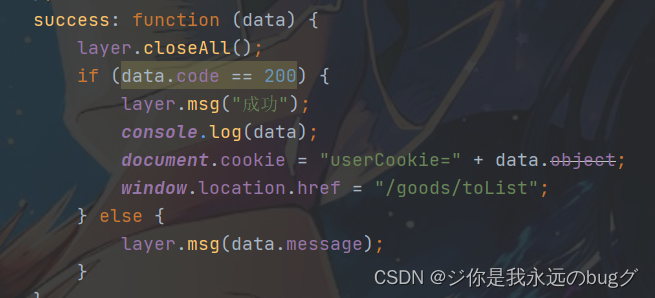
此时点击登录会看到 cookie的值
4、goods Controller
因为登录成功会进行跳转商品列表页
<!doctype html>
<html lang="en"
      xmlns:th="http://www.thymeleaf.org">
<head>
    <meta charset="UTF-8">
    <meta name="viewport"
          content="width=device-width, user-scalable=no, initial-scale=1.0, maximum-scale=1.0, minimum-scale=1.0">
    <meta http-equiv="X-UA-Compatible" content="ie=edge">
    <title>商品列表</title>
</head>
<body>
<p th:text="'hello:' + ${user.nickname}"></p>
</body>
</html>
package com.example.seckill.controller;

import com.example.seckill.common.RespBean;
import com.example.seckill.controller.parm.LoginRequestParam;
import com.example.seckill.pojo.User;
import com.example.seckill.service.IGoodsService;
import lombok.extern.slf4j.Slf4j;
import org.springframework.beans.factory.annotation.Autowired;
import org.springframework.stereotype.Controller;
import org.springframework.ui.Model;
import org.springframework.util.StringUtils;
import org.springframework.web.bind.annotation.CookieValue;
import org.springframework.web.bind.annotation.RequestMapping;
import javax.servlet.http.HttpSession;


@RequestMapping("/goods")
@Controller
@Slf4j
public class GoodsController {


    @Autowired
    IGoodsService goodsService;


    /** * 跳转商品页 * @param session * @param model * @param cookie * @return */
    @RequestMapping("/toList")
    public String toList(HttpSession session, Model model, @CookieValue("userCookie") String cookie){


        if (StringUtils.isEmpty(cookie)){
     //如果 cookie为 空 跳转到 登录页面
            return "login";

        }
        // 从session 中获取用户
        User user = (User) session.getAttribute(cookie);

        if (null == user){
     // 如果用户信息为空 跳转登录
            return "login";
        }
        // 将用户信息 传到前端页面
        model.addAttribute("user",user);
        return "goodsList";

    }

}
此时点击登录 会跳转页面
边栏推荐
- [cloud native training camp] module 7 kubernetes control plane component: scheduler and controller
- Kubernetes - YAML文件解读
- 【Transform】【实践】使用Pytorch的torch.nn.MultiheadAttention来实现self-attention
- 详解指针进阶1
- Relationship between truncated random distribution and original distribution
- Yolov5 series (I) -- network visualization tool netron
- 解决pushgateway数据多次推送会覆盖的问题
- Global and Chinese market of transfer case 2022-2028: Research Report on technology, participants, trends, market size and share
- 自定义注解
- Construction of operation and maintenance system
猜你喜欢
Redis主从、哨兵、集群模式介绍

Construction of operation and maintenance system

Série yolov5 (i) - - netron, un outil de visualisation de réseau
redis缓存穿透,缓存击穿,缓存雪崩解决方案
C语言刷题~Leetcode与牛客网简单题
详解指针进阶2

High quality workplace human beings must use software to recommend, and you certainly don't know the last one
![[Yu Yue education] scientific computing and MATLAB language reference materials of Central South University](/img/83/922efb4f88843f1b7feaccf2b515b9.jpg)
[Yu Yue education] scientific computing and MATLAB language reference materials of Central South University

Popular understanding of gradient descent

Visual host system design and development (Halcon WinForm)
随机推荐
Dataframe returns the whole row according to the value
视觉上位系统设计开发(halcon-winform)-6.节点与宫格
Enable multi-threaded download of chrome and edge browsers
[transform] [NLP] first proposed transformer. The 2017 paper "attention is all you need" by Google brain team
Apache ant extension tutorial
Unity hierarchical bounding box AABB tree
C语言刷题~Leetcode与牛客网简单题
Visual host system design and development (Halcon WinForm)
Global and Chinese markets for transparent OLED displays 2022-2028: Research Report on technology, participants, trends, market size and share
XWiki Installation Tips
【日常训练】395. 至少有 K 个重复字符的最长子串
MySQL reports an error: [error] mysqld: file '/ mysql-bin. 010228‘ not found (Errcode: 2 “No such file or directory“)
什么是embedding(把物体编码为一个低维稠密向量),pytorch中nn.Embedding原理及使用
Finally, someone explained the financial risk management clearly
Using Tengine to solve the session problem of load balancing
Jvm-03-runtime data area PC, stack, local method stack
使用Tengine解决负载均衡的Session问题
【云原生训练营】模块八 Kubernetes 生命周期管理和服务发现
leetcode_ Power of Four
Using notepad++ to build an arbitrary language development environment