当前位置:网站首页>Liunx prohibit Ping explain the different usage of traceroute
Liunx prohibit Ping explain the different usage of traceroute
2022-07-05 11:43:00 【Gegwu MMQ!!】
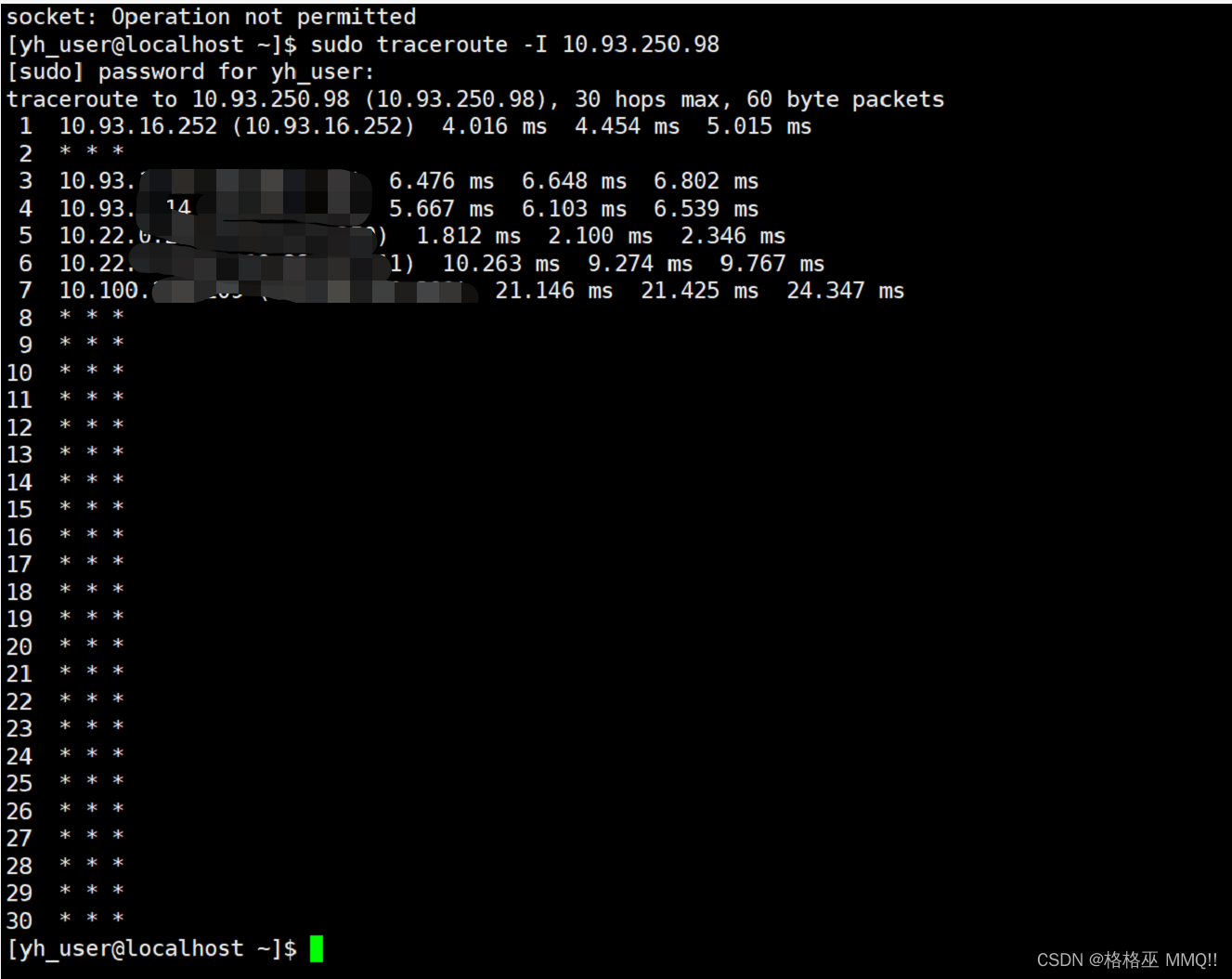
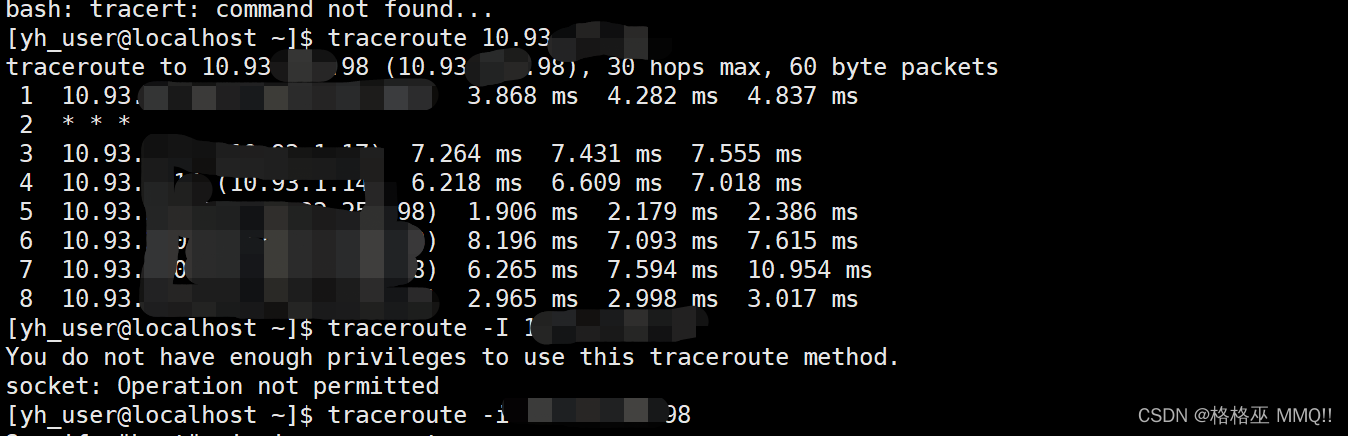
Linux Virtual machine can Ping The destination address , But you can't traceroute, Only the gateway .
reason :windows Of tracert The default is to go ICMP agreement , and linux Of traceroute The default is to go UDP agreement , If between two points UDP connection By any firewall Block out , that traceroute No way. .
resolvent :traceroute -I Add I Use ICMP agreement
Linux Systematic ping Command is a common network command , It is usually used to test connectivity with the target host , We often say “ping Let's have a look at some machine , See if it's on ”、 When you can't open a web page, you say “ You first ping default gateway 192.168.1.1 try ”. It sends ICMP ECHO_REQUEST Packet to network host (send ICMP ECHO_REQUEST to network hosts), And show the response , In this way, we can determine whether the target host is accessible according to the information it outputs ( But it's not absolute ). Some servers in order to prevent passing ping Detected , Disabled through firewall ping Or disable... In kernel parameters ping, This way, we can't go through ping Determine if the host is still on .
linux Under the ping and windows Under the ping There is a slight difference ,linux Next ping Will not automatically terminate , Need to press ctrl+c Terminate or use parameters -c Specify the number of responses required to complete .
1. Command format :
ping [ Parameters ] [ Host name or IP Address ]
2. Command function :
ping The command is used for : Determine the status of the network and each external host ; Track and isolate hardware and software issues ; test 、 Evaluate and manage the network . If the host is running and connected to the Internet , It responds to the echo signal . Each echo request contains an Internet Protocol (IP) and ICMP head , Followed by one tim structure , And enough bytes to fill in this packet . The default is to send the echo request continuously until the interrupt signal is received (Ctrl-C).
ping The command sends a datagram per second and prints a line of output for each received response .ping Command to calculate signal round-trip time and ( Information ) Packet loss statistics , And show a brief summary after it's done .ping Command timed out in program or when received SIGINT End of signal .Host Parameter is either a valid host name or Internet address .
3. Command parameter :
-d Use Socket Of SO_DEBUG function .
-f Limit detection . Send a large number of network packets to a machine quickly , Look at its response .
-n Output only values .
-q Do not display any information about the packets sent , Show only the final result .
-r Ignore the ordinary Routing Table, Send the packet directly to the remote host . Usually check whether there is a problem with the network interface of the machine .
-R Record the routing process .
-v Display the execution process of the instruction in detail .
-c number : Stop... After sending a specified number of packets .
-i Number of seconds : Set the interval of a few seconds to send a network packet to a machine , The default is send once a second .
-I Network interface : Use the specified network interface to send out packets .
-l Load ahead : Set before sending the required information , Packets sent first .
-p Template Styles : Set the template style to fill the packet .
-s Number of bytes : Specifies the number of bytes of data sent , The default is 56, add 8 Bytes of ICMP head , Is the total 64ICMP Data bytes .
-t Survival value : Set the survival value TTL Size .
4. Using examples :
example 1:ping The general situation of
command :
ping 192.168.120.205
Output :
Copy code
[[email protected] ~]# ping 192.168.120.205
PING 192.168.120.205 (192.168.120.205) 56(84) bytes of data.
64 bytes from 192.168.120.205: icmp_seq=1 ttl=64 time=0.720 ms
64 bytes from 192.168.120.205: icmp_seq=2 ttl=64 time=0.181 ms
64 bytes from 192.168.120.205: icmp_seq=3 ttl=64 time=0.191 ms
64 bytes from 192.168.120.205: icmp_seq=4 ttl=64 time=0.188 ms
64 bytes from 192.168.120.205: icmp_seq=5 ttl=64 time=0.189 ms
— 192.168.120.205 ping statistics —
5 packets transmitted, 5 received, 0% packet loss, time 4000ms
rtt min/avg/max/mdev = 0.181/0.293/0.720/0.214 ms
[[email protected] ~]#
Copy code
explain :
example 2:ping The impassable situation
command :
ping 192.168.120.202
Output :
Copy code
[[email protected] ~]# ping 192.168.120.202
PING 192.168.120.202 (192.168.120.202) 56(84) bytes of data.
From 192.168.120.204 icmp_seq=1 Destination Host Unreachable
From 192.168.120.204 icmp_seq=2 Destination Host Unreachable
From 192.168.120.204 icmp_seq=3 Destination Host Unreachable
From 192.168.120.204 icmp_seq=4 Destination Host Unreachable
From 192.168.120.204 icmp_seq=5 Destination Host Unreachable
From 192.168.120.204 icmp_seq=6 Destination Host Unreachable
— 192.168.120.202 ping statistics —
8 packets transmitted, 0 received, +6 errors, 100% packet loss, time 7005ms
, pipe 4
[[email protected] ~]#
Copy code
explain :
example 3:ping gateway
command :
ping -b 192.168.120.1
Output :
Copy code
[[email protected] ~]# route
Kernel IP routing table
Destination Gateway Genmask Flags Metric Ref Use Iface
192.168.120.0 * 255.255.255.0 U 0 0 0 eth0
192.168.0.0 192.168.120.1 255.255.0.0 UG 0 0 0 eth0
10.0.0.0 192.168.120.1 255.0.0.0 UG 0 0 0 eth0
default 192.168.120.240 0.0.0.0 UG 0 0 0 eth0
[[email protected] ~]# ping -b 192.168.120.1
PING 192.168.120.1 (192.168.120.1) 56(84) bytes of data.
64 bytes from 192.168.120.1: icmp_seq=1 ttl=255 time=2.02 ms
64 bytes from 192.168.120.1: icmp_seq=2 ttl=255 time=1.83 ms
64 bytes from 192.168.120.1: icmp_seq=3 ttl=255 time=1.68 ms
64 bytes from 192.168.120.1: icmp_seq=4 ttl=255 time=1.98 ms
64 bytes from 192.168.120.1: icmp_seq=5 ttl=255 time=1.88 ms
— 192.168.120.1 ping statistics —
5 packets transmitted, 5 received, 0% packet loss, time 4000ms
rtt min/avg/max/mdev = 1.682/1.880/2.020/0.129 ms
Copy code
explain :
example 4:ping Number of times
command :
ping -c 10 192.168.120.206
Output :
Copy code
[[email protected] ~]# ping -c 10 192.168.120.206
PING 192.168.120.206 (192.168.120.206) 56(84) bytes of data.
64 bytes from 192.168.120.206: icmp_seq=1 ttl=64 time=1.25 ms
64 bytes from 192.168.120.206: icmp_seq=2 ttl=64 time=0.260 ms
64 bytes from 192.168.120.206: icmp_seq=3 ttl=64 time=0.242 ms
64 bytes from 192.168.120.206: icmp_seq=4 ttl=64 time=0.271 ms
64 bytes from 192.168.120.206: icmp_seq=5 ttl=64 time=0.274 ms
64 bytes from 192.168.120.206: icmp_seq=6 ttl=64 time=0.295 ms
64 bytes from 192.168.120.206: icmp_seq=7 ttl=64 time=0.269 ms
64 bytes from 192.168.120.206: icmp_seq=8 ttl=64 time=0.270 ms
64 bytes from 192.168.120.206: icmp_seq=9 ttl=64 time=0.253 ms
64 bytes from 192.168.120.206: icmp_seq=10 ttl=64 time=0.289 ms
— 192.168.120.206 ping statistics —
10 packets transmitted, 10 received, 0% packet loss, time 9000ms
rtt min/avg/max/mdev = 0.242/0.367/1.251/0.295 ms
[[email protected] ~]#
Copy code
explain :
example 5: Limited by time intervals and times ping
command :
ping -c 10 -i 0.5 192.168.120.206
Output :
Copy code
[[email protected] ~]# ping -c 10 -i 0.5 192.168.120.206
PING 192.168.120.206 (192.168.120.206) 56(84) bytes of data.
64 bytes from 192.168.120.206: icmp_seq=1 ttl=64 time=1.24 ms
64 bytes from 192.168.120.206: icmp_seq=2 ttl=64 time=0.235 ms
64 bytes from 192.168.120.206: icmp_seq=3 ttl=64 time=0.244 ms
64 bytes from 192.168.120.206: icmp_seq=4 ttl=64 time=0.300 ms
64 bytes from 192.168.120.206: icmp_seq=5 ttl=64 time=0.255 ms
64 bytes from 192.168.120.206: icmp_seq=6 ttl=64 time=0.264 ms
64 bytes from 192.168.120.206: icmp_seq=7 ttl=64 time=0.263 ms
64 bytes from 192.168.120.206: icmp_seq=8 ttl=64 time=0.331 ms
64 bytes from 192.168.120.206: icmp_seq=9 ttl=64 time=0.247 ms
64 bytes from 192.168.120.206: icmp_seq=10 ttl=64 time=0.244 ms
— 192.168.120.206 ping statistics —
10 packets transmitted, 10 received, 0% packet loss, time 4499ms
rtt min/avg/max/mdev = 0.235/0.362/1.241/0.294 ms
[[email protected] ~]# ping -c 10 -i 0.01 192.168.120.206
PING 192.168.120.206 (192.168.120.206) 56(84) bytes of data.
64 bytes from 192.168.120.206: icmp_seq=1 ttl=64 time=0.244 ms
64 bytes from 192.168.120.206: icmp_seq=2 ttl=64 time=0.195 ms
64 bytes from 192.168.120.206: icmp_seq=3 ttl=64 time=0.219 ms
64 bytes from 192.168.120.206: icmp_seq=4 ttl=64 time=0.204 ms
64 bytes from 192.168.120.206: icmp_seq=5 ttl=64 time=3.56 ms
64 bytes from 192.168.120.206: icmp_seq=6 ttl=64 time=1.93 ms
64 bytes from 192.168.120.206: icmp_seq=7 ttl=64 time=0.193 ms
64 bytes from 192.168.120.206: icmp_seq=8 ttl=64 time=0.193 ms
64 bytes from 192.168.120.206: icmp_seq=9 ttl=64 time=0.202 ms
64 bytes from 192.168.120.206: icmp_seq=10 ttl=64 time=0.211 ms
— 192.168.120.206 ping statistics —
10 packets transmitted, 10 received, 0% packet loss, time 90ms
rtt min/avg/max/mdev = 0.193/0.716/3.564/1.080 ms
[[email protected] ~]#
Copy code
explain :
example 6: By domain name ping Sites on the public network
command :
ping -c 5 www.58.com
Output :
Copy code
peida-VirtualBox ~ # ping -c 5 www.58.com
PING www.58.com (211.151.111.30) 56(84) bytes of data.
64 bytes from 211.151.111.30: icmp_req=1 ttl=49 time=14.7 ms
64 bytes from 211.151.111.30: icmp_req=2 ttl=49 time=16.4 ms
64 bytes from 211.151.111.30: icmp_req=3 ttl=49 time=15.2 ms
64 bytes from 211.151.111.30: icmp_req=4 ttl=49 time=14.6 ms
64 bytes from 211.151.111.30: icmp_req=5 ttl=49 time=19.9 ms
— www.58.com ping statistics —
5 packets transmitted, 5 received, 0% packet loss, time 20101ms
rtt min/avg/max/mdev = 14.618/16.192/19.917/1.965 ms
peida-VirtualBox ~ #
Copy code
explain :
example 7: Multi parameter usage
command :
ping -i 3 -s 1024 -t 255 192.168.120.206
Output :
Copy code
[[email protected] ~]# ping -i 3 -s 1024 -t 255 192.168.120.206
PING 192.168.120.206 (192.168.120.206) 1024(1052) bytes of data.
1032 bytes from 192.168.120.206: icmp_seq=1 ttl=64 time=1.99 ms
1032 bytes from 192.168.120.206: icmp_seq=2 ttl=64 time=0.694 ms
1032 bytes from 192.168.120.206: icmp_seq=3 ttl=64 time=0.300 ms
1032 bytes from 192.168.120.206: icmp_seq=4 ttl=64 time=0.481 ms
1032 bytes from 192.168.120.206: icmp_seq=5 ttl=64 time=0.415 ms
1032 bytes from 192.168.120.206: icmp_seq=6 ttl=64 time=0.600 ms
1032 bytes from 192.168.120.206: icmp_seq=7 ttl=64 time=0.411 ms
1032 bytes from 192.168.120.206: icmp_seq=8 ttl=64 time=0.281 ms
1032 bytes from 192.168.120.206: icmp_seq=9 ttl=64 time=0.318 ms
1032 bytes from 192.168.120.206: icmp_seq=10 ttl=64 time=0.362 ms
1032 bytes from 192.168.120.206: icmp_seq=11 ttl=64 time=0.408 ms
1032 bytes from 192.168.120.206: icmp_seq=12 ttl=64 time=0.445 ms
1032 bytes from 192.168.120.206: icmp_seq=13 ttl=64 time=0.397 ms
1032 bytes from 192.168.120.206: icmp_seq=14 ttl=64 time=0.406 ms
1032 bytes from 192.168.120.206: icmp_seq=15 ttl=64 time=0.458 ms
— 192.168.120.206 ping statistics —
15 packets transmitted, 15 received, 0% packet loss, time 41999ms
rtt min/avg/max/mdev = 0.281/0.531/1.993/0.404 ms
[[email protected] ~]#
Copy code
explain :
-i 3 The sending cycle is 3 second -s Set the sending packet size to 1024 -t Set up TTL The value is 255
in the majority of cases , As a network engineer or system administrator, I will work in UNIX Under the host system , Execute the command line directly :
Traceroute hostname
And in the Windows Under the system is execution Tracert The order of :
Tracert hostname
For example, it is used in Beijing windows NT host ( Already with Beijing 163 After establishing a point-to-point connection )
Use NT In the system Tracert command :( User available : Start -> function , Input "command" Call out command Window use this command )
C:>tracert www.yahoo.com
Parameter description :
tracert [-d] [-h maximum_hops] [-j computer-list] [-w timeout] target_name
Parameters
-d
Specifies that the address is not resolved for the computer name .
-h maximum_hops
Specifies the maximum number of hops to find the target .
-jcomputer-list
Specified in the computer-list Loose source routing in .
-w timeout
Waiting for timeout The number of milliseconds specified for each reply .
target_name
The name of the target computer .
Traceroute Command parameters for :
Traceroute The usage of is : Traceroute [options] data size
[options] There are :
Traceroute How it works :
Traceroute The simplest basic usage is :traceroute hostname
Traceroute The design of the program is to use ICMP And IP header Of TTL(Time To Live) Field (field). First ,traceroute Send one TTL yes 1 Of IP datagram( Actually , Every time I send you 3 individual 40 Bytes of package , Include source address , Destination address and time tag of the package ) Destination , When the first router on the path (router) Receiving this datagram when , It will TTL reduce 1. here ,TTL Turn into 0 了 , So the router will put this datagram lose , And send back one 「ICMP time exceeded」 news ( Including hair IP The source address of the package ,IP All contents of the package and router IP Address ),traceroute After receiving this message , We know that this router exists on this path , next traceroute Send out another TTL yes 2 Of datagram, Find the first 2 Router … traceroute Every time will send out datagram Of TTL Add 1 To find another router , This repetitive action continues until a certain datagram Arrive at the destination . When datagram After arriving at the destination , The host will not send back ICMP time exceeded news , Because it's the destination , that traceroute How to know the destination has arrived ?
Traceroute Sending out UDP datagrams When we get to our destination , What it chooses to deliver port number It's a number that the average app doesn't use (30000 above ), So when this UDP datagram After arriving at the destination, the host will send back a 「ICMP port unreachable」 The news of , And when traceroute When I received the news , We know that the destination has arrived . therefore traceroute stay Server There is no such thing as Daemon The program .
Traceroute Extract hair ICMP TTL Of the expiration message device IP Address and domain name resolution . Every time ,Traceroute All print out a series of data , Including the domain name of the routing device and IP Address , The time it takes for three bags to go back and forth .
Traceroute There is a fixed time to wait for a response (ICMP TTL Expiration message ). If this time passes , It will print out a series of * No : On this path , This device can't send out in a given time ICMP TTL Response to expiration message . then ,Traceroute to TTL The counter adds 1, Keep going .
边栏推荐
- Harbor image warehouse construction
- The ninth Operation Committee meeting of dragon lizard community was successfully held
- 项目总结笔记系列 wsTax KT Session2 代码分析
- 无线WIFI学习型8路发射遥控模块
- SET XACT_ABORT ON
- 阻止瀏覽器後退操作
- Open3D 网格(曲面)赋色
- An error is reported in the process of using gbase 8C database: 80000305, host IPS long to different cluster. How to solve it?
- 查看多台机器所有进程
- COMSOL--建立几何模型---二维图形的建立
猜你喜欢
![[singleshotmultiboxdetector (SSD, single step multi frame target detection)]](/img/c7/8ad64582e09683818171b625769f37.png)
[singleshotmultiboxdetector (SSD, single step multi frame target detection)]
![[yolov5.yaml parsing]](/img/ae/934f69206190848ec3da10edbeb59a.png)
[yolov5.yaml parsing]
MySQL 巨坑:update 更新慎用影响行数做判断!!!

石油化工企业安全生产智能化管控系统平台建设思考和建议
![[calculation of loss in yolov3]](/img/8c/1ad99b8fc1c5490f70dc81e1e5c27e.png)
[calculation of loss in yolov3]
redis主从中的Master自动选举之Sentinel哨兵机制
【 YOLOv3中Loss部分计算】

13.(地图数据篇)百度坐标(BD09)、国测局坐标(火星坐标,GCJ02)、和WGS84坐标系之间的转换
MySQL giant pit: update updates should be judged with caution by affecting the number of rows!!!
7.2 daily study 4
随机推荐
[loss functions of L1, L2 and smooth L1]
Go language learning notes - first acquaintance with go language
Acid transaction theory
Open3D 欧式聚类
11. (map data section) how to download and use OSM data
Startup process of uboot:
COMSOL -- 3D casual painting -- sweeping
How to protect user privacy without password authentication?
c#操作xml文件
[mainstream nivida graphics card deep learning / reinforcement learning /ai computing power summary]
XML parsing
NFT 交易市场主要使用 ETH 本位进行交易的局面是如何形成的?
Crawler (9) - scrape framework (1) | scrape asynchronous web crawler framework
871. Minimum Number of Refueling Stops
Unity xlua monoproxy mono proxy class
无线WIFI学习型8路发射遥控模块
C#实现WinForm DataGridView控件支持叠加数据绑定
汉诺塔问题思路的证明
What about SSL certificate errors? Solutions to common SSL certificate errors in browsers
【云原生 | Kubernetes篇】Ingress案例实战(十三)