当前位置:网站首页>js5day(事件监听,函数赋值给变量,回调函数,环境对象this,全选反选案例,tab栏案例)
js5day(事件监听,函数赋值给变量,回调函数,环境对象this,全选反选案例,tab栏案例)
2022-07-02 09:45:00 【荻风溪畔】
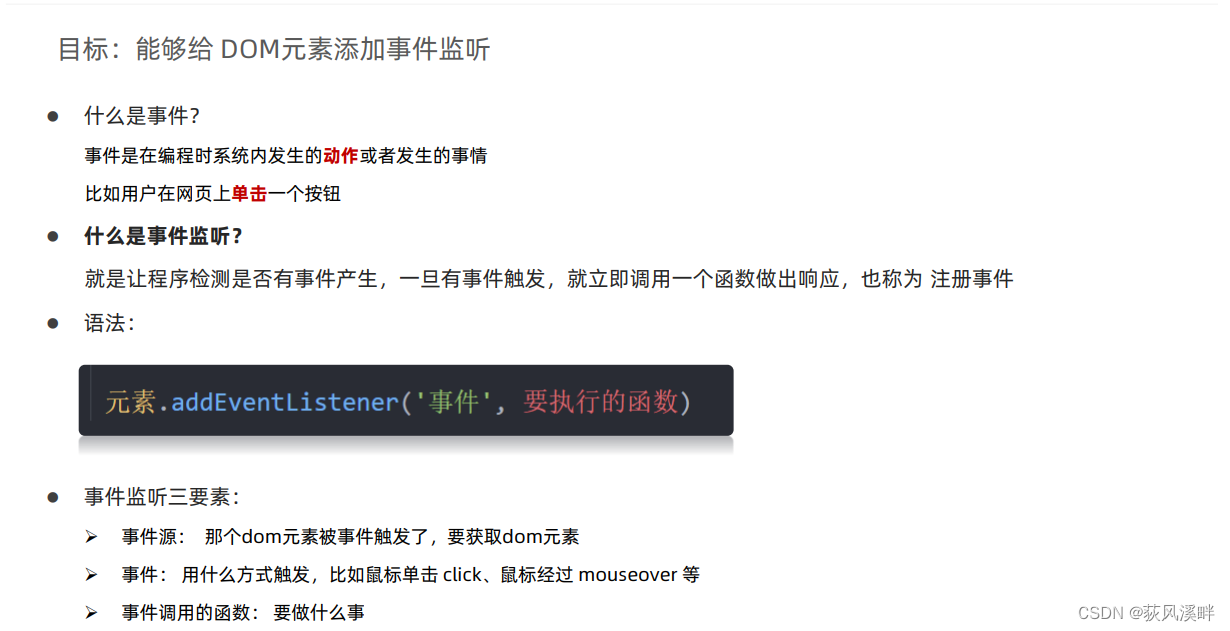
事件监听
事件监听三要素:
- 事件源 (谁被触发了)
- 事件 (用什么方式触发,比如鼠标单击
click、鼠标经过mouseover等) - 事件处理程序 (要做什么事情)
    <button>点击我弹出好东西</button>
    <script>
        let btn = document.querySelector('button')
        btn.addEventListener('click', function () {

            alert('点我作甚')
        })
    </script>

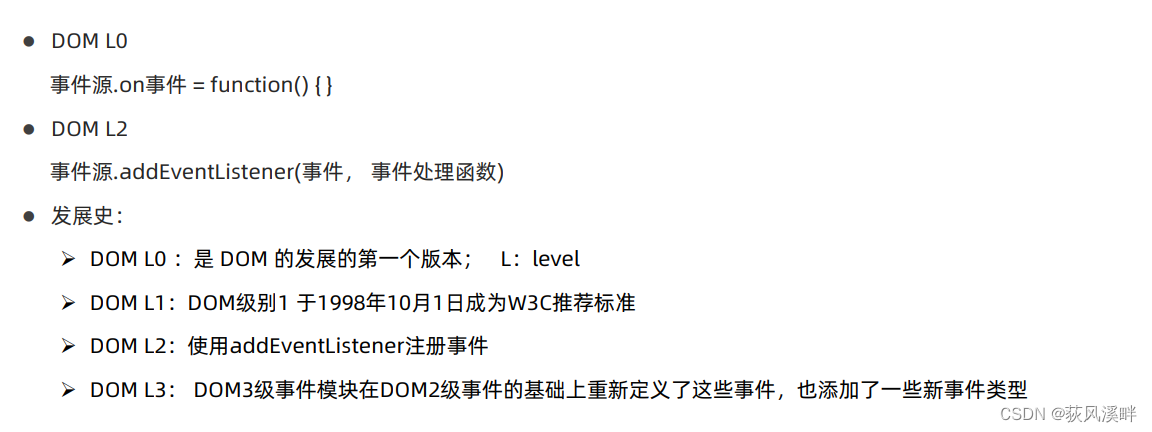
事件监听版本:
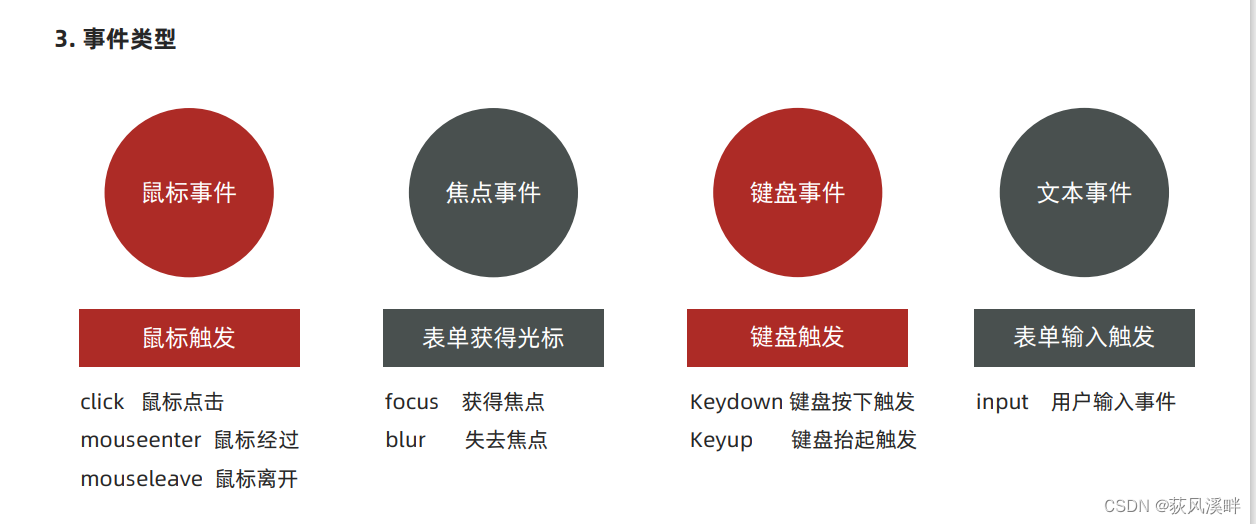
事件类型
高阶函数
高阶函数可以被简单理解为函数的高级应用,JavaScript 中函数可以被当成【值】来对待,基于这个特性实现函数的高级应用。
【值】就是 JavaScript 中的数据,如数值、字符串、布尔、对象等。
函数表达式
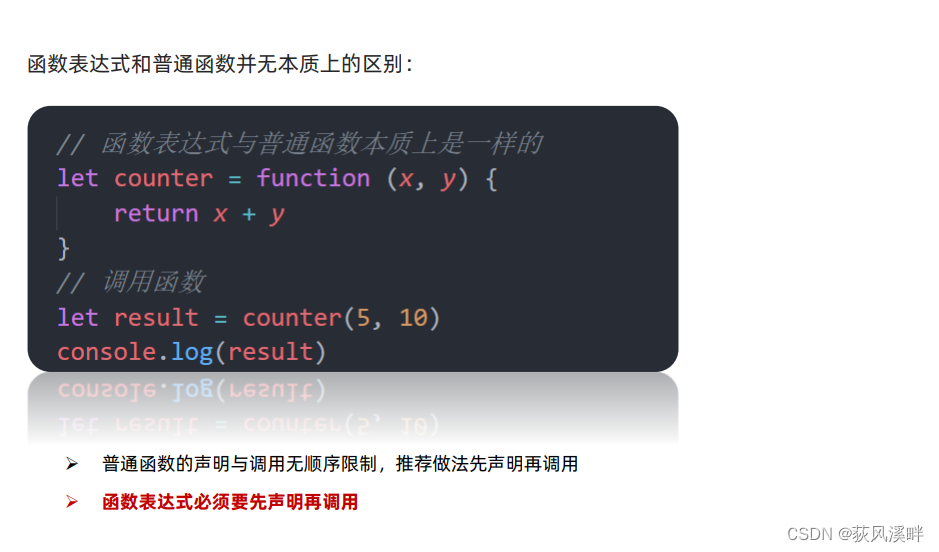
- 函数也是【数据】
- 把函数赋值给变量
回调函数

- 把函数当做另外一个函数的参数传递,这个函数就叫回调函数
- 回调函数本质还是函数,只不过把它当成参数使用
- 使用匿名函数做为回调函数比较常见
环境对象
目标:能够分析判断函数运行在不同环境中 this 所指代的对象
环境对象指的是函数内部特殊的变量this ,它代表着当前函数运行时所处的环境
**作用:**弄清楚this的指向,可以让我们代码更简洁
- 函数的调用方式不同,this 指代的对象也不同
- 【谁调用, this 就是谁】 是判断 this 指向的粗略规则
- 直接调用函数,其实相当于是 window.函数,所以 this 指代 window
排他思想
当前元素为A状态,其他元素为B状态。
使用:
- 干掉所有人
使用for循环 - 复活他自己
通过this或者下标找到自己或者对应的元素
<!DOCTYPE html>
<html lang="en">

<head>
    <meta charset="UTF-8">
    <meta http-equiv="X-UA-Compatible" content="IE=edge">
    <meta name="viewport" content="width=device-width, initial-scale=1.0">
    <title>Document</title>
    <style>
        .pink {

            background: pink;
        }
    </style>
</head>

<body>
    <button>第1个</button><button>第2个</button><button>第3个</button><button>第4个</button><button>第5个</button>
    <script>
        let btns = document.querySelectorAll('button')
        for (let i = 0; i < btns.length; i++) {

            btns[i].addEventListener('click', function () {

                // this.classList.add('pink') //this指向当前调用函数的的btns[i]
                // 干掉所有按钮
                for (let j = 0; j < btns.length; j++) {

                    btns[j].classList.remove('pink')
                }
                //复活我自己
                this.classList.add('pink')
            })
        }
    </script>
</body>

</html>
改进:(这里必须预设一个按钮有pink类,而第一个方法不需要)
<button class="pink">第1个</button><button>第2个</button><button>第3个</button><button>第4个</button><button>第5个</button>
    <script>
        let btns = document.querySelectorAll('button')
        for (let i = 0; i < btns.length; i++) {

            btns[i].addEventListener('click', function () {

                // 我只需要找出那个唯一的 pink类,删除
                document.querySelector('.pink').classList.remove('pink')
                // 改变我自己
                this.classList.add('pink')
            })
        }
    </script>
tab栏应用案例:
<!DOCTYPE html>
<html>

<head lang="en">
  <meta charset="UTF-8" />
  <title></title>
  <style type="text/css">
    * {

      margin: 0;
      padding: 0;
    }

    ul {

      list-style: none;
    }

    .wrapper {

      width: 1000px;
      height: 475px;
      margin: 0 auto;
      margin-top: 100px;
    }

    .tab {

      border: 1px solid #ddd;
      border-bottom: 0;
      height: 36px;
      width: 320px;
    }

    .tab li {

      position: relative;
      float: left;
      width: 80px;
      height: 34px;
      line-height: 34px;
      text-align: center;
      cursor: pointer;
      border-top: 4px solid #fff;
    }

    .tab span {

      position: absolute;
      right: 0;
      top: 10px;
      background: #ddd;
      width: 1px;
      height: 14px;
      overflow: hidden;
    }

    .products {

      width: 1002px;
      border: 1px solid #ddd;
      height: 476px;
    }

    .products .main {

      float: left;
      display: none;
    }

    .products .main.active {

      display: block;
    }

    .tab li.active {

      border-color: red;
      border-bottom: 0;
    }
  </style>
</head>

<body>
  <div class="wrapper">
    <ul class="tab">
      <li class="tab-item active">国际大牌<span>◆</span></li>
      <li class="tab-item">国妆名牌<span>◆</span></li>
      <li class="tab-item">清洁用品<span>◆</span></li>
      <li class="tab-item">男士精品</li>
    </ul>
    <div class="products">
      <div class="main active">
        <a href="###"><img src="imgs/guojidapai.jpg" alt="" /></a>
      </div>
      <div class="main">
        <a href="###"><img src="imgs/guozhuangmingpin.jpg" alt="" /></a>
      </div>
      <div class="main">
        <a href="###"><img src="imgs/qingjieyongpin.jpg" alt="" /></a>
      </div>
      <div class="main">
        <a href="###"><img src="imgs/nanshijingpin.jpg" alt="" /></a>
      </div>
    </div>
  </div>
  <script>
    // 0. 获取元素
    // 得到所有的小li,div
    let lis = document.querySelectorAll('ul.tab .tab-item')
    let divs = document.querySelectorAll('.products .main')
    // 1. 头部tab栏切换模块
    // 1.1 先给4个小li添加点击事件
    for (let i = 0; i < lis.length; i++) {

      lis[i].addEventListener('click', function () {

        //tab列变换
        li_active = document.querySelector('.tab li.active')
        li_active.classList.remove('active')// 找到以前的active 类,移除掉
        this.classList.add('active')// 当前的元素添加
        // 2. 底部显示隐藏模块 一定要写到点击事件的里面
        div_active = document.querySelector('.products div.active')
        div_active.classList.remove('active')
        // div对应序号的那个加上active
        divs[i].classList.add('active')   //小结,虽然都是active,但是样式不同。建议改成两个不同的名字
      })
    }
  </script>
</body>

</html>
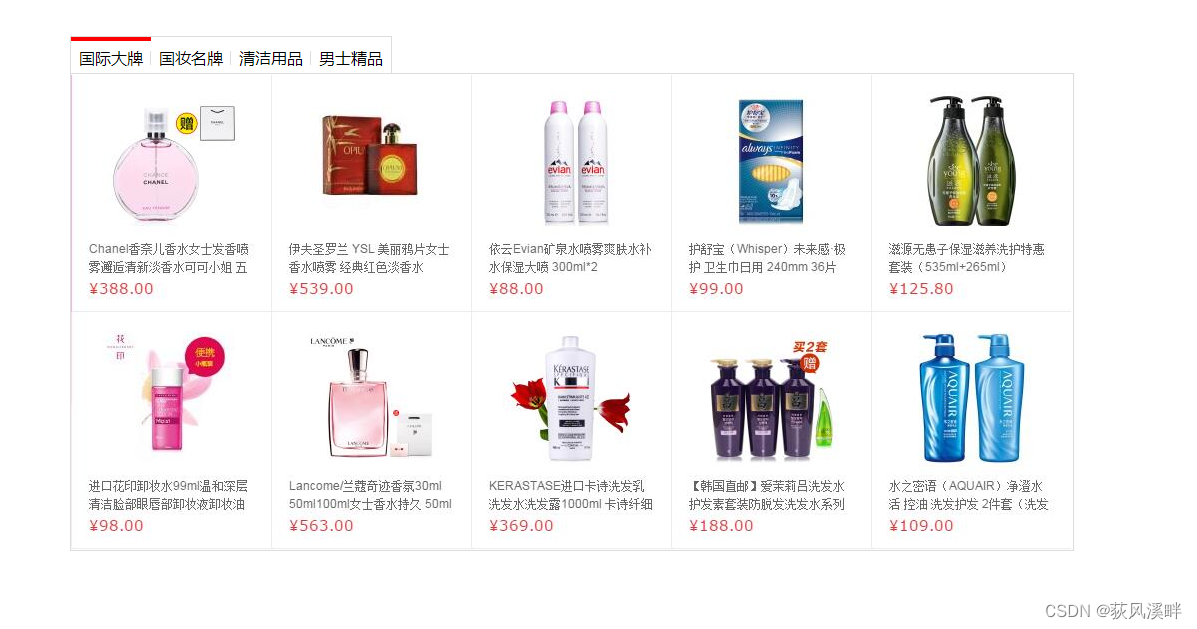
案例
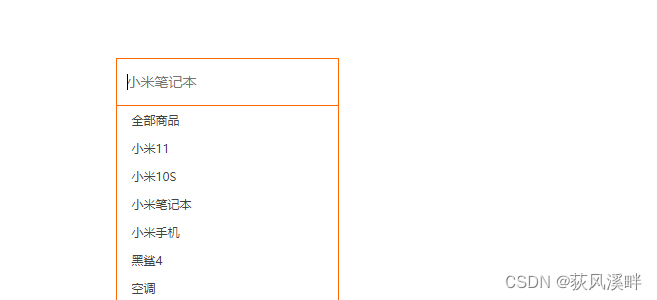
小米搜索框案例
<!DOCTYPE html>
<html lang="en">

<head>
    <meta charset="UTF-8">
    <meta http-equiv="X-UA-Compatible" content="IE=edge">
    <meta name="viewport" content="width=device-width, initial-scale=1.0">
    <title>Document</title>
    <style> * {
       margin: 0; padding: 0; box-sizing: border-box; } ul {
       list-style: none; } .mi {
       position: relative; width: 223px; margin: 100px auto; } .mi input {
       width: 223px; height: 48px; padding: 0 10px; font-size: 14px; line-height: 48px; border: 1px solid #e0e0e0; outline: none; transition: all .3s; } .mi .search {
       border: 1px solid #ff6700; } .result-list {
       display: none; position: absolute; left: 0; top: 48px; width: 223px; border: 1px solid #ff6700; border-top: 0; background: #fff; } .result-list a {
       display: block; padding: 6px 15px; font-size: 12px; color: #424242; text-decoration: none; } .result-list a:hover {
       background-color: #eee; } </style>

</head>

<body>
    <div class="mi">
        <input type="search" placeholder="小米笔记本">
        <ul class="result-list">
            <li><a href="#">全部商品</a></li>
            <li><a href="#">小米11</a></li>
            <li><a href="#">小米10S</a></li>
            <li><a href="#">小米笔记本</a></li>
            <li><a href="#">小米手机</a></li>
            <li><a href="#">黑鲨4</a></li>
            <li><a href="#">空调</a></li>
        </ul>
    </div>
    <script> // 1. 获取元素 input  let search = document.querySelector('input[type="search"]') //外单内双引号 let list = document.querySelector('.result-list') // 2. 事件监听 获得光标事件 focus search.addEventListener('focus', function () {
       // 显示下拉菜单 list.style.display = 'block' // 文本框变色 this.classList.add('search') }) // 3. 事件监听 失去光标事件 blur search.addEventListener('blur', function () {
       // 隐藏下拉菜单 list.style.display = 'none' // 文本框去色 this.classList.remove('search') }) </script>
</body>

</html>
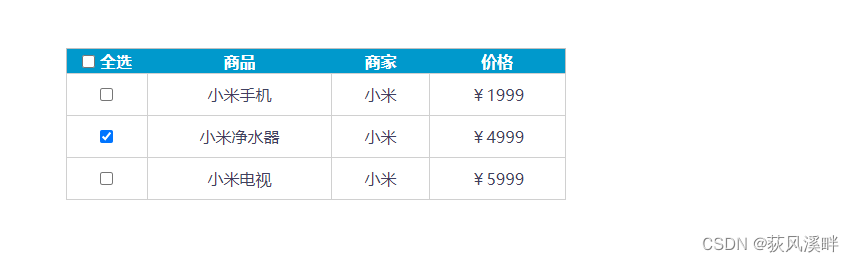
全选反选案例
<!DOCTYPE html>
<html>

<head lang="en">
  <meta charset="UTF-8">
  <title></title>
  <style> * {
       margin: 0; padding: 0; } table {
       border-collapse: collapse; border-spacing: 0; border: 1px solid #c0c0c0; width: 500px; margin: 100px auto; text-align: center; } th {
       background-color: #09c; font: bold 16px "微软雅黑"; color: #fff; height: 24px; } td {
       border: 1px solid #d0d0d0; color: #404060; padding: 10px; } .allCheck {
       width: 80px; } </style>
</head>

<body>
  <table>
    <tr>
      <th class="allCheck">
        <input type="checkbox" name="" id="checkAll"> <span class="all">全选</span>
      </th>
      <th>商品</th>
      <th>商家</th>
      <th>价格</th>
    </tr>
    <tr>
      <td>
        <input type="checkbox" name="check" class="ck">
      </td>
      <td>小米手机</td>
      <td>小米</td>
      <td>¥1999</td>
    </tr>
    <tr>
      <td>
        <input type="checkbox" name="check" class="ck">
      </td>
      <td>小米净水器</td>
      <td>小米</td>
      <td>¥4999</td>
    </tr>
    <tr>
      <td>
        <input type="checkbox" name="check" class="ck">
      </td>
      <td>小米电视</td>
      <td>小米</td>
      <td>¥5999</td>
    </tr>
  </table>
  <script> let checkall = document.querySelector('#checkAll') let cks = document.querySelectorAll('.ck') let all = document.querySelector('.all') //监听全选复选框 checkall.addEventListener('click', function () {
       console.log(checkall.checked) for (let i = 0; i < cks.length; i++) {
       cks[i].checked = checkall.checked //不要等于true要跟checkall状态一致才对 } if (checkall.checked) {
       //也可以checkall.checked === true all.innerHTML = '取消' } else {
       all.innerHTML = '全选' } }) //监听全选复选框 for (let i = 0; i < cks.length; i++) {
       cks[i].addEventListener('click', function () {
       // 只要点击任何一个小按钮,都要遍历所有的小按钮  for (let j = 0; j < cks.length; j++) {
       if (!cks[j].checked) {
       checkall.checked = false all.innerHTML = '全选' return } } checkall.checked = true all.innerHTML = '取消' }) } </script>
</body>

</html>
购物车加减操作

<!DOCTYPE html>
<html lang="en">

<head>
  <meta charset="UTF-8">
  <meta name="viewport" content="width=device-width, initial-scale=1.0">
  <meta http-equiv="X-UA-Compatible" content="ie=edge">
  <title>Document</title>
  <style>
    div {

      width: 80px;
    }

    input[type=text] {

      width: 50px;
      height: 44px;
      outline: none;
      border: 1px solid #ccc;
      text-align: center;
      border-right: 0;
    }

    input[type=button] {

      height: 24px;
      width: 22px;
      cursor: pointer;
    }

    input {

      float: left;
      border: 1px solid #ccc;

    }
  </style>
</head>

<body>
  <div>
    <input type="text" id="total" value="1" readonly>
    <input type="button" value="+" id="add">
    <input type="button" value="-" id="reduce" disabled>

  </div>
  <script>
    let total = document.querySelector('#total')
    let add = document.querySelector('#add')
    let reduce = document.querySelector('#reduce')
    add.addEventListener('click', function () {

      total.value++
      if (total.value > 1) {

        reduce.disabled = false
      }
    })
    console.log(typeof total.value)    //total.value是字符串类型
    reduce.addEventListener('click', function () {

      total.value--
      if (total.value == 1) {
        //比较运算符也有隐式转换(total.value转成字符串)
        reduce.disabled = true
      }
    })


  </script>
</body>

</html>
边栏推荐
- js 迭代器 生成器 异步代码处理 promise+生成器 -> await/async
- BOM DOM
- Writing method of then part in drools
- PR 2021 quick start tutorial, learn about the and functions of the timeline panel
- 浏览器node事件循环
- China traffic sign detection data set
- spfa AcWing 852. spfa判断负环
- Leetcode - Sword finger offer 51 Reverse pairs in an array
- H5 to app
- CPU指令集介绍
猜你喜欢
LTC3307AHV 符合EMI标准,降压转换器 QCA7005-AL33 PHY
![[old horse of industrial control] detailed explanation of Siemens PLC TCP protocol](/img/13/9002244555ebe8a61660c2506993fa.png)
[old horse of industrial control] detailed explanation of Siemens PLC TCP protocol
Initial JDBC programming

What is the relationship between NFT and metauniverse? How to view the market? The future market trend of NFT
![[FFH] little bear driver calling process (take calling LED light driver as an example)](/img/e7/153ae9f1befc12825d277620049f9d.jpg)
[FFH] little bear driver calling process (take calling LED light driver as an example)
"As a junior college student, I found out how difficult it is to counter attack after graduation."

Go learning notes - multithreading

线性DP AcWing 899. 编辑距离
区间DP AcWing 282. 石子合并

Record the range of data that MySQL update will lock
随机推荐
There is a hidden danger in CDH: the exchange memory used by the process of this role is XX megabytes. Warning threshold: 200 bytes
NTMFS4C05NT1G N-CH 30V 11.9A MOS管,PDF
Error in kubeadm join: [error port-10250]: port 10250 is in use [error fileavailable--etc kubernetes PKI
Discrimination of the interval of dichotomy question brushing record (Luogu question sheet)
线性DP AcWing 895. 最长上升子序列
Intel internal instructions - AVX and avx2 learning notes
Leetcode - Sword finger offer 59 - I, 59 - II
Win10 system OmniPeek wireless packet capturing network card driver failed to install due to digital signature problem solution
通过反射执行任意类的任意方法
Use sqoop to export ads layer data to MySQL
Rust search server, rust quick service finding tutorial
The differences and relationships among port, targetport, nodeport and containerport in kubenetes
2.7 binary tree, post order traversal - [FBI tree]
Drools executes string rules or executes a rule file
Calculate the maximum path sum of binary tree
SparkContext: Error initializing SparkContext解决方法
线性DP AcWing 898. 数字三角形
线性DP AcWing 896. 最长上升子序列 II
drools中then部分的写法
Redis transaction mechanism implementation process and principle, and use transaction mechanism to prevent inventory oversold