当前位置:网站首页>【进程间通信IPC】- 信号量的学习
【进程间通信IPC】- 信号量的学习
2022-07-27 08:45:00 【我今年十六岁】
目录
一:了解信号量
•Dijkstra提出的“信号量”概念是共发程序(两个进程同时在访问同一个顺序)设计领域的一项重大进步•信号量是一种变量,它只能取正整数值,对这些正整数只能进行两种操作:等待和信号•用两种记号来表示信号量的这两种操作:P(semaphore variable) 代表等待 -1
V(semaphore variable) 代表信号 +1
同时运行的数据不安全--信号量
线程:多条线程同时访问同一个数据源,会出现线程同步问题
线程同步解决方案:线程的互斥量 线程的信号量 【线程锁】【一个进程中的多条线程】【线程锁解决进程内部问题】
进程:多条进程同时访问同一个数据源,会出现进程共发程序设计问题
进程数据共享安全问题解决方案:IPC信号量 【进程锁】【不同进程中的多条线程】【进程锁解决进程外部问题】
二:pv操作
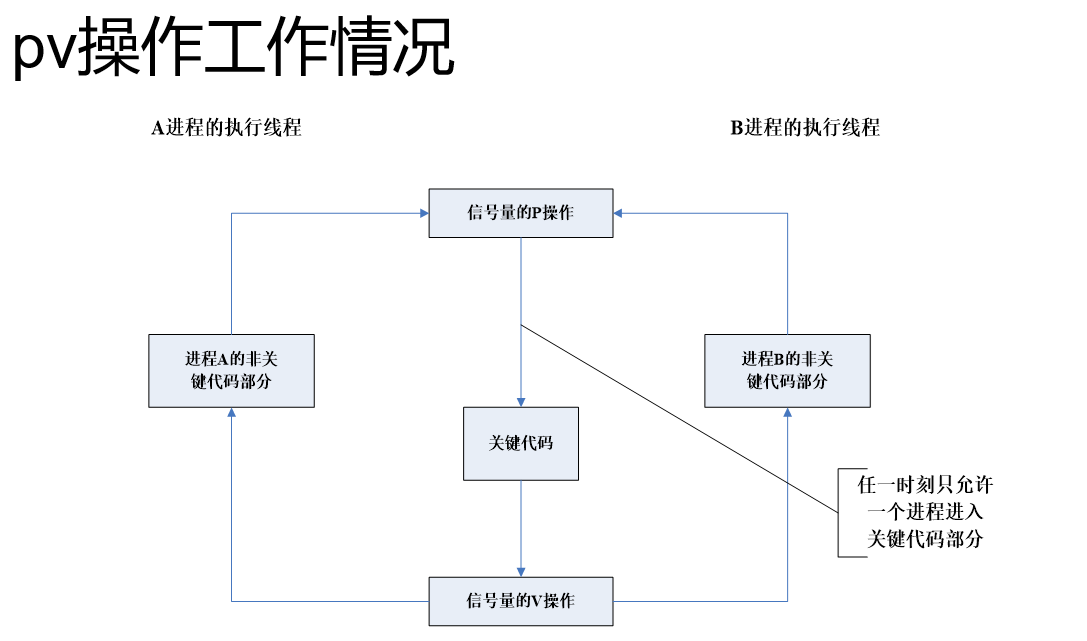
假设我们有一个信号量变量sv,则pv操作的
定义如下
•P(sv):如果sv的值大于零,就给它减去1;如果sv的值等于零,就挂起【阻塞】该进程的执行【P操作加锁】•V(sv): 如果有其他进程因等待sv变量而被挂起,就让它恢复执行;如果没有进程因等待sv变量而被挂起,就给它加1【V操作解锁】

三:信号量的分类
•最简单的信号量是一个只能取“0”和“1”值的变量,也就是人们常说的“二进制信号量”【做锁】•可以取多种正整数值的信号量叫做“通用信号量”【做通知,但是信号量 消息队列更好用】
四:信号量函数
消息队列:msgget(创建/访问) msgctl(删除) msgsnd(发送) msgrcv(接收)
共享内存:shmget(创建/访问) shmctl(删除) shmat(连接) shmdt(断开)
信号量:semget(创建/访问) semctl(删除) semop(P和V操作)
•每一个信号量函数都能对成组的通用信号量进行操作,自然也可以完成对最简单的二进制信号量的操作•还经常需要用到头文件<sys/types.h>和<sys/ipc.h>
int semctl(int sem_id,int sem_num,int command,...);
int semget(key_t key,int num_sems,int sem_flags);
int semop(int sem_id,struct sembuf * sops,size_t nsops);
函数名:semget函数
函数作用:创建一个新的信号量或者取得一个现有信号量的键字
函数参数:int semget (key_t key,int num_sems,int sem_flag);
•key: 是一个整数值,不相关的进程将通过这个值去访问同一个 信号量•num_sems:需要使用的信号量个数,它几乎总是取值为1•sem_flags:是一组标志,其作用与open函数的各种标志很相似,它低端的九个位是该信号量的权限,其作用相当于文件的访问权限,可以与键值IPC_CREATE做按位的OR操作以创建一个新的信号量(IPC_CREAT|0766)函数返回:成功时将返回一个正数值,它就是其他信号量函数要用到的那个标识码,如果失败,将返回-1
函数名:semop函数
函数作用:改变信号量的键值
函数参数:int semop ( int sem_id, struct sembuf *sem_ops,size_t num_sem_ops,);
•sem_id:是该信号量的标识码,也就是semget函数的返回值•sem_ops:是个指向一个结构数值的指针•Semop调用的一切动作都是一次性完成的,这是为了避免出现因使用了多个信号量而可能发生的竞争现象其中的
sembuf结构体中的元素
struct sembuf{
short sem_num;
short sem_op;
short sem_flg;
};
•sem_num是信号量的编号,如果你的工作不需要使用一组信号量,这个值一般就取为0。•sem_op是信号量一次PV操作时加减的数值,一般只会用到两个值,一个是“-1”,也就是P操作,等待信号量变得可用;另一个是“+1”,也就是我们的V操作,发出信号量已经变得可用•sem_flag通常被设置为SEM_UNDO.她将使操作系统跟踪当前进程对该信号量的修改情况
函数名:semctl函数
函数作用:允许我们直接控制信号量的信息
函数参数:int semctl(int sem_id,int sem_num,int command,…);
•sem_id: 是由semget函数返回的一个信号量标识码•sem_num: 信号量的编号,如果在工作中需要使用到成组的信号量,就要用到这个编号;它一般取值为0,表示这是第一个也是唯一的信号量•comman:将要采取的操作动作•如果还有第四个参数,那它将是一个“union semun”复合结构•删除 semctl(sem_id,0,IPC_RMID);semctl函数里的command可以有许多不同的值,下面这两个是比较常用的:
•SETVAL:用来把信号量初始化为一个已知的值,这个值在semun结构里是以val成员的面目传递的。
•IPC_RMID:删除一个已经没有人继续使用的信号量标识码
五:信号量代码学习
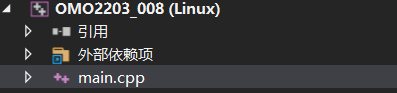
创建两个工程 代表两个进程
#include<iostream>
#include<stdio.h>
#include <sys/types.h>
#include <sys/ipc.h>
#include <sys/sem.h>
#include<unistd.h>

using namespace std;

union semun {
	int              val;    /* Value for SETVAL */
	struct semid_ds* buf;    /* Buffer for IPC_STAT, IPC_SET */
	unsigned short* array;  /* Array for GETALL, SETALL */
	struct seminfo* __buf;  /* Buffer for IPC_INFO
								(Linux-specific) */
};


//信号量的创建
int sem_create(key_t key, int num_sems)
{
	int res = 0;
	res = semget(key,num_sems, IPC_CREAT | 0777);
	if (res < 0)
	{
		perror("semget error");
	}
	return res;
}

//信号量赋初始值
int sem_setVal(int semid, int semindex, int val)
{
	union semun arg;
	arg.val = val;

	int res = semctl(semid, semindex, SETVAL, arg);
	if (res < 0)
	{
		perror("semctl error");
	}
	return res;
}

//信号量 P操作 -1
int sem_p(int sem_id, int semindex)
{
	struct sembuf buf = { semindex,-1,SEM_UNDO };
	int res = semop(sem_id, &buf, 1);
	if (res < 0)
	{
		perror("semop error");
	}
	return res;
}

//信号量 V操作 +1
int sem_v(int sem_id, int semindex)
{
	struct sembuf buf = { semindex,1,SEM_UNDO };
	int res = semop(sem_id, &buf, 1);
	if (res < 0)
	{
		perror("semop error");
	}
	return res;
}

int main()
{
	//信号量创建
	int semid = sem_create((key_t)1003, 1);
	//信号量0下标设置初始值1
	sem_setVal(semid, 0, 1);
	//加锁
	sem_p(semid, 0);
	for (int i = 0; i < 30; i++)
	{
		cout << "第一个工程进程----------" << i << endl;
		sleep(1);
	}
	//解锁
	sem_v(semid, 0);
	return 0;
}
#include<iostream>
#include<stdio.h>
#include <sys/types.h>
#include <sys/ipc.h>
#include <sys/sem.h>
#include<unistd.h>

using namespace std;

union semun {
	int              val;    /* Value for SETVAL */
	struct semid_ds* buf;    /* Buffer for IPC_STAT, IPC_SET */
	unsigned short* array;  /* Array for GETALL, SETALL */
	struct seminfo* __buf;  /* Buffer for IPC_INFO
								(Linux-specific) */
};


//信号量的创建
int sem_create(key_t key, int num_sems)
{
	int res = 0;
	res = semget(key, num_sems, IPC_CREAT | 0777);
	if (res < 0)
	{
		perror("semget error");
	}
	return res;
}


//信号量 P操作 -1
int sem_p(int sem_id, int semindex)
{
	struct sembuf buf = { semindex,-1,SEM_UNDO };
	int res = semop(sem_id, &buf, 1);
	if (res < 0)
	{
		perror("semop error");
	}
	return res;
}

//信号量 V操作 +1
int sem_v(int sem_id, int semindex)
{
	struct sembuf buf = { semindex,1,SEM_UNDO };
	int res = semop(sem_id, &buf, 1);
	if (res < 0)
	{
		perror("semop error");
	}
	return res;
}

int main()
{
	//信号量访问
	int semid = sem_create((key_t)1003, 1);

	//加锁
	sem_p(semid, 0);

	for (int i = 0; i < 30; i++)
	{
		cout <<"--------------第二个工程进程----------" << i << endl;
		sleep(1);
	}
	//解锁
	sem_v(semid, 0);

	return 0;
}
结果:
在第一个进程执行完毕之后,第二个进程才可以启动

ipcs查看一下 进程在运行的时候,信号量是一直存在的

需要等待两个进程运行完毕,可以通过ipcrm -a 来删除信号量


边栏推荐
- Sequential storage and chain storage of stack implementation
- Sliding conflict of view
- Day5 - Flame restful request response and Sqlalchemy Foundation
- 如何在B站上快乐的学习?
- while Loop
- QPushButton 按钮的创建与简单应用
- VS Code中#include报错(新建的头文件)
- Management of product pictures
- Background coupon management
- Hundreds of people participated. What are these people talking about in the opengauss open source community?
猜你喜欢

The wechat installation package has soared from 0.5m to 260m. Why are our programs getting bigger and bigger?
P7 Day1 get to know the flask framework
![Connection failed during installation of ros2 [ip: 91.189.91.39 80]](/img/7f/92b7d44cddc03c58364d8d3f19198a.png)
Connection failed during installation of ros2 [ip: 91.189.91.39 80]

redis的string类型及bitmap
Element display mode: block level, inline, inline block, nesting specification, display mode conversion

Minio 安装与使用

First experience of tryme in opengauss

NIO this.selector.select()

User management - restrictions

杭州电子商务研究院发布“数字化存在”新名词解释
随机推荐
JS detects whether the client software is installed
First experience of tryme in opengauss
Oppo self-developed large-scale knowledge map and its application in digital intelligence engineering
[uni app advanced practice] take you hand-in-hand to learn the development of a purely practical complex project 1/100
Bandwidth and currency
How to view instances of software objects in QSIM?
Hangzhou E-Commerce Research Institute released an explanation of the new term "digital existence"
Openresty + keepalived 实现负载均衡 + IPV6 验证
redis 网络IO
Set set
691. 立方体IV
MCDF顶层验证方案
Make a game by yourself with pyGame 01
UVM入门实验1
How to permanently set source
Massive data Xiao Feng: jointly build and govern opengauss root community and share a thriving new ecosystem
Matlab求解微分代数方程 (DAE)
Creation and simple application of QPushButton button button
Vertical align cannot align the picture and text vertically
MCDF top level verification scheme