当前位置:网站首页>如何获取飞机穿过雷达两端的坐标
如何获取飞机穿过雷达两端的坐标
2022-06-28 19:28:00 【weixin_45486229】
首先说一下大致的实现步骤:
- 创建雷达扫描的实体并定义飞机飞行的路线;
- 利用通视分析的接口找到飞机进入和穿出雷达侦测范围的位置坐标;
- 利用坐标构建线实体,雷达范围内为红色,范围外为绿色。
1. 创建雷达扫描的实体并定义飞机飞行的路线
首先创建雷达扫描实体,用添加实体的方式去添加雷达实体。
主要代码如下:
let sensorEntity = viewer.entities.add({
    position: Cesium.Cartesian3.fromDegrees(116.45093826887725, 39.90558654617389, 14.3030),
    rectangularSensor: new Cesium.RectangularSensorGraphics({
        radius: new Cesium.CallbackProperty(function () {
            return +self.radius;
        }, false),
        slice: 120,//切分程度
        xHalfAngle: new Cesium.CallbackProperty(function () {
            return Cesium.Math.toRadians(self.xHalfAngle);
        }, false),//左右夹角
        yHalfAngle: new Cesium.CallbackProperty(function () {
            return Cesium.Math.toRadians(self.yHalfAngle);
        }, false),//上下夹角
        lineColor: new Cesium.CallbackProperty(function () {
            return Cesium.Color.fromCssColorString(self.lineColor);
        }, false),//线颜色
        material: new Cesium.Color(0.0, 1.0, 1.0, 1),//统一材质
        showScanPlane: new Cesium.CallbackProperty(function () {
            return self.scanPlane;
        }, false),//显示扫描面
        scanPlaneColor: new Cesium.CallbackProperty(function () {
            return Cesium.Color.fromCssColorString(self.scanPlaneColor);
        }, false),//扫描面颜色
        scanPlaneMode: new Cesium.CallbackProperty(function () {
            return self.scanPlaneMode ? 'vertical' : 'horizontal';
        }, false),//垂直扫描模式
        scanPlaneRate: new Cesium.CallbackProperty(function () {
            return self.scanPlaneRate;
        }, false),//扫描速率
        showIntersection: true,//是否显示扫描与地球的线
        showThroughEllipsoid: false//是否穿过地球显示
    })
});
然后创建飞机飞行路线,让飞机沿线飞行。用的是时钟函数的方式去让飞机沿线飞行的。
主要代码:
// 飞机沿线飞行
var startTime = Cesium.JulianDate.fromDate(new Date(2019, 2, 25, 16));
var startPosition = Cesium.Cartesian3.fromDegrees(116.47326309033961, 39.90512322998635, 600);
var endTime = Cesium.JulianDate.addSeconds(startTime, 1000, new Cesium.JulianDate());
var endPosition = Cesium.Cartesian3.fromDegrees(116.4189181104128, 39.903026132659456, 600);
viewer.clock.startTime = startTime.clone();
viewer.clock.stopTime = endTime.clone();
viewer.clock.currentTime = startTime.clone();
viewer.clock.clockRange = Cesium.ClockRange.LOOP_STOP; //Loop at the end
viewer.clock.multiplier = 10;
viewer.timeline.zoomTo(startTime, endTime);
var carPositionProperty = new Cesium.SampledPositionProperty();
carPositionProperty.addSample(startTime, startPosition);
carPositionProperty.addSample(endTime, endPosition);
var carPosition = carPositionProperty.getValue(viewer.clock.currentTime);
var heading = Cesium.Math.toRadians(-3);
var pitch = 0;
var roll = 0;
var hpr = new Cesium.HeadingPitchRoll(heading, pitch, roll);
var orientation = Cesium.Transforms.headingPitchRollQuaternion(carPosition, hpr);
var carModel = viewer.entities.add({
    name: "gltf",
    position: new Cesium.CallbackProperty(function () {
        return carPosition;
    }, false),
    orientation: orientation,
    model: {
        uri: "./SampleData/gltf/客机模型/客机模型.gltf",
        scale: 60
    },
    viewFrom: new Cesium.Cartesian3(35, 70, 30)
});
viewer.clock.onTick.addEventListener(function () {
    var currentTime = Cesium.JulianDate.clone(viewer.clock.currentTime);
    carPosition = carPositionProperty.getValue(currentTime);
});
2. 利用通视分析的接口找到飞机进入和穿出雷达侦测范围的位置坐标
使用通视分析从起飞点到结束点进行分析得到靠近起飞点的第一个障碍点坐标;然后反过来进行通视分析得到远离起飞点的第二个障碍点坐标:
主要代码:
// 飞机起飞结束位置坐标:
takeOffposition = [116.47326309033961, 39.90512322998635, 560]
finishposition = [116.4189181104128, 39.903026132659456, 560]
setTimeout(function () {
    // 通视分析判断点位.
    sightline.build();
    sightline.lineWidth = 3
    //设置观察点
    sightline.viewPosition = takeOffposition;
    // 设置目标点
    var flag = sightline.addTargetPoint({
        position: finishposition,
        name: "point0"
    });
}, 200)
// 获取障碍点的方法延时运行,因为通视分析需要时间
setTimeout(function () {
    sightline.getBarrierPoint("point0", function (e) {
        positions.fisrtObstacle = e.position
    })
    // 清除第一次的通视分析结果.
    sightline.removeAllTargetPoint();
    sightline.viewPosition = finishposition;
    var flag1 = sightline.addTargetPoint({
        position: takeOffposition,
        name: "point1"
    });
}, 300)
setTimeout(function () {
    sightline.getBarrierPoint("point1", function (e) {
        positions.secondObstacle = e.position
    })
    sightline.removeAllTargetPoint();
}, 380)
3. 利用坐标构建线实体,雷达范围内为红色,范围外为绿色。
这个比较简单直接附代码:
// 结束位置到第二个穿出雷达范围实体
viewer.entities.add({
    id: "test1",
    polyline: {
        positions: Cesium.Cartesian3.fromDegreesArrayHeights([positions.secondObstacle.longitude * (180 / Math.PI), positions.secondObstacle.latitude * (180 / Math.PI), positions.secondObstacle.height, finishposition[0], finishposition[1], finishposition[2]]),
        width: 4.0,
        material: Cesium.Color.GREEN.withAlpha(0.9),
        depthFailMaterial: Cesium.Color.GREEN.withAlpha(0.9)
    }
});
// 开始位置到进入雷达范围实体
viewer.entities.add({
    id: "test2",
    polyline: {
        positions: Cesium.Cartesian3.fromDegreesArrayHeights([positions.fisrtObstacle.longitude * (180 / Math.PI), positions.fisrtObstacle.latitude * (180 / Math.PI), positions.fisrtObstacle.height, takeOffposition[0], takeOffposition[1], takeOffposition[2]]),
        width: 4.0,
        material: Cesium.Color.GREEN.withAlpha(0.9),
        depthFailMaterial: Cesium.Color.GREEN.withAlpha(0.9)
    }
});
// 构建两个点中间被发现的线实体
viewer.entities.add({
    id: "test3",
    polyline: {
        positions: Cesium.Cartesian3.fromDegreesArrayHeights([positions.secondObstacle.longitude * (180 / Math.PI), positions.secondObstacle.latitude * (180 / Math.PI), positions.secondObstacle.height, positions.fisrtObstacle.longitude * (180 / Math.PI), positions.fisrtObstacle.latitude * (180 / Math.PI), positions.fisrtObstacle.height]),
        width: 4.0,
        material: Cesium.Color.RED.withAlpha(0.9),
        depthFailMaterial: Cesium.Color.RED.withAlpha(0.9)
    }
});
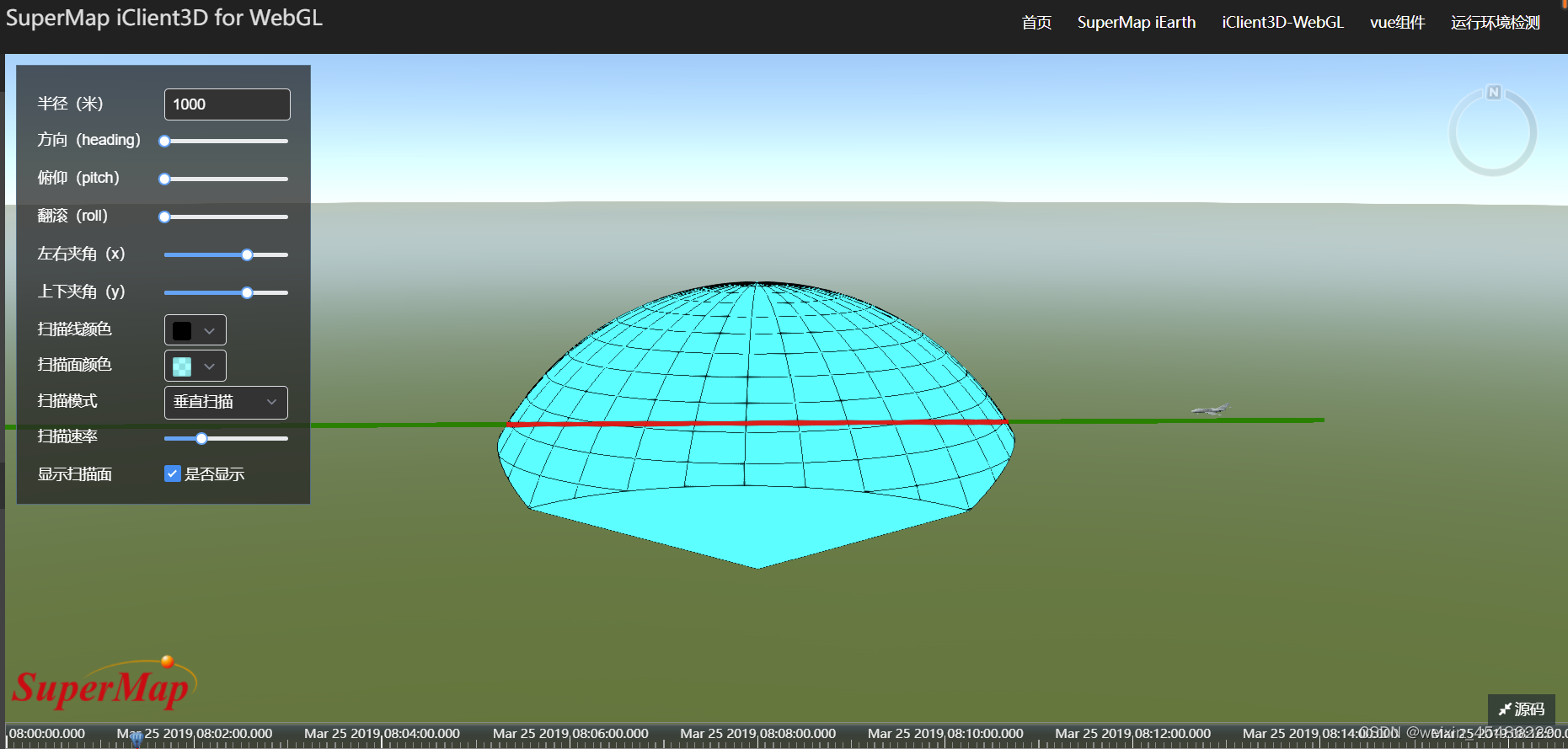
最终效果如下:
边栏推荐
- 视差js特效js轮播图插件
- Constrained Delaunay triangulation in MATLAB
- h5向日葵作业
- Gaozelong, a digital economy expert: Yingke changed its name to yingcosmos. Will yuancosmos become the next growth engine of Yingke?
- From design delivery to development, it is easy and efficient!
- Bayesian inference problem, MCMC and variational inference
- 《数字经济全景白皮书》消费金融数字化篇 重磅发布
- kettle(六):基于Kettle的数据库全量备份
- 类加载机制与对象的创建
- Demo of intelligent computing system 2 bangc operator development (heterogeneous programming flow of CPU and mlu270)
猜你喜欢

echart:横向柱状图的类目文字位置调整

Windows 64位下载安装My SQL

电脑如何检查驱动程序是否正常

SQL calculates daily new users and retention rate indicators

秋招经验分享 | 银行笔面试该怎么准备

Web3 that unleashes the value of the Internet

基于趋势和季节性的时间序列预测

Double contextual relationship network for polyp segmentation

Why is it not enough to declare the structure alias when using the structure variable of other files in C language, and the proper name must be used? (cannot add struct when using alias)

PCL 环境下安装配置CGAL 5.4.1
随机推荐
行业分析| 快对讲,楼宇对讲
How does the computer check whether the driver is normal
事实/论断/断言/结论/断定/判定
Technical methodology of new AI engine under the data infrastructure upgrade window
数据库学习笔记(SQL04)
为什么C语言用使用其他文件的结构体变量时,声明结构体别名还不行,必须使用本名?(使用别名时不能加struct)
shell读取Json文件的值
jvm内存结构
国内有正规安全的外汇交易商吗?
Find out the users who log in for 7 consecutive days and 30 consecutive days
春风动力携手华为打造智慧园区标杆,未来工厂创新迈上新台阶
论文笔记:Universal Value Function Approximators
Variational graph auto-encoders (VGAE)
MDM数据分析功能说明
Chunfeng power and Huawei work together to build a smart Park benchmark, and the future factory innovation will reach a new level
h5向日葵作业
How many objects are created after new string ("hello")?
How to learn JS through w3school / how to use the JS reference manual of w3school
Can py SQL get the table structure?
Windows 64位下载安装My SQL