当前位置:网站首页>Closed door cultivation (24) shallow understanding of cross domain problems
Closed door cultivation (24) shallow understanding of cross domain problems
2022-06-29 09:34:00 【likeGhee】
Originally, I wanted to say that it was an in-depth study , But the level is limited , That is to say, put your hands on the surface of the water for more 0.25 The depth of CM
, Skim the skin .
List of articles
What is cross domain problem
Cross domain is actually a security mechanism for browsers , Request access to domain name and AJAX The requested address is inconsistent , The browser will not be able to return the requested result .
Specific examples , Now I visit... In the browser url Address www.aaa.com/a, The background server of this page sends a request to www.bbbb.com/b, Because the browser cross domain security mechanism , Block your access .
Cross domain problem simulation
Let's first configure host, Add two custom domain names for us to test 
a web The project creates a test servlet, hold tomcat Start it up
@WebServlet("/test")
public class TestServlet extends HttpServlet {

    @Override
    protected void doGet(HttpServletRequest req, HttpServletResponse resp) throws ServletException, IOException {

        String username = req.getParameter("name");
        JSONObject jsonObject = new JSONObject();
        jsonObject.put("username", username);
        resp.getWriter().write(jsonObject.toJSONString());
    }
}
b web Project index.jsp visit a The test interface
<%@ page contentType="text/html;charset=UTF-8" language="java" %>
<html>
  <head>
    <title>$Title$</title>
  </head>

  <script src="http://libs.baidu.com/jquery/1.7.2/jquery.min.js"></script>

  <script type="text/javascript"> $(document).ready(function (){
      $.ajax({
      type : "GET", async : false, url : "http://a.a.com:8080/biguanxiulian_2_war_exploded/test?username=123", dataType : "json", success : function (data){
      alert(data["username"]) }, error : function (){
      alert("fail") } }) }) </script>
  <body>
  </body>
</html>
visit b web Project index.jsp, Cross domain errors will be reported 

This is because AJAX The requested domain name is inconsistent with the domain name I am currently visiting , The browser will not get by default ajax result .
Browser default web site ajax The request is under the same domain name . This is the browser mechanism .
How to solve cross domain problems
Use jsonP Only support get request , I won't support it post
Use interface gateway ,springcloud ( Commonly used in enterprise development )
httpclient Internal forwarding
response add to header Request headers allow cross domain .
But my level is limited ,springcloud Put it first
First, let's talk about several methods
response Add request headers to solve cross domain problems
stay a web Add an extra piece of code to the project
resp.setHeader("Access-Control-Allow-Origin", "*");
@WebServlet("/test")
public class TestServlet extends HttpServlet {

    @Override
    protected void doGet(HttpServletRequest req, HttpServletResponse resp) throws ServletException, IOException {

        String username = req.getParameter("username");
        JSONObject jsonObject = new JSONObject();
        jsonObject.put("username", username);
        resp.getWriter().write(jsonObject.toJSONString());
        //  Allow browser cross domain access ,* Allow all
        resp.setHeader("Access-Control-Allow-Origin", "*");
    }
}
b Visit the website again , Normal return result 
jsonp Solving cross domain problems
JSONP Used in the front end
JSON Only support GET, It doesn't work very well either
modify ajax Code ,dataType Change it to jsonp, Add a line jsonp: “jsonpCallback”
<script type="text/javascript"> $(document).ready(function (){
      $.ajax({
      type : "GET", async : false, url : "http://a.a.com:8080/biguanxiulian_2_war_exploded/test?username=123", dataType : "jsonp", jsonp: "jsonpCallback",//  The server side is used to receive the callback func Parameters  success : function (data){
      alert(data["username"]) }, error : function (){
      alert("fail") } }) }) </script>
Server side modification , obtain jsonpCallback Parameters , structure String Return results ,jsonpCallback + ( + Return content + )
@WebServlet("/test")
public class TestServlet extends HttpServlet {

    @Override
    protected void doGet(HttpServletRequest req, HttpServletResponse resp) throws ServletException, IOException {

        String username = req.getParameter("username");
        JSONObject jsonObject = new JSONObject();
        jsonObject.put("username", username);

        String jsonpCallback = req.getParameter("jsonpCallback");
        System.out.println(jsonpCallback);

        resp.getWriter().println(
                String
                .format("%s(%s)",
                        jsonpCallback,
                        jsonObject.toJSONString()));

        //resp.setHeader("Access-Control-Allow-Origin", "*");
    }
}
View results , visit url With jsonpCallback Parameters , This parameter is generated by the client , At the time of the visit jsonpCallback The value of helps us automatically construct . Corresponding jsonp: “jsonpCallback”
In response to the results 

What's the mechanism ?
Use script send out get request , We are quoting jquery.min.js When I use it script request , It is possible to obtain results across ,jsonp Send the request in this way , Callback Arguments , Parse the parameter , Get results .
The result of parameter callback here is
jsonpCallback=jQuery17206283321772985047_1611579842743&_=1611579842749
Analytical parameters , The result sent by the server is obtained
&_=1611579842749 -> username: “123”
Note that the type is script Type of 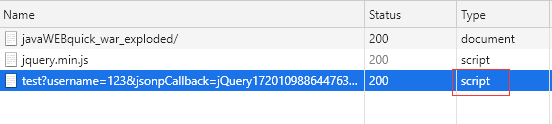
jsonp It is not supported post Of , We can test it
@WebServlet("/test")
public class TestServlet extends HttpServlet {

    @Override
    protected void doGet(HttpServletRequest req, HttpServletResponse resp) throws ServletException, IOException {

        System.out.println(" Called GET");
        //String username = req.getParameter("username");
        //JSONObject jsonObject = new JSONObject();
        //jsonObject.put("username", username);
        //
        //String jsonpCallback = req.getParameter("jsonpCallback");
        //System.out.println(jsonpCallback);
        //
        //resp.getWriter().write(
        // String
        // .format("%s(%s)",
        // jsonpCallback,
        // jsonObject.toJSONString()));

        //resp.setHeader("Access-Control-Allow-Origin", "*");
    }

    @Override
    protected void doPost(HttpServletRequest req, HttpServletResponse resp) throws ServletException, IOException {

        System.out.println(" Called POST");
        String username = req.getParameter("username");
        JSONObject jsonObject = new JSONObject();
        jsonObject.put("username", username);

        String jsonpCallback = req.getParameter("jsonpCallback");
        System.out.println(jsonpCallback);

        resp.getWriter().write(
                String
                        .format("%s(%s)",
                                jsonpCallback,
                                jsonObject.toJSONString()));
    }
}
Change the front-end code to POST request , Access test ,alert 了 fail, But back to 200, The request mode automatically becomes GET
The code clearly states that the request method is post Of 
Server spooling , Not at all post Methods 
therefore jsonp I won't support it post
httpclient Internal forwarding solves cross domain problems
b Send within the project httpclient to a project
b Project introduction httpclient jar package
		<dependency>
            <groupId>org.apache.httpcomponents</groupId>
            <artifactId>httpclient</artifactId>
            <version>4.5.2</version>
        </dependency>
Write httpclient forward
@WebServlet("/ForwardToAServerServlet")
public class ForwardToAServerServlet extends HttpServlet {

    @Override
    protected void doGet(HttpServletRequest req, HttpServletResponse resp) throws ServletException, IOException {

        //  Create a default connection
        CloseableHttpClient httpClient = HttpClients.createDefault();

        //  establish get Connect
        HttpGet httpGet = new HttpGet("http://a.a.com:8080/biguanxiulian_2_war_exploded/test?username=123");
        //  Executive visit
        CloseableHttpResponse closeableHttpResponse = httpClient.execute(httpGet);

        //  Get status code
        int code = closeableHttpResponse.getStatusLine().getStatusCode();

        //  To obtain state
        System.out.println("code:" + code);

        if (code == 200) {

            resp.getWriter().write(
                    EntityUtils
                            .toString(closeableHttpResponse.getEntity()));
        }

        //  Close the connection
        closeableHttpResponse.close();
        httpClient.close();
    }
}
visit ForwardToAServerServlet Interface , By httpclient The result obtained by calling the interface 
That modification index.jsp, Visit your own ForwardToAServerServlet Interface is fine , Successfully bypassed the browser's cross domain detection
<html>
  <head>
    <title>$Title$</title>
  </head>

  <script src="http://libs.baidu.com/jquery/1.7.2/jquery.min.js"></script>

  <script type="text/javascript"> $(document).ready(function (){
      $.ajax({
      type : "get", async : false, url : "http://b.b.com:8081/javaWEBquick_war_exploded//ForwardToAServerServlet", dataType : "json", //jsonp: "jsonpCallback",//  The server side is used to receive the callback func Parameters  success : function (data){
      alert(data["username"]) }, error : function (){
      alert("fail") } }) }) </script>
  <body>
  </body>
</html>
Successfully solve cross domain problems 
Use httpclient The drawback is the efficiency point , A bit like redirection , Made two requests .
The biggest advantage of this method is that it is very safe , Packet capturing cannot analyze the interface you really call , The request of the access interface is hidden in httpclient Forwarding , Similar to adding a layer of shell .
Written in the back
In fact, these methods are not used in projects to solve cross domain problems .
Small demo Quickly solve cross domain problems in , You can use .
The project generally uses the gateway interface , build api Interface gateway , So what's the principle ?
Server setup nginx, The server deploys several different projects , Client access nginx The server ,nginx Determine the access of the project name forwarding client .
The advantage of this is : Clients access a domain name , Cross domain work is left to nginx The server forwards .
边栏推荐
- Data visualization: the four quadrants of data visualization teach you to correctly apply icons
- Pytorch summary learning series - data manipulation
- How to implement observer mode
- Simple use of promise method
- UE4 display 3D editable points in Viewport
- LFFD:一种用于边缘检测的轻量化快速人脸检测器
- Yolo nano: a highly compact one look convolutional neural network for target detection
- [noi Simulation Competition] add points for noi (heavy chain dissection, line segment tree)
- c语言printf大家族系列
- (transfer) mysql: error 1071 (42000): specified key was too long; max key length is 767 bytes
猜你喜欢
ThinkPHP 6 uses mongodb

Wechat applet determines the file format of URL
如何将谷歌浏览器设置为默认浏览器

How to do unit test well

# 《网络是怎么样连接的》读书笔记 - WEB服务端请求和响应(四)

UE4 在4.20-23版本安裝Datasmith插件

Detecting and counting tiny faces

Wechat applet latest canvas2d handwritten signature
![[target detection] | indicator a probabilistic challenge for object detection](/img/82/7b830d44bed7b1509cb0cdfed88e3e.png)
[target detection] | indicator a probabilistic challenge for object detection
LFFD:一种用于边缘检测的轻量化快速人脸检测器
随机推荐
LeetCode刷题——泰波那契数列
LFFD:一种用于边缘检测的轻量化快速人脸检测器
# 《网络是怎么样连接的》读书笔记 - WEB服务端请求和响应(四)
Network security issues
UE4 编译单个文件(VS与编辑器分别启动)
UE4 蓝图修改Array 中Get a copy 为 reference
Mysql database and table splitting strategy and application scenarios
Have you done the network security "physical examination" this year?
UE4 去掉材质中Mask透明白边
UE4 动画重定向
《网络是怎么样连接的》读书笔记 - WEB服务端请求和响应(五)
Pytorch Summary - Automatic gradient
easyexecl导出100万行execl报字体错误的解决办法
Self cultivation (XXI) servlet life cycle, service method source code analysis, thread safety issues
云管理平台:OpenStack架构设计及详细解读
深卷积神经网络时代的目标检测研究进展
1.4 regression of machine learning methods
pytorch总结学习系列-数据操作
两阶段目标检测原理详细版
Reading notes on how to connect the network - Web server request and response (V)