当前位置:网站首页>Zotero | Zotero translator plugin update | Solve the problem that Baidu academic literature cannot be obtained
Zotero | Zotero translator plugin update | Solve the problem that Baidu academic literature cannot be obtained
2022-07-31 07:10:00 【twitching meow tail】
Zotero translator plugin update
I. Introduction
The author has written several articles before, introducing the installation, use and update of the Zotero translator plugin, as follows:
1. Download, installation, registration and basic usage settings of document management software //Zotero (1)
2. Document management software // Common plug-ins for Zotero – Zotero translators//HowNet downloads//Zhihu translator + Jasminum (Jasmine) (four);
3. Document management software//Zotero's common plug-in - Zotero Connector automatically grabs web pages and downloads and saves documents in batches (3);
4. Document management software // Five ways to import documents in Zotero (9).
Subsequent readers indicated that the DOI could not be obtained using Baidu Scholar, resulting in the inability to import documents.
Cause and solution:
Update the Zotero translator plugin.
For plugin updates, please refer to the above article, which also summarizes the plugin update operations.
Second, Zotero Connector plugin update
1. Latest plugin download
Download the latest plugin at the Zotero Connector github homepage.
Contains installation instructions for Chrome, Firefox, Safari, Microsoft edge.
Figure 1 Zotero translators download homepagestrong>
2. Plugin Installation
Unzip the compressed package, you can see the translators directory shown in Figure 2, copy the required files in the directory "CNKI.js" to ZoteroTranslators directory (If you forget your Zotero-translators path, you can view it in "Edit-Preferences" as shown in Figure 3).
Figure 2 Zotero translators directory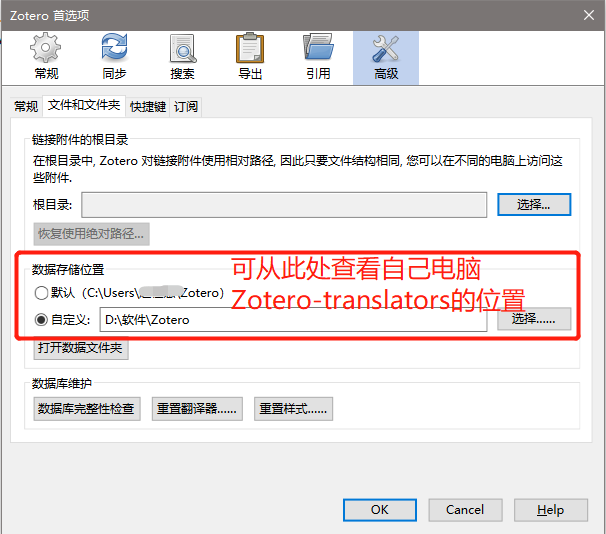
Figure 3 Zotero data storage location
The contents of the directory under the Zotero-translators path are shown in Figure 4.
Figure 4 under Zotero—translators pathTable of Contents
3. Plugin Updates
Right-click on the installed Zotero Connector plug-in in your browser and click "Options" to open its parameter interface to view Preferences.
Zotero Connector Preferences.Click "Update Translators" in the Advanced interface, you can click several times to ensure the update is completed.
Note: You can also check "Enable Logging" and "Show in Console" during the update process, and the log record will be updated at the "0 lines logged" position to view the update.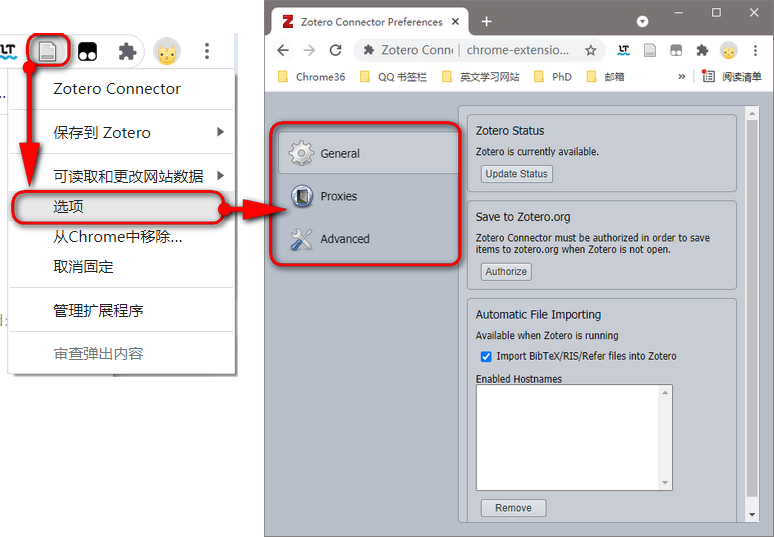
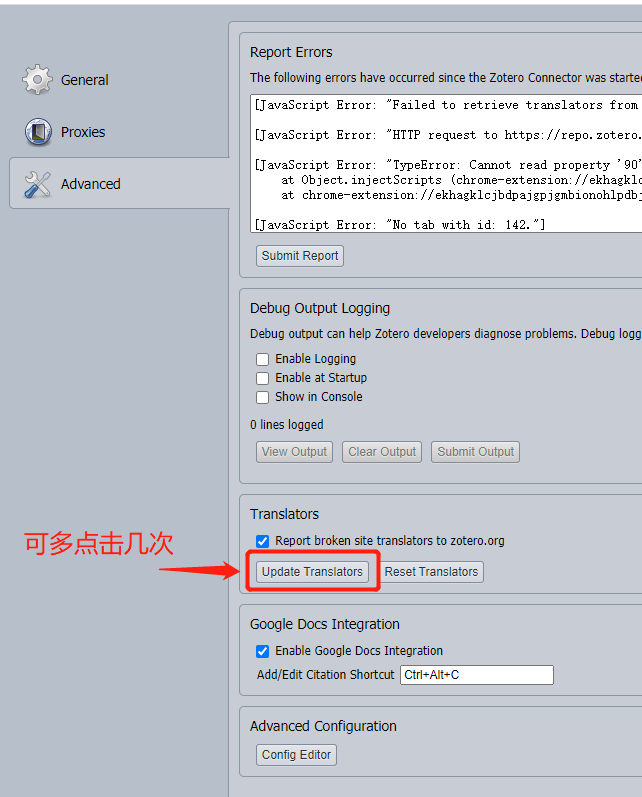
Figure 5 Zotero Connector web page update Translators
Note: After updating and adding the translator, it will take effect restart the software. An example of downloaded documents is shown in Figure 6.
Figure 6 Zotero Connector updated download example
边栏推荐
猜你喜欢





随机推荐
搭建zabbix监控及邮件报警(超详细教学)
Gradle剔除依赖演示
安装gstreamer开发依赖库到项目sysroot目录
CHI论文阅读(1)EmoGlass: an End-to-End AI-Enabled Wearable Platform for Enhancing Self-Awareness of Emoti
codec2 BlockPool:不可读库
360推送-360推送工具-360批量推送工具
shell的脚本的基本用法
一文读懂 MongoDB 和 MySQL 的差异
深度解析 z-index
ls的用法
运行 npm 会弹出询问 “你要如何打开这个文件?“
Oracle入门 12 - Linux 磁盘分区及LVM实战
What is float?What is document flow?Several ways and principles of clearing floats?What is BFC, how to trigger BFC, the role of BFC
Analysis of the implementation principle and detailed knowledge of v-model syntactic sugar and how to make the components you develop support v-model
Zabbix 配置详解
机器学习反向传播的一些推导公式
Run the NPM will pop up to ask "how are you going to open this file?"
小实战项目之——吃货联盟订餐系统
MySQL笔记下
Redux状态管理