当前位置:网站首页>Cesium tutorial (1) interface introduction -3dfiles loading - change mouse operation settings
Cesium tutorial (1) interface introduction -3dfiles loading - change mouse operation settings
2022-07-27 06:36:00 【LEILEI18A】
Cesium course (1) Interface is introduced -3dtiles load - Change mouse operation settings
Catalog
1. Interface is introduced (7-8 Interchange location )
1. Interface is introduced (7-8 Interchange location )
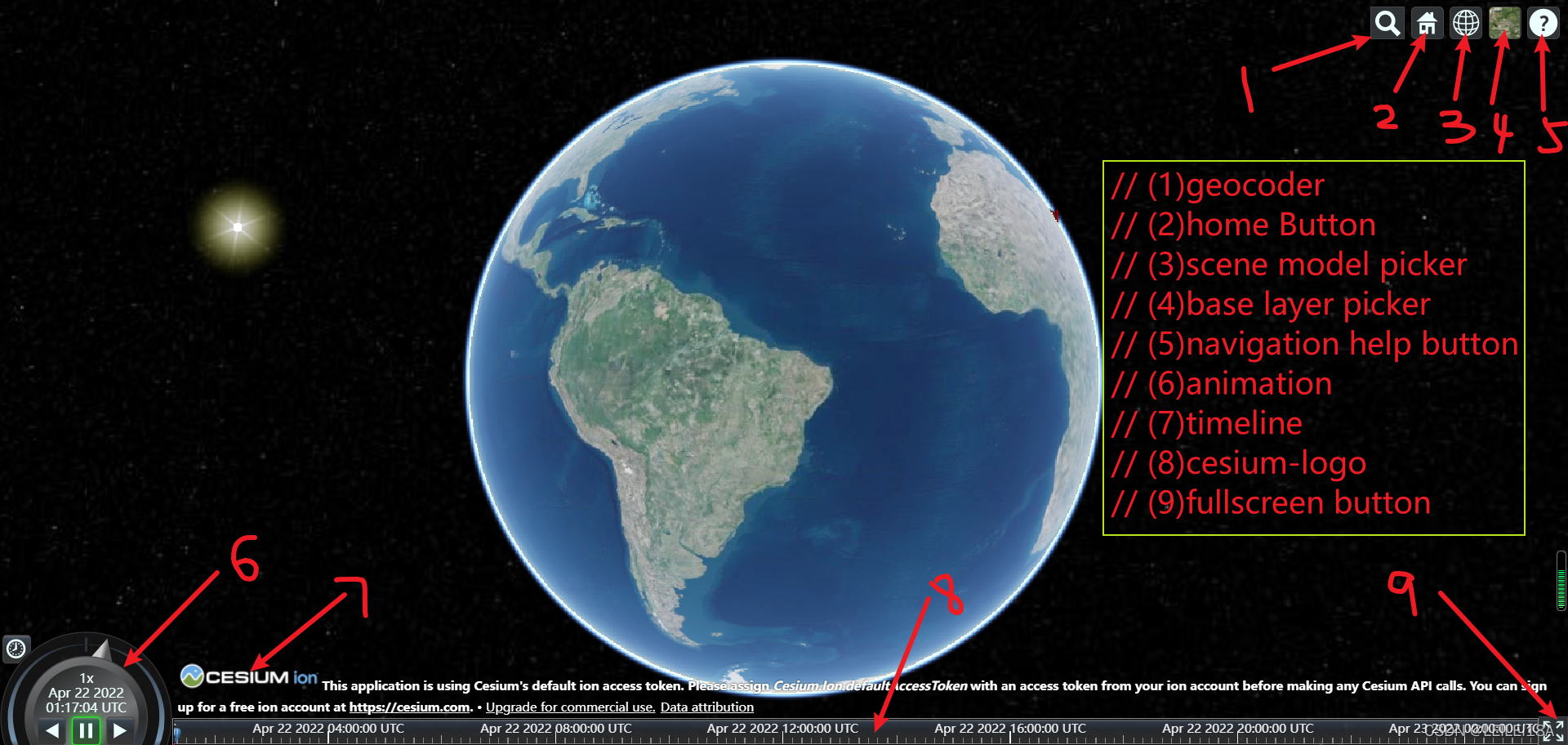
2. Data transfer 3dtiles
(1) cesiumlab Need to connected to the Internet Free transfer to many formats ( Advanced features charge )
(2) cesiumApp
(3) osgb-3dtiles github On the search
3. Code details
Realization Interface management - Mouse operation settings -3dtiles load - Initial position positioning
html part
<!DOCTYPE html>
<html lang="en">
<head>
    <meta charset="UTF-8">
    <meta http-equiv="X-UA-Compatible" content="IE=edge">
    <meta name="viewport" content="width=device-width, initial-scale=1.0">
    <title>Document</title>
    <script src="../Build/Cesium/Cesium.js"></script>
    <link rel="stylesheet" href="../Build/Cesium/Widgets/widgets.css" />
    <style>
        html,
        body,
        #cesiumContainer {
            width: 100%;
            height: 100%;
            margin: 0;
            padding: 0;
            overflow: hidden;
        }

    </style>
</head>
<body>
    <div id="cesiumContainer"></div>
    <script src="./app.js"></script>
</body>
</html>
app.js part
//  By introducing cesium.d.ts Realization vscode  Code intelligence prompt !
// /// <reference path="../Build/Cesium/Cesium.d.ts" />
// import * as Cesium from "cesium";

var viewer = new Cesium.Viewer("cesiumContainer", {
    // geocoder: false,  //  Search button
    // sceneModePicker: false,  // 2D-3D-CV Mode switch button
    // navigationHelpButton: false,  //  Help button
    // animation: false,  //  Animation button ( Circle in the small left corner )
    // timeline: false,  //  Timeline

    scene3DOnly: false,  //  Whether each geometry is represented by 3D Formal rendering (GPU)
});
//  Get rid of logo
viewer.cesiumWidget.creditContainer.style.display = "none";

//  Remove the background layer
// viewer.imageryLayers.removeAll();

//  Change mouse operation habits
//  Close double click event
// viewer.screenSpaceEventHandler.removeInputAction(
//     Cesium.ScreenSpaceEventType.LEFT_DOUBLE_CLICK
// );
//  Right mouse button   Tilt operation
viewer.scene.screenSpaceCameraController.tiltEventTypes = [
    Cesium.CameraEventType.RIGHT_DRAG
];
//  Mouse wheel   Zoom operation
viewer.scene.screenSpaceCameraController.zoomEventTypes = [
    Cesium.CameraEventType.WHEEL,
    // Cesium.CameraEventType.PINCH
];
//  Left mouse button  3D When focusing on the local part, it feels like translation - The essence is that the earth rotates ( Small scope - Rotation is similar to Translation )
viewer.scene.screenSpaceCameraController.rotateEventTypes = [
    Cesium.CameraEventType.LEFT_DRAG
];

//  load 3dtiles- Tilt the camera model - use cesiumlab turn 3dtiles
const tileset = viewer.scene.primitives.add(new Cesium.Cesium3DTileset({
    url : "./Data/tileset.json",
    maximumMemoryUsage: 1024,
}));
//  Load asynchronously
var height = 5;
tileset.readyPromise.then(function(tileset) {
    console.log(tileset);
    var cartographic = Cesium.Cartographic.fromCartesian(tileset.boundingSphere.center);

    var lng = Cesium.Math.toDegrees(cartographic.longitude); // Use the conversion of longitude, latitude and radian , take WGS84 The radian coordinate system is converted to the target value , Radians, turns
    var lat = Cesium.Math.toDegrees(cartographic.latitude);
    // Calculate the surface coordinates of the central point
    var surface = Cesium.Cartesian3.fromDegrees(lng, lat, 0.0);
    // Coordinates after offset
    var offset = Cesium.Cartesian3.fromDegrees(lng, lat, height);
    var translation = Cesium.Cartesian3.subtract(offset, surface, new Cesium.Cartesian3());
    tileset.modelMatrix = Cesium.Matrix4.fromTranslation(translation);


    //  It is not recommended to modify the source code directly online , You can set homeButton Monitoring events
    var heading = Cesium.Math.toRadians(0);
    var pitch = Cesium.Math.toRadians(-90);
    viewer.zoomTo(tileset, new Cesium.HeadingPitchRange(heading, pitch));
    // overwrite homebutton
    viewer.homeButton.viewModel.command.beforeExecute.addEventListener(function (e) {
        e.cancel = true;
        viewer.zoomTo(tileset, new Cesium.HeadingPitchRange(heading, pitch));
    });

    //  increase entity
    var center = tileset.boundingSphere.center;
    center.z = center.z + 20;
    viewer.entities.add({
        name : 'Citizens Bank Park',
        position : center,
        point : {
            pixelSize : 5,
            color : Cesium.Color.RED,
            outlineColor : Cesium.Color.WHITE,
            outlineWidth : 2
        },
        label : {
            text : 'Cesium- Tilt the camera model ',
            font : '16pt monospace',
            fillColor : Cesium.Color.RED,
            style: Cesium.LabelStyle.FILL_AND_OUTLINE,
            outlineWidth : 2,
            verticalOrigin : Cesium.VerticalOrigin.BOTTOM,
            pixelOffset : new Cesium.Cartesian2(0, -9)
        }
    });
});
4. other
(1) vscode in cesium Intelligent prompt function
Native js, Don't use vue when , Recommended in the js Start writing the following code to realize intelligent prompt :( When running code , Comment out this 2 Line code , Otherwise, the report will be wrong )
/// <reference path="../Build/Cesium/Cesium.d.ts" />
import * as Cesium from "cesium";
(2)cesium Installation tutorial On the Internet !
边栏推荐
猜你喜欢

多线程的知识补充

Li Kou daily question leetcode 513. find the value in the lower left corner of the tree

Related knowledge of internal classes

Source code compilation and installation lamp and discuz Forum

Navigation related messages
基于Apache下ab工具进行网站压力性能测试

Ram of IP core

文件内容的读写——数据流

Basic concepts of software testing
数据库的联合查询
随机推荐
bug分类及缺陷和csv文件测试
DHCP原理与配置
Common SQL optimization methods
ROS distributed communication
Detailed explanation of thread safety problems
Simple understanding of network principle
gradle的安装配置及使用
rsync远程同步
Programming learning records - Lesson 9 [operators]
LAMP--源码编译安装
Network troubleshooting: Ping and tracert commands
shell之if条件语句
Basic knowledge of English: Rules for using attributives Part 2
DNS故障分析优化
C language -- string operation function and memory operation function
shell--变量的运算
接口测试概念及Postman工具简介使用
英语基础知识:定语使用规则下篇
源码编译安装LAMP和DISCUZ论坛
兼容性测试知识点