当前位置:网站首页>MySQL learning record (6)
MySQL learning record (6)
2022-07-02 21:29:00 【White_ Silence (Learning version)】
1. View
Definition : View is a virtual table , rely on select Sentence creation
Reason for creating view :
- By defining views, frequently used SELECT Statement save for efficiency .
- By defining views, users can see data more clearly .
- By defining the view, you can not expose all the fields of the data table , Enhance data confidentiality .
- Data redundancy can be reduced by defining views .
1.1 Syntax for creating views
CREATE VIEW < View name >(< Name 1>,< Name 2>,...) AS <SELECT sentence >
among SELECT Sentences need to be written in AS After keyword . SELECT The columns in the statement are arranged in the same order as the columns in the view , SELECT Regulation in statement 1 The column is the... In the view 1 Column , SELECT Regulation in statement 2 The column is the... In the view 2 Column , And so on . And the column name of the view is defined in the list after the view name .
View name In the database, it needs to be only Of , Cannot have the same name as other views and tables .
When defining a view Not to be used ORDER BY sentence
Create view :
Views based on a single table
CREATE VIEW productsum (product_type, cnt_product)
AS
SELECT product_type, COUNT(*)
  FROM product
 GROUP BY product_type ;
Views based on multiple tables
-- First create a new table
CREATE TABLE shop_product
(shop_id    CHAR(4)       NOT NULL,
 shop_name  VARCHAR(200)  NOT NULL,
 product_id CHAR(4)       NOT NULL,
 quantity   INTEGER       NOT NULL,
 PRIMARY KEY (shop_id, product_id));
INSERT INTO shop_product (shop_id, shop_name, product_id, quantity) VALUES ('000A',	' Tokyo ',		'0001',	30);
INSERT INTO shop_product (shop_id, shop_name, product_id, quantity) VALUES ('000A',	' Tokyo ',		'0002',	50);
INSERT INTO shop_product (shop_id, shop_name, product_id, quantity) VALUES ('000A',	' Tokyo ',		'0003',	15);
INSERT INTO shop_product (shop_id, shop_name, product_id, quantity) VALUES ('000B',	' Nagoya ',	'0002',	30);
INSERT INTO shop_product (shop_id, shop_name, product_id, quantity) VALUES ('000B',	' Nagoya ',	'0003',	120);
INSERT INTO shop_product (shop_id, shop_name, product_id, quantity) VALUES ('000B',	' Nagoya ',	'0004',	20);
INSERT INTO shop_product (shop_id, shop_name, product_id, quantity) VALUES ('000B',	' Nagoya ',	'0006',	10);
INSERT INTO shop_product (shop_id, shop_name, product_id, quantity) VALUES ('000B',	' Nagoya ',	'0007',	40);
INSERT INTO shop_product (shop_id, shop_name, product_id, quantity) VALUES ('000C',	' Osaka ',		'0003',	20);
INSERT INTO shop_product (shop_id, shop_name, product_id, quantity) VALUES ('000C',	' Osaka ',		'0004',	50);
INSERT INTO shop_product (shop_id, shop_name, product_id, quantity) VALUES ('000C',	' Osaka ',		'0006',	90);
INSERT INTO shop_product (shop_id, shop_name, product_id, quantity) VALUES ('000C',	' Osaka ',		'0007',	70);
INSERT INTO shop_product (shop_id, shop_name, product_id, quantity) VALUES ('000D',	' Fukuoka, ',		'0001',	100);
-- stay productsum shop_product Create a view based on
CREATE VIEW view_shop_product(product_type, sale_price, shop_name)
AS
SELECT product_type, sale_price, shop_name
FROM product,
shop_product
WHERE product.product_id = shop_product.product_id;1.2 Modify the syntax of the view structure
ALTER VIEW < View name > AS <SELECT sentence >
-- Modify the view
ALTER VIEW productSum
    AS
        SELECT product_type, sale_price
          FROM Product
         WHERE regist_date > '2009-09-11';
1.3 Update the view
The view is a virtual table , Therefore, the operation on the view is the operation on the underlying basic table , Therefore, only when the definition of the underlying basic table is met can the modification be successful .
That is, update and modify the view , It is essentially a modification of the basic table .
For a view , If any of the following structures are included, they cannot be updated :
- Aggregate functions SUM()、MIN()、MAX()、COUNT() etc. .
- DISTINCT keyword .
- GROUP BY Clause .
- HAVING Clause .
- UNION or UNION ALL Operator .
- FROM Clause contains multiple tables .
-- The statement that updates the view , Use UPDATE  SET
UPDATE productsum
   SET sale_price = '5000'
 WHERE product_type = ' Office Supplies ';
1.4 Delete view
DROP VIEW < View name 1> [ , < View name 2> …]
DROP VIEW productsum;
2. Subquery
Subquery refers to a query that is nested within another query statement by one query statement , The subquery result is used as the outer layer of another query Filter conditions , Queries can be Based on one or more tables .
Subqueries are one-time , It will not be saved as a view .
2.1 nested subqueries
-- nested subqueries
SELECT product_type, cnt_product
FROM (SELECT *
        FROM (SELECT product_type,
                      COUNT(*) AS cnt_product
                FROM product
               GROUP BY product_type) AS productsum
       WHERE cnt_product = 4) AS productsum2;
-- The innermost subquery is named productSum, This statement is based on product_type Group and query the number , In the second level query, the number will be 4 Find out your products , Outermost query product_type and cnt_product Two .
-- For simplicity and efficiency , Try to minimize SELECT Iteration of subquery statements
2.2 Scalar subquery ( Single subquery )
Singleness is what is required SQL sentence
-- Query the goods whose sales unit price is higher than the average unit price
SELECT product_id, product_name, sale_price
  FROM product
 WHERE sale_price > (SELECT AVG(sale_price) FROM product);
Only one value can be returned , That is to return the specific... In the table A column of a row

SELECT product_id,
       product_name,
       sale_price,
       (SELECT AVG(sale_price)
          FROM product) AS avg_price
FROM product; 
2.3 Associated subquery
The associated sub query connects the internal and external queries to filter data
SELECT product_type, product_name, sale_price
  FROM product AS p1
 WHERE sale_price > (SELECT AVG(sale_price)
                       FROM product AS p2
                      WHERE p1.product_type = p2.product_type
   GROUP BY product_type);
-- The internal table is P2, The external table is P1, Use WHERE Connect the two tables together 
The execution process of association query :
- First, execute without WHERE The main query of
- Match according to the main query result product_type, Get subquery results
- Combine the sub query results with the main query to execute the complete query SQL sentence
Exercises 1
Create a view that meets the following three conditions ( The view name is ViewPractice5_1). Use product( goods ) Table as a reference table , Suppose the table contains the initial state of 8 Row data .
- Conditions 1: Sales unit price is greater than or equal to 1000 Yen .
- Conditions 2: The registration date is 2009 year 9 month 20 Japan .
- Conditions 3: Include product name 、 Sales unit price and registration date .
CREATE VIEW ViewPractice5_1
AS
(SELECT product_name,sale_price,regist_date
FROM product
WHERE sale_price >= 1000 AND regist_date="2009-09-20" );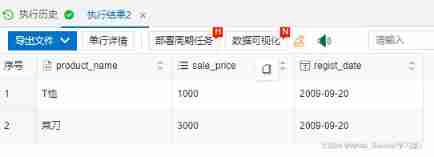
View created in exercise 1 ViewPractice5_1 Insert the following data , What's the result ?
SQL Something went wrong , I don't know the result
-- Please write according to the following results  SELECT  sentence , among  sale_price_all  List the average selling unit price of all goods .

/*product_id | product_name | product_type | sale_price | sale_price_all
------------+-------------+--------------+------------+---------------------
0001       | T shirt          |  clothes          | 1000       | 2097.5000000000000000
0002       |  Punch         |  Office Supplies       | 500        | 2097.5000000000000000
0003       |  motion T T-shirt        |  clothes           | 4000      | 2097.5000000000000000
0004       |  kitchen knife           |  Kitchenware       | 3000       | 2097.5000000000000000
0005       |  pressure cooker         |  Kitchenware       | 6800       | 2097.5000000000000000
0006       |  Fork           |  Kitchenware       | 500        | 2097.5000000000000000
0007       |  Clean the board         |  Kitchenware        | 880       | 2097.5000000000000000
0008       |  Ball pen         |  Office Supplies        | 100       | 2097.5000000000000000*/

SELECT product_id,product_name,product_type,sale_price,
(SELECT AVG(sale_price)
 FROM product) AS sale_price_all
FROM product
ORDER BY product_id;
Please write one according to the conditions in exercise 1 SQL sentence , Create a view with the following data ( The name is AvgPriceByType).
product_id | product_name | product_type | sale_price | avg_sale_price
------------+-------------+--------------+------------+---------------------
0001       | T shirt          |  clothes          | 1000       |2500.0000000000000000
0002       |  Punch          |  Office Supplies      | 500        | 300.0000000000000000
0003       |  motion T T-shirt         |  clothes         | 4000        |2500.0000000000000000
0004       |  kitchen knife           |  Kitchenware       | 3000        |2795.0000000000000000
0005       |  pressure cooker          |  Kitchenware      | 6800        |2795.0000000000000000
0006       |  Fork           |  Kitchenware       | 500         |2795.0000000000000000
0007       |  Clean the board          |  Kitchenware      | 880         |2795.0000000000000000
0008       |  Ball pen          |  Office Supplies      | 100         | 300.0000000000000000

/* Tips : The key is  avg_sale_price  Column . Different from exercise 3 , Here we need to calculate   It is the average selling unit price of each commodity type . This is the same as using the associated subquery .  in other words , This column can be created using the associated subquery . The question is where to use this associated subquery .*/
CREATE VIEW AvgPriceByType
AS (SELECT product_id,product_name,product_type,sale_price,
(SELECT avg(sale_price)
from product AS p2
WHERE p1.product_type=p2.product_type
GROUP BY p1.product_type) AS avg_sale_price
FROM product AS p1);
边栏推荐
- Today, I met a Alipay and took out 35K. It's really sandpaper to wipe my ass. it's a show for me
- Cardinality sorting (detailed illustration)
- China microporous membrane filtration market trend report, technological innovation and market forecast
- [shutter] statefulwidget component (bottom navigation bar component | bottomnavigationbar component | bottomnavigationbaritem component | tab switching)
- Don't you want to have a face-to-face communication with cloud native and open source experts? (including benefits
- MySQL learning notes (Advanced)
- Golang string segmentation
- Add two numbers of leetcode
- Write the content into the picture with type or echo and view it with WinHex
- Research Report on the overall scale, major manufacturers, major regions, products and applications of outdoor vacuum circuit breakers in the global market in 2022
猜你喜欢
6 pyspark Library

In depth research and investment feasibility report of global and Chinese isolator industry, 2022-2028
Customized Huawei hg8546m restores Huawei's original interface
![[shutter] statefulwidget component (image component | textfield component)](/img/4b/8e54607939989f994303ce5d922331.gif)
[shutter] statefulwidget component (image component | textfield component)

It is said that this year gold three silver four has become gold one silver two..

Detailed upgrade process of AWS eks
![[CV] Wu Enda machine learning course notes | Chapter 12](/img/c8/9127683b6c101db963edf752ffda86.jpg)
[CV] Wu Enda machine learning course notes | Chapter 12
![[question brushing diary] classic questions of dynamic planning](/img/31/fcd8230f809d6178f11e7095c1ef94.jpg)
[question brushing diary] classic questions of dynamic planning

Redis sentinel cluster working principle and architecture deployment # yyds dry goods inventory #
![[shutter] statefulwidget component (create statefulwidget component | materialapp component | scaffold component)](/img/04/4070d51ce8b7718db609ef2fc8bcd7.jpg)
[shutter] statefulwidget component (create statefulwidget component | materialapp component | scaffold component)
随机推荐
The metamask method is used to obtain account information
Research Report on the overall scale, major manufacturers, major regions, products and application segmentation of signal distributors in the global market in 2022
Accounting regulations and professional ethics [18]
Construction and maintenance of business website [1]
JDBC | Chapter 4: transaction commit and rollback
Baidu sued a company called "Ciba screen"
Research Report on market supply and demand and strategy of microplate instrument industry in China
Who do you want to open a stock account? Is it safe to open a mobile account?
[dynamic planning] p1220: interval DP: turn off the street lights
kernel_ uaf
Research and Analysis on the current situation of China's clamping device market and forecast report on its development prospect
China Indonesia advanced wound care market trend report, technological innovation and market forecast
Construction and maintenance of business websites [6]
In depth research and investment feasibility report of global and Chinese isolator industry, 2022-2028
Research Report on minimally invasive medical robot industry - market status analysis and development prospect prediction
Research Report on market supply and demand and strategy of China's Plastic Geogrid industry
Welfare | Hupu isux11 Anniversary Edition is limited to hand sale!
Go web programming practice (2) -- process control statement
6 pyspark Library
Research Report on the overall scale, major manufacturers, major regions, products and application segmentation of precoated metallic coatings in the global market in 2022