当前位置:网站首页>MySQL compressed package installation, fool teaching
MySQL compressed package installation, fool teaching
2022-07-31 05:53:00 【m0_67391401】
1. Download the mysql installation package from the official website
URL: MySQL :: Download MySQL Community Server (Archived Versions)Versions)
Select the version and download the compressed package (I chose 5.7.30 here)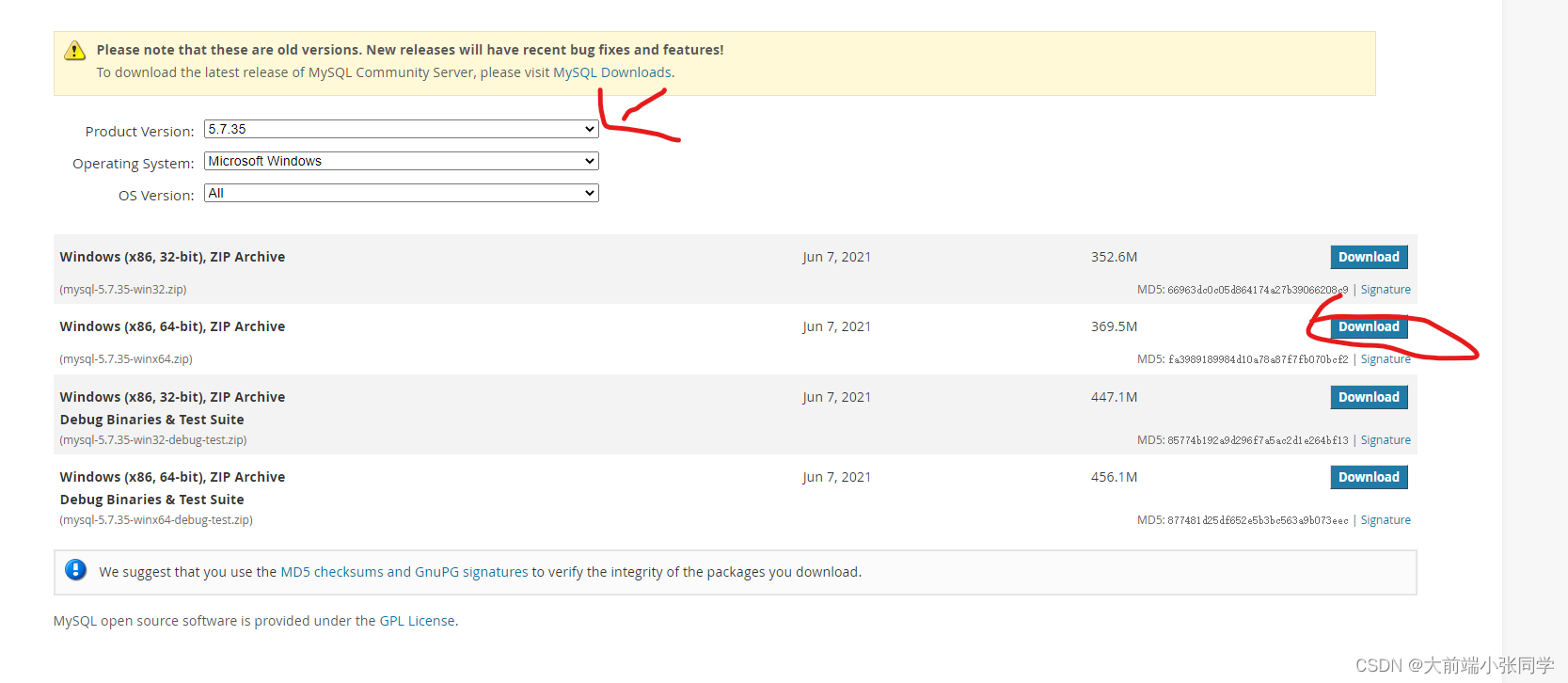 2.After the download is complete, extract it (note: try not to have Chinese or spaces in the path of programming software during installation)
3. Then create the my.ini configuration file in the file directory 
Add the following configuration to the my.ini configuration file
[mysqld]#Set 3306 portport=3306# Set the installation directory of mysqlbasedir=D:Mysqlmysql-5.7.35# Set the storage directory for the data of the mysql databasedatadir=D:Mysqlmysql-5.7.35data# maximum number of connections allowedmax_connections=200# The character set used by the server defaults to the 8-bit encoded latin1 character setcharacter-set-server=utf8# The default storage engine that will be used when creating new tablesdefault-storage-engine=INNODB# skip passwordskip-grant-tables4. Then copy the bin file path in the directory and add it to the global environment variable (if the global environment variable will not be added, you can move to the previous article on the home page)
5. After the configuration is complete, save and exit, then open cmd as an administrator, and enter mysql --version to check whether the environment is successfully configured (the following is the case of success) 
At this step, some students may report an error: Cannot continue to execute the code because MSVCP120.dll cannot be found
Cause there is no vcredist, workaround: Downloadvcredist URLDownload Visual C++ Redistributable Packages for Visual Studio 2013 from Official Microsoft Download CenterChoose the corresponding version to download, install it immediatelyCan
6. Use the mysqld-install command to install the MySQL service
7. Enter the bin directory of the mysql file Enter the bin directory!!!Use mysqld --initialize-insecure to initialize the data directory (data directory: store configuration files, log files, database data files)
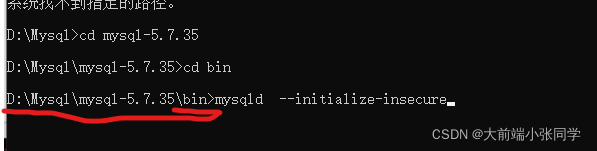
8. Enter net start mysql to start the mysql service
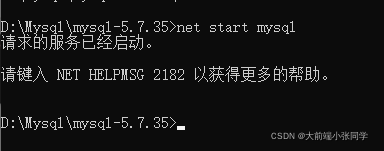
9. After successful startup, enter mysql -uroot to log in to mysql (because the skip password has been set in the my.ini configuration file, so this login does not require a password)
10. After successful login, we enter update user set authentication_string=password("the password you want to modify") where user="root";reset the password, after entering flushprivileges; Refresh the permissions, enter quit to exit mysql after no error is reported
11. After setting the password, go back to the my.ini configuration file, comment it out with # or delete it directly skip-grant-tables
Then here I have successfully downloaded and configured mysql
14. Restart the mysql service to check if it can run completely: Enter net stop mysql to stop the service first, then enter net startmysql to start the service, there may be someThe little friend will report an error: ERROR 2003 (HY000): Can't connect to MySQL server on 'localhost' (10061) At this time, we only need to right-click this computer, click Manage, select Services,Find mysql, select the startup type as automatic, and then start it, 
So far, our mysql has been successfully installed
The test is effective, I hope it helps everyone
Let me introduce myself first. The editor graduated from Shanghai Jiaotong University in 2013. I worked in a small company and went to big factories such as Huawei and OPPO. I joined Alibaba in 2018, until now.I know that most junior and intermediate java engineers want to upgrade their skills, they often need to explore their own growth or sign up to study, but for training institutions, the tuition fee is nearly 10,000 yuan, which is really stressful.Self-learning that is not systematic is very inefficient and lengthy, and it is easy to hit the ceiling and the technology stops.Therefore, I collected a "full set of learning materials for java development" for everyone. The original intention is also very simple. I hope to help friends who want to learn by themselves but don't know where to start, and at the same time reduce everyone's burden.Add the business card below to get a full set of learning materials
边栏推荐
猜你喜欢





随机推荐
踏上编程之路,你必须要干的几件事
16 【打包上线 图片懒加载】
可以“繁殖”的程序
NFT与数字藏品到底有何区别?
NFTs: The Heart of Digital Ownership
The MySQL database in Alibaba Cloud was attacked, and the data was finally recovered
mysql启动报错The server quit without updating PID file几种解决办法
Redis:安装使用
13 【代理配置 插槽】
C language tutorial (2) - printf and data types that come with c
什么是 GameFi?
leetcode-每日一题731. 我的日程安排表 II
About integrating superset into your own project
11 【组件通信】
feign调用不通问题,JSON parse error Illegal character ((CTRL-CHAR, code 31)) only regular white space (r
The TOKEN value of Kubernetes joining the cluster expires
闭包(五)----一个常见的循环
uni-app进阶之自定义【day13】
MySQL压缩包方式安装,傻瓜式教学
gin框架学习-JWT认证