当前位置:网站首页>基于Pyqt5工具栏按钮可实现界面切换-2
基于Pyqt5工具栏按钮可实现界面切换-2
2022-07-02 22:13:00 【疯狂的豆包】
Pyqt5是Python中一个可视化超级好用的库,接下来就跟着一起看一下如何实现工具栏按钮切换界面。本章主要介绍代码如何实现,话不多说,开始介绍。
1. 使用pyUIC工具将mainwindow.ui转换为“.py”文件,代码如下:
# -*- coding: utf-8 -*-

# Form implementation generated from reading ui file 'mainwindow.ui'
#
# Created by: PyQt5 UI code generator 5.15.4
#
# WARNING: Any manual changes made to this file will be lost when pyuic5 is
# run again.  Do not edit this file unless you know what you are doing.


from PyQt5 import QtCore, QtGui, QtWidgets


class Ui_MainWindow(object):
    def setupUi(self, MainWindow):
        MainWindow.setObjectName("MainWindow")
        MainWindow.resize(800, 600)
        self.centralwidget = QtWidgets.QWidget(MainWindow)
        self.centralwidget.setObjectName("centralwidget")
        self.widget = QtWidgets.QWidget(self.centralwidget)
        self.widget.setGeometry(QtCore.QRect(10, 10, 781, 501))
        palette = QtGui.QPalette()
        brush = QtGui.QBrush(QtGui.QColor(255, 255, 255))
        brush.setStyle(QtCore.Qt.SolidPattern)
        palette.setBrush(QtGui.QPalette.Active, QtGui.QPalette.Base, brush)
        brush = QtGui.QBrush(QtGui.QColor(255, 255, 127))
        brush.setStyle(QtCore.Qt.SolidPattern)
        palette.setBrush(QtGui.QPalette.Active, QtGui.QPalette.Window, brush)
        brush = QtGui.QBrush(QtGui.QColor(255, 255, 255))
        brush.setStyle(QtCore.Qt.SolidPattern)
        palette.setBrush(QtGui.QPalette.Inactive, QtGui.QPalette.Base, brush)
        brush = QtGui.QBrush(QtGui.QColor(255, 255, 127))
        brush.setStyle(QtCore.Qt.SolidPattern)
        palette.setBrush(QtGui.QPalette.Inactive, QtGui.QPalette.Window, brush)
        brush = QtGui.QBrush(QtGui.QColor(255, 255, 127))
        brush.setStyle(QtCore.Qt.SolidPattern)
        palette.setBrush(QtGui.QPalette.Disabled, QtGui.QPalette.Base, brush)
        brush = QtGui.QBrush(QtGui.QColor(255, 255, 127))
        brush.setStyle(QtCore.Qt.SolidPattern)
        palette.setBrush(QtGui.QPalette.Disabled, QtGui.QPalette.Window, brush)
        self.widget.setPalette(palette)
        self.widget.setAutoFillBackground(True)
        self.widget.setObjectName("widget")
        self.widget_2 = QtWidgets.QWidget(self.widget)
        self.widget_2.setGeometry(QtCore.QRect(160, 110, 451, 231))
        palette = QtGui.QPalette()
        brush = QtGui.QBrush(QtGui.QColor(255, 255, 255))
        brush.setStyle(QtCore.Qt.SolidPattern)
        palette.setBrush(QtGui.QPalette.Active, QtGui.QPalette.Base, brush)
        brush = QtGui.QBrush(QtGui.QColor(0, 255, 255))
        brush.setStyle(QtCore.Qt.SolidPattern)
        palette.setBrush(QtGui.QPalette.Active, QtGui.QPalette.Window, brush)
        brush = QtGui.QBrush(QtGui.QColor(255, 255, 255))
        brush.setStyle(QtCore.Qt.SolidPattern)
        palette.setBrush(QtGui.QPalette.Inactive, QtGui.QPalette.Base, brush)
        brush = QtGui.QBrush(QtGui.QColor(0, 255, 255))
        brush.setStyle(QtCore.Qt.SolidPattern)
        palette.setBrush(QtGui.QPalette.Inactive, QtGui.QPalette.Window, brush)
        brush = QtGui.QBrush(QtGui.QColor(0, 255, 255))
        brush.setStyle(QtCore.Qt.SolidPattern)
        palette.setBrush(QtGui.QPalette.Disabled, QtGui.QPalette.Base, brush)
        brush = QtGui.QBrush(QtGui.QColor(0, 255, 255))
        brush.setStyle(QtCore.Qt.SolidPattern)
        palette.setBrush(QtGui.QPalette.Disabled, QtGui.QPalette.Window, brush)
        self.widget_2.setPalette(palette)
        self.widget_2.setAutoFillBackground(True)
        self.widget_2.setObjectName("widget_2")
        MainWindow.setCentralWidget(self.centralwidget)
        self.menubar = QtWidgets.QMenuBar(MainWindow)
        self.menubar.setGeometry(QtCore.QRect(0, 0, 800, 26))
        self.menubar.setObjectName("menubar")
        MainWindow.setMenuBar(self.menubar)
        self.statusbar = QtWidgets.QStatusBar(MainWindow)
        self.statusbar.setObjectName("statusbar")
        MainWindow.setStatusBar(self.statusbar)
        self.toolBar = QtWidgets.QToolBar(MainWindow)
        self.toolBar.setObjectName("toolBar")
        MainWindow.addToolBar(QtCore.Qt.TopToolBarArea, self.toolBar)
        self.action_1 = QtWidgets.QAction(MainWindow)
        self.action_1.setObjectName("action_1")
        self.action_2 = QtWidgets.QAction(MainWindow)
        self.action_2.setObjectName("action_2")
        self.toolBar.addAction(self.action_1)
        self.toolBar.addAction(self.action_2)

        self.retranslateUi(MainWindow)
        QtCore.QMetaObject.connectSlotsByName(MainWindow)

    def retranslateUi(self, MainWindow):
        _translate = QtCore.QCoreApplication.translate
        MainWindow.setWindowTitle(_translate("MainWindow", "MainWindow"))
        self.toolBar.setWindowTitle(_translate("MainWindow", "toolBar"))
        self.action_1.setText(_translate("MainWindow", "打开界面1"))
        self.action_2.setText(_translate("MainWindow", "打开界面2"))
2. 在main.py中输入以下代码:
import sys
from mainwindow import Ui_MainWindow
from PyQt5 import *
from PyQt5.QtWidgets import *
from PyQt5.QtCore import *
from PyQt5.QtWidgets import QHeaderView, QTableWidgetItem, QHBoxLayout

class MainUI(Ui_MainWindow, QMainWindow):
    def __init__(self, parent=None):
        super(MainUI, self).__init__(parent)
        self.setupUi(self)
    def openM(self):
        self.widget.show()
        self.widget_2.hide()
    def openC(self):
        self.widget_2.show()
        self.widget.show()

if __name__ == "__main__":
    app = QApplication(sys.argv)
    main = MainUI()
    main.show()
    main.action_1.triggered.connect(main.openM)
    main.action_2.triggered.connect(main.openC)
    sys.exit(app.exec_())
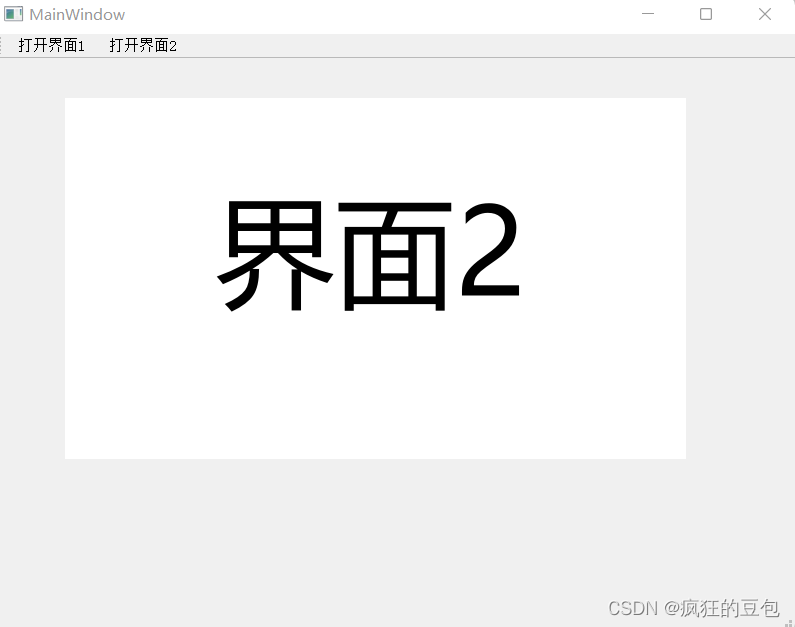
3.实现的界面如下,打开界面1,界面1出现,界面2隐藏,打开界面2,界面1隐藏,界面2出现。

总结
经过两章详细的介绍,实现了同一窗体下,两个界面的切换,同时按钮是在工具栏中放置的,整洁美观。
边栏推荐
猜你喜欢
Strictly abide by the construction period and ensure the quality, this AI data annotation company has done it!

Start from the bottom structure to learn the customization and testing of FPGA --- Xilinx ROM IP

Generics and reflection, this is enough
Niuke network: maximum submatrix

QT qpprogressbar details

Tiktok actual combat ~ number of likes pop-up box

Alibaba cloud award winning experience: how to use polardb-x
Introduction to the latest plan of horizon in April 2022

Talk about memory model and memory order

The motivation of AES Advanced Encryption Protocol
随机推荐
ServletContext learning diary 1
Submit code process
分布式监控系统zabbix
深度剖析数据在内存中的存储----C语言篇
Tiktok actual combat ~ number of likes pop-up box
Configuration clic droit pour choisir d'ouvrir le fichier avec vs Code
设置单击右键可以选择用VS Code打开文件
20220524_ Database process_ Statement retention
提交代码流程
Warning: implicitly declaring library function 'printf' with type 'int (const char *,...)‘
Value sequence < detailed explanation of daily question >
Jinglianwen technology's low price strategy helps AI enterprises reduce model training costs
Stop slave is stuck -- the event of the transaction is not copied completely
Lambda expression: an article takes you through
Niuke network: maximum submatrix
密码技术---分组密码的模式
Minimum spanning tree
SharedPreferences 保存List<Bean> 到本地并解决com.google.gson.internal.LinkedTreeMap cannot be cast to异常
移动端 1px 像素兼容性问题,实现1px 边框
电路设计者常用的学习网站