当前位置:网站首页>浅识Flutter 基本组件之CheckboxListTile组件
浅识Flutter 基本组件之CheckboxListTile组件
2022-07-31 03:12:00 【阿大豆】
浅识Flutter 基本组件之CheckboxListTile组件
CheckboxListTile的使用方法、功能和Checkbox差不多,但是它的使用范围更广、设计出的UI更美观
CheckboxListTile常用属性如下表所示。
| 属性名 | 类型 | 功能说明 |
|---|---|---|
| title | widget | 设置主标题组件 |
| subtitle | Widget | 设置副标题组件 |
| isThreeLine | bool | 设置显示的复选框是否占三行,默认值为false |
| dense | bool | 设置是否垂直密集显示标题 |
| secondary | widget | 设置显示的小组件,与□所在位置相反 |
| selected | bool | 设置选中后标题文字高亮,默认值为 false |
| controlAffinity | ListTileControlAffinity | 设置□相对于标题文字的位置,取值包含leading(前面)、platform (后面)和trailing(后面) |
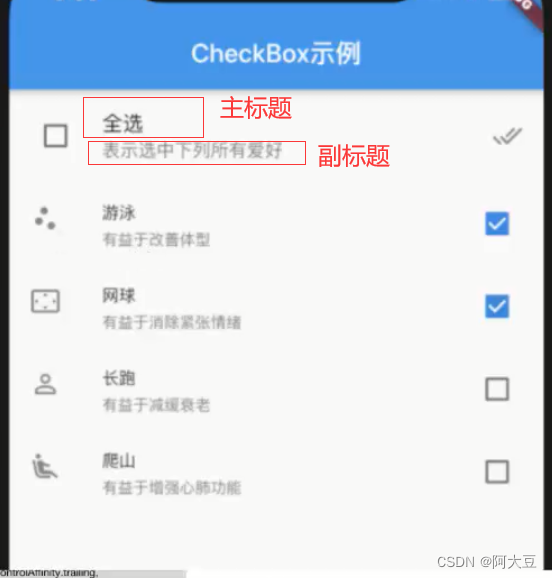
CheckboxListTile的属性值
  const CheckboxListTile({

    Key? key,
    required this.value,
    required this.onChanged,
    this.activeColor,
    this.checkColor,
    this.tileColor,
    this.title,
    this.subtitle,
    this.isThreeLine = false,
    this.dense,
    this.secondary,
    this.selected = false,
    this.controlAffinity = ListTileControlAffinity.platform,
    this.autofocus = false,
    this.contentPadding,
    this.tristate = false,
    this.shape,
    this.selectedTileColor,
    this.visualDensity,
    this.focusNode,
    this.enableFeedback,
  }) : assert(tristate != null),
       assert(tristate || value != null),
       assert(isThreeLine != null),
       assert(!isThreeLine || subtitle != null),
       assert(selected != null),
       assert(controlAffinity != null),
       assert(autofocus != null),
       super(key: key);
必须要有value,onChanged
CheckboxListTile(onChanged: (bool? value) {
      }, value:false,),

controlAffinity 设置□相对于标题文字的位置,取值包含leading(前面)、platform (后面)和trailing(后面)
 /*调整复选框和图标的位置*/
        controlAffinity:ListTileControlAffinity.leading ,
设置前

设置后: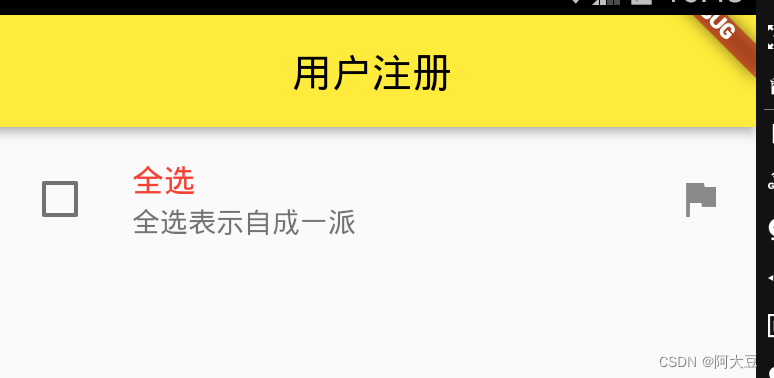
创建多个CheckboxListTile
Column column = Column(
      children: <Widget>[
        CheckboxListTile(
          value: this.isChecked,
          /*设置主标题组件*/
          title: Text(
            '全选',
            style: TextStyle(color: Colors.red),
          ),
          /*设置副标题组件*/
          subtitle: Text('全选表示自成一派'),
          /*设置显示的小组件,与□所在位置相反*/
          secondary: Icon(Icons.flag),
          /*调整复选框和图标的位置*/
          controlAffinity: ListTileControlAffinity.leading,
          onChanged: (bool? value) {

            setState(() {

              isChecked = value!;
            });
          },
        ),
        CheckboxListTile(
          title: Text(select[0]),
            subtitle: Text('堕胎小分队'),
            secondary: Icon(Icons.info),
            /*调整复选框和图标的位置*/
            controlAffinity: ListTileControlAffinity.leading,
            value: flag[0],
            onChanged: (value) {

              setState(() {

                flag[0] = value;
              });
            }
            ),
        CheckboxListTile(
            title: Text(select[1]),
            subtitle: Text('世兰好苦队'),
            secondary: Icon(Icons.info),
            /*调整复选框和图标的位置*/
            controlAffinity: ListTileControlAffinity.leading,
            value: flag[1],
            onChanged: (value) {

              setState(() {

                flag[1] = value;
              });
            }
        ),
        CheckboxListTile(
            title: Text(select[2]),
            subtitle: Text('莞莞类卿队'),
            secondary: Icon(Icons.info),
            /*调整复选框和图标的位置*/
            controlAffinity: ListTileControlAffinity.leading,
            value: flag[2],
            onChanged: (value) {

              setState(() {

                flag[2] = value;
              });
            }
        ),


      ],
    );
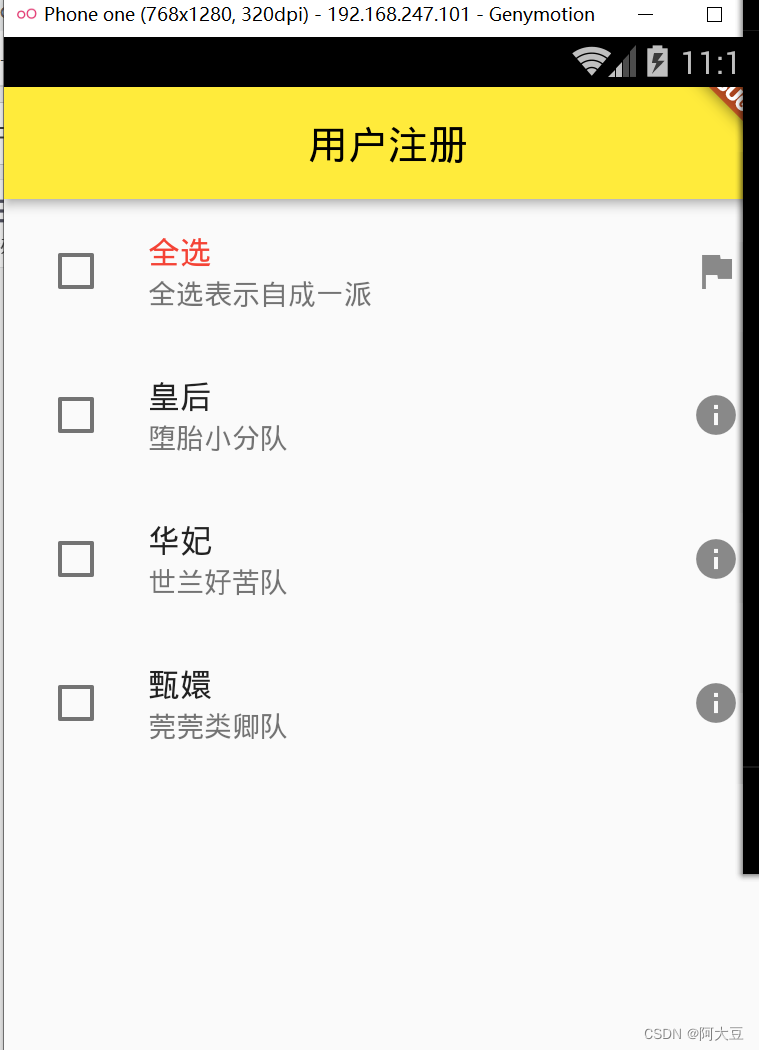
实现一键全选或一键取消全选 功能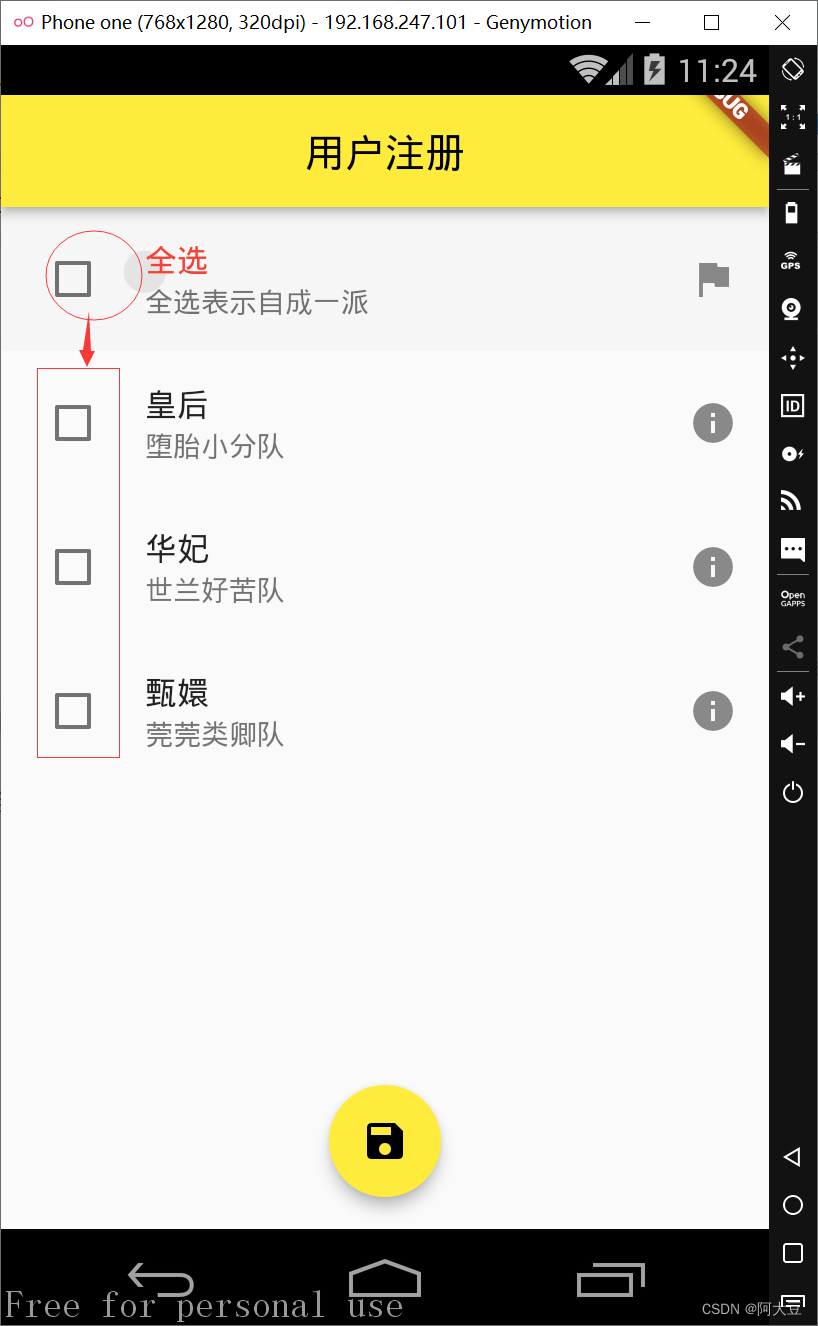
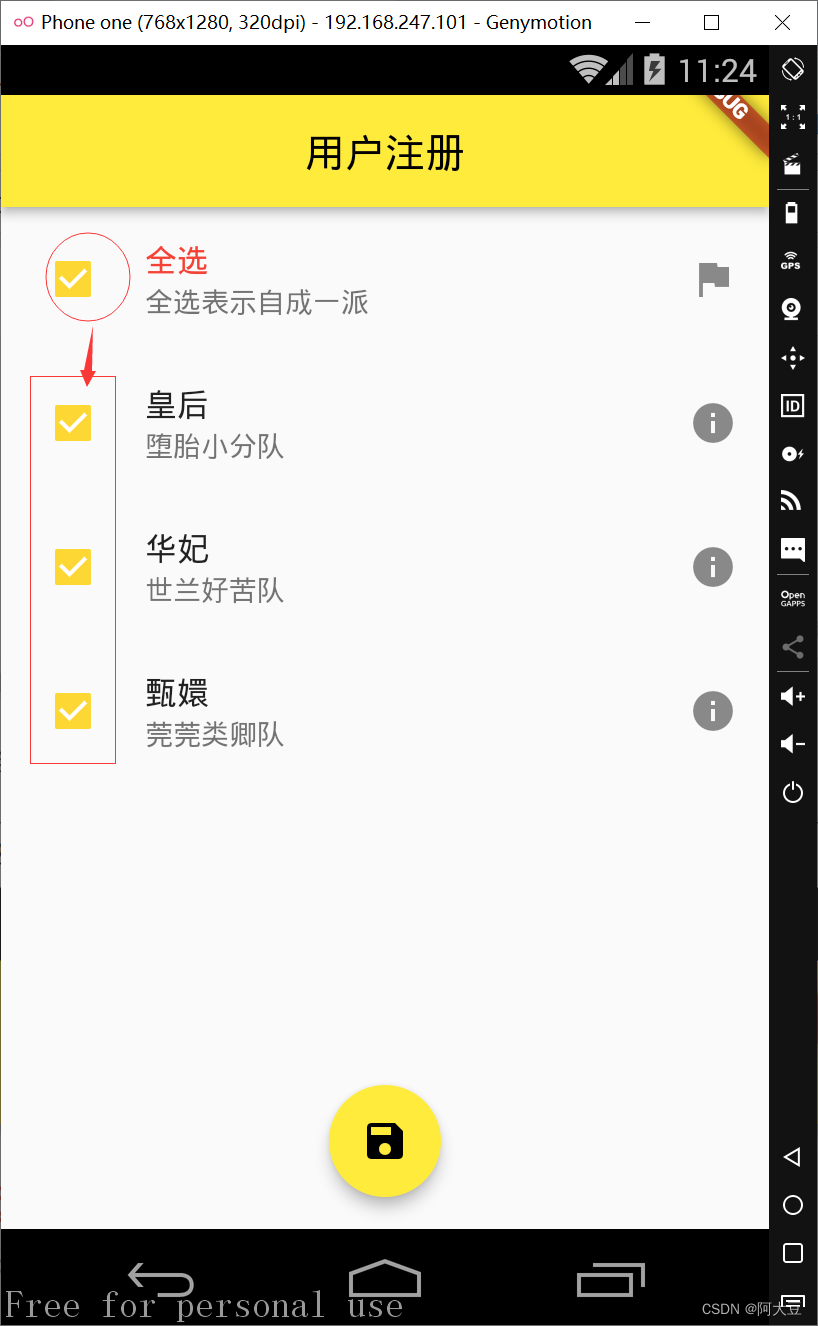
全部代码
import 'package:flutter/cupertino.dart';
import 'package:flutter/material.dart';

class zhucepage extends StatefulWidget {

  @override
  State<StatefulWidget> createState() {

    return MyState();
  }
}

class MyState extends State {

  List flag = [false, false, false];
  List select = ['皇后', '华妃', '甄嬛'];
  bool isChecked = false;
  @override
  Widget build(BuildContext context) {

    Row row = Row(
      children: <Widget>[
        Text('选择你的阵营: '),
        Text(select[0]),
        Checkbox(
          value: flag[0],
          onChanged: (value) {

            //setState更新值
            setState(() {

              flag[0] = value!;
            });
          },
        ),
        Text(select[1]),
        Checkbox(
          value: flag[1],
          onChanged: (value) {

            //setState更新值
            setState(() {

              flag[1] = value!;
            });
          },
        ),
        Text(select[2]),
        Checkbox(
          value: flag[2],
          onChanged: (value) {

            //setState更新值
            setState(() {

              flag[2] = value!;
            });
          },
        ),
      ],
    );
    /*创建多个CheckboxListTile*/
    Column column = Column(
      children: <Widget>[
        CheckboxListTile(
          value: this.isChecked,
          /*设置主标题组件*/
          title: Text(
            '全选',
            style: TextStyle(color: Colors.red),
          ),
          /*设置副标题组件*/
          subtitle: Text('全选表示自成一派'),
          /*设置显示的小组件,与□所在位置相反*/
          secondary: Icon(Icons.flag),
          /*调整复选框和图标的位置*/
          controlAffinity: ListTileControlAffinity.leading,
          onChanged: (bool? value) {

            setState(() {

              isChecked = value!;

                for(int i=0;i<flag.length;i++){

                 flag[i]=isChecked;

              }
            });
          },
        ),
        CheckboxListTile(
          title: Text(select[0]),
            subtitle: Text('堕胎小分队'),
            secondary: Icon(Icons.info),
            /*调整复选框和图标的位置*/
            controlAffinity: ListTileControlAffinity.leading,
            value: flag[0],
            onChanged: (value) {

              setState(() {

                flag[0] = value;
              });
            }
            ),
        CheckboxListTile(
            title: Text(select[1]),
            subtitle: Text('世兰好苦队'),
            secondary: Icon(Icons.info),
            /*调整复选框和图标的位置*/
            controlAffinity: ListTileControlAffinity.leading,
            value: flag[1],
            onChanged: (value) {

              setState(() {

                flag[1] = value;
              });
            }
        ),
        CheckboxListTile(
            title: Text(select[2]),
            subtitle: Text('莞莞类卿队'),
            secondary: Icon(Icons.info),
            /*调整复选框和图标的位置*/
            controlAffinity: ListTileControlAffinity.leading,
            value: flag[2],
            onChanged: (value) {

              setState(() {

                flag[2] = value;
              });
            }
        ),


      ],
    );

    return Scaffold(
      appBar: AppBar(
        title: Text('用户注册'),
        centerTitle: true,
      ),
      body: column,

      floatingActionButton: FloatingActionButton(
        onPressed: () {

          String info = "你选择的阵营是:";
          for (int i = 0; i < flag.length; i++) {

            if (flag[i]) {

              /*如果选项被选中*/
              info = info + select[i] + ' ';
            }
          }
          print(info);
        },
        tooltip: 'Increment',
        child: Icon(Icons.save),
      ),
      floatingActionButtonLocation:
          FloatingActionButtonLocation.centerFloat, //浮标的位置
    );
  }
}
边栏推荐
- SQL injection Less47 (error injection) and Less49 (time blind injection)
- Mysql 45讲学习笔记(二十三)MYSQL怎么保证数据不丢
- 分布式锁以及实现方式三种
- TCP和UDP详解
- 分布式系统架构需要解决的问题
- MultipartFile file upload
- JS function this context runtime syntax parentheses array IIFE timer delay self.backup context call apply
- 【Cocos Creator 3.5】缓动系统停止所有动画
- QML的使用
- 数据库文件中的未分配的块和未使用的块的区别
猜你喜欢
![[C language] Preprocessing operation](/img/69/0aef065ae4061edaf0d96b89846bf2.png)
[C language] Preprocessing operation
【动态规划】连续子数组的最大和
STM32问题合集
Local area network computer hardware information collection tool
共模电感的仿真应用来了,满满的干货送给大家

一份高质量的测试用例如何养成?

Discourse Custom Header Links

What is distributed and clustered?What is the difference?

LeetCode simple problem to find the subsequence of length K with the largest sum
CefSharp入门-winform
随机推荐
【编译原理】词法分析程序设计原理与实现
What skills do I need to learn to move from manual testing to automated testing?
MP使用时的几个常见报错
5. SAP ABAP OData 服务如何支持 $filter (过滤)操作
How to develop a high-quality test case?
What is SQALE
【Cocos Creator 3.5】缓动系统停止所有动画
The els block moves the boundary to the right, and accelerates downward.
els 方块向右移动边界判断、向下加速
Point Cloud DBSCAN Clustering (MATLAB, not built-in function)
CefSharp入门-winform
Observer pattern
execsnoop tool
[Godot][GDScript] 2D cave map randomly generated
11. Redis implements follow, unfollow, and follow and follower lists
4. Sensitive word filtering (prefix tree)
CorelDRAW2022 streamlined Asia Pacific new features in detail
C#远程调试
分布式系统架构需要解决的问题
With 7 years of experience, how can functional test engineers improve their abilities step by step?