当前位置:网站首页>QML first day
QML first day
2022-06-12 11:54:00 【Boya_ Hancock】
Catalog
Select your own storage path and project name :
Choose the compilation environment :
stay QML Signal slots are defined in :
establish QML, The environment I use is win10 System ,VS2022+Qt6.2 Study QML.
Let's not talk about the environment , Actually, it's very good to build. There are many ways to build on the Internet .
Create a demo:
open VS2022


Select your own storage path and project name :

Next configure Qt

Choose the compilation environment :
I choose vs2019 debug Version of

Run it :

The basic has been created .
Next learn QML Knowledge in . I have seen a little before , Personally, I think it is similar to WPF similar . I feel quite friendly . I don't know whether it will be easy to learn in the future .
QML knowledge :
import QtQuick 2.9
import QtQuick.Window 2.2

Window {
    visible: true
    width: 640
    height: 480
    title: qsTr("Hello World")
}
This is QML The default code when creating
This one in the code Window It is the window after running , There are several properties .
The first attribute is the visible attribute , visible If set to true Is visible ,false Even if the code is running, there will be no window .
height and width Is to set the height and width of the window .
title Property is used to set the title of the window .
import QtQuick 2.9
import QtQuick.Window 2.2

Window {//root  Control , Equivalent to the main interface
    visible: true
    width: 640
    height: 480
    x:50
    y:60    // Relative to the parent control
    title: qsTr("My QML")
}
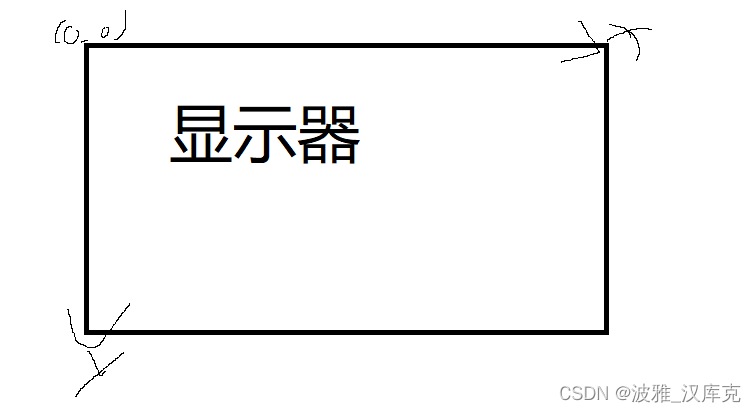
In the code snippet x and y Property is used to set where the software displays . Now the software is from (50,60) This coordinate starts to show . be relative to window This control ,window Is the display coordinates .
If it's in another space x and y Is the position relative to other controls .
The display coordinates are based on the upper left corner , It looks something like this .
Limit window size
    minimumWidth: 400
    minimumHeight: 300
    maximumWidth: 800
    maximumHeight: 500
Be careful : Use VS2022 Development QML When I write the wrong attribute VS There's no mistake , But the software just doesn't work . So use vs Development qml Must pay attention to qml The properties of must be checked for correctness .
    color:"#FF00FF"
    opacity:0.5
color Is to set the color of the form
opacity Is to set the transparency of the form

stay QML Signal slots are defined in :
stay qml Custom signals in :signal mySig()
This is a signal ,mySig It's a signal ;
Slot function :
onMySig:{
}
In front of them on and M Be sure to capitalize .
import QtQuick 2.9
import QtQuick.Window 2.2

Window {
    visible: true
    width: 600
    height: 400
    minimumWidth: 400
    minimumHeight: 300
    maximumWidth: 800
    maximumHeight: 500
    color:"#FF00FF"
    opacity:0.5
    title: qsTr("My QML")

    signal mySig()


    onMySig:{

    }
}
Button{
id:btn1
width:50
height:50
focus:true
objectName:"btn1"
background:Rectangle{
border.color:btn1.focus?"blue":"black"
}
        onClicked:{
            console.log("btn1 clicked")
        }
Keys.onRightPressed:{
btn2.foucs = true
}
}
Button{
id:btn2
width:50
height:50
x: 100
objectName:"btn2"
background:Rectangle{
border.color:btn2.focus?"blue":"black"
}
onClicked:{
console.log("btn2 clicked")
}
Keys.onLeftPressed:{
btn1.foucs = true
}
}This is the addition of button Space :import QtQuick.Controls 2.3 Need to add
onClicked:{
console.log("btn1 clicked")
}This is the system slot function .
边栏推荐
- Postman incoming list
- Unit test case framework --unittest
- QT adds a summary of the problems encountered in the QObject class (you want to use signals and slots) and solves them in person. Error: undefined reference to `vtable for xxxxx (your class name)‘
- Data processing instructions of arm instruction set
- ARM指令集之Load/Store指令寻址方式(二)
- 邻居子系统之ARP协议数据处理过程
- First understand the onion model, analyze the implementation process of middleware, and analyze the source code of KOA Middleware
- LeetCode 890. 查找和替换模式(模拟+双哈希表)
- Tpage design
- When you have a server
猜你喜欢
LeetCode 890. 查找和替换模式(模拟+双哈希表)

7-5 复数四则运算

Doris记录服务接口调用情况

5g NR Protocol Learning - - ts38.211 downlink channel

LeetCode 1037. 有效的回旋镖(向量叉乘)

Ficusjs series (I) introduction to ficusjs

Cookie和Session

Face recognition PIP failed to install Dlib Library

conda环境下pip install 无法安装到指定conda环境中(conda环境的默认pip安装位置)

Relation entre les classes et à l'intérieur des classes de classification vidéo - - Régularisation
随机推荐
kubernetes集群搭建
Load/store instruction addressing mode of arm instruction set (2)
TinyMCE series (II) TinyMCE plug-in development
Mysql45 lecture 01 | infrastructure: how is an SQL query executed?
Data processing instructions of arm instruction set
Rich text editor copying pictures in word documents
IP地址管理
ioremap
进程的创建和回收
TinyMCE series (I) TinyMCE environment construction
淘宝新改版商家如何操作,需要注意的点有哪些
B.刷墙(C语言)
Summary of rosbridge use cases_ Chapter 26 opening multiple rosbridge service listening ports on the same server
Deep learning and CV tutorial (14) | image segmentation (FCN, segnet, u-net, pspnet, deeplab, refinenet)
邻居子系统之邻居项状态更新
【深度学习基础】神经网络的学习(4)
机器学习之线性模型
M-arch (fanwai 10) gd32l233 evaluation -spi drive DS1302
Compiling Draco library on Windows platform
5g NR protocol learning -- ts38.211 downlink channel