当前位置:网站首页>利用PHP开发具有注册、登陆、文件上传、发布动态功能的网站
利用PHP开发具有注册、登陆、文件上传、发布动态功能的网站
2022-07-31 15:55:00 【MUNG东隅】
目录
介绍:
此项目采用html+css+php+mysql开发
做这个开发的目的一是练习我的web开发能力,二来相当于一个小靶场,可以自己进行一些漏洞试验,自己做一下攻防。
之后会更新对这个靶站做的一些攻击和修复,包括sql注入、文件上传、XSS、验证码业务逻辑错误。
展示:

登陆页面:
简单的登陆表单,采用post方式进行数据传输,对输入的用户名和密码进行sql查询,查询成功会跳转到welcome.php页面

注册页面:
简单的注册功能,往数据库里插入数据

主页:
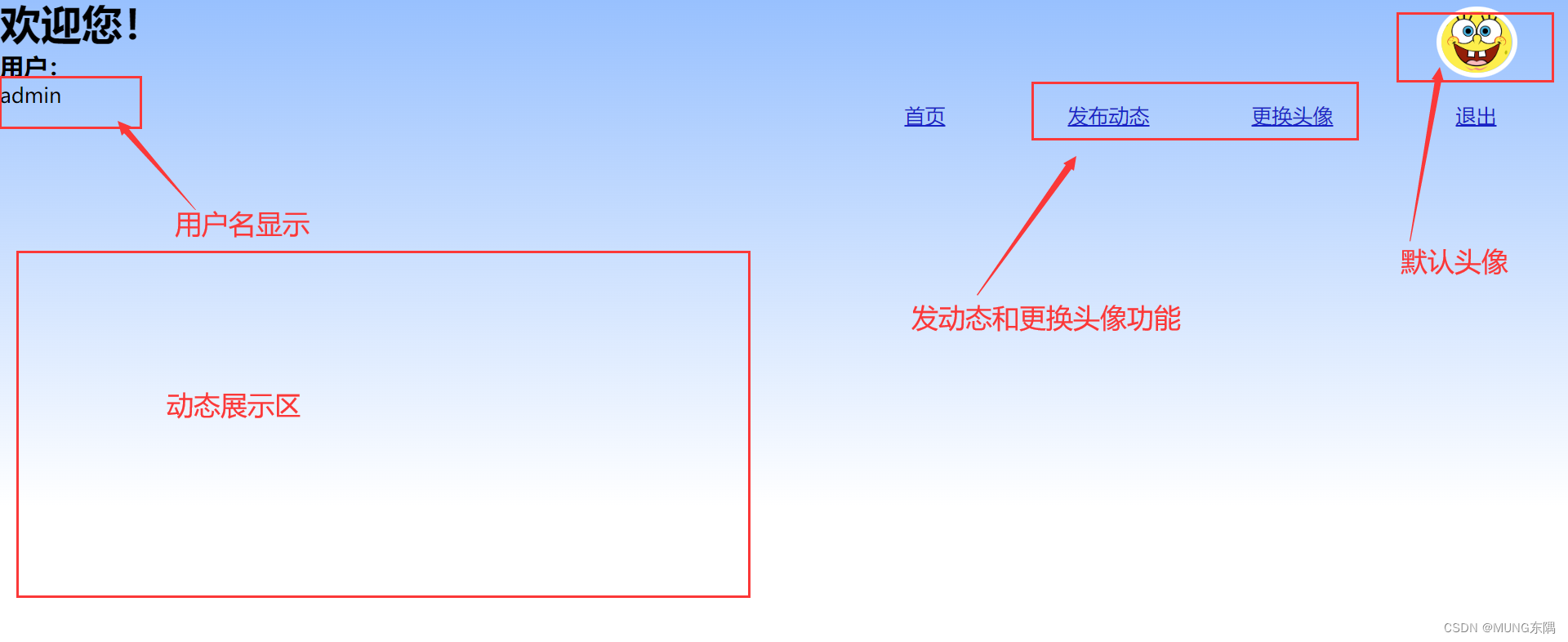 发布动态模块:
这也是我第一次做这个功能,我想的是为每个用户创建一个数据表,把发布的动态的内容插入到用户的数据表里,然后在主页进行数据查询并展示。

发布成功效果:

更换头像模块:
进行文件上传,头像的路径会被存储到数据库中,并根据用户名查询和展示头像

更换头像展示:


源代码:
blog.php
<!DOCTYPE html>
<html lang="en">
<head>
    <meta charset="UTF-8">
    <meta http-equiv="X-UA-Compatible" content="IE=edge">
    <meta name="viewport" content="width=device-width, initial-scale=1.0">
    <title>Welcome</title>
    <style>
        *{
            margin:0px;
            padding:0px;
        }
        #background{
    position: absolute;width: 100%;height: 300px;
   margin-bottom: 0px;height: 500px;
   background-image: linear-gradient(rgb(151, 192, 254),white);

                     }
      #headpic{
        position: absolute;top: 10px;right:50px;
        height: 60px;width: auto;
        border-radius: 50%;
        border: 5px white solid;
      }
      a{
        float:right;margin-top: 20px;
    list-style: none;
    display: table-cell;
    width: 80px;
    height: 30px;
   text-align: center;
    border-radius: 40%;
            margin-left: 50px;
            margin-right: 50px;

            color:rgb(23, 35, 199) ;
      }
form{

    height: 500px;
    text-align: center;
    margin-top: 5%;
}
#buttorn1{
    position:absolute;bottom: -120px;left:48%;
}

    </style>
</head>
<body>
<div id="background">
<?php
session_start();
header("Content-type:text/html;charset=utf-8");
$username=$_SESSION['user'];
$dbtable=substr($username,0,8).'blog';

include('./blogconn.php');//链接数据库


$sql22="create table $dbtable(id int auto_increment primary key, blog varchar(300) not null);";
$result=mysqli_query($conn2,$sql22);
$conn2->query($sql22);

$blog=$_POST['blog'];
if(isset($blog)){
$blogsql="insert into $dbtable(id,blog) values(null,'$blog');";

$result=mysqli_query($conn2,$blogsql);

}
mysqli_close($conn);//关闭数据库
   ?>
    <?php

    session_start();
    $username=$_SESSION['user'];

    include('./conn.php');
            $sql = "select pic from flag where username = '$username'";//根据用户名查找头像信息
            $result = mysqli_query($conn,$sql);//执行sql
            $row = mysqli_fetch_array($result, MYSQLI_BOTH);
            $str='<img alt="头像" src="'.$row['pic'].'" title="头像" id="headpic">';
            print_r($str);
      ?>
        <h1>欢迎您!</h1>
        <h3>用户:</h3>
        <?php
        session_start();
        if($_SESSION['user']==""){
            echo "<script language='javascript'>alert('请通过正确途径登录');history.back();</script>";
        }else{
            echo $_SESSION['user'];
        }
            ?>

        <a href="index.html">退出</a>
        <a href="./headpic.php"><p>更换头像</p></a>
        <a href="./blog.php"><p>发布动态</p></a>
        <a href="./welcome.php"><p>首页</p></a>

        <form method="post" action="./blog.php">
              <p>发布动态:</p>
              <textarea rows="18" cols="66" name="blog">在此处编辑</textarea>
              <input type="submit" value="我写好了"id="buttorn1" >
        </form>
     </div>

</body>
</html>
blogconn.php
<?php
session_start();
header("Content-type:text/html;charset=utf-8");
$username=$_SESSION['user'];
$dbtable=substr($username,0,8).'blog';

$dbhost = "127.0.0.1";
$dbuser = 'root';
$dbname = "sqlinject";	//数据库名称

$dbpass = "";	//数据库密码
$conn2=mysqli_connect($dbhost,$dbuser,$dbpass);
if(!$conn=mysqli_connect($dbhost,$dbuser,$dbpass)){
    die("连接失败:".mysqli_connect_error());
}
$connt=mysqli_select_db($conn2,$dbname);
//echo "<script type='text/javascript'>alert('欢迎');</script>";
?>
conn.php
<?php
$dbhost = "127.0.0.1";
$dbuser = 'root';
$dbname = "sqlinject";	//数据库名称
$dbtable='flag';
$dbpass = "";	//数据库密码
$conn=mysqli_connect($dbhost,$dbuser,$dbpass);
if(!$conn=mysqli_connect($dbhost,$dbuser,$dbpass)){
    die("连接失败:".mysqli_connect_error());
}
$connt=mysqli_select_db($conn,$dbname);
//echo "<script type='text/javascript'>alert('欢迎');</script>";
?>
headpic.php
<!DOCTYPE html>
<html lang="en">
<head>
    <meta charset="UTF-8">
    <meta http-equiv="X-UA-Compatible" content="IE=edge">
    <meta name="viewport" content="width=device-width, initial-scale=1.0">
    <title>Welcome</title>
    <style>
        *{
            margin:0px;
            padding:0px;
        }
        #background{
    position: absolute;width: 100%;height: 300px;
   margin-bottom: 0px;height: 500px;
   background-image: linear-gradient(rgb(151, 192, 254),white);

                     }
      #headpic{
        position: absolute;top: 10px;right:50px;
        height: 60px;width: auto;
        border-radius: 50%;
        border: 5px white solid;
      }
      a{
        float:right;margin-top: 20px;
    list-style: none;
    display: table-cell;
    width: 80px;
    height: 30px;
   text-align: center;
    border-radius: 40%;
            margin-left: 50px;
            margin-right: 50px;

            color:rgb(23, 35, 199) ;
      }
    </style>
    <script type="text/javascript">
    function checkFile() {
        var file = document.getElementsByName('file')[0].value;
        if (file == null || file == "") {
            alert("请选择要上传的文件!");
            return false;
        }
        //定义允许上传的文件类型
        var allow_ext = ".jpg|.png|";
        //提取上传文件的类型
        var ext_name = file.substring(file.lastIndexOf("."));
        //判断上传文件类型是否允许上传
        if (allow_ext.indexOf(ext_name) == -1) {
            var errMsg = "该文件不允许上传,请上传" + allow_ext + "类型的文件,当前文件类型为:" + ext_name;
            alert(errMsg);
            return false;
        }
    }
</script>
</head>
<body>
<div id="background">
    <?php
    error_reporting(0);
    session_start();
    $username=$_SESSION['user'];

    include('./conn.php');
            $sql = "select pic from flag where username = '$username'";//根据用户名查找头像信息
            $result = mysqli_query($conn,$sql);//执行sql
            $row = mysqli_fetch_array($result, MYSQLI_BOTH);
            $str='<img alt="头像" src="'.$row['pic'].'" title="头像" id="headpic">';
            print_r($str);
      ?>
        <h1>欢迎您!</h1>
        <h3>用户:</h3>
        <?php
        session_start();
        if($_SESSION['user']==""){
            echo "<script language='javascript'>alert('请通过正确途径登录');history.back();</script>";
        }else{
            echo $_SESSION['user'];
        }
            ?>

        <a href="index.html">退出</a>
        <a href="./headpic.php"><p>更换头像</p></a>
        <a href="./blog.php"><p>发布动态</p></a>
        <a href="./welcome.php"><p>首页</p></a>

        <form method="post" enctype="multipart/form-data" action="upload.php" onsubmit="return checkFile()">
           <input type="file" name="file" value="文件"/>
           <input type="submit" name="submit" value="提交">
        </form>
     </div>


</body>
</html>
index.html
<!DOCTYPE html>
<html lang="en">
<head>
    <meta charset="UTF-8">
    <meta http-equiv="X-UA-Compatible" content="IE=edge">
    <meta name="viewport" content="width=device-width, initial-scale=1.0">
    <link rel="stylesheet" href="style1.css">
    <title>login</title>
</head>
<body  background="./bg.jpg">

    <form action="./login.php" method="post">
        <tr height="40px">
            <td align="right"><p style="color: white;">用户名:</p></td>
            <td>
                <input type="text"  name='username' autofocus placeholder="输入用户名">
            </td>
        </tr>
        <tr height="40px">
            <td align="right"><p style="color: white;">密码:</p></td>
            <td>
                <input type="password"  name='password'  maxlength="9" placeholder="输入密码">
            </td>
        </tr>
        <tr height="40px">
            <td colspan="2" align="center">
                <input type="submit" value="登陆"class="buttorn1" readonly="readonly">
                <a href="./register.html"> <p>注册</p></a>
            </td>
        </tr>
    </form>


</body>
</html>
login.php
<?PHP
session_start();
header("Content-type:text/html;charset=utf-8");
    include('./conn.php');//链接数据库
    $username = addslashes($_POST['username']);//post获得用户名表单值
    $passowrd = $_POST['password'];//post获得用户密码单值
    $_SESSION['user'] = $_POST['username'];

    if ($username && $passowrd){//如果用户名和密码都不为空
             $sql = "select * from flag where username = ('$username') and password='$passowrd'";//检测数据库是否有对应的username和password的sql
             $result = mysqli_query($conn,$sql);//执行sql
             $rows=mysqli_num_rows($result);//返回一个数值
             if($rows){//0 false 1 true
                session_start(); //创建session

                   header("refresh:0;url=./welcome.php");//如果成功跳转至welcome.html页面
                   exit;
             }else{
                echo "<script type='text/javascript'>alert('忘记密码的话去问问神奇海螺哦! =͟͟͞͞(꒪⌓꒪*)');location='denglu.html';</script>";

             }
    }


    mysqli_close($conn);//关闭数据库
?>
register.html
<!DOCTYPE html>
<html lang="en">
<head>
    <meta charset="UTF-8">
    <meta http-equiv="X-UA-Compatible" content="IE=edge">
    <meta name="viewport" content="width=device-width, initial-scale=1.0">
    <link rel="stylesheet" href="style1.css">
    <title>register</title>
</head>
<body  background="./bg.jpg">

    <form action="./register.php" method="post">
        <tr height="40px">
            <td align="right"><p style="color: white;">用户名:</p></td>
            <td>
                <input type="text"  name='username' autofocus placeholder="输入用户名">
            </td>
        </tr>
        <tr height="40px">
            <td align="right"><p style="color: white;">密码:</p></td>
            <td>
                <input type="password"  name='password'  maxlength="9" placeholder="输入密码">
            </td>
        </tr>
        <tr height="40px">
            <td colspan="2" align="center">
                <input type="submit" value="注册"class="buttorn1" readonly="readonly">
                <input type="reset" value="重置"class="buttorn1" readonly="readonly">
            </td>
        </tr>
    </form>


</body>
</html>
register.php
<?php
session_start();
header("Content-type:text/html;charset=utf-8");
include('./conn.php');//链接数据库


$username = addslashes($_POST['username']);
$password = $_POST['password'];


if($username&&$password)
{
    mysqli_query($conn,"insert into flag(id,username,password,pic) values(null,('$username'),'$password','./headpic/headpic.png');");
    echo "注册成功,即将跳转至登录页面";
    header("refresh:1.5;url=./index.html");
    exit;
}

mysqli_close($conn);
?>
style1.css
body{
    margin:0;padding: 0;
}
form{
    position: absolute;
    top:100px;left:500px;
}
.buttorn1 {
    position: relative;top:100px;left:-320px;
    width: 100px;
    height: 30px;
    background-color: #93b518;
    margin-top: 20px;
    margin-left: 75px;
    border-radius: 3px;
    font-size: 18px;
    font-family: 微软雅黑;
    color: white;
}
upload.php
<?php
    session_start();
    header("Content-Type:text/html;charset=utf-8");
    include('./conn.php');
// 附件的存储位置、附件的名字

$path='./headpic/'.$_FILES['file']['name'];
echo '文件路径'.$path."<br>";
$username = $_SESSION['user'];
// 拼接成该文件在服务器上的名称


if($_FILES['file']['error']>0) {
    die("出错了!".$_FILES['file']['error']);
}
if(move_uploaded_file($_FILES['file']['tmp_name'],$path)){
    //echo "<BR>"."Upload Success!";

    mysqli_query($conn,"update flag set pic='$path' where username='$username';");
    echo "恭喜您,上传成功!"."<br />3秒后将自动跳转到主页!";
    header("refresh:3;url=./welcome.php");
}else{
    //echo "<BR>"."Upload Failed!".$_FILES['photo']['error'];
    echo "对不起,上传头像失败了!";
    header("refresh:2;url=./welcome.php");
}
?>
welcome.php
<!DOCTYPE html>
<html lang="en">
<head>
    <meta charset="UTF-8">
    <meta http-equiv="X-UA-Compatible" content="IE=edge">
    <meta name="viewport" content="width=device-width, initial-scale=1.0">
    <title>Welcome</title>
    <style>
        *{
            margin:0px;
            padding:0px;
        }
        #background{
    position: absolute;width: 100%;height: 300px;
   margin-bottom: 0px;height: 500px;
   background-image: linear-gradient(rgb(151, 192, 254),white);

                     }
      #headpic{
        position: absolute;top: 10px;right:50px;
        height: 60px;width: auto;
        border-radius: 50%;
        border: 5px white solid;
      }
      a{
        float:right;margin-top: 20px;
    list-style: none;
    display: table-cell;
    width: 80px;
    height: 30px;
   text-align: center;
    border-radius: 40%;
            margin-left: 50px;
            margin-right: 50px;

            color:rgb(23, 35, 199) ;
      }
      .blog{
        height: 200px;width: 500px;margin: 50px;text-align: center;padding: 10px;background-image: linear-gradient(rgb(151, 192, 254),white);;
        border-radius: 10%;
      }
    </style>
</head>
<body>
    <div id="background">
    <?php
    error_reporting(0);
    session_start();
    $username=$_SESSION['user'];

    include('./conn.php');
            $sql = "select pic from flag where username = '$username'";//根据用户名查找头像信息
            $result = mysqli_query($conn,$sql);//执行sql
            $row = mysqli_fetch_array($result, MYSQLI_BOTH);
            $str='<img alt="头像" src="'.$row['pic'].'" title="头像" id="headpic">';
            print_r($str);
      ?>
        <h1>欢迎您!</h1>
        <h3>用户:</h3>
        <a href="index.html">退出</a>
        <a href="./headpic.php"><p>更换头像</p></a>
        <a href="./blog.php"><p>发布动态</p></a>
        <a href="./welcome.php"><p>首页</p></a>
<?php
        session_start();
        if($_SESSION['user']==""){
            echo "<script language='javascript'>alert('请通过正确途径登录');history.back();</script>";
        }else{
            echo $_SESSION['user'];
        }


             include('./blogconn.php');//链接数据库
             $sql3="select count(id) from $dbtable;";
             $result=mysqli_query($conn2,$sql3);
             $row = mysqli_fetch_array($result, MYSQLI_BOTH);
             $num=$row[0];
             $i=1;
             for($i=1;$i<=$num;$i++){
                $sql4="select blog from $dbtable where id=$i";
                $result4=mysqli_query($conn2,$sql4);
                $row4 = mysqli_fetch_array($result4, MYSQLI_BOTH);

                $blogdiv='<div class="blog">'.$row4[0].'</div>';
                print_r($blogdiv);
             }
        ?>

     </div>

</body>
</html>边栏推荐
- Kubernetes常用命令
- C language - function
- 2020 WeChat applet decompilation tutorial (can applet decompile source code be used)
- Grafana安装后web打开报错
- 入职一个月反思
- What is the difference between BI software in the domestic market?
- 2020微信小程序反编译教程(小程序反编译源码能用吗)
- Foreign media right, apple on May be true in inventory
- 6-22漏洞利用-postgresql数据库密码破解
- Unity中实现点选RenderTexture中的3D模型
猜你喜欢

苹果官网样式调整 结账时产品图片“巨大化”
复杂高维医学数据挖掘与疾病风险分类研究
mongo进入报错

全新宝马3系上市,安全、舒适一个不落

6-22 Vulnerability exploit - postgresql database password cracking
Tencent Cloud Deployment----DevOps

The use of button controls
![[TypeScript] In-depth study of TypeScript type operations](/img/d9/ee240ccba72e8d3114ee5c52ed0c8f.png)
[TypeScript] In-depth study of TypeScript type operations
Browser's built-in color picker
The new BMW 3 Series is on the market, with safety and comfort
随机推荐
gerrit中如何切换远程服务器
The use of button controls
Qt practical cases (54) - using transparency QPixmap design pictures
使用 GraphiQL 可视化 GraphQL 架构
C程序是如何跑起来的01 —— 普通可执行文件的构成
复制延迟案例(3)-单调读
Foreign media right, apple on May be true in inventory
The use of border controls
Bilateral filtering acceleration "recommended collection"
SIGABRT 报错时的注意事项和解决方法
国内市场上的BI软件,到底有啥区别
MySQL基础篇【单行函数】
MySQL的相关问题
Tencent Cloud Deployment----DevOps
C语言-函数
EF Core 2.2中将ORM框架生成的SQL语句输出到控制台
The arm button controls the flashing of the led light (embedded button experiment report)
Kubernetes常用命令
Implement anti-shake and throttling functions
【TypeScript】深入学习TypeScript类型操作