当前位置:网站首页>django model生成docx数据库设计文档
django model生成docx数据库设计文档
2022-06-29 03:22:00 【徒余途】
django项目数据库设计文档生成
直接上代码
使用说明
按照步骤 TODO1、TODO2、TODO3 之后运行文件,数据库设计文档生成在当前目录下
# Desc : django项目生成doc文档
# TODO 注: model的Meta属性和字段属性记得添加verbose_name属性,apps.py需要添加verbose_name

# TODO 1. 复制项目DJANGO_SETTINGS_MODULE的值
# TODO 2. 在项目settings.py中配置 PROJECT_NAME(项目名称)
# TODO 3. 需要修改此自建app的列表 model_doc_apps的值
import os
import sys
import django

sys.path.append(os.path.dirname(os.path.dirname(os.path.abspath(__file__))))
# TODO 1 复制项目DJANGO_SETTINGS_MODULE的值 替换 radio_station_design.settings
os.environ.setdefault("DJANGO_SETTINGS_MODULE", "radio_station_design.settings")
django.setup()

# TODO 3 需要导出的model模块
model_doc_apps = ['usermanage', 'station', ]

from django.apps import apps
# TODO 2 导入PROJECT_NAME(自定义项目名称)
from radio_station_design.settings import PROJECT_NAME

from docx import Document
from docx.enum.text import WD_PARAGRAPH_ALIGNMENT
from docx.oxml import OxmlElement
from docx.oxml.ns import qn
from docx.shared import Inches, Pt, RGBColor
from datetime import datetime


class MyDoc:
    """生成docx文档"""

    def __init__(self, out_path, project_name='项目名称'):
        self.project_name = project_name
        self.out_path = out_path
        self._get_doc()

    def _get_doc(self):
        self.document = Document()

    def add_heading(self, head, level=1):
        """自定义的标题格式"""
        # heading = self.document.add_heading(head, level)
        if not 0 <= level <= 9:
            raise ValueError("level must be in range 0-9, got %d" % level)
        style = "Title" if level == 0 else "Heading %d" % level
        p = self.document.add_paragraph(style=style)
        space_size = 11 - level
        # 段前间距
        p.paragraph_format.space_before = Pt(space_size)
        # 段后间距
        p.paragraph_format.space_after = Pt(space_size)
        p_run = p.add_run(head)
        p_run.font.name = u"仿宋"
        if level:
            p_run.font.color.rgb = RGBColor(0, 68, 136)
        # 加粗
        p_run.bold = True
        # 字体大小
        font_size = 28 - level * 2
        p_run.font.size = Pt(font_size)
        return p

    def set_title(self):
        """设置标题以及生成日期"""
        title = self.document.add_heading(self.project_name + "数据库设计", 0)
        title.paragraph_format.alignment = WD_PARAGRAPH_ALIGNMENT.CENTER

        p = self.document.add_paragraph()
        p.paragraph_format.alignment = WD_PARAGRAPH_ALIGNMENT.RIGHT
        # 右侧缩进
        p.paragraph_format.right_indent = Pt(4)
        pp = p.add_run("文档生成时间:" + datetime.now().strftime("%Y-%m-%d"))

        pp.font.size = Pt(16)

    def generate_doc(self):
        """生成文档固定部分"""
        # 生成doc文档
        self.set_title()
        self.add_heading('引言', level=1)
        self.add_paragraph("")
        self.add_heading('关于', level=1)
        self.add_paragraph(f"此文档主要介绍{
      self.project_name}数据库定义。")
        self.add_heading('目标读者', level=1)
        self.add_paragraph("此文档提供给软件开发人员和系统维护人员使用。")
        self.add_heading('术语定义', level=1)
        self.add_paragraph("")
        self.add_heading('参考资料', level=1)
        self.add_paragraph("")
        self.add_heading('数据库设计', level=1)

    def add_model(self, model_name='model名称', table_name="table_name", data=[]):
        """添加model生成doc部分"""
        self.add_heading(model_name, level=3)
        self.add_paragraph("表名:" + table_name)
        if len(data) == 0:
            return
        table = self.document.add_table(rows=1, cols=7, style='Medium List 1 Accent 1')
        table.alignment = WD_PARAGRAPH_ALIGNMENT.CENTER
        table.autofit = True
        header_cells = table.rows[0].cells
        table.rows[0].height = Inches(0.5)
        header_cells[0].text = '字段名称'
        header_cells[1].text = '中文含义'
        header_cells[2].text = '数据类型'
        header_cells[3].text = '不为空'
        header_cells[4].text = '默认值'
        header_cells[5].text = '键值'
        header_cells[6].text = '备注'
        header_cells[0].width = Inches(1.5)
        header_cells[1].width = Inches(1.5)
        header_cells[2].width = Inches(1.25)
        header_cells[3].width = Inches(0.75)
        header_cells[4].width = Inches(1)
        header_cells[5].width = Inches(0.8)
        header_cells[6].width = Inches(2)
        for d0, d1, d2, d3, d4, d5, d6 in data:
            row = table.add_row()
            row.height = Inches(0.3)
            row_cells = row.cells
            row_cells[0].text = str(d0)
            row_cells[1].text = str(d1)
            row_cells[2].text = str(d2)
            row_cells[3].text = str(d3)
            row_cells[4].text = str(d4)
            row_cells[5].text = str(d5)
            row_cells[6].text = str(d6)
        self.set_cells_border(table)
        self.set_cells_text_alignment(table)
        self.add_paragraph("")

    def set_cells_text_alignment(self, table):
        """给table设置居中格式或其他"""
        for row in range(len(table.rows)):
            for col in range(len(table.columns)):
                # 水平居中
                # table.cell(row, col).paragraphs[0].alignment = WD_PARAGRAPH_ALIGNMENT.CENTER
                # 垂直居中
                table.cell(row, col).vertical_alignment = WD_PARAGRAPH_ALIGNMENT.CENTER

    def set_cell_value(self, cell, value):
        """给单个cell赋值,以及格式"""
        cell.text = str(value)
        # 水平居中
        # cell.paragraphs[0].alignment=WD_PARAGRAPH_ALIGNMENT.CENTER
        # 垂直居中
        cell.vertical_alignment = WD_PARAGRAPH_ALIGNMENT.CENTER
        pass

    def add_app_name(self, app_name='模块名称'):
        """添加模块名称"""
        self.add_heading(app_name, level=2)

    def _close_doc(self):
        self.document.save(self.out_path)

    def make_doc(self):
        self._close_doc()

    def add_paragraph(self, text):
        """添加段落以及设置格式"""
        p = self.document.add_paragraph()
        # 左侧缩进
        p.paragraph_format.left_indent = Pt(4)
        # 右侧缩进
        p.paragraph_format.right_indent = Pt(4)
        # 首行缩进
        # p.paragraph_format.first_line_indent = Inches(0.25)

        # 行间距
        p.paragraph_format.line_spacing = Pt(18)
        # 段前间距
        p.paragraph_format.space_before = Pt(7)
        # 段后间距
        p.paragraph_format.space_after = Pt(15)
        p_run = p.add_run(text)
        p_run.font.name = u"仿宋"
        p_run.font.size = Pt(14)
        # 加粗
        # p.add_run('bold').bold = True
        # p.add_run(' and some ')
        # 斜体
        # p.add_run('italic.').italic = True

    def add_picture(self, pic_path):
        self.document.add_picture('monty-truth.png', width=Inches(1.25))

    def add_table(self, data, rows, cols):
        table = self.document.add_table(rows=rows, cols=cols)
        header_cells = table.rows[0].cells
        header_cells[0].text = 'Qty'
        header_cells[1].text = 'Id'
        header_cells[2].text = 'Desc'
        for qty, id, desc in data:
            row_cells = table.add_row().cells
            row_cells[0].text = str(qty)
            row_cells[1].text = id
            row_cells[2].text = desc

    def set_cells_border(self, table):
        """给table设置边框"""
        for row in range(len(table.rows)):
            for col in range(len(table.columns)):
                self.set_cell_border(table.cell(row, col),
                                     top={
    "sz": 0.5, "val": "single", "color": "#000000", "space": "0"},
                                     bottom={
    "sz": 0.5, "val": "single", "color": "#000000", "space": "0"},
                                     left={
    "sz": 0.5, "val": "single", "color": "#000000", "space": "0"},
                                     right={
    "sz": 0.5, "val": "single", "color": "#000000", "space": "0"},
                                     insideH={
    "sz": 0.5, "val": "single", "color": "#000000", "space": "0"},
                                     end={
    "sz": 0.5, "val": "single", "color": "#000000", "space": "0"})

    def set_cell_border(self, cell, **kwargs):
        """ Set cell`s border 设置单个cell的边框 参考文档:http://www.360doc.com/content/22/0204/21/76948455_1015984457.shtml Usage: set_cell_border( cell, top={"sz": 12, "val": "single", "color": "#FF0000", "space": "0"}, bottom={"sz": 12, "color": "#00FF00", "val": "single"}, left={"sz": 24, "val": "dashed", "shadow": "true"}, right={"sz": 12, "val": "dashed"}, ) """
        tc = cell._tc
        tcPr = tc.get_or_add_tcPr()

        # check for tag existnace, if none found, then create one
        tcBorders = tcPr.first_child_found_in("w:tcBorders")
        if tcBorders is None:
            tcBorders = OxmlElement('w:tcBorders')
            tcPr.append(tcBorders)

        # list over all available tags
        for edge in ('left', 'top', 'right', 'bottom', 'insideH', 'insideV'):
            edge_data = kwargs.get(edge)
            if edge_data:
                tag = 'w:{}'.format(edge)

                # check for tag existnace, if none found, then create one
                element = tcBorders.find(qn(tag))
                if element is None:
                    element = OxmlElement(tag)
                    tcBorders.append(element)

                # looks like order of attributes is important
                for key in ["sz", "val", "color", "space", "shadow"]:
                    if key in edge_data:
                        element.set(qn('w:{}'.format(key)), str(edge_data[key]))


def magic_doc():
    mydoc = MyDoc(project_name=PROJECT_NAME, out_path=f'./{
      PROJECT_NAME}_数据库设计.docx')
    mydoc.generate_doc()
    for label in model_doc_apps:
        app = apps.get_app_config(label)
        mydoc.add_app_name(app.verbose_name)
        for model_name in app.models:
            target_cls = apps.get_registered_model(label, model_name)
            model_key = target_cls._meta.verbose_name
            table_name = target_cls._meta.db_table
            fields = dict()
            for field in target_cls._meta.fields:
                if type(field).__name__ == 'ForeignKey':
                    f_name = field.name + "_id"
                else:
                    f_name = field.name
                if f_name not in fields.keys():
                    fields[f_name] = dict()
                fields[f_name].update(field.__dict__)
                fields[f_name]['field_type'] = str(type(field).__name__)

            data_list = []
            for (k, v) in fields.items():
                is_main_key = is_for_key = False
                if 'NOT_PROVIDED' in str(v['default']):
                    v['default'] = ''
                if v['choices'] == None:
                    v['choices'] = ''
                if v['primary_key'] is True:
                    is_main_key = True
                if v['field_type'] == 'ForeignKey':
                    is_for_key = True
                key_types = list()
                if is_main_key:
                    key_types.append("主键")
                if is_for_key:
                    key_types.append("外键")
                v['primary_key'] = ','.join(key_types)
                args = list()
                for tag in ['name', 'verbose_name', 'field_type', 'null', 'default', 'primary_key', 'choices']:

                    if tag == 'choices':
                        if v[tag]:
                            args.append(str({
    item[0]: item[1] for item in v[tag]}))
                        else:
                            args.append("")
                    elif tag == 'null':
                        if v[tag]:
                            args.append(str(v[tag]))
                        else:
                            args.append("")
                    else:
                        args.append(str(v[tag]))
                data_list.append(args)

            mydoc.add_model(model_key, table_name, data_list)
    mydoc.make_doc()


if __name__ == '__main__':
    magic_doc()
边栏推荐
- [flutter topic] 66 diagram basic constraints box (I) yyds dry goods inventory
- LeetCode 每日一题——324. 摆动排序 II
- 逆序对对数计算,顺序对对数计算——归并排序
- 蓝桥杯2022初赛——扫雷
- 搭建nexus服务
- Equal wealth
- [yunyuanyuan] it's so hot. Why don't you come and understand it?
- Restore the binary search tree [simulate according to the meaning of the question - > find the problem - > analyze the problem - > see the bidding]
- The method of exporting packages of all components from existing PCBs in Altium Designer
- 19.03 vessel description and simple application examples continued
猜你喜欢

深度解析“链动2+1”模式的商业逻辑
If you dare to write MQ message queue middleware on your resume, you must win these questions!
![Sequence traversal of binary tree ii[one of sequence traversal methods - > recursive traversal + level]](/img/f9/efb73dd6047e6d5833581376904788.png)
Sequence traversal of binary tree ii[one of sequence traversal methods - > recursive traversal + level]

微信小程序安全登录,必须先校验微信返回openid,确保信息唯一性。
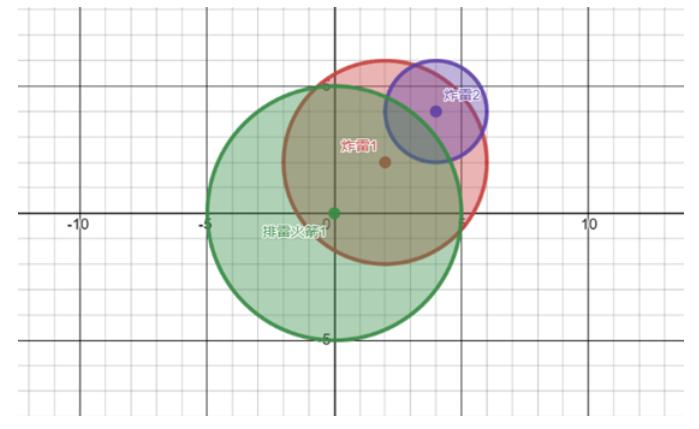
蓝桥杯2022初赛——扫雷

Tupu software intelligent energy integrated management and control platform

VIM configuration and use
![Jerry's watch begins to move [chapter]](/img/85/232da1c1f8dddb3af1e564e4a0fc53.jpg)
Jerry's watch begins to move [chapter]
![[North Asia data recovery] data recovery case of ibm-ds3512 storage server RAID5 damaged data loss](/img/84/c8604f539db4658049406080d7f09a.jpg)
[North Asia data recovery] data recovery case of ibm-ds3512 storage server RAID5 damaged data loss
![Same tree [from part to whole]](/img/2d/997b9cb9cd4f8ea8620f5a66fcf00a.png)
Same tree [from part to whole]
随机推荐
Tortoise does not display a green Icon
Laravel, execute PHP artist migrate and report an error alter table `users`add unique `users_ email_ unique`(`email`))
[North Asia data recovery] data recovery case of ibm-ds3512 storage server RAID5 damaged data loss
2022-2028 global MWIR camera industry research and trend analysis report
无法定位程序输入点 [email protected]
Yyds dry inventory everything a primary developer should know about activity
Digital twin application of smart Park Based on Web GIS aerial photography
allegro对走好的线取消走线的方法
微信小程序安全登录,必须先校验微信返回openid,确保信息唯一性。
深度解析“链动2+1”模式的商业逻辑
priority_queue的理解
測試入門——集成測試
Stm32l4 Series MCU ADC accurately calculates input voltage through internal reference voltage
VIM configuration and use
Jerry's watch begins to move [chapter]
There's a mystery behind the little login
2022-2028 global low carbon concrete industry research and trend analysis report
快速排序,查询序列的第K大的数
Getting started with testing - integration testing
priority_ Understanding of queue