当前位置:网站首页>搭建主从模式集群redis
搭建主从模式集群redis
2022-07-02 18:23:00 【夏诗曼CharmaineXia】
安装单机reids详细教程:https://blog.csdn.net/CharmaineXia/article/details/125297843?spm=1001.2014.3001.5502
一个主节点(master)可以有多个从节点(slave),一个从节点只能有一个主节点。
每台redis都默认自己是主节点,所以只配置从机,不用配置主机。
搭建一主二从集群
三台服务器都装好redis,先配置好一台从机的配置文件,然后把配置文件复制到其他从机即可。
方法1.配置文件配置从机(永久,重启生效)
①编辑从机配置文件
vi /home/admin/redis/redis-5.0.7/theRedisConf/redis.conf
添加上master的IP或主机及端口号
replicaof 192.168.xxx.xxx 6379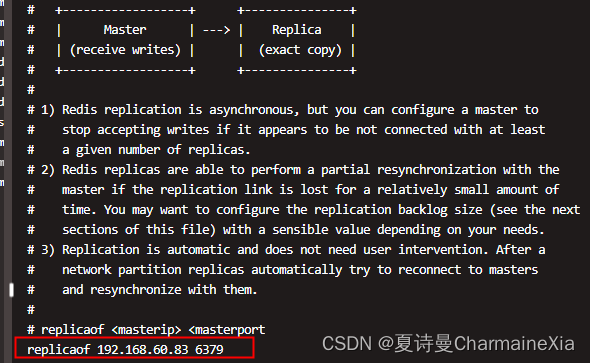
配置完重启生效。
方法2.命令配置从机(即时生效,但redis服务重启就失效了)
①进度客户端,查看当前库信息
redis-cli -p 6379 或者进到src下执行 ./redis-cli -p 6379
info replication
127.0.0.1:6379> info replication
# Replication
role:master    #角色是master
connected_slaves:0    # 没有从机
master_replid:04caec4cc89fb5a3e5515c90f91d4e4922fe6e6b
master_replid2:0000000000000000000000000000000000000000
master_repl_offset:0
second_repl_offset:-1
repl_backlog_active:0
repl_backlog_size:1048576
repl_backlog_first_byte_offset:0
repl_backlog_histlen:0
②设置从机的主节点
SLAVEOF 主机的IP 6379
查看设置以后的库信息
info replication
#从机中查看
127.0.0.1:6379> info replication
# Replication
role:slave    #角色变成了从机
master_host:192.168.60.83  #主机的IP地址
master_port:6379   #主机中redis的端口号
master_link_status:down

#在主机中查看
127.0.0.1:6379> info replication
# Replication
role:master
connected_slaves:2
slave0:ip=192.168.60.84,port=6379,state=online,offset=14,lag=0
slave1:ip=192.168.60.85,port=6379,state=online,offset=14,lag=1
master_replid:8e296970ccfa0ebd6dff8416e1d21d8f892d0dab
三台配置完成后:
依次启动redis服务,先启动主节点,后启动从节点。
cd /
./usr/local/bin/redis-server /home/admin/redis/redis-5.0.7/theRedisConf/redis.conf
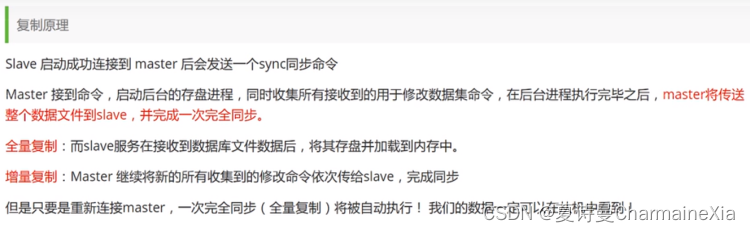
主从复制的原理:
边栏推荐
猜你喜欢

Data dimensionality reduction factor analysis
Excel finds the same value in a column, deletes the row or replaces it with a blank value
How performance testing creates business value

Imitation Jingdong magnifying glass effect (pink teacher version)

Thread application instance
高级性能测试系列《24. 通过jdbc执行sql脚本》

PHP parser badminton reservation applet development requires online system

Chic Lang: completely solve the problem of markdown pictures - no need to upload pictures - no need to network - there is no lack of pictures forwarded to others
性能测试如何创造业务价值
使用CLion编译OGLPG-9th-Edition源码
随机推荐
C的内存管理
论文导读 | 机器学习在数据库基数估计中的应用
Markdown basic grammar
MySQL advanced learning summary 7: MySQL data structure - Comparison of hash index, AVL tree, B tree and b+ tree
【测试开发】软件测试—概念篇
虚拟机初始化脚本, 虚拟机相互免秘钥
Tutorial (5.0) 09 Restful API * fortiedr * Fortinet network security expert NSE 5
数据降维——主成分分析
Introduction to the paper | application of machine learning in database cardinality estimation
[100 cases of JVM tuning practice] 03 -- four cases of JVM heap tuning
xml开发方式下AutowiredAnnotationBeanPostProcessor的注册时机
Golang concurrent programming goroutine, channel, sync
使用CLion编译OGLPG-9th-Edition源码
Web2.0的巨头纷纷布局VC,Tiger DAO VC或成抵达Web3捷径
[test development] software testing - concept
Virtual machine initialization script, virtual machine mutual secret key free
《重构:改善既有代码的设计》读书笔记(上)
IDEA编辑器去掉sql语句背景颜色SQL语句警告No data sources are configured to run this SQL...和SQL Dialect is Not Config
二进制操作
The mybatieshelperpro tool can be generated to the corresponding project folder if necessary