当前位置:网站首页>坚果天气
坚果天气
2022-07-27 09:08:00 【华为云】
坚果天气
先来看一下效果
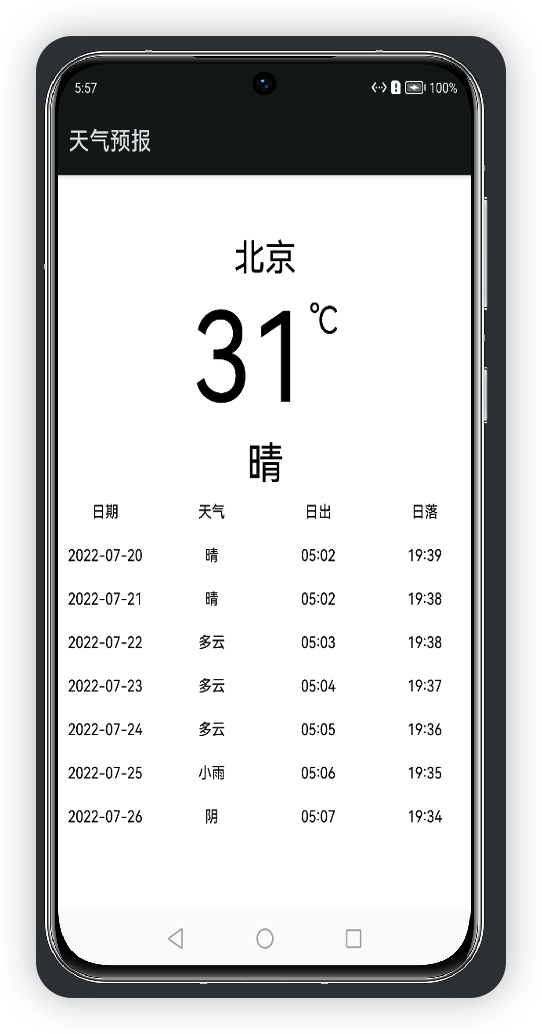
本项目界面搭建基于ArkUI中TS扩展的声明式开发范式,
数据接口是,
使用ArkUI自带的网络请求调用接口。
我想要实现的一个功能是,查询当前城市的实时天气,
目前已实现的功能有:
默认查询北京的天气预报
查看当前的天气
查看未来七天的天气
通过本项目,你能学到的知识有:
网络请求
条件渲染
状态管理
先来看一下
目录结构
├── config.json├── ets│ └── MainAbility│ ├── app.ets│ ├── common│ │ └── RealtimeWeather.ets│ ├── data│ │ ├── get_test.ets│ │ └── get_week_test.ets│ ├── model│ │ ├── daily.ets│ │ ├── now.ets│ │ └── weatherModel.ets│ └── pages│ └── Main.ets└── resources ├── base │ ├── element │ │ ├── color.json │ │ └── string.json │ └── media │ └── icon.png └── rawfile接下来开始正文,
我们先分析一下结构:
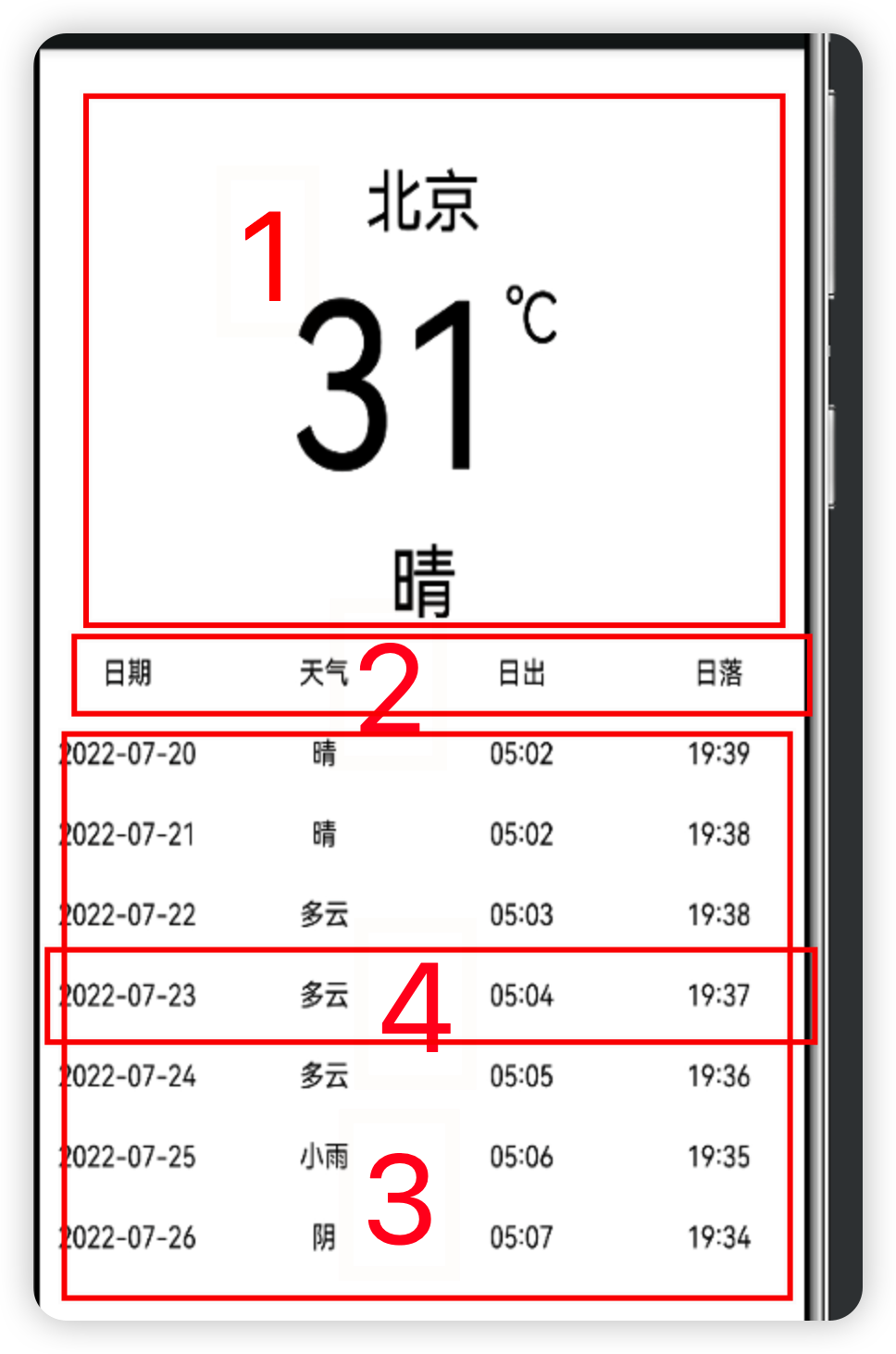
我们可以分为三块
第一部分为实时天气信息栏
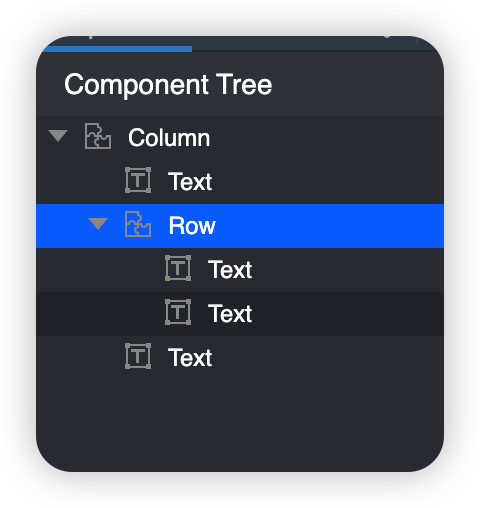
代码如下
// @ts-nocheck/** * 该组件为实时天气预报组件 * * powered by 坚果 * 2022/7/20 */@[email protected] export struct RealtimeWeather{ @State temp: string = "9" @State text: string = "坚果" @State isRequestSucceed: boolean = true build(){ Column() { Text($r("app.string.city")) .fontSize(30) Row() { Text(this.temp) .fontSize(100) Text('℃') .fontSize(30) .margin({ top: 10 }) } .alignItems(VerticalAlign.Top) .margin({ top: 5 }) Text(this.text) .fontSize(36) .margin({ top: 5 }) }.margin({ top: 50 }) } }第二部分为
this.WeatherText("日期") this.WeatherText("天气") this.WeatherText("日出") this.WeatherText("日落")第三部分为:
Scroll(){ Column(){ ForEach(this.future, (item: WeatherWeekData) => { Row() { this.WeatherText(item.fxDate) this.WeatherText(item.textDay) this.WeatherText(item.sunrise) this.WeatherText(item.sunset) }.margin({left:10}) }, item => item.fxDate) }}最后用Column包裹
完整的代码如下:
Main.ets
// @ts-nocheck/* * Copyright (c) 2021 JianGuo Device Co., Ltd. * Licensed under the Apache License, Version 2.0 (the "License"); * you may not use this file except in compliance with the License. * You may obtain a copy of the License at * * http://www.apache.org/licenses/LICENSE-2.0 * * Unless required by applicable law or agreed to in writing, software * distributed under the License is distributed on an "AS IS" BASIS, * WITHOUT WARRANTIES OR CONDITIONS OF ANY KIND, either express or implied. * See the License for the specific language governing permissions and * limitations under the License. */import { WeatherModel, WeatherData, WeatherWeekData, } from '../model/weatherModel';import { RealtimeWeather } from '../common/RealtimeWeather'import { getWeekTest } from '../data/get_week_test'import { getTest } from '../data/get_test'import prompt from '@system.prompt';import http from '@ohos.net.http';@[email protected] Main { aboutToAppear() { this.getRequest() this.getWeekRequest() } @State realtime: WeatherData = getTest() @State future: Array<WeatherWeekData> = getWeekTest() @State isRequestSucceed: boolean = true @Builder WeatherText(text: string) { Text(text) .fontSize(14) .layoutWeight(1) .textAlign(TextAlign.Center) .margin({ top: 10, bottom: 10 }) } build() { Column() { if (this.isRequestSucceed) { // 当前天气 RealtimeWeather({ temp: this.realtime.temp, text: this.realtime.text }) Row() { this.WeatherText("日期") this.WeatherText("天气") this.WeatherText("日出") this.WeatherText("日落") }.margin({top:20}) Scroll(){ Column(){ ForEach(this.future, (item: WeatherWeekData) => { Row() { this.WeatherText(item.fxDate) this.WeatherText(item.textDay) this.WeatherText(item.sunrise) this.WeatherText(item.sunset) }.margin({left:10}) }, item => item.fxDate) } } Text("数据来自和风天气") .fontSize(14) .margin({ bottom: 30 }) } }.width("100%").height("100%") } // 请求方式:GET 获取一周天气预报 getWeekRequest() { // 每一个httpRequest对应一个http请求任务,不可复用 let httpRequest = http.createHttp() let url = 'https://devapi.qweather.com/v7/weather/7d?location=101010100&key=48fbadf80bbc43ce853ab9a92408373e' httpRequest.request(url, (err, data) => { if (!err) { if (data.responseCode == 200) { console.info('=====data.result=====' + data.result) // 解析数据 var weatherModel: WeatherModel = JSON.parse(data.result.toString()) // 判断接口返回码,0成功 if (weatherModel.code == 200) { // 设置数据 this.future = weatherModel.daily this.isRequestSucceed = true; ForEach(weatherModel.daily, (item: WeatherWeekData) => { console.log(console.info('=====data.result+item.fxDate=====' + item.fxDate)) }, item => item.date) console.info('=====data.result===' + weatherModel.daily) } else { // 接口异常,弹出提示 prompt.showToast({ message: "数据请求失败" }) } } else { // 请求失败,弹出提示 prompt.showToast({ message: '网络异常' }) } } else { // 请求失败,弹出提示 prompt.showToast({ message: err.message }) } }) } // 请求方式:GET getRequest() { // 每一个httpRequest对应一个http请求任务,不可复用 let httpRequest = http.createHttp() let url = 'https://devapi.qweather.com/v7/weather/now?location=101010100&key=48fbadf80bbc43ce853ab9a92408373e' httpRequest.request(url, (err, data) => { if (!err) { if (data.responseCode == 200) { console.info('=====data.result=====' + data.result) // 解析数据 //this.content= data.result; // 解析数据 var weatherModel: WeatherModel = JSON.parse(data.result.toString()) // 判断接口返回码,0成功 if (weatherModel.code == 200) { // 设置数据 this.realtime = weatherModel.now this.isRequestSucceed = true; console.info('=====data.result===this.content==' + weatherModel.now) } else { // 接口异常,弹出提示 prompt.showToast({ message: "数据请求失败" }) } } else { // 请求失败,弹出提示 prompt.showToast({ message: '网络异常' }) } } else { // 请求失败,弹出提示 prompt.showToast({ message: err.message }) } }) }}里面用到了网络请求
网络请求的步骤
1、声明网络请求权限
在entry下的config.json中module字段下配置权限
"reqPermissions": [ { "name": "ohos.permission.INTERNET" }]2、支持http明文请求
默认支持https,如果要支持http,在entry下的config.json中deviceConfig字段下配置
"default": { "network": { "cleartextTraffic": true }}3、创建HttpRequest
// 导入模块import http from '@ohos.net.http';// 创建HttpRequest对象let httpRequest = http.createHttp();4、发起请求
GET请求(默认为GET请求)
// 请求方式:GET getRequest() { // 每一个httpRequest对应一个http请求任务,不可复用 let httpRequest = http.createHttp() let url = 'https://devapi.qweather.com/v7/weather/now?location=101010100&key=48fbadf80bbc43ce853ab9a92408373e' httpRequest.request(url, (err, data) => { if (!err) { if (data.responseCode == 200) { console.info('=====data.result=====' + data.result) // 解析数据 //this.content= data.result; // 解析数据 var weatherModel: WeatherModel = JSON.parse(data.result.toString()) // 判断接口返回码,0成功 if (weatherModel.code == 200) { // 设置数据 this.realtime = weatherModel.now this.isRequestSucceed = true; console.info('=====data.result===this.content==' + weatherModel.now) } else { // 接口异常,弹出提示 prompt.showToast({ message: "数据请求失败" }) } } else { // 请求失败,弹出提示 prompt.showToast({ message: '网络异常' }) } } else { // 请求失败,弹出提示 prompt.showToast({ message: err.message }) } })}5、解析数据(简单示例)
1.网络请求到的json字符串
export function getTest() { return [ { "obsTime": "2022-07-20T09:24+08:00", "temp": "28", "feelsLike": "29", "icon": "101", "text": "多云", "wind360": "225", "windDir": "西南风", "windScale": "3", "windSpeed": "17", "humidity": "71", "precip": "0.0", "pressure": "1000", "vis": "8", "cloud": "91", "dew": "21" }, ]}2.创建相应的对象
export class WeatherWeekData { fxDate: string // sunrise: string // sunset: string // moonrise: string // moonset: string // moonPhase: string // moonPhaseIcon: string // tempMax: string // tempMin: string // iconDay: string // textDay: string textNight: string // wind360Day: string // windDirDay: string // windScaleDay: string // windSpeedDay: string // wind360Night: string // windDirNight: string // dew: string // windScaleNight: string // , windSpeedNight: string // humidity: string // precip: string // pressure: string // vis: string // cloud: string // uvIndex: string //}实况天气
目前支持全国4000+个市县区和海外15万个城市实时天气数据,包括实时温度、体感温度、风力风向、相对湿度、大气压强、降水量、能见度、露点温度、云量等数据。
请求URL
// 北京实况天气 https://devapi.qweather.com/v7/weather/now?location=101010100&key=你的KEY请求参数
请求参数包括必选和可选参数,如不填写可选参数将使用其默认值,参数之间使用&进行分隔。
key
用户认证key,请参考。例如 key=123456789ABC
location
需要查询地区的LocationID或以英文逗号分隔的经度,纬度坐标十进制,最多支持小数点后两位),LocationID可通过服务获取。例如 location=101010100 或 location=116.41,39.92
返回数据格式
// 北京实况天气 // https://devapi.qweather.com/v7/weather/now?location=101010100&key=你的KEY{ "code": "200", "updateTime": "2020-06-30T22:00+08:00", "fxLink": "http://hfx.link/2ax1", "now": { "obsTime": "2020-06-30T21:40+08:00", "temp": "24", "feelsLike": "26", "icon": "101", "text": "多云", "wind360": "123", "windDir": "东南风", "windScale": "1", "windSpeed": "3", "humidity": "72", "precip": "0.0", "pressure": "1003", "vis": "16", "cloud": "10", "dew": "21" }, "refer": { "sources": [ "QWeather", "NMC", "ECMWF" ], "license": [ "commercial license" ] }} // 请求方式:GET getRequest() { // 每一个httpRequest对应一个http请求任务,不可复用 let httpRequest = http.createHttp() let url = 'https://devapi.qweather.com/v7/weather/now?location=101010100&key=48fbadf80bbc43ce853ab9a92408373e' httpRequest.request(url, (err, data) => { if (!err) { if (data.responseCode == 200) { console.info('=====data.result=====' + data.result) // 解析数据 //this.content= data.result; // 解析数据 var weatherModel: WeatherModel = JSON.parse(data.result.toString()) // 判断接口返回码,0成功 if (weatherModel.code == 200) { // 设置数据 this.realtime = weatherModel.now this.isRequestSucceed = true; console.info('=====data.result===this.content==' + weatherModel.now) } else { // 接口异常,弹出提示 prompt.showToast({ message: "数据请求失败" }) } } else { // 请求失败,弹出提示 prompt.showToast({ message: '网络异常' }) } } else { // 请求失败,弹出提示 prompt.showToast({ message: err.message }) } }) }七天天气预报
接口
// 北京7天预报 // https://devapi.qweather.com/v7/weather/7d?location=101010100&key=你的KEY返回数据
// 北京3天预报 // 商业版 https://api.qweather.com/v7/weather/3d?location=101010100&key=你的KEY// 开发版 https://devapi.qweather.com/v7/weather/3d?location=101010100&key=你的KEY{ "code": "200", "updateTime": "2021-11-15T16:35+08:00", "fxLink": "http://hfx.link/2ax1", "daily": [ { "fxDate": "2021-11-15", "sunrise": "06:58", "sunset": "16:59", "moonrise": "15:16", "moonset": "03:40", "moonPhase": "盈凸月", "moonPhaseIcon": "803", "tempMax": "12", "tempMin": "-1", "iconDay": "101", "textDay": "多云", "iconNight": "150", "textNight": "晴", "wind360Day": "45", "windDirDay": "东北风", "windScaleDay": "1-2", "windSpeedDay": "3", "wind360Night": "0", "windDirNight": "北风", "windScaleNight": "1-2", "windSpeedNight": "3", "humidity": "65", "precip": "0.0", "pressure": "1020", "vis": "25", "cloud": "4", "uvIndex": "3" }, { "fxDate": "2021-11-16", "sunrise": "07:00", "sunset": "16:58", "moonrise": "15:38", "moonset": "04:40", "moonPhase": "盈凸月", "moonPhaseIcon": "803", "tempMax": "13", "tempMin": "0", "iconDay": "100", "textDay": "晴", "iconNight": "101", "textNight": "多云", "wind360Day": "225", "windDirDay": "西南风", "windScaleDay": "1-2", "windSpeedDay": "3", "wind360Night": "225", "windDirNight": "西南风", "windScaleNight": "1-2", "windSpeedNight": "3", "humidity": "74", "precip": "0.0", "pressure": "1016", "vis": "25", "cloud": "1", "uvIndex": "3" }, { "fxDate": "2021-11-17", "sunrise": "07:01", "sunset": "16:57", "moonrise": "16:01", "moonset": "05:41", "moonPhase": "盈凸月", "moonPhaseIcon": "803", "tempMax": "13", "tempMin": "0", "iconDay": "100", "textDay": "晴", "iconNight": "150", "textNight": "晴", "wind360Day": "225", "windDirDay": "西南风", "windScaleDay": "1-2", "windSpeedDay": "3", "wind360Night": "225", "windDirNight": "西南风", "windScaleNight": "1-2", "windSpeedNight": "3", "humidity": "56", "precip": "0.0", "pressure": "1009", "vis": "25", "cloud": "0", "uvIndex": "3" } ], "refer": { "sources": [ "QWeather", "NMC", "ECMWF" ], "license": [ "commercial license" ] }}代码
// 请求方式:GET 获取一周天气预报 getWeekRequest() { // 每一个httpRequest对应一个http请求任务,不可复用 let httpRequest = http.createHttp() let url = 'https://devapi.qweather.com/v7/weather/7d?location=101010100&key=48fbadf80bbc43ce853ab9a92408373e' httpRequest.request(url, (err, data) => { if (!err) { if (data.responseCode == 200) { console.info('=====data.result=====' + data.result) // 解析数据 var weatherModel: WeatherModel = JSON.parse(data.result.toString()) // 判断接口返回码,0成功 if (weatherModel.code == 200) { // 设置数据 this.future = weatherModel.daily this.isRequestSucceed = true; ForEach(weatherModel.daily, (item: WeatherWeekData) => { console.log(console.info('=====data.result+item.fxDate=====' + item.fxDate)) }, item => item.date) console.info('=====data.result===' + weatherModel.daily) } else { // 接口异常,弹出提示 prompt.showToast({ message: "数据请求失败" }) } } else { // 请求失败,弹出提示 prompt.showToast({ message: '网络异常' }) } } else { // 请求失败,弹出提示 prompt.showToast({ message: err.message }) } }) }城市搜索
调用接口(Get方式)
请求URL
# 搜索关键字beij // https://geoapi.qweather.com/v2/city/lookup?location=beij&key=你的KEYlocation
需要查询地区的名称,支持文字、以英文逗号分隔的经度,纬度坐标(十进制,最多支持小数点后两位)、LocationID或Adcode(仅限中国城市)。例如 location=北京 或 location=116.41,39.92
模糊搜索,当location传递的为文字时,支持模糊搜索,即用户可以只输入城市名称一部分进行搜索,最少一个汉字或2个字符,结果将按照相关性和Rank值进行排列,便于开发或用户进行选择他们需要查看哪个城市的天气。例如location=bei,将返回与bei相关性最强的若干结果,包括黎巴嫩的贝鲁特和中国的北京市
重名,当location传递的为文字时,可能会出现重名的城市,例如陕西省西安市、吉林省辽源市下辖的西安区和黑龙江省牡丹江市下辖的西安区,此时会根据Rank值排序返回所有结果。在这种情况下,可以通过adm参数的方式进一步确定需要查询的城市或地区,例如location=西安&adm=黑龙江
名词解释
Rank值
Rank值是表明一个城市或地区排名的数字,基于多种因素综合计算而来,例如:人口、面积、GDP、搜索热度等。取值范围为1-10,在定位搜索服务中,返回的结果除了关键字的相关性以外,也会参考该城市的Rank值。数值越大代表该城市或地区的人口越多、面积更大或更加热门。例如陕西省西安市的Rank值就要比黑龙江省牡丹江市西安区更高,当使用“西安”作为关键字定位的时候,西安市的排名要高于西安区。
LocationID
LocationID或locid,是城市、地区或POI点的ID,一般由数字或字母+数字组成,是一个地点的唯一标识。LocationID可以通过定位搜索服务获取,中国地区、热门海外城市、一些POI点的LocationID还可以通过下载。
参考文档
https://dev.qweather.com/docs/api/weather/weather-daily-forecast/
最后限时开放我的鸿蒙学习交流群,手把手教你提Pr。
git地址:
边栏推荐
- tensorflow包tf.keras模块构建和训练深度学习模型
- Solve the problem of Chinese garbled code on the jupyter console
- Hangzhou E-Commerce Research Institute released an explanation of the new term "digital existence"
- Linear list (sequential storage, chain storage) (linked list of leading nodes, linked list of non leading nodes)
- The execution sequence of async/await, macro tasks and micro tasks
- 8 kinds of visual transformer finishing (Part 1)
- 02 linear structure 3 reversing linked list
- HUAWEI 机试题:火星文计算 js
- Pytorch custom CUDA operator tutorial and runtime analysis
- NiO example
猜你喜欢

Digital intelligence innovation

8 kinds of visual transformer finishing (Part 1)

Some practical, commonly used and increasingly efficient kubernetes aliases

基于restful页面数据交互
数智革新
Restful

罗克韦尔AB PLC 通过RSLinx Classic与PLC建立通信的具体方法步骤

pollFirst(),pollLast(),peekFirst(),peekLast()

被三星和台积电挤压的Intel终放下身段,为中国芯片定制芯片工艺
Linux Installation and remote connection MySQL records
随机推荐
[nonebot2] several simple robot modules (Yiyan + rainbow fart + 60s per day)
Implementation of queue (sequential storage, chain storage)
2036: [Blue Bridge Cup 2022 preliminary] statistical submatrix (two-dimensional prefix sum, one-dimensional prefix sum)
Activation functions commonly used in deep learning
Tensorflow loss function
QT uses SQLite to open multiple database files at the same time
Mmrotate trains its dataset from scratch
接口测试工具-Postman使用详解
async/await的执行顺序以及宏任务和微任务
软件测试功能测试全套常见面试题【功能测试-零基础】必备4-1
Encountered 7 file(s) that should have been pointers, but weren‘t
【微服务~Sentinel】Sentinel之dashboard控制面板
MySQL基础知识学习(一)
Pytorch custom CUDA operator tutorial and runtime analysis
BOM的常用操作和有关获取页面/窗口高度、宽度及滚动的兼容性写法
Some practical, commonly used and increasingly efficient kubernetes aliases
N queen problem (backtracking, permutation tree)
【ACL2020】一种新颖的成分句法树序列化方法
npm install报错 强制安装
pollFirst(),pollLast(),peekFirst(),peekLast()