当前位置:网站首页>自定义ViewGroup实现搜索栏历史记录流式布局
自定义ViewGroup实现搜索栏历史记录流式布局
2022-08-02 03:27:00 【浮空over】
文章目录
前言
自定义view和viewGroup是Android中重要的组成部分,自定义view只要在onDraw()方法中实现,需要判断大小是会用到onMeasure()方法,而自定义viewGroup主要用到onMeasure()方法和onLayout()方法
一、效果图
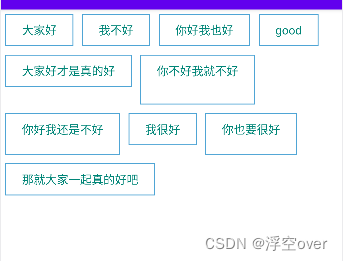
二、理论基础
UI绘制流程中:
1、onMeasure()
measure()方法被final修饰不可重写,onMeasure()可重写
父view重写onMeasure()方法,调用子view的measure()方法,子view的measure()方法调用子view的onMeasure()方法,以此递归
每个view的onMeasure()方法最终调用setMeasureDimension()方法保存测量结果
view:onMeasure()会计算出自己的尺寸然后保存
ViewGroup:onMeasure()会调用子view的measure()自我测量(期望值),在根据期望值来计算实际尺寸和位置,同时根据子view的尺寸来计算自己尺寸
如何测量子view?getChildMeasureSpec(),三个参数:spec来自父类,padding来自自己,childDimension来自子view
2、onLayout():摆放子控件
onLayout()
layoutChildren()
clild.layout()
三、实现步骤
1.定义一个类继承自ViewGroup
定义变量:子控件的容器和行高
   //所有的子控件容器
    List<List<View>> list = new ArrayList<>();
    //每一行行高存起来
    List<Integer> listLineHeight = new ArrayList<>();

    //防止测量多次
    private boolean isMeasure = false;
构造方法:
	public FlowLayout(Context context) {

        super(context);
    }

    public FlowLayout(Context context, AttributeSet attrs) {

        super(context, attrs);
    }

    public FlowLayout(Context context, AttributeSet attrs, int defStyleAttr) {

        super(context, attrs, defStyleAttr);
    }
2.重写 generateLayoutParams
	@Override
    public LayoutParams generateLayoutParams(AttributeSet attrs) {

        return new MarginLayoutParams(getContext(),attrs);
    }
3.重写onMeasure()
onMeasure()方法是重点,首先获取父控件给的一个参考值,然后获取到自己的测量模式,保存当前控件里面的子控件的总宽高,每一行的高度值,然后计算实际宽高,注意最后一行要特殊处理,每一行的最后一个item也要特殊处理
	@Override
    protected void onMeasure(int widthMeasureSpec, int heightMeasureSpec) {

        //获取父控件给的一个参考值
        int widthSize = MeasureSpec.getSize(widthMeasureSpec);
        int heightSize = MeasureSpec.getSize(heightMeasureSpec);

        //获取到自己的测量模式
        // 在LinearLayout中measureChildBeforeLayout中把测量规则改成自view的
        int widthMode = MeasureSpec.getMode(widthMeasureSpec);
        int heightMode = MeasureSpec.getMode(heightMeasureSpec);

        //保存当前控件里面的子控件的总宽高
        int childCountWidth = 0;
        int childCountHeight = 0;

        if(!isMeasure){

            isMeasure = true;
        }else{

            //当前控件中字控件一行使用的宽度值
            int lineCountWidth = 0;

            //保存一行中最高子控件
            int lineMaxHeight = 0;

            //存储每个子控件的宽高
            int iChildWidth = 0;
            int iChildHeight = 0;

            //创建一行的容器
            List<View> viewList = new ArrayList<>();

            //遍历所有子控件
            int childCount = getChildCount();
            for (int x = 0; x < childCount; x++) {

                //获得子控件
                View childAt = getChildAt(x);
                //先测量子控件
                measureChild(childAt,widthMeasureSpec,heightMeasureSpec);
                //从子控件中获取LayoutParams
                MarginLayoutParams layoutParams = (MarginLayoutParams)childAt.getLayoutParams();
                //计算当前控件实际宽高
                iChildWidth = childAt.getMeasuredWidth() + layoutParams.leftMargin + layoutParams.rightMargin;
                iChildHeight = childAt.getMeasuredHeight() + layoutParams.bottomMargin + layoutParams.topMargin;
                //当子控件宽度累加后是否大于父控件
                if (iChildWidth +lineCountWidth > widthSize){

                    //需要换行,保存一行的信息
                    //每次换行的时候比较当前行和上一行谁的宽度大
                    childCountWidth = Math.max(lineCountWidth,childCountWidth);
                    //如果需要换行,累加行高
                    childCountHeight += lineMaxHeight;
                    //把行高记录到集合中
                    listLineHeight.add(lineMaxHeight);
                    //把一行的数据放进总容器
                    list.add(viewList);
                    //把一行的容器重新创建一个,新的一行
                    viewList = new ArrayList<>();
                    //将每一行总宽高重新初始化
                    lineCountWidth = iChildWidth;
                    lineMaxHeight = iChildHeight;

                    viewList.add(childAt);
                }else {

                    lineCountWidth += iChildWidth;
                    //对比每个子控件高度谁最高
                    lineMaxHeight = Math.max(lineMaxHeight , iChildHeight);
                    //如果不需要换行,保存在一行中
                    viewList.add(childAt);
                }
                //这样做的原因是 之前的if else中 不会把最后一行的高度加进listLineHeight
                // 最后一行要特殊对待 不管最后一个item是不是最后一行的第一个item
                if(x == childCount - 1){

                    //保存当前行信息
                    childCountWidth = Math.max(lineCountWidth,childCountWidth);
                    childCountHeight +=lineMaxHeight;

                    listLineHeight.add(lineMaxHeight);
                    list.add(viewList);
                }
            }
        }

        //设置控件最终的大小
        int measureWidth = widthMode == MeasureSpec.EXACTLY?widthSize:childCountWidth;
        int measureHeight = heightMode == MeasureSpec.EXACTLY?heightSize:childCountHeight;
        setMeasuredDimension(measureWidth,measureHeight);

    }
4.重新onLayout()
摆放子控件位置,遍历每一行的控件,获取到当前这一行的position
	@Override
    protected void onLayout(boolean b, int i, int i1, int i2, int i3) {

        //摆放子控件位置
        int left,right,top,bottom;
        //保存上一个控件边距
        int countLeft = 0;
        //保存上一行的高度和边距
        int countTop = 0;
        //遍历所有行
        for (List<View> views : list) {

            //遍历每一行的控件
            for (View view : views) {

                //获取到控件的属性对象
                MarginLayoutParams layoutParams = (MarginLayoutParams) view.getLayoutParams();
                left = countLeft+layoutParams.leftMargin;
                top = countTop + layoutParams.topMargin;
                right = left+view.getMeasuredWidth();
                bottom = top+view.getMeasuredHeight();
                view.layout(left,top,right,bottom);

                countLeft += view.getMeasuredWidth() + layoutParams.leftMargin + layoutParams.rightMargin;
            }
            //获取到当前这一行的position
            int index = list.indexOf(views);
            countLeft = 0;
            countTop+= listLineHeight.get(index);
        }
        list.clear();
        listLineHeight.clear();
    }
5.xml文件
 <com.wuchen.flowui.FlowLayout android:layout_width="wrap_content" android:layout_height="wrap_content" >
        <TextView android:layout_width="wrap_content" android:layout_height="wrap_content" android:text="大家好" android:paddingLeft="20dp" android:paddingRight="20dp" android:paddingTop="10dp" android:textColor="@color/colorPrimary" android:background="@drawable/text_bg" android:layout_margin="5dp" android:paddingBottom="10dp"/>
        <TextView android:layout_width="wrap_content" android:layout_height="wrap_content" android:text="我不好" android:paddingLeft="20dp" android:paddingRight="20dp" android:textColor="@color/colorPrimary" android:paddingTop="10dp" android:layout_margin="5dp" android:background="@drawable/text_bg" android:paddingBottom="10dp"/>

        <TextView android:layout_width="wrap_content" android:layout_height="wrap_content" android:text="你好我也好" android:paddingLeft="20dp" android:paddingRight="20dp" android:paddingTop="10dp" android:textColor="@color/colorPrimary" android:background="@drawable/text_bg" android:layout_margin="5dp" android:paddingBottom="10dp"/>

        <TextView android:layout_width="wrap_content" android:layout_height="wrap_content" android:text="good" android:paddingLeft="20dp" android:paddingRight="20dp" android:paddingTop="10dp" android:textColor="@color/colorPrimary" android:background="@drawable/text_bg" android:layout_margin="5dp" android:paddingBottom="10dp"/>

        <TextView android:layout_width="wrap_content" android:layout_height="wrap_content" android:text="大家好才是真的好" android:paddingLeft="20dp" android:paddingRight="20dp" android:textColor="@color/colorPrimary" android:paddingTop="10dp" android:background="@drawable/text_bg" android:layout_margin="5dp" android:paddingBottom="10dp"/>

        <TextView android:layout_width="wrap_content" android:layout_height="60dp" android:text="你不好我就不好" android:paddingLeft="20dp" android:paddingRight="20dp" android:paddingTop="10dp" android:textColor="@color/colorPrimary" android:background="@drawable/text_bg" android:layout_margin="5dp" android:paddingBottom="10dp"/>

        <TextView android:layout_width="wrap_content" android:layout_height="50dp" android:text="你好我还是不好" android:paddingLeft="20dp" android:paddingRight="20dp" android:paddingTop="10dp" android:textColor="@color/colorPrimary" android:background="@drawable/text_bg" android:layout_margin="5dp" android:paddingBottom="10dp"/>

        <TextView android:layout_width="wrap_content" android:layout_height="wrap_content" android:text="我很好" android:paddingLeft="20dp" android:paddingRight="20dp" android:paddingTop="10dp" android:textColor="@color/colorPrimary" android:background="@drawable/text_bg" android:layout_margin="5dp" android:paddingBottom="10dp"/>

        <TextView android:layout_width="wrap_content" android:layout_height="50dp" android:text="你也要很好" android:paddingLeft="20dp" android:paddingRight="20dp" android:paddingTop="10dp" android:textColor="@color/colorPrimary" android:background="@drawable/text_bg" android:layout_margin="5dp" android:paddingBottom="10dp"/>
        <TextView android:layout_width="wrap_content" android:layout_height="wrap_content" android:text="那就大家一起真的好吧" android:paddingLeft="20dp" android:paddingRight="20dp" android:paddingTop="10dp" android:textColor="@color/colorPrimary" android:background="@drawable/text_bg" android:layout_margin="5dp" android:paddingBottom="10dp"/>
    </com.wuchen.flowui.FlowLayout>
四、demo地址
边栏推荐
猜你喜欢
修复APP的BUG,热修复的知识点和大厂的相关资料汇总

hackmyvm-bunny预排

Win10 解决AMD平台下SVM无法开启的问题
Eric target penetration test complete tutorial

Kotlin - 标准函数(with、run和apply)
OPENSSL基本实验以及OPENSSL详解

PHP反序列化漏洞

【泰山众筹】模式为什么一直都这么火热?是有原因的
Solve the problem that the 5+APP real machine test cannot access the background (same local area network)
利用cookie获取admin权限 CTF基础题
随机推荐
Microsoft Office安装全过程记录
CSRF(跨站请求伪造)
大厂底层必修:“应用程序与 AMS 的通讯实现”
战场:3(双子叶植物)vulnhub走读
Shuriken: 1 vulnhub walkthrough
快速搭建一个网关服务,动态路由、鉴权的流程,看完秒会(含流程图)
备战金九银十:Android 高级架构师的学习路线及面试题分享
xxe of CTF
View的滑动
CTF introductory notes ping
The first time to tear the code by hand, how to solve the problem of full arrangement
WeChat applet development video loading: [Rendering layer network layer error] Failed to load media
关于我的项目-微信公众号~
Scrapy crawler encounters redirection 301/302 problem solution
Cookie is used to collect the admin privileges CTF foundation problem
超级云APP,陪伴您一起成长的软件
Summary of php function vulnerabilities
强化学习笔记:DDPG
真·杂项:资本论阅读笔记(随缘更新)
PALISADE:CKKS的使用