当前位置:网站首页>Oauth2.0 - explanation of simplified mode, password mode and client mode
Oauth2.0 - explanation of simplified mode, password mode and client mode
2022-07-03 06:01:00 【Xiao bichao】
One 、OAuth2.0
In the last article, we have discussed OAuth2.0 I explained , And the authentication process of authorization code mode , And built a simple authentication service and resource service , In the previous article, we only explained the authentication login mode of authorization code , This article is about simplifying patterns 、 Password mode 、 Client mode these three modes are demonstrated and explained , Here is the address of the last article :
In the preparation of the previous article , We have released all models to c1 This customer id, So in the demonstration of the following mode, we can directly use the project built in the previous article :
Two 、 Simplified mode

The simplified mode is relative to the authorization code mode , It reduces the exchange through authorization code Token Steps for .
The resource owner opens the client , The client requires authorization from the resource owner , It redirects the browser to the authorization server , The identity information of the client will be attached during redirection
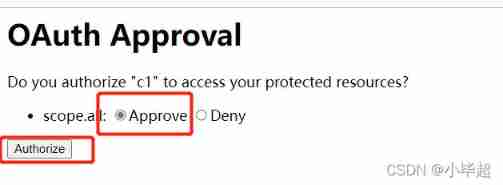
The browser displays the authorize to authorization server page , After that, the user agrees to authorize .
The authorization server sends the authorization code to the token (access_token) With Hash In the form of redirection uri Of fargment Send to browser .
Generally speaking , Simplified mode is used for third-party single page applications without server side , Because no server can receive authorization code .
characteristic
- Simple . The process is simple
- For pure front end applications
- unsafe . A bit careless ,Token Can be obtained by malicious scripts
- Token The validity period is short , When the browser is closed, it will fail
Browser access :
http://localhost:8020/oauth/authorize?client_id=c1&response_type=token&scope=all&redirect_uri=http://www.baidu.com

In the address bar, you can see the returned token:
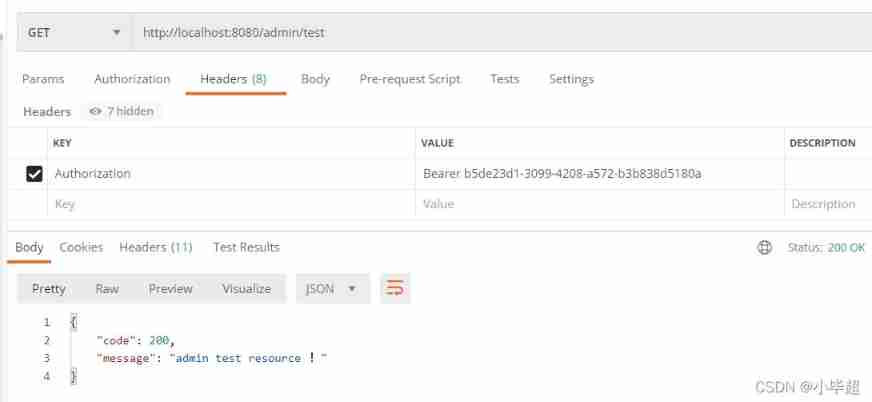
Use Token Access resource interface :
3、 ... and 、 Password mode
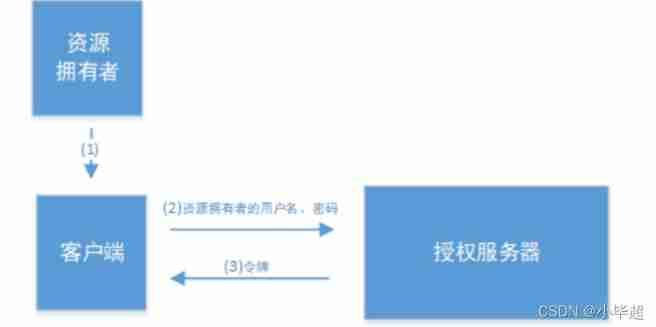
- The resource owner will the user name 、 The password is sent to the client
- The client holds the user name of the resource owner 、 The password requests a token from the authorization server (access_token)
This model is very simple , But it means directly leaking sensitive user information to client, So this shows that this model can only be used for client It's our own development . So password patterns are generally used for our own development , The first is native App Or first party single page applications .
characteristic :
- Need to enter account password , Extremely unsafe , Third party applications need to be highly trusted
- It is applicable to situations where other authorization modes cannot be adopted
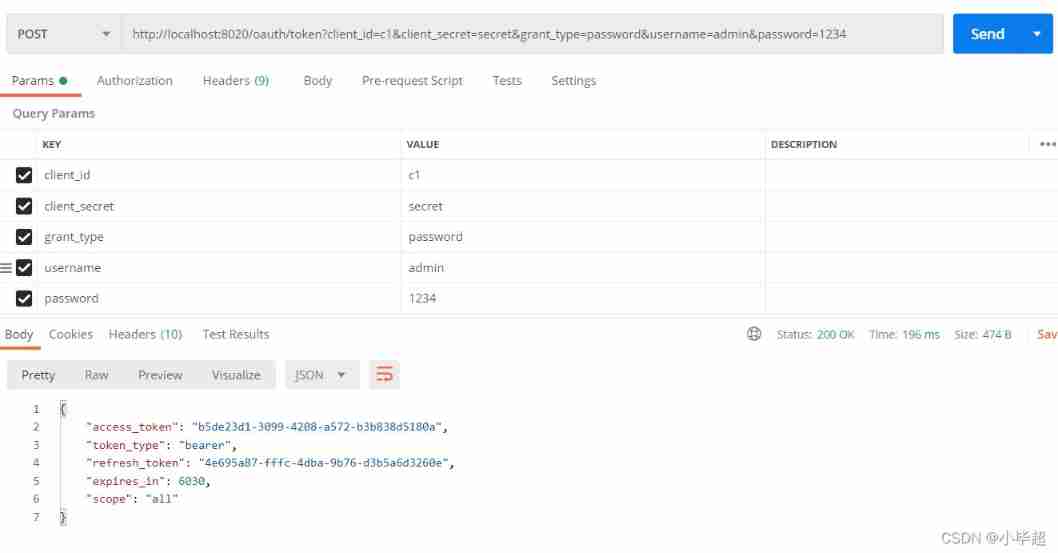
Use PostMan send out POST request :
http://localhost:8020/oauth/token?client_id=c1&client_secret=secret&grant_type=password&username=admin&password=1234
Use Token Access resource interface :
Four 、 Client mode

- The client sends its own identity information to the authorization server , And request a token (access_token)
- After confirming that the identity of the client is correct , Put the token (access_token) Send to client
This is the most convenient but insecure mode . So this requires us to be right client Complete trust , and client It's also safe . So this pattern is generally used to provide server-side services that we fully trust . such as , Partner system docking , Pull a set of user information .
characteristic
- The authorization dimension is the application dimension , Not user dimension . Therefore, it is possible for multiple users to share one Token The situation of
- Shared resources applicable to application dimensions
Use PostMan send out POST request :
http://localhost:8020/oauth/token?client_id=c1&client_secret=secret&grant_type=client_credentials
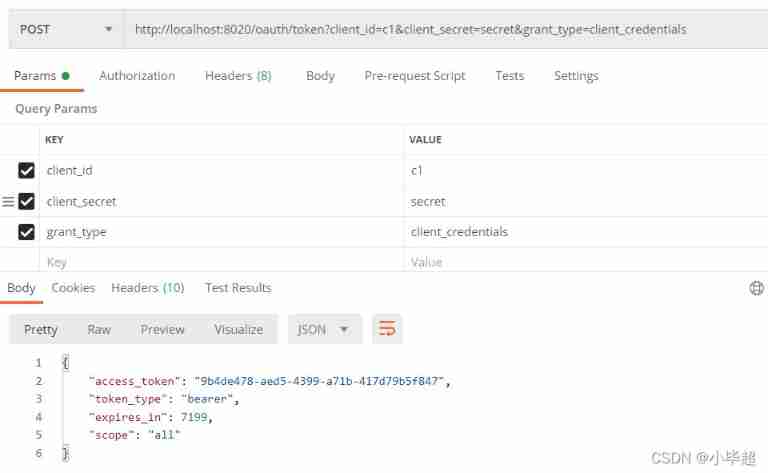
Use Token Access resource interface :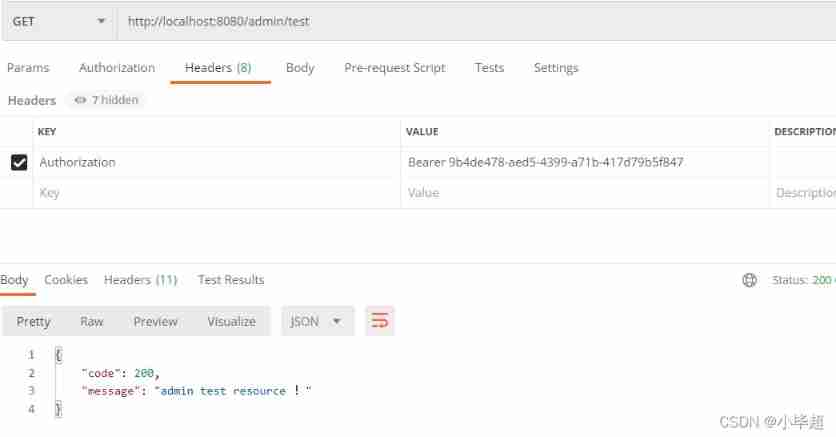

Love little buddy can pay attention to my personal WeChat official account. , Get more learning materials !
边栏推荐
- Ansible firewall firewalld setting
- 1. Somme des deux nombres
- Kubernetes notes (II) pod usage notes
- 从 Amazon Aurora 迁移数据到 TiDB
- Personal outlook | looking forward to the future from Xiaobai's self analysis and future planning
- Alibaba cloud Alipay sandbox payment
- Why is the website slow to open?
- [teacher Zhao Yuqiang] redis's slow query log
- Kubernetes notes (IV) kubernetes network
- Core principles and source code analysis of disruptor
猜你喜欢

Introduction to redis using Lua script

Bernoulli distribution, binomial distribution and Poisson distribution, and the relationship between maximum likelihood (incomplete)
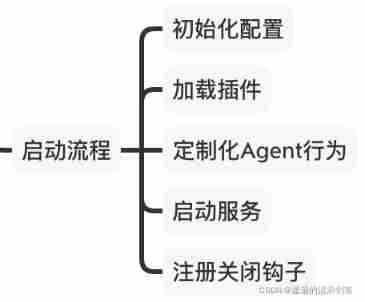
Skywalking8.7 source code analysis (I): agent startup process, agent configuration loading process, custom class loader agentclassloader, plug-in definition system, plug-in loading
![Ensemble, série shuishu] jour 9](/img/39/c1ba1bac82b0ed110f36423263ffd0.png)
Ensemble, série shuishu] jour 9

Clickhouse learning notes (I): Clickhouse installation, data type, table engine, SQL operation
一起上水硕系列】Day 9
![[teacher Zhao Yuqiang] redis's slow query log](/img/a7/2140744ebad9f1dc0a609254cc618e.jpg)
[teacher Zhao Yuqiang] redis's slow query log

@Import annotation: four ways to import configuration classes & source code analysis
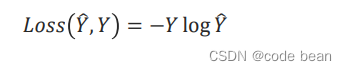
pytorch 多分类中的损失函数

Redhat7 system root user password cracking
随机推荐
Jetson AgX Orin platform porting ar0233 gw5200 max9295 camera driver
[teacher Zhao Yuqiang] MySQL high availability architecture: MHA
Why should there be a firewall? This time xiaowai has something to say!!!
QT read write excel -- qxlsx insert chart 5
Kubernetes notes (V) configuration management
[teacher Zhao Yuqiang] Cassandra foundation of NoSQL database
Troubleshooting of 32GB Jetson Orin SOM failure to brush
Final review Day8
2022.6.30DAY591
Bio, NiO, AIO details
2022.7.2day594
[escape character] [full of dry goods] super detailed explanation + code illustration!
Kubernetes notes (II) pod usage notes
[Zhao Yuqiang] deploy kubernetes cluster with binary package
Understand one-way hash function
MySQL 5.7.32-winx64 installation tutorial (support installing multiple MySQL services on one host)
Loss function in pytorch multi classification
Installation du plug - in CAD et chargement automatique DLL, Arx
[minesweeping of two-dimensional array application] | [simple version] [detailed steps + code]
The most responsible command line beautification tutorial