当前位置:网站首页>UE4 source code reading_ Bone model and animation system_ Animation node
UE4 source code reading_ Bone model and animation system_ Animation node
2022-07-03 08:25:00 【_ lazycat】
0. Write it at the front
This article is a collection of personal learning notes , If there is a mistake , I hope you can point out .
1. Animation play :FAnimNode_SequencePlayer
Related parameters :
- UAnimSequenceBase Sequence: Animation clips
- PlayRateBasis: Playback rate base , By PlayRate except
- PlayRate: Playback rate , It could be negative , Indicates reverse broadcast
- PlayRateScaleBiasClamp: Yes PlayRate Extra treatment ( The zoom , Offset and Clamp), In addition Basis Post operation
- StartPosition: The starting position of the animation node
- bLoopAnimation: Cycle animation
1.1 UAnimSequence
Inherited from UAnimSequenceBase, Save the key frame data of the animation sequence , And contains several orbital data
1. The main data :
TArray RawAnimationData; Raw uncompressed animation keyframe data
TArray SourceRawAnimationData; RawAnimationData Copy of , It is only modified during initialization
Struct FRawAnimSequenceTrack: Single key frame data , Including translation 、 Rotate and scale .TArray<FVector> PosKeys; TArray<FQuat> RotKeys; TArray<FVector> ScaleKeys;
2. Resource settings
a. Compression Set: Animation compression settings
See animation compression for details
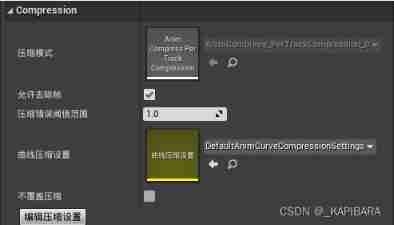
b. Addtive Set: Overlay settings 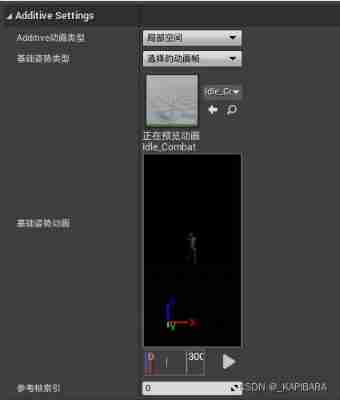
- TEnumAsByte AdditiveAnimType; The type of superimposed animation
AAT_None
AAT_LocalSpaceBase Based on local joint space
AAT_RotationOffsetMeshSpace Rotation is based on model space , Translation is based on local joint space - TEnumAsByte RefPoseType; Types of basic postures
ABPT_None UMETA(DisplayName = “None”),
ABPT_RefPose UMETA(DisplayName = “Skeleton Reference Pose”),
ABPT_AnimScaled UMETA(DisplayName = “Selected animation scaled”),
ABPT_AnimFrame UMETA(DisplayName = “Selected animation frame”),
c. RootMotion Set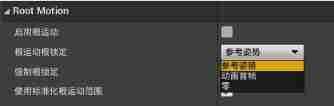
3. Main function 【TODO】
- GetAnimationPose
- GetBonePose
- AnimCompressionTypes:: DecompressPose
- GetBonePose_Additive
2. RootMotion
2.1 RootMotionMontage
UAnimMontage:
1.ExtractRootMotionFromTrackRange: from Montage Extract within a certain range in the animation track RootMotion data
ExtractRootMotionFromTrack:
StartTrackPosition、EndTrackPosition:
Extract from the specified start time to the end time Montage Internal RootMotion data , Last output to FRootMotionMovementParams objectGetRootMotionExtractionStepsForTrackRange:
Due to a Montage The animation track of may consist of multiple animation sequences , So it is extracted in the way of animation sequence by animation RootMotion data , There is TArray in .
FRootMotionExtractionStep: There is an animation sequence (UAnimSequence) And extraction RootMotion The range of data ( Start position and end position )
You may encounter loopback playback (StartTrackPosition>EndTrackPosition), It needs to be extracted in the correct order .
If it is loopback , When the animation track has multiple animation sequences, it needs to traverse from the last bit forward .
Otherwise, it will traverse the animation sequence list in order .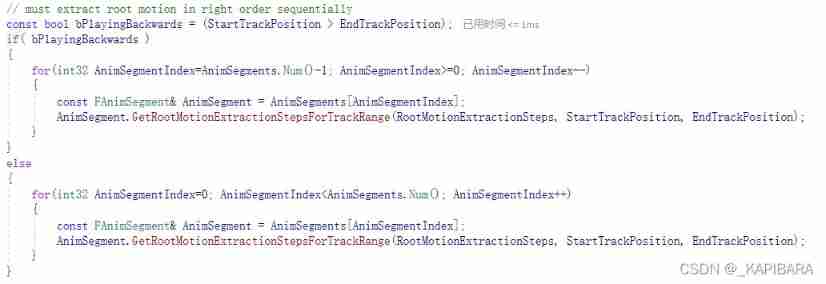
FAnimSegment::GetRootMotionExtractionStepsForTrackRange
Check whether the start time and end time fall within the range of the animation sequence , If so, add Step listExtractRootMotionFromTrack:
- After calculating Step After the animation collection , Traverse Step
- Judge whether the animation is turned on RootMotion.
- For opening RootMotion Of Step(AnimSequence)
call AnimSequence->ExtractRootMotionFromRange Extract displacement data
FTransform StartTransform = ExtractRootTrackTransform(StartTrackPosition, NULL);
FTransform EndTransform = ExtractRootTrackTransform(EndTrackPosition, NULL);
=》UAnimSequence::GetBoneTransform
=》AnimEncodingLegacyBase::GetBoneAtom Finally, call the interface to extract
Then the extracted displacement data (DeltaTransform) Deposit in FRootMotionMovementParams In the object
RootMotion.Accumulate(DeltaTransform), This function does not input weights , direct 1 Than 1 The final displacement is fused
2.2 RootMotion Anim
FAnimInstanceProxy::TickAssetPlayerInstances:
When RootMotion The model is RootMotionFromEverything when , In this function , According to the weight RootMotion Data extraction to FRootMotionMovementParams In the object
2.3 RootMotion Application and synchronization
See mobile synchronization .
3. Animation overlay :FAnimNode_ApplyAdditive
1. The main variable :
FPoseLink Base: Connect base Animation node
FPoseLink Additive: Connect overlay animation nodes
float Alpha: Overlay weights
2. Main interface :
- FAnimNode_ApplyAdditive::Evaluate_AnyThread
- obtain Base Two animation poses of node and overlay node
Base.Evaluate(Output);
const bool bExpectsAdditivePose = true;
FPoseContext AdditiveEvalContext(Output, bExpectsAdditivePose);
Additive.Evaluate(AdditiveEvalContext); - Calculate the resulting pose after superposition
FAnimationRuntime::AccumulateAdditivePose
- obtain Base Two animation poses of node and overlay node
- FAnimationRuntime::AccumulateAdditivePose
- According to the type of superposition , Choose different interface calculation
Local space superposition :AccumulateLocalSpaceAdditivePoseInternal
Grid volume space overlay :AccumulateMeshSpaceRotationAdditiveToLocalPoseInternal - In case of curve animation
BaseCurve.Accumulate(AdditiveCurve, Weight);
- According to the type of superposition , Choose different interface calculation
- FAnimationRuntime::AccumulateLocalSpaceAdditivePoseInternal
- Traverse BasePose Every bone of :
According to the superposition weight , Calculate the superposition of each bone
The superposition weight is 1 when :
BasePose[BoneIndex].AccumulateWithAdditiveScale(AdditivePose[BoneIndex], VBlendWeight);
The superposition weight is less than 1 when :
FTransform Additive = AdditivePose[BoneIndex];
FTransform::BlendFromIdentityAndAccumulate(BasePose[BoneIndex], Additive, VBlendWeight);
- Traverse BasePose Every bone of :
- AccumulateWithAdditiveScale: Calculate the superimposed Rotation、Translation、Scale data
Atom: Pose data to be superimposed- Deal with rotation : The superposition of rotations , Multiply by quaternion :
const VectorRegister BlendedRotation = VectorMultiply(Atom.Rotation, BlendWeight.Value);
Rotation = VectorQuaternionMultiply2(BlendedRotation, Rotation); - Process translation : Add vectors
const VectorRegister BlendedTranslation = VectorMultiply(Atom.Translation, BlendWeight.Value);
Translation = VectorAdd(Translation, BlendedTranslation); - Dealing with scaling :
Scale3D = Base_Scale3D * (Default + (Atom_Scale3D * wight))
- Deal with rotation : The superposition of rotations , Multiply by quaternion :
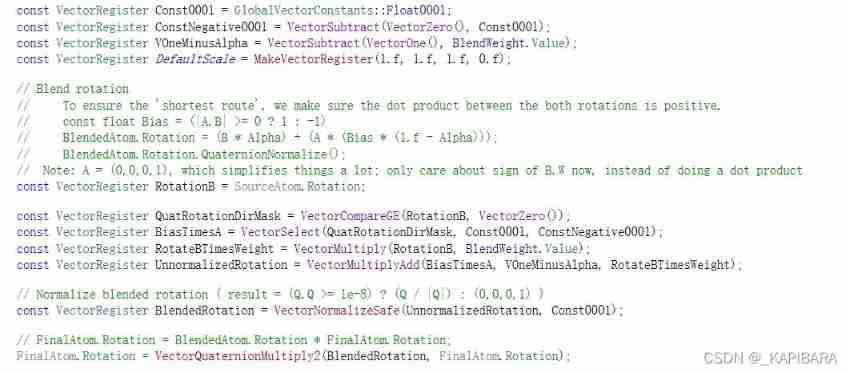
- BlendFromIdentityAndAccumulate: It is also calculated after superposition Rotation、Translation、Scale data
- The translation and zoom processing are consistent with the above
Although it uses Lerp, but (0,0,0) and Atom Press Weight Do interpolation , It's actually Atom * Weight Result
- Processing of rotation
- The translation and zoom processing are consistent with the above
4. Animation blending :BlendSpace
边栏推荐
- unity2019_ Input management
- Mall management system of database application technology course design
- redis集群系列四
- Initial unity
- Intersectionpicker in osgearth
- php-fpm软件的安装+openresty高速缓存搭建
- Osgconv tool usage
- Golang 字符串分割,替换和截取
- Multi traveling salesman problem -- overview of formula and solution process
- Luaframwrok handles resource updates
猜你喜欢
unity2019_ Input management

Image processing 8-cnn image classification

Student educational administration management system of C # curriculum design

Unity performance optimization

Open the influence list of "National Meteorological Short Videos (Kwai, Tiktok) in November" in an interactive way“
About Wireshark's unsuccessful installation of npcap

jupyter远程服务器配置以及服务器开机自启
C#课程设计之学生教务管理系统

Chocolate installation
the installer has encountered an unexpected error installing this package
随机推荐
Golang json格式和结构体相互转换
Lua framwrok framework starts
Osgearth topographic shading map drawing
Unity change default editor
Compilation error: "not in executable format: file format not recognized"“
jupyter远程服务器配置以及服务器开机自启
Jupyter remote server configuration and server startup
Pit & ADB wireless debugging of vivo real machine debugging
Flex flexible box layout
C语言-入门-精华版-带你走进编程(一)
Multi traveling salesman problem -- overview of formula and solution process
Base64 and base64url
Wpf: solve the problem that materialdesign:dialoghost cannot be closed
Transplantation of tslib Library
十六进制编码简介
Use of ue5 QRcode plug-in
數據庫應用技術課程設計之商城管理系統
100 GIS practical application cases (78) - Multi compliance database design and data warehousing
Haproxy+kept build 01
梯度下降法求解BP神经网络的简单Demo