当前位置:网站首页>C disk drives, folders and file operations
C disk drives, folders and file operations
2022-06-25 08:00:00 【ykxxcs】
c# Operation of files and folders
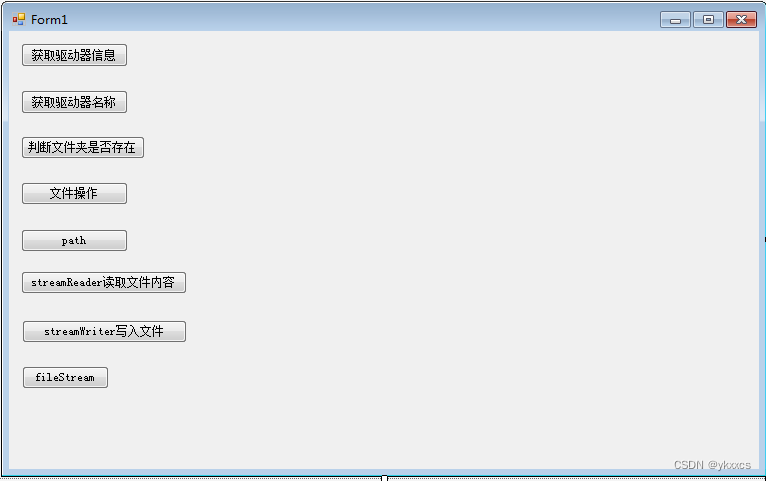
public partial class Form1 : Form
    {
        public Form1()
        {
            InitializeComponent();
        }

        private void button1_Click(object sender, EventArgs e)
        {
            //Driveinfo driveInfo = new Driveinfo("C");  // Copied it from the Internet , There is a mistake
            DriveInfo driveInfo = new DriveInfo("C");
            MessageBox.Show(driveInfo.ToString());
            MessageBox.Show(" Name of the drive :" + driveInfo.Name);
            MessageBox.Show(" The root directory of the drive :" + driveInfo.RootDirectory);
            MessageBox.Show(" Whether the drive is ready :" + driveInfo.IsReady);
            MessageBox.Show(" Amount of free space available on disk :" + driveInfo.AvailableFreeSpace);
            MessageBox.Show(" Total free space available on drive :" + driveInfo.TotalFreeSpace);
            MessageBox.Show(" Total storage space on drive :" + driveInfo.TotalSize);
            MessageBox.Show(" File system format name :" + driveInfo.DriveFormat);
            MessageBox.Show(" Drive type :" + driveInfo.DriveType);
            MessageBox.Show(" The volume label of the drive :" + driveInfo.VolumeLabel);

        }
 // Get all drive names and file formats in your computer
        private void button2_Click(object sender, EventArgs e)
        {

            DriveInfo[] drives = DriveInfo.GetDrives();
            foreach (DriveInfo drive in drives)
            {
                if (drive.IsReady)
                {
                    MessageBox.Show(" Drive name :" + drive.Name);
                    MessageBox.Show(" File format :" + drive.DriveFormat);
                }
            }

        }
         // Use  Directory  Class in  D  On disk operation  code  Folder , It is required to judge whether the folder exists first ,
        private void button3_Click(object sender, EventArgs e)
        {

            // Delete... If it exists , Otherwise, create the folder
            if (Directory.Exists(@"D:\code"))
                Directory.Delete(@"D:\code", true);
            else
                Directory.CreateDirectory(@"D:\code");
            MessageBox.Show("ok");

        }

        private void button4_Click(object sender, EventArgs e)
        {
            // stay  D  Discoid  code  Create a folder named  test1.txt  The file of , And get the relevant attributes of the file , Then move it to D On the plate  code-1  In the folder .
            Directory.CreateDirectory(@"D:\code");
            FileInfo fileInfo = new FileInfo(@"D:\code\test1.txt");
            if (!fileInfo.Exists)
                fileInfo.Create().Close();// create a file .Close() Close the stream and release all resources associated with it

            fileInfo.Attributes = FileAttributes.Normal;
            MessageBox.Show(" file name :" + fileInfo.Name);
            MessageBox.Show(" File parent directory :" + fileInfo.Directory);
            MessageBox.Show(" Full directory of files :" + fileInfo.FullName);
            MessageBox.Show(" Full path to directory :" + fileInfo.DirectoryName);
            MessageBox.Show(" File creation time :" + fileInfo.CreationTime);
            MessageBox.Show(" File extension :" + fileInfo.Extension);
            MessageBox.Show(" Whether the file is read-only :" + fileInfo.IsReadOnly);
            MessageBox.Show(" Last accessed file time :" + fileInfo.LastAccessTime);
            MessageBox.Show(" Last write file time :" + fileInfo.LastWriteTime);
            MessageBox.Show(" file size :" + fileInfo.Length);


            Directory.CreateDirectory(@"D:\code-1");// establish  code-1  Folder
            FileInfo newFileInfo = new FileInfo(@"D:\code-1\test1.txt");// Judge  code-1 Whether there is... Under the folder test1.txt
            if (!newFileInfo.Exists)
                fileInfo.MoveTo(@"D:\code-1\test1.txt");// If it doesn't exist, move the file

        }

        private void button5_Click(object sender, EventArgs e)
        {
            // Path path = new Path();
            //string path = @"d:\code";
        }

        private void button6_Click(object sender, EventArgs e)
        {
            //  Directory.CreateDirectory(@"D:\code");// Create directory
            // File.Create(@"D:\code\test.txt").Close(); // Create files in the directory

 //==================================== Read  D  disc  code  Under the folder  test.txt  Information in the file . ============

            string path = @"D:\code\test.txt";
            StreamReader reader = new StreamReader(path);
            if (reader.Peek() != -1)// Determine whether there are characters in the file
            {
               // string str = reader.ReadLine();// Read only one line
                string str = reader.ReadToEnd();// Read it all
                MessageBox.Show(str);
                Console.ReadLine();
            }
            reader.Close();

        }

        private void button7_Click(object sender, EventArgs e)
        {
            // towards  D  disc  code  The folder  test.txt  Write your name and mobile number in the file
            string path = @"D:\code\test.txt";
            using (StreamWriter writer = new StreamWriter(path))
            {
                writer.WriteLine(" full name ");
                writer.WriteLine(" Phone number ");
                writer.Flush();// Refresh cache
            }
        }

        private void button8_Click(object sender, EventArgs e)
        {
            // stay  D  disc  code  The folder  student.txt  Write the student number information in the file
            File.Create(@"D:\code\student.txt").Close();
            string path = @"D:\code\student.txt";
            string mes = " Student number :3188906224";
            byte[] bytes = Encoding.UTF8.GetBytes(mes);// Convert data from string type to byte type
            using (FileStream fileStream = new FileStream(path, FileMode.Open, FileAccess.Write))
            {
                fileStream.Write(bytes, 0, bytes.Length);
                fileStream.Flush();
            }

            // from  D  Discoid  code  In the folder  student.txt  The student number in the file is read out , And display it on the console
            if (File.Exists(path))
            {
                using (FileStream fileStream = new FileStream(path, FileMode.Open, FileAccess.Read))
                {
                    byte[] b = new byte[fileStream.Length];// Define the byte array for storing file information
                    fileStream.Read(b, 0, b.Length);// Read file information
                    char[] c = Encoding.UTF8.GetChars(b);// Convert the read data from byte type to character type
                    Console.WriteLine(c);

                }
            }
            else
                Console.WriteLine(" file does not exist ");
            Console.ReadLine();

        }
    }
}
Here it is , Thank you, blogger : Pistachio 2021, Part of this article is transferred from the following link
https://blog.csdn.net/weixin_56814032/article/details/120242871
边栏推荐
- socket问题记录
- 洛谷P1073 [NOIP2009 提高组] 最优贸易(分层图+最短路)
- 传统的IO存在什么问题?为什么引入零拷贝的?
- Six causes of PCB disconnection 2021-10-20
- 电子学:第009课——实验 7:研究继电器
- 50 pieces of professional knowledge of Product Manager (IV) - from problem to ability improvement: amdgf model tool
- 27. 移除元素
- 基于RBAC 的SAAS系统权限设计
- Ubuntu18下登录mysql 5.7设置root密码
- c# winform panel自定义图片和文字
猜你喜欢

基于STM32MP157调试MIPI-DSI屏幕
TCP的那点玩意儿

Basic use of ActiveMQ in Message Oriented Middleware

用函数的递归来解决几道有趣的题

Six causes of PCB disconnection 2021-10-20

CAN透传云网关CANIOT,CANDTU记录CAN报文远程收发CAN数据

Use the frame statistics function of the message and waveform recording analyzer royalscope to troubleshoot the accidental faults of the CAN bus

PCB board design - automatic layout 2021-10-15

时钟刻度盘的绘制

How much do you know about electronic components on PCB?
随机推荐
Take you through the normalization flow of GaN
Three Siemens fire-fighting hosts fc18 are equipped with can optical transceiver for optical fiber redundant ring network networking test
消息中间件之ActiveMQ的基本使用
@Resource和@Autowired注解的不同,为什么推荐@Resource?
c# winform panel自定义图片和文字
Mining microbial dark matter -- a new idea
Share the process requirements for single-layer flexible circuit board
饮食干预减轻癌症治疗相关症状和毒性
2160. 拆分数位后四位数字的最小和
电子学:第012课——实验 13:烧烤 LED
c#磁盘驱动器及文件夹还有文件类的操作
How to select lead-free and lead-free tin spraying for PCB? 2021-11-16
飞机引气系统的建模与故障仿真
Dietary intervention reduces cancer treatment-related symptoms and toxicity
allgero报错:Program has encountered a problem and must exit. The design will be saved as a .SAV file
唐老师讲运算放大器(第七讲)——运放的应用
Invalid Navicat scheduled task
Six causes of PCB disconnection 2021-10-20
bat启动.NET Core
Analysis and utilization of Microsoft Office Word remote command execution vulnerability (cve-2022-30190)