当前位置:网站首页>Excel文件读写(创建与解析)
Excel文件读写(创建与解析)
2022-08-01 23:47:00 【m0_67392273】
可以进行Excel文件处理的主流技术包括:
① Apache POI ( 基于DOM方式进行解析,将文件直接加载内存,速度较快,适合Excel文件数据量不大的应用场景)
② JXL (适合Excel文件数据量不大的应用场景)
③ Alibaba EasyExcel (采用逐行读取的解析模式,将每一行的解析结果以观察者的模式通知处理(AnalysisEventListener),所以比较适合数据量较大的Excel文件解析)
(其中常用的是Apache POI,Alibaba EasyExcel。)
一.Apache POI
POI提供了对不同格式文件的解析:
HSSF用于解析旧版本的Excel文件(.xls),由于旧版本的Excel文件只能存在65535行数据,所以已经不常用,目前常用XSSF解析Excel文件(.xlsx)。
首先添加jjar包依赖:
1. Workbook
Workbook接口代表一个Excel文件,通常创建它的实现类对象来创建(/加载)Excel文件,常用实现类是XSSFWorkbook。
(1).创建Excel文件
try (Workbook workbook = new XSSFWorkbook();
				FileOutputStream out =
						new FileOutputStream("E:\猿\demo.xlsx")) {

			// 将 workbook 对象中包含的数据,通过输出流,写入至Excel文件
			workbook.write(out);
			} catch (IOException e) {
			e.printStackTrace();
		}
(2).加载(解析)Excel文件
        // 通过输入流,读取excel文件
		FileInputStream in = new FileInputStream("E:\成绩.xlsx");
		// 将输入流传入Workbook
		Workbook workbook = new XSSFWorkbook(in);
注意还要关闭输入流,可以调用 in.close(),我们通常使用 try catch块来自动关闭:
try (Workbook workbook = new XSSFWorkbook();
				FileOutputStream out =
						new FileOutputStream("E:\demo.xlsx")) {
			// 将 workbook 对象中包含的数据,通过输出流,写入至Excel文件
			workbook.write(out);
		} catch (IOException e) {
			e.printStackTrace();
		}
(3)sheet (工作簿)
通过Workbook来进行工作簿sheet的创建和获取
①.sheet的创建
// 按照默认名称创建工作簿
Sheet sheet1 = workbook.createSheet();

// 按照自定义名称创建工作簿
Sheet sheet2 = workbook.createSheet("自定义工作簿");
②.sheet的获取
// 按照工作簿下标获取Sheet
Sheet sheet01 = workbook.getSheetAt(0);

// 按照工作簿名称获取Sheet
Sheet sheet02 = workbook.getSheet("Sheet0");
③.工作簿的数量
int sheetNum = workbook.getNumberOfSheets();
System.out.println("工作簿数量:" + sheetNum);
④.工作簿的数据行
System.out.println("工作簿0的数据行:" + sheet0.getLastRowNum());
(3).Row(数据行)
①.创建数据行
Row row0 = sheet0.createSheet(0);
②.获取首/尾行下标
int first = sheet.getFirstRowNum();
int last = sheet.getLastRowNum();
③. 根据下标获取指定行
Row row = sheet.getRow(0); //第一行
④.遍历指定区域行
// 遍历所有行
for (int i = 1; i <= sheet.getLastRowNum(); i++) {
    Row row = sheet.getRow(i);
    System.out.println(row);
}
(4).Cell(单元格)
①.单元格的创建与获取
Cell cell0 = Row.createCell(0); // cell的创建
Cell cell = Row.getCell(0); // cell的获取
②.设置列头(表格第一行)的内容
cellHead.setCellValue("序号");
cellHead1.setCellValue("姓名");
cellHead2.setCellValue("性别");
cellHead3.setCellValue("创建日期");
②.获取单元格内容
System.out.println("序号:" + cell0.getNumericCellValue());
System.out.println("姓名:" + cell1.getStringCellValue());
③.设置单元格内容
cell0.setCellValue(Math.random()*1000);
④.获取单元格类型
CellType type = cell.getCellType();
⑤.设置单元格格式
     // 创建单元格格式
     // 获取格式编码
      DataFormat dataFormat = workbook.createDataFormat();
      short formatCode = dataFormat.getFormat("yyyy-MM-dd HH:mm:ss");
	  System.out.println("单元格格式编码:" + formatCode);

	 // 创建cellStyle单元格格式对象
	  CellStyle cellStyle = workbook.createCellStyle();
	  cellStyle.setDataFormat(formatCode); // 设置单元格格式编码
      ...
     // 通过设置cellStyle单元格格式对象,来正常显示日期
      Cell cell0 = Row.createCell();
	  cell0.setCellStyle(cellStyle); // 设置单元格格式
	  cell0.setCellValue(new Date());	 // 保存日期至本单元格
二. 超大Excel文件的读写
1.使用POI写入 ===> SXXSFWorkbook
它可以写入非常大的数据量,如100w甚至更多,写数据速度快,占用内存更少。
它在写入过程中会产生临时文件,默认为100条数据被保存至内存中,如果超过这个默认数据量,前面的数据就会被写入临时文件,可通过设置SXSSFWorkbook的构造参数来设置每次在内存中保持的行数,当达到这个值时,会把这些数据flush到磁盘上,这样就不会出现内存不够的情况。
SXSSFWorkbook写入10w行数据(由于时间问题就用用10w行数据来测试)
实现代码如下:
//  Workbook的实现类 SXSSFWorkbook:
		try (Workbook workbook = new SXSSFWorkbook();
				FileOutputStream out = new FileOutputStream("E:\10w.xlsx")) {
			long begin = System.currentTimeMillis();
			Sheet sheet = workbook.createSheet();

			// 创建列头
			Row headRow = sheet.createRow(0);
		    // 设置列头单元格内容
			Cell cellVal0 = headRow.createCell(0);
			cellVal0.setCellValue("序号");

			// 创建数据行
			for(int i = 0;i < 100000;i++) {
				String name = "A"  + i;
				// 创建行
				Row row = sheet.createRow(i+1);

				// 创建单元格
				Cell cell0 = row.createCell(0); // 序号
				cell0.setCellValue(String.valueOf(i+1));
			}
		workbook.write(out);
		long after = System.currentTimeMillis();
System.out.println("SXSSFWorkbook写入10w行数据所耗时:" + (after-begin) + "ms");

		} catch (IOException e) {
			// TODO Auto-generated catch block
			e.printStackTrace();
		}
运行结果如下:
CPU使用如下
2.使用Alibaba EasyExcel写入
首先下载Alibaba EasyExcel相关jar包
使用EasyExcel写入10w订单数据
// easyExcel:对超大文件读取快,内存占用小
// 写入10w订单数据
		long begin = System.currentTimeMillis();
		// 10w
		EasyExcel.write("E:\easy10w.xlsx",Order.class).sheet("订单列表").doWrite(data());

		long after = System.currentTimeMillis();
		System.out.println("共耗时" + (after-begin) + "ms");

	}
	// 创建100w条订单数据
	private static List<Order> data(){
		List<Order> list = new ArrayList<Order>();

		for(int i = 0;i < 100000;i++) {
			list.add(new Order());
			}
		return list;
		}
运行结果如下: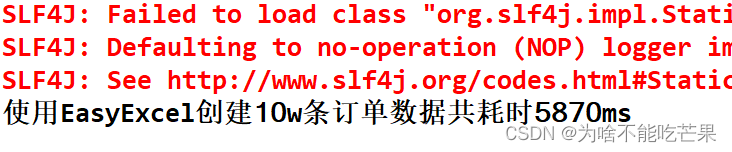
CPU使用率如下: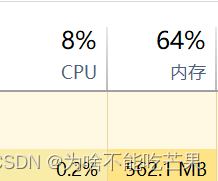
由此可见,10w的数据,相比之下,SXSSFWorkbook运行速度最快,CPU占用率最高;EasyExcel运行速度较低,CPU占用率最低。由于poi的内存消耗很大,EasyExcel可以大量减少内存的占用(原因是EasyExcel采用逐行读取的解析模式,并没有将文件数据一次性全部加载到内存,是在磁盘上一行一行读取数据),故推荐使用EasyExcel。
先自我介绍一下,小编13年上师交大毕业,曾经在小公司待过,去过华为OPPO等大厂,18年进入阿里,直到现在。深知大多数初中级java工程师,想要升技能,往往是需要自己摸索成长或是报班学习,但对于培训机构动则近万元的学费,着实压力不小。自己不成体系的自学效率很低又漫长,而且容易碰到天花板技术停止不前。因此我收集了一份《java开发全套学习资料》送给大家,初衷也很简单,就是希望帮助到想自学又不知道该从何学起的朋友,同时减轻大家的负担。添加下方名片,即可获取全套学习资料哦
边栏推荐
- Flink学习第五天——Flink可视化控制台依赖配置和界面介绍
- oozie startup error on cdh's hue, Cannot allocate containers as requested resource is greater than maximum allowed
- The monthly salary of the test post is 5-9k, how to increase the salary to 25k?
- solidity
- Use Jenkins for continuous integration, this knowledge point must be mastered
- 斜堆、、、
- 【图像融合】基于加权和金字塔实现图像融合附matlab代码
- Sql之各种Join
- Getting started with IDEA is enough to read this article
- npm npm
猜你喜欢
Win10安装DBeaver连接MySQL8、导入和导出数据库详细教程
仿牛客网项目第三章:开发社区核心功能(详细步骤和思路)
架构基本概念和架构本质
Access the selected node in the console
【MySQL系列】MySQL数据库基础

【C语言进阶】文件操作(二)
在CentOS下安装MySQL

使用Ganache、web3.js和remix在私有链上部署并调用合约
Appears in oozie on CDH's hue, error submitting Coordinator My Schedule

With a monthly salary of 12K, the butterfly changed to a new one and moved forward bravely - she doubled her monthly salary through the career change test~
随机推荐
Enterprise firewall management, what firewall management tools are there?
6134. 找到离给定两个节点最近的节点-力扣双百代码
类型“FC<Props>”的参数不能赋给类型“ForwardRefRenderFunction<unknown, Props>”的参数。 属性“defaultProps”的类型不兼容。 不
Wincc报表教程(SQL数据库的建立,wincc在数据库中保存和查询数据,调用Excel模板把数据保存到指定的位置和打印功能)
ansible模块--copy模块
如何用Redis实现分布式锁?
企业防护墙管理,有什么防火墙管理工具?
Always use "noopener" or "noreferrer" for links that open in a new tab
How do programmers solve online problems gracefully?
很多人喜欢用多御安全浏览器,竟是因为这些原因
程序员还差对象?new一个就行了
Calculate the angle of a line defined by two points
@WebServlet注解(Servlet注解)
在linux下MySQL的常用操作命令
Docker搭建Mysql主从复制
Chapter 11 Working with Dates and Times
云原生DevOps环境搭建
GIF制作-灰常简单的一键动图工具
numpy.unique
一款简洁的文件传输工具