当前位置:网站首页>Day113. Shangyitong: WeChat login QR code, login callback interface
Day113. Shangyitong: WeChat login QR code, login callback interface
2022-07-30 09:56:00 【Firework Youth·】
目录
一、WeChat scan login preparation
二、Wechat scans the QR code to log in
三、WeChat scan login callback interface - 内网穿透 *
2、Integrate WeChat scan login front-end
一、WeChat scan login preparation
官网:微信开放平台
1. 注册、资质
(1)登录注册
(2)激活、完善开发者资料
(3)开发者资质认证
(4)创建网站应用
(5)Obtain the necessary parameters for development

2. Clarify the three-way connection method
1.SDK:Import relevant dependencies as required (The docking-related information is encapsulated into dependencies)
2. API:Access to fixed addresses,Pass a fixed number of arguments,参考API文档.会使用httpclient工具
3. 登录流程
文档:微信开放平台
时序图|泳道图

二、Wechat scans the QR code to log in
1、后端接口实现
1、查看文档
方式一:拼写urlMake redirect page jumps
方拾二:通过jsRealize QR code acquisition

2、准备工作
1. 添加配置信息
#There is no auto-configuration class 需要手动读取
# 微信开放平台 appid
wx.open.app_id=你的appid
# 微信开放平台 appsecret
wx.open.app_secret=你的appsecret
# 微信开放平台 重定向url
wx.open.redirect_url=http://你的服务器名称/api/ucenter/wx/callback
2. utils Create a constant class under the package
@Component
//@PropertySource("classpath:application.properties") The variable name needs to match the configuration file
public class ConstantPropertiesUtil implements InitializingBean {

	@Value("${wx.open.app_id}")
	private String appId;

	@Value("${wx.open.app_secret}")
	private String appSecret;

	@Value("${wx.open.redirect_url}")
	private String redirectUrl;

	public static String WX_OPEN_APP_ID;
	public static String WX_OPEN_APP_SECRET;
	public static String WX_OPEN_REDIRECT_URL;

	@Override
	public void afterPropertiesSet() throws Exception {
		WX_OPEN_APP_ID = appId;
		WX_OPEN_APP_SECRET = appSecret;
		WX_OPEN_REDIRECT_URL = redirectUrl;
	}
}
3. 实现接口
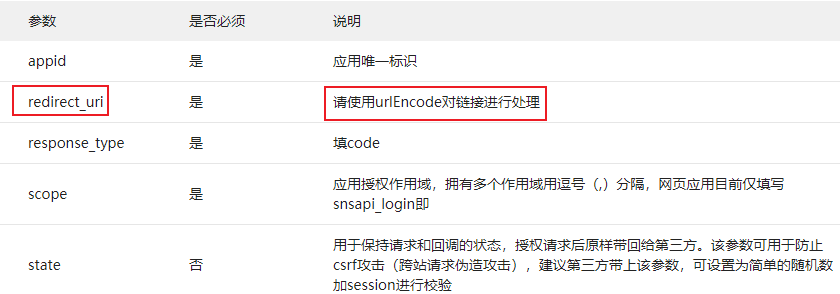
1. 接口分析
*参数:无
*返回值:map (获取二维码参数)
2. 实现 WeixinApiController
@Api(tags = "微信接口")
@Controller
@RequestMapping("/api/ucenter/wx")
public class WeixinApiController {

    //获取微信登录参数
    @GetMapping("getLoginParam")
    @ResponseBody
    public R genQrConnect(HttpSession session) throws UnsupportedEncodingException {
        Map<String, Object> map = new HashMap<>();
        //地址进行URLEncoder编码
        String redirectUri = URLEncoder.encode(ConstantPropertiesUtil.WX_OPEN_REDIRECT_URL, "UTF-8");

        map.put("appid", ConstantPropertiesUtil.WX_OPEN_APP_ID);
        map.put("redirectUri", redirectUri);
        map.put("scope", "snsapi_login");
        map.put("state", System.currentTimeMillis()+"");//System.currentTimeMillis()+""
        return R.ok().data(map);
    }
}
3. 修改端口,添加网关配置

#设置路由id
spring.cloud.gateway.routes[4].id=service-user
#设置路由的uri
spring.cloud.gateway.routes[4].uri=lb://service-user
#设置路由断言,代理servicerId为auth-service的/auth/路径
spring.cloud.gateway.routes[4].predicates= Path=/*/ucenter/**
2、前端页面实现
(1)方式一,拼写url进行重定向 (Redirect to a web page QR code)
(2)方式二,通过jsRealize QR code acquisition(选择,用户体验更好,The QR code is embedded in the page)

1. 创建API接口方法
创建 api/wx.js
import request from '@/utils/request'

const api_name = `/api/ucenter/wx`

export default {
  getLoginParam() {
    return request({
      url: `${api_name}/getLoginParam`,
      method: `get`
    })
  }
}
2. Confirm page elements

3. 改造JS
import wxApi from '@/api/wx'

        ...
        mounted() {
            // 注册全局登录事件对象
            window.loginEvent = new Vue();
            // 监听登录事件
            loginEvent.$on('loginDialogEvent', function () {
                document.getElementById("loginDialog").click();
            })
            // 触发事件,显示登录层:loginEvent.$emit('loginDialogEvent')
            //初始化微信js
            const script = document.createElement('script')
            script.type = 'text/javascript'
            script.src = 'https://res.wx.qq.com/connect/zh_CN/htmledition/js/wxLogin.js'
            document.body.appendChild(script)

            // 微信登录回调处理
            let self = this;
            window["loginCallback"] = (name, token, openid) => {
                self.loginCallback(name, token, openid);
            }
        },
        methods: {
            //WeChat login callback method
            loginCallback(name, token, openid) {
                //1.第一次登录,绑定手机号
                //2.不是第一次,设置登录状态
            },
            //切换微信登录
            weixinLogin() {
                this.dialogAtrr.showLoginType = 'weixin'
                wxApi.getLoginParam().then(response => {
                    let obj = new WxLogin({
                        self_redirect: true,
                        id: 'weixinLogin', // 需要显示的容器id
                        appid: response.data.appid, // 公众号appid wx*******
                        scope: response.data.scope, // 网页默认即可
                        redirect_uri: response.data.redirectUri, // 授权成功后回调的url
                        state: response.data.state, // 可设置为简单的随机数加session用来校验
                        style: 'black', // 提供"black"、"white"可选.二维码的样式
                        href: '' // 外部css文件url,需要https
                    });
                });
            },
三、WeChat scan login callback interface - 内网穿透 *
1、内网穿透
How to request an internal network address for an external network request
解决方案:
1. Solve intranet penetration in the company *
Find the operation and maintenance personnel to solve,Log in to the switch console,Add the mapping relationship between the internal and external networks
例如:192.168.140.100:12345 => 192.168.43.86:8160
2. 个人解决:修改系统配置文件host,添加域名和ip映射
优点:简单
缺点:只能使用80端口,(只能配置ipMapping Port mapping cannot be configured)
3. 个人解决:使用内网穿透工具
优点:可以配置ip映射,It can also be used with port mapping
缺点:花钱
4. 个人解决:Published on external hostsweb服务,Do the request redirect to the intranet
优势:可以配置ip映射,It can also be used with port mapping
缺点:Intranet interfaceurl,端口不能修改
5. 个人解决:Intranet penetration is provided by WeChat,principles and methods (4) 一致
所以,端口号8160 请求url不能变

1、后端接口开发
1. 接口分析
*参数:code 、state
*返回值:重定向地址
2. userService 添加依赖
    <dependencies>
        <!--httpclient-->
        <dependency>
            <groupId>org.apache.httpcomponents</groupId>
            <artifactId>httpclient</artifactId>
        </dependency>
    </dependencies>
3. 添加工具类

4. controller方法实现
    //扫码后,微信回调方法,授权临时票据code
    @GetMapping("callback")
    public String callback(String code, String state, HttpSession session) {
        //1.Get the WeChat callback verification codecode
        System.out.println("code = " + code);
        System.out.println("state = " + state);
        //2.访问微信接口,用code验证码,换取access_token、open_id
        //2.1拼写url
        //方式一
        String url = "ttps://api.weixin.qq.com/sns/oauth2/access_token?" +
                "appid=APPID&secret=SECRET&code=CODE&grant_type=authorization_code";

        //方式二
        StringBuffer baseAccessTokenUrl = new StringBuffer()
                .append("https://api.weixin.qq.com/sns/oauth2/access_token")
                .append("?appid=%s")
                .append("&secret=%s")
                .append("&code=%s")
                .append("&grant_type=authorization_code");
        String accessTokenUrl = String.format(baseAccessTokenUrl.toString(),
                ConstantPropertiesUtil.WX_OPEN_APP_ID,
                ConstantPropertiesUtil.WX_OPEN_APP_SECRET,
                code);

        //2.2Use the tool to send a request and get a response
        try {
            String accessTokenString = HttpClientUtils.get(accessTokenUrl);
            System.out.println("accessTokenString = " + accessTokenString);

            //2.3从json串中获取access_token、open_id
            JSONObject accessTokenJson = JSONObject.parseObject(accessTokenString);
            String accessToken = accessTokenJson.getString("access_token");
            String openid = accessTokenJson.getString("openid");

            //3.根据open_id查询用户信息
            QueryWrapper<UserInfo> wrapper = new QueryWrapper<>();
            wrapper.eq("openid",openid);
            UserInfo userInfo = userInfoService.getOne(wrapper); //openid是唯一的

            //4.用户信息为空,Go through the registration process
            if(userInfo==null){
                //5.根据access_token、open_id获取用户信息,完成注册流程
                //5.1拼写url
                String baseUserInfoUrl = "https://api.weixin.qq.com/sns/userinfo" +
                        "?access_token=%s" +
                        "&openid=%s";
                String userInfoUrl = String.format(baseUserInfoUrl, accessToken, openid);
                //5.2Send a request with the help of a tool,获取响应
                String resultInfo = HttpClientUtils.get(userInfoUrl);
                System.out.println("resultInfo:"+resultInfo);
                //5.3Convert backjson串,获取返回值
                JSONObject resultInfoJson = JSONObject.parseObject(resultInfo);
                //用户昵称
                String nickname = resultInfoJson.getString("nickname");
                //用户头像
                String headimgurl = resultInfoJson.getString("headimgurl");
                //5.4userInfo中存入信息,完成注册操作
                userInfo = new UserInfo();
                userInfo.setOpenid(openid);
                userInfo.setNickName(nickname);
                userInfo.setStatus(1);
                userInfoService.save(userInfo);
            }

            //6.Verify that the user is not locked out
            if(userInfo.getStatus()==0){
                throw new YyghException(20001,"用户已被锁定");
            }

            //7.Verify whether the user is bound with a mobile phone number
            //If the mobile phone number is boundopenid=""
            //如果没有绑定手机号openid=WeChat unique number
            Map<String,Object> map = new HashMap<>();
            if(userInfo.getPhone()==null){
                map.put("openid",openid);
            }else {
                map.put("openid","");
            }

            //8.补全用户信息,进行登录
            String name = userInfo.getName();
            if(StringUtils.isEmpty(name)) {
                name = userInfo.getNickName();
            }
            if(StringUtils.isEmpty(name)) {
                name = userInfo.getPhone();
            }
            String token = JwtHelper.createToken(userInfo.getId(), name);
            map.put("token", token);
            map.put("name", name);

            //9.Redirects back to the relevant page
            return "redirect:http://localhost:3000/weixin/callback?token="
                    +map.get("token")+ "&openid="+map.get("openid")
                    +"&name="+URLEncoder.encode((String) map.get("name"),"utf-8");
        } catch (Exception e) {
            e.printStackTrace();
            throw new YyghException(20001,"Wechat scan code login failed");
        }
    }
5. Modify the mobile phone number verification code login interface,Implement binding mobile phone number
    //会员登录
    @Override
    public Map<String, Object> login(LoginVo loginVo) {
        //1.数据校验
        String phone = loginVo.getPhone();
        String code = loginVo.getCode();
        String openid = loginVo.getOpenid();

        if(StringUtils.isEmpty(phone)||StringUtils.isEmpty(code)){
            throw new YyghException(20001,"注册信息有误");
        }
        //2.校验验证码
        //2.1 根据手机号从redis取出验证码
        String rediscode = redisTemplate.opsForValue().get(phone);
        //2.2 对比验证码,注意字符串空指针
        if(!code.equals(rediscode)){
            throw new YyghException(20001,"验证码有误");
        }

        //2.3判断openid,Sign in with the mobile phone number verification code,It is not empty to bind the mobile phone number
        Map<String, Object> map = new HashMap<>();
        UserInfo userInfo;
        if(StringUtils.isEmpty(openid)){
            //3.根据手机号查询用户信息
            QueryWrapper<UserInfo> wrapper = new QueryWrapper<>();
            wrapper.eq("phone",phone);
            userInfo = baseMapper.selectOne(wrapper);

            //4.用户信息为空,走注册功能
            if(userInfo==null){
                userInfo = new UserInfo();
                userInfo.setPhone(phone);
                userInfo.setStatus(1); //0锁定 1正常
                baseMapper.insert(userInfo);
            }

        }else {
            //8.根据openid查询用户信息
            QueryWrapper<UserInfo> wrapper = new QueryWrapper<>();
            wrapper.eq("openid",openid);
            userInfo = baseMapper.selectOne(wrapper);
            if(userInfo==null){
                throw new YyghException(20001,"User registration information is incorrect");
            }
            //9.Update user phone number information
            userInfo.setPhone(phone);
            baseMapper.updateById(userInfo);

        }

        //5.判断用户是否被锁定
        if(userInfo.getStatus()==0){
            throw new YyghException(20001,"用户已被锁定");
        }
        //6.补全用户信息
        //返回页面显示名称

        String name = userInfo.getName();
        if(StringUtils.isEmpty(name)) {
            name = userInfo.getNickName();
        }
        if(StringUtils.isEmpty(name)) {
            name = userInfo.getPhone();
        }
        //7.用户登录
        String token = JwtHelper.createToken(userInfo.getId(), userInfo.getName());

        map.put("token", token);
        map.put("name", name);

        return map;
    }
相关api:


WeChat name if yesemoji表情,Inserting into the database will fail.解决方案:java emoji显示乱码_Java处理emoji的方式_Jacob's Blog-CSDN博客
方法2. 添加依赖,进行解析
        <!--emojiSmall icon analysis-->
        <dependency>
            <groupId>com.vdurmont</groupId>
            <artifactId>emoji-java</artifactId>
            <version>4.0.0</version>
        </dependency>
2、Integrate WeChat scan login front-end
1. 需求确认
说明:我们只期望返回一个空页面,然后跟登录层通信就可以了,其实就是一个过渡页面,所以我们要给这个过渡页面定义一个空模板
2. 创建空白布局

3. 创建空白页面

<template>
    <!-- header -->
    <div>
    </div>
    <!-- footer -->
</template>
<script>
    export default {
        layout: "empty",
        data() {
            return {
            }
        },
        //页面加载后执行
        mounted() {
            //1.获取参数 queryObtained by question mark
            let token = this.$route.query.token
            let openid = this.$route.query.openid
            let name = this.$route.query.name
            //2.调用父vue方法
            window.parent['loginCallback'](name, token, openid)
        },
    }
</script>
4. 在myheader.vue添加方法 The method is implemented after WeChat scans the code
        methods: {
            //WeChat login callback method
            loginCallback(name, token, openid) {
                //1.第一次登录,绑定手机号
                if (openid != "") {
                    this.userInfo.openid = openid
                    //this.dialogAtrr.showLoginType = 'phone'
                    this.showLogin() //showLogin The popup object is initialized
                }
                //2.不是第一次,设置登录状态
                this.setCookies(name, token)

            },
        ....
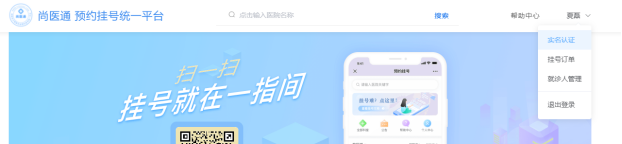
测试:
边栏推荐
- Jenkins 如何玩转接口自动化测试?
- Test automation selenium (a)
- An article to understand service governance in distributed development
- How to avoid CMDB becoming a data island?
- leetcode 剑指 Offer 42. 连续子数组的最大和
- Re20:读论文 What About the Precedent: An Information-Theoretic Analysis of Common Law
- (Text) Frameless button settings
- els 方块停在方块上。
- Unable to locate the program input point ucrtbase.abort on the dynamic link library api-ms-win-crt-runtime-|1-1-0.dll
- leetcode 剑指 Offer 52. 两个链表的第一个公共节点
猜你喜欢

九九乘法表

初识Apifox——如何使用Apifox做一个简单的接口测试

The use of qsort function and its analog implementation

企业数字化建设,自研还是采购?

HR团队如何提升效率?人力资源RPA给你答案

20220728 Use the bluetooth on the computer and the bluetooth module HC-05 of Huicheng Technology to pair the bluetooth serial port transmission

Unified exception handling causes ResponseBodyAdvice to fail

conda 导出/导出配置好的虚拟环境

An article to understand service governance in distributed development

读书笔记:《这才是心理学:看穿伪心理学的本质(第10版)》
随机推荐
606. 根据二叉树创建字符串(视频讲解!!!)
【深度学习】(问题记录)<对一个变量求梯度得到什么>-线性回归-小批量随机梯度下降
leetcode 剑指 Offer 57. 和为s的两个数字
leetcode 剑指 Offer 25. 合并两个排序的链表
Re21:读论文 MSJudge Legal Judgment Prediction with Multi-Stage Case Representation Learning in the Real
实战演练 | 在 MySQL 中计算每日平均日期或时间间隔
功能测试、UI自动化测试(web自动化测试)、接口自动化测试
MySQL【运算符】
Unified exception handling causes ResponseBodyAdvice to fail
HR团队如何提升效率?人力资源RPA给你答案
快解析结合象过河erp
flowable工作流所有业务概念
快解析结合友加畅捷通t1飞跃版
Determine whether a tree is a complete binary tree - video explanation!!!
PyQt5快速开发与实战 7.4 事件处理机制入门 and 7.5 窗口数据传递
STM32CubeMX配置生成FreeRTOS项目
leetcode 剑指 Offer 48. 最长不含重复字符的子字符串
C语言顺序表基本操作
Day113.尚医通:微信登录二维码、登录回调接口
Test automation selenium (a)