当前位置:网站首页>shell脚本快速入门----shell基本语法总结
shell脚本快速入门----shell基本语法总结
2020-11-09 14:29:00 【朱子龙2018】
1.#!脚本的开头
#!/bin/bash
2.脚本属性
添加可执行属性,chmod +x 或使用“.”运行,例如运行当前目录下的a.sh 可执行命令 “. ./a.sh” 文件格式要是unix,在linux下创建的文件没有问题,在windows下写的脚本要特别注意文件格式 查看文件格式 vim 打开文件 set ff 查看文件格式 set ff=type 设置文件格式,type为文件格式
3.变量
字母下划线开头,后面可以跟字母下划线和数字 赋值: a=1 等号两边不能有空格; 取消变量unset 使用弱变量,可以没有类型,不定义类型时都当做字符串对待, 定义的变量如果不加local修饰,则为全局变量,在整个脚本范围内起作用 用export 可以将脚本变量导出为环境变量 位置参数$0为脚本名字 $n为脚本的第n个参数 $? 命令和脚本的返回值 $* 或$#表示命令行参数个数 只读变量readonly
4.数组
定义 :a=('1' '2'); a的值用括号括起来,成员用单引号包含,成员与成员之间用空格隔开 指定成员赋值 a=([2]=1 [3]=2); 引用 :${a[1]} ${array[@]} ${array[*]} 得到整个数组元素 输出相同,但@获取的结果是以空格隔开的各个元素,*输出的是一整个字符串 数组截断:${array[@]:1:2}取出数组的第一到第二个元素 连接数组 c=(${a[@]} ${b[@]}) 替换元素 c=(${c[@]/str1/str2})
5.转义和引用
\ 使用转义字符可以使\ 后的字符仅当做字符来使用 " " 部分引用,在部分引用中$ `(反引号) \ 仍然会被解释会特殊含义 ' ' 全引用,全引用中多有字符只当做普通字符
6.命令替换
将命令的标准输出作为赋值赋给某个变量 使用(`)或$() $()仅在bash shell用有效 以date命令为例 DATE=`date' DATE=$(date)
7.运算符
1.算数运算符 + - * / % ** (幂运算)+= -= *= /= %= ++ -- 使用let命令计算 let a=1+2 2.位运算符, << >> & | ^ ~同样使用let命令来进行操作 3.使用$[]或$(())运算 echo $[2+3] 4.使用expr运算 expr 1 + 1 要求操作数和操作符时间用空格隔开 5.declare命令 用declare 声明变量类型,后续可以直接运算 declare -i a; a=1+1;操作符两侧不能有空格 6.使用bc做浮点数运算 e=$("scale=3;$a/$b"|bc); scale设置浮点数的现实位数,不设置则显示为整数结果
8.测试和判断
test [ ] 格式 test expression 或者 [ expression ] 注意表达式两侧均有空格; 1.文件测试 -b FILE 文件存在且为块设备时返回真 -c FILE 文件存在且为字符设备时返回真 -d FILE 文件存在且为目录时返回真 -e FILE 文件或目录存在是返回真 -f FILE 文件存在且为普通文件时返回真 -x FILE 文件存在且为可执行文件时返回真 -w FILE 文件存在且可写时返回真 -r FILE 文件存在且可读时返回真 -l FILE 文件存在且为链接时返回真 -p FILE 文件存在且为管道时返回真 -s FILE 文件存在且大小不为0时返回真 -S FILE 文件存在且为socket时返回真 -g FILE 文件存在且设置了SGID时返回真 -u FILE 文件存在且设置了SUID时返回真 -k FILE 文件存在且设置了sticky时返回真 -G FILE 文件存在且属于有效用户组时返回真 -O FILE 文件存在且属于有效用户时返回真 FILE1 -nt FILE2 当文件1比文件2新时返回真 FILE1 -ot FILE2 当文件1比文件2旧时返回真
2.字符串测试 -z “string”字符串为空时返回真 -n “string”字符串不为空时返回真 “string1”= “string2”相同返回真 “string1”!= “string2”不相同返回真 “string1” > “string2”字典排序,string1排在string2之前返回真 “string1”< “string2”字典排序,string1排在string2之后返回真 3.整数比较 "num1" -eq "num2" 相等 "num1" -gt "num2" 大于 "num1" -lt "num2" 小于 "num1" -ge "num2" 大于或等于 "num1" -le "num2" 小于或等于 "num1" -ne "num2" 不等于 4.逻辑测试符 !expression 非 expression1 -a expression2 且 expression1 -o expression2 或 5.逻辑运算符 !逻辑非,对真假取反 && 逻辑与,连接两个表达式,只有两个表达式都为真时,结果才为真 || 逻辑或
9.逻辑结构 判断分支
1.if
//基本结构
if expression;then
    command1
    command2
fi

//if/else结构
if expression;then
    command1
    command2
else
    command3
fi

//if/elif/else结构
if expression;then
    command
elif expression2;then
    command
fi
2.case
case VAR in
var1) command;;
var2) command;;
var3) command;;
*)command;;
esac
10.逻辑结构 循环
1.for
for VARIABLE in (list) //如果变量列表是连续的数字,可以写做 {1..n} $(seq 1 n) 或者$(seq 1 2 100) 表示从1到100,每次增加2,即1到100的奇数
do
    command
done

//类C的for循环
for((expression1;expression2;expression))
do
        command
done
2.while
while expression
do
    command
done

//while 死循环
while (1)
while true
while:
3.until
unitl wxpression
do
    command
done
//until死循环
until ((0))
until false
4.slect 和单参数的for相似,也可以用if case实现
select varible in (list)
do
    command
done
5.循环控制 break continue break 单独一个break,跳出当前循环,break n,跳出当前n层循环 continue 结束当前循环,进入下一次循环,continue n,结束当前n层循环,
11.函数
1.定义
function FUNCTION_NAME()       //关键字function可以省略
{
    command1;
    command2;
    return n;                //当函数带有返回值时,通过$?来接收返回值
}
2.函数参数传递 即使是全局变量,不传递给函数,函数也无法使用,相反,如果函数内部的变量未声明local,则函数内部的变量在整个儿脚本中都可以使用 函数传参形式
function $a
版权声明
本文为[朱子龙2018]所创,转载请带上原文链接,感谢
https://my.oschina.net/u/3831427/blog/4709947
边栏推荐
- Tidb x micro banking reduces time consumption by 58%, and distributed architecture helps to realize inclusive finance
- 苏宁基于知识图谱的大规模告警收敛和根因定位实践
- 基于synchronized锁的深度解析
- 深圳C1考证历程
- JVM learning (4) - garbage collector and memory allocation
- It's amazing! Ali senior architect 20 years of experience, collate and share servicemesh actual combat documents, pay rise is bad for this article!
- Hadoop学习(三)-YARN
- Get this template, double your salary
- CCF BDCI hot topic: privacy information recognition in unstructured business text information
- Some common types of error exception in Python
猜你喜欢

通配符SSL证书应该去哪里注册申请

JS method of judging object type_ How to use typeof_ How to use instanceof_ How to use constructor_ Object.prototype.toString How to use ()
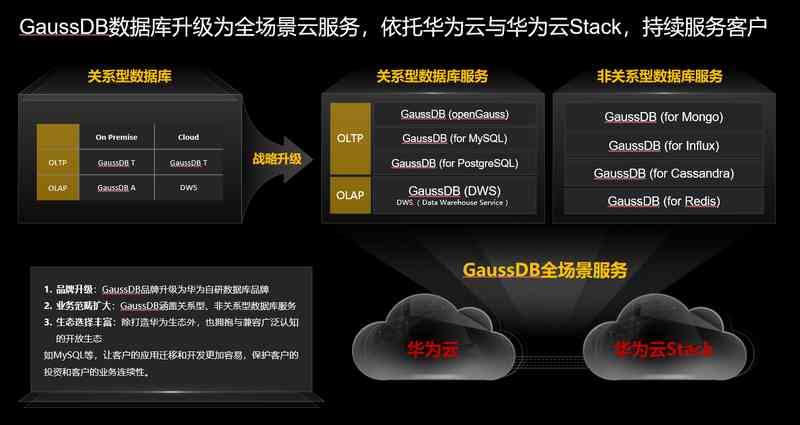
华为云GaussDB:从颠覆自我到颠覆行业,重构数据库市场新格局
android studio AIDL的使用
Two ways for Tencent cloud server to build WordPress website
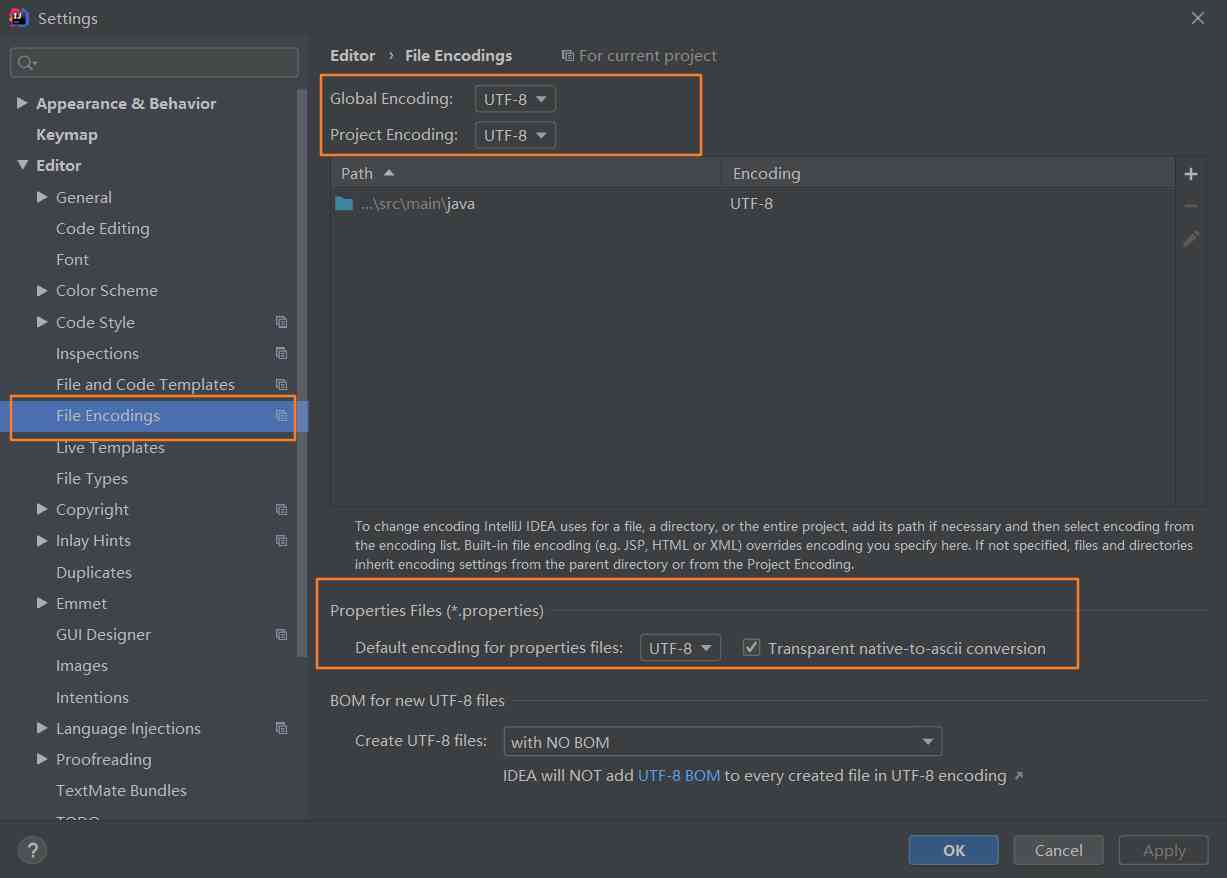
Idea solves garbled Chinese output of YML configuration file
Rainbow sorting | Dutch flag problem
![Detailed explanation of [golang] GC](/img/64/02a80f3cebb5351f9ecd1e2d1a76c3.jpg)
Detailed explanation of [golang] GC
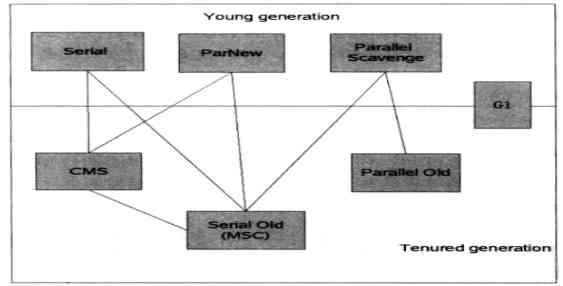
JVM学习(四)-垃圾回收器和内存分配
Vscode plug-in configuration pointing North
随机推荐
技美那么贵,不如找顾问 | AALab企业顾问业务
彩虹排序 | 荷兰旗问题
高德全链路压测——语料智能化演进之路
决策树算法-理论篇
“开源软件供应链点亮计划 - 暑期 2020”公布结果 基于 ChubaoFS 开发的项目获得最佳质量奖
JVM学习(六)-内存模型和线程
Adobe experience design / XD 2020 software installation package (with installation tutorial)
服务应用 ClockService安卓实现闹钟
Well, the four ways to query the maximum value of sliding window are good
Why I strongly recommend custom development of small programs, these benefits you need to understand
腾讯云服务器搭建wordpress网站的两种方式(详细图文新手版)
Idea rest client, yes, I haven't opened postman yet
10款必装软件,让Windows使用效率飞起!
Some common types of error exception in Python
Offline installation method of Arthas without network environment
导师制Processing网课 双十一优惠进行中
跟我一起学.NetCore之EF Core 实战入门,一看就会
Programmers before and after buying a house, after reading has cried blind
03. Priority link model
岗位内推 | 微软亚洲研究院智能多媒体组招聘计算机视觉算法实习生