当前位置:网站首页>Hands on deep learning (35) -- text preprocessing (NLP)
Hands on deep learning (35) -- text preprocessing (NLP)
2022-07-04 09:37:00 【Stay a little star】
List of articles
Text preprocessing (Pre-processing)
NLP In order to facilitate the later training of neural network, the preprocessing of text data is indispensable for natural language processing .
Usually text preprocessing includes :
- Raw data loading (raw data)
- participle (segmentation)
- Data cleaning (Cleaning)
- Data standardization (Normalization):Stemming / Lemmazation
- feature extraction (Feature extraction):tf-idf/word2vec
- modeling (modeling): Similarity algorithm 、 Classification algorithm
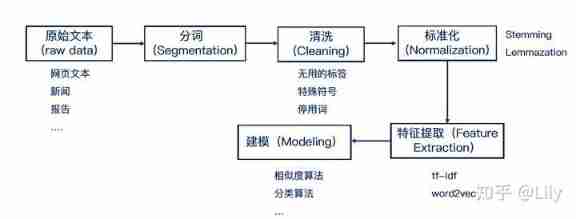
cite: Greedy for Technology
This paper mainly introduces the most basic English text preprocessing , Including raw data reading and word segmentation , To learn more about preprocessing operations, please refer to NLP introduction -- Text preprocessing Pre-processing. At present, there are many better word segmentation libraries , Can be called directly , But Li Mu's great God code It explains how to build a sub thesaurus from the most basic , Personally, I think it is very useful , From the basic understanding, it is also more convenient to call various libraries to work efficiently .
1. Reading data sets
An article can be simply regarded as a sequence of words , Even a sequence of characters . In order to facilitate the use of sequence data in future experiments , Here, text data is preprocessed , It mainly consists of the following steps :
- Load text data into memory
- Split string into Tags ( Such as , Words and characters )
- Build a vocabulary , Map split tags to numeric indexes
- Convert text to a numeric index sequence , So that the model can easily perform other operations on it
import collections
import re
from d2l import torch as d2l
We from H.G.Well Of Time machine Start by loading text in . This is a fairly small corpus , Only 30000 Multiple words , But enough to achieve our goal , That is, text preprocessing . In reality, a document set may contain billions of words . The following function reads the data set into a list of text lines , Each line is a string . For the sake of simplicity , We ignore punctuation and capital letters here .
#@save
d2l.DATA_HUB['time_machine'] = (d2l.DATA_URL+'timemachine.txt','090b5e7e70c295757f55df93cb0a180b9691891a')

def read_time_machine():
    """ The pretreatment operation here is violent , Eliminate punctuation marks and special characters , There's only... Left 26 Letters and spaces """
    with open(d2l.download('time_machine'),'r') as f:
        lines = f.readlines()
    return [re.sub('[^A-Za-z]+',' ',line).strip().lower() for line in lines]

lines = read_time_machine()
print(f'# text lines: {
      len(lines)}')
print(lines[0])
print(lines[10])
Downloading ../data/timemachine.txt from http://d2l-data.s3-accelerate.amazonaws.com/timemachine.txt...
# text lines: 3221
the time machine by h g wells
twinkled and his usually pale face was flushed and animated the
2. Tokenization
Split the text sequence into a tag list , Mark (token) Is the basic unit of text . Finally, a tag list is returned , Each tag is a string (string)
def tokenize(lines,token='word'):
    if token=="word":
        return [line.split() for line in lines]
    elif token =="char":
        return [list(line) for line in lines]
    else:
        print("Error: Unknown token type :"+token)

tokens = tokenize(lines)
for i in range(11):
    print(tokens[i])
['the', 'time', 'machine', 'by', 'h', 'g', 'wells']
[]
[]
[]
[]
['i']
[]
[]
['the', 'time', 'traveller', 'for', 'so', 'it', 'will', 'be', 'convenient', 'to', 'speak', 'of', 'him']
['was', 'expounding', 'a', 'recondite', 'matter', 'to', 'us', 'his', 'grey', 'eyes', 'shone', 'and']
['twinkled', 'and', 'his', 'usually', 'pale', 'face', 'was', 'flushed', 'and', 'animated', 'the']
3. vocabulary
The marked string type is not convenient for the use of the model , The input required by the model is numbers . We build a dictionary ( Thesaurus vocabulary), Used to map string tags to from 0 In the initial numerical index .
- To do this, we need to first count the unique tags in all documents in the training set , It is called corpus (corpus).
- Then assign a numerical index to each unique tag according to its frequency of occurrence .( Rarely seen tags are usually removed to reduce complexity )
- corpus (corpus) Any tag that does not exist in or has been deleted can be mapped to a specific unknown tag “<unk >”.
- We can choose to add a list , Used to save reserved tags , for example “<pad>” Indicates filling ;“<bos>” Represents the beginning of a sequence ;“<eos>” Indicates the end of the sequence .
def count_corpus(tokens):
    """ Count the frequency of tags : there tokens yes 1D List or 2D list """
    if len(tokens) ==0 or isinstance(tokens[0],list):
        #  take tokens Flatten into a list filled with tags
        tokens = [token for line in tokens for token in line]
    return collections.Counter(tokens)

class Vocab:
    """ Build a text vocabulary """
    def __init__(self,tokens=None,min_freq=0,reserved_tokens=None):
        if tokens is None:
            tokens=[]
        if reserved_tokens is None:
            reserved_tokens = []
        #  Sort according to frequency
        counter = count_corpus(tokens)
        self.token_freqs = sorted(counter.items(),key=lambda x:x[1],reverse=True)

        #  Index of unknown tag is 0
        self.unk , uniq_tokens = 0, ['<unk>']+reserved_tokens
        uniq_tokens += [token for token,freq in self.token_freqs
                       if freq >= min_freq and token not in uniq_tokens]
        self.idx_to_token,self.token_to_idx = [],dict() #  Find the tag according to the index and find the index according to the tag
        for token in uniq_tokens:
            self.idx_to_token.append(token)
            self.token_to_idx[token] = len(self.idx_to_token)-1

    def __len__(self):
        return len(self.idx_to_token)

    def __getitem__(self,tokens):
        """ Switch to one by one item For the output """
        if not isinstance(tokens,(list,tuple)):
            return self.token_to_idx.get(tokens,self.unk)
        return [self.__getitem__(token) for token in tokens]

    def to_tokens(self,indices):
        """ If it is a single index Direct output , If it is list perhaps tuple Iterative output """
        if not isinstance(indices,(list,tuple)):
            return self.idx_to_token[indices]
        return [self.idx_to_token[index] for index in indices]
#  Use time machine Data sets are used as corpora to construct vocabularies , Then print the first few common tags and indexes
vocab = Vocab(tokens)
print(list(vocab.token_to_idx.items())[:10])
[('<unk>', 0), ('the', 1), ('i', 2), ('and', 3), ('of', 4), ('a', 5), ('to', 6), ('was', 7), ('in', 8), ('that', 9)]
#  Now you can convert each line of text into a numeric index
for i in [0,10]:
    print('words:',tokens[i])
    print('indeces:',vocab[tokens[i]])
words: ['the', 'time', 'machine', 'by', 'h', 'g', 'wells']
indeces: [1, 19, 50, 40, 2183, 2184, 400]
words: ['twinkled', 'and', 'his', 'usually', 'pale', 'face', 'was', 'flushed', 'and', 'animated', 'the']
indeces: [2186, 3, 25, 1044, 362, 113, 7, 1421, 3, 1045, 1]
4. Integrate the above functions
Pack all the content into load_corpus_time_machine Among functions , This function returns corpus( Tag index list ) and vocab( Vocabulary of time machine corpus ). Two things need to be changed :
- We convert text tags into characters , Not words , In order to simplify the training in the following chapters
corpusIs a single list , Instead of using a list of tags , because time machine Each line of text in the dataset is not necessarily a sentence or a paragraph .
def load_corpus_time_machine(max_tokens=-1):
    """ return Time machine Tag index list and glossary in dataset """
    lines = read_time_machine()
    tokens = tokenize(lines,'char')
    vocab = Vocab(tokens)
    #  because Time machine Every text line in the dataset , Not necessarily a sentence or paragraph
    #  So flatten all text lines into a list
    corpus = [vocab[token] for line in tokens for token in line]
    if max_tokens >0:
        corpus = corpus[:max_tokens]
    return corpus,vocab

corpus,vocab = load_corpus_time_machine()
len(corpus),len(vocab)
(170580, 28)
list(vocab.token_to_idx.items())
[('<unk>', 0),
 (' ', 1),
 ('e', 2),
 ('t', 3),
 ('a', 4),
 ('i', 5),
 ('n', 6),
 ('o', 7),
 ('s', 8),
 ('h', 9),
 ('r', 10),
 ('d', 11),
 ('l', 12),
 ('m', 13),
 ('u', 14),
 ('c', 15),
 ('f', 16),
 ('w', 17),
 ('g', 18),
 ('y', 19),
 ('p', 20),
 ('b', 21),
 ('v', 22),
 ('k', 23),
 ('x', 24),
 ('z', 25),
 ('j', 26),
 ('q', 27)]
lines = read_time_machine()
tokens = tokenize(lines,'char')
for i in [0,10]:
    print('words:',tokens[i])
    print('indeces:',vocab[tokens[i]])
words: ['t', 'h', 'e', ' ', 't', 'i', 'm', 'e', ' ', 'm', 'a', 'c', 'h', 'i', 'n', 'e', ' ', 'b', 'y', ' ', 'h', ' ', 'g', ' ', 'w', 'e', 'l', 'l', 's']
indeces: [3, 9, 2, 1, 3, 5, 13, 2, 1, 13, 4, 15, 9, 5, 6, 2, 1, 21, 19, 1, 9, 1, 18, 1, 17, 2, 12, 12, 8]
words: ['t', 'w', 'i', 'n', 'k', 'l', 'e', 'd', ' ', 'a', 'n', 'd', ' ', 'h', 'i', 's', ' ', 'u', 's', 'u', 'a', 'l', 'l', 'y', ' ', 'p', 'a', 'l', 'e', ' ', 'f', 'a', 'c', 'e', ' ', 'w', 'a', 's', ' ', 'f', 'l', 'u', 's', 'h', 'e', 'd', ' ', 'a', 'n', 'd', ' ', 'a', 'n', 'i', 'm', 'a', 't', 'e', 'd', ' ', 't', 'h', 'e']
indeces: [3, 17, 5, 6, 23, 12, 2, 11, 1, 4, 6, 11, 1, 9, 5, 8, 1, 14, 8, 14, 4, 12, 12, 19, 1, 20, 4, 12, 2, 1, 16, 4, 15, 2, 1, 17, 4, 8, 1, 16, 12, 14, 8, 9, 2, 11, 1, 4, 6, 11, 1, 4, 6, 5, 13, 4, 3, 2, 11, 1, 3, 9, 2]
summary
- Text is an important form of sequential data
- In order to preprocess the text , We usually need to split the text into tags , Build vocabulary to map tag strings to numeric indexes , And convert the text data into Tag Index for model operation
Reference resources :
【1】 Hands-on deep learning PyTorch edition
【2】NLP introduction -- Text preprocessing Pre-processing
【3】《 Hands-on deep learning 》
边栏推荐
- Global and Chinese market of sampler 2022-2028: Research Report on technology, participants, trends, market size and share
- C语言指针面试题——第二弹
- About the for range traversal operation in channel in golang
- Solve the problem of "Chinese garbled MySQL fields"
- Logstack configuration details -- elasticstack (elk) work notes 020
- Nurse level JDEC addition, deletion, modification and inspection exercise
- In depth investigation and Strategic Research Report on China's motion controller Market (2022 Edition)
- After unplugging the network cable, does the original TCP connection still exist?
- Flutter tips: various fancy nesting of listview and pageview
- 【leetcode】540. A single element in an ordered array
猜你喜欢

2022-2028 global seeder industry research and trend analysis report
Jianzhi offer 09 realizes queue with two stacks
Target detection -- intensive reading of yolov3 paper

法向量点云旋转
PHP personal album management system source code, realizes album classification and album grouping, as well as album image management. The database adopts Mysql to realize the login and registration f
回复评论的sql

Markdown syntax
Solve the problem of "Chinese garbled MySQL fields"
After unplugging the network cable, does the original TCP connection still exist?
2022-2028 global small batch batch batch furnace industry research and trend analysis report
随机推荐
Analysis report on the development status and investment planning of China's modular power supply industry Ⓠ 2022 ~ 2028
Are there any principal guaranteed financial products in 2022?
How do microservices aggregate API documents? This wave of show~
[C Advanced] file operation (2)
《网络是怎么样连接的》读书笔记 - FTTH
Logstack configuration details -- elasticstack (elk) work notes 020
Sort out the power node, Mr. Wang he's SSM integration steps
China battery grade manganese sulfate Market Forecast and strategic consulting report (2022 Edition)
AMLOGIC gsensor debugging
HMS core helps baby bus show high-quality children's digital content to global developers
You can see the employment prospects of PMP project management
Lauchpad x | MODE
LeetCode 74. Search 2D matrix
ArrayBuffer
Rules for using init in golang
2022-2028 global special starch industry research and trend analysis report
If you can quickly generate a dictionary from two lists
2022-2028 global gasket metal plate heat exchanger industry research and trend analysis report
回复评论的sql
2022-2028 global tensile strain sensor industry research and trend analysis report