当前位置:网站首页>Solution to the problem that the keypad light does not light up when starting up
Solution to the problem that the keypad light does not light up when starting up
2022-07-01 15:55:00 【Uaena_ An】
Solution to the problem that the keypad light does not light up when starting up
Many people enter the login interface when they boot up and enter their password , Use the numeric keypad , But many times it will appear numlock The light is not bright , That is, the keypad light is not on , You have to press it every time , Is it troublesome ? Now let's tell you the comprehensive solution .
①:
Start ---- function ---- Input regedit---- enter ---- find HKEY_USERS→ .DEFAULT→Control Panel→Keyboard On the right InitialKeyboardIndicators Change the numerical data to 2 OK, Close the registry , Restart the computer .
②:
You can't change the registry , Just start up BIOS Set in the , Press after power on Del Key or F2,F8,F12 Get into BIOS, Different models , Please enter in your own way . find Advanced BIOS Features Open and find Boot UP Numlock status Set to ON that will do
③:
The above two methods can basically solve , I haven't tried the following methods , stay config.sys Add the command to start the keypad light when starting up , Start ---- function ---- Input sysedit ---- Just opened the “ System configuration editor ” window ,. single click “Config.sys” The title bar , Switch it to the current editing window , Then type “NumLock=ON” Again Save your changes and close “ System configuration editor ” window .
④:
Create a new text document , Write the following code
set WshShell=CreateObject("WScript.shell")
WshShell.SendKeys"{NUMLOCK}"
After saving the file , Any name ( Don't repeat it ), Modify the extension bit “vbs”, double-click , Restart the computer .
⑤:
Delete registry entries
HKEY_LOCAL_MACHINE\SOFTWARE\Microsoft\Windows\CurrentVersion\
Explorer\MyComputer\NameSpace\{3D6BE802-FC0D-4595-A304-E611F97089DC
The following is transferred from the Internet , For reference only ..
==============================================================
Method 1 . Don't do anything after entering the desktop , Press light Num Lock The lamp , Shut down the system , Try restarting again. In addition, if the system has a password , When logging in to enter user name and password , Don't type , Press light first Num Lock The lamp , Then click close the system , Then restart .( It is strongly recommended that this method be tried first ).
Method 2 . Open registry editor , find HKEY_USERS.DEFAULTControlPanelKeyboard, Put it under InitialKeyboardIndicators The key value of is changed to “2”, Exit Registry Editor , Restart the computer , You will find that the light on the numeric keypad is no longer off .
Method 3 . Just be right config.sys This can be achieved by minor surgery . The setting method is as follows :
1. single click “ Start ” Menu “ function ” command , And then in “ open ” Box “sysedit”, Press enter , open “ System configuration editor ” window .
2. single click “Config.sys” The title bar , Switch it to the current editing window , Then type “NumLock=ON” This line of command .
3. Save your changes and close “ System configuration editor ” window .
Method four , First, in the BIOS Zhongba NumLock Item is set to Enable, And then in BIOS Lieutenant general PnPWithOS Item is also set to Enable that will do . However, when logging off the user NumLock The keypad lock is closed , Open it manually
边栏推荐
- 2022-07-01日报:谷歌新研究:Minerva,用语言模型解决定量推理问题
- SAP CRM organization Model(组织架构模型)自动决定的逻辑分析
- Deep operator overloading (2)
- Gaussdb (for MySQL):partial result cache, which accelerates the operator by caching intermediate results
- 大龄测试/开发程序员该何去何从?是否会被时代抛弃?
- 【LeetCode】43. 字符串相乘
- Seate中用了shardingjdbc 就不能用全局事务了吗?
- 【云动向】6月上云新风向!云商店热榜揭晓
- #夏日挑战赛# HarmonyOS canvas实现时钟
- Zhang Chi Consulting: lead lithium battery into six sigma consulting to reduce battery capacity attenuation
猜你喜欢

For the sustainable development of software testing, we must learn to knock code?

【300+精选大厂面试题持续分享】大数据运维尖刀面试题专栏(三)

process.env.NODE_ENV

Please, stop painting star! This has nothing to do with patriotism!

Deep operator overloading (2)
![[one day learning awk] function and user-defined function](/img/e1/a378211ef05fcc4d469363f3e509a7.png)
[one day learning awk] function and user-defined function
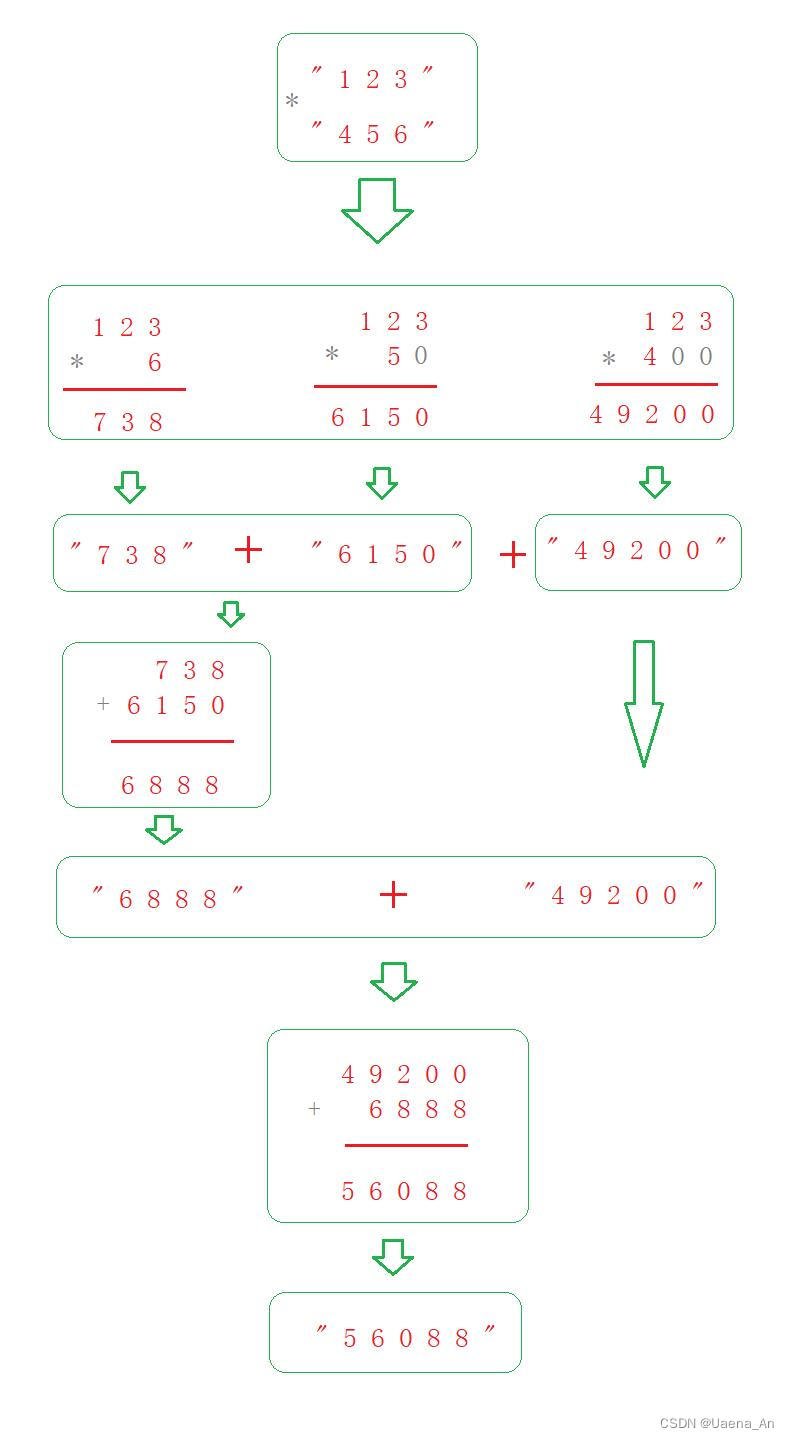
【LeetCode】43. String multiplication

Introduction to RT thread env tool (learning notes)

Sales management system of lightweight enterprises based on PHP

工厂高精度定位管理系统,数字化安全生产管理
随机推荐
Is JPMorgan futures safe to open an account? What is the account opening method of JPMorgan futures company?
Description | Huawei cloud store "commodity recommendation list"
Factory high-precision positioning management system, digital safety production management
精益六西格玛项目辅导咨询:集中辅导和点对点辅导两种方式
二叉树的前序,中序,后续(非递归版本)
Photoshop插件-HDR(二)-脚本开发-PS插件
STM32ADC模拟/数字转换详解
TensorFlow团队:我们没被抛弃
ADS算力芯片的多模型架构研究
【STM32-USB-MSC问题求助】STM32F411CEU6 (WeAct)+w25q64+USB-MSC Flash用SPI2 读出容量只有520KB
6.2 normalization 6.2.6 BC normal form (BCNF) 6.2.9 normalization summary
Smart Party Building: faith through time and space | 7.1 dedication
最新NLP赛事实践总结!
For the sustainable development of software testing, we must learn to knock code?
Zero copy technology of MySQL
使用腾讯云搭建图床服务
HR interview: the most common interview questions and technical answers
[target tracking] |stark
TensorFlow團隊:我們沒被拋弃
电脑照片尺寸如何调整成自己想要的