当前位置:网站首页>QT compile 45 graphic report of security video monitoring system
QT compile 45 graphic report of security video monitoring system
2022-06-12 04:22:00 【qq60b6d1b681847】
One 、 Preface
The graphic report corresponds to the previous text report , After previous log query , Need to print or export , It's all written records line by line , In the near future, graphic alarm records need to be printed and exported , So I took the opportunity to import and export the previous data (xls/pdf) And print components , This is also a legacy component that needs to be re architected , Deleted 60% Redundant code for , The parameter of structure storing and exporting print data is added , Made a general static function export and print , Very convenient , At the same time, it also expands the data export and printing support of graphic alarm , Support incoming picture path , Customize the main title, subtitle, etc . In the whole process of transformation , Summed up a few little experience .
- Function with return value , Be sure to take the initiative return Return value , Some compilers can compile normally without return value , But there will be problems when running , You don't get the results you want , Because no return Corresponding value .
- Defined local variables , Actively give an initial value , It's a good habit that must be formed , Otherwise, the initial value given by the compiler may not be what you want , such as int Variable default 0, Sometimes it becomes a large value at random ,bool The initial value of the variable is different, and the compiler has different values , Some are true Some are false, It is more reliable to actively give an initial value .
- Some functions have many arguments , And it may be modified and added later , This leads to the source modification , The associated signal slot shall also be modified , The parameter type and location must be exactly the same , The corresponding slot function processing also needs to be modified , The workload of changes is very heavy and very unfriendly , So for functions with non fixed parameters , It is recommended to use structure , It's very easy to add other parameters , Moreover, there is no need to modify the signal slot Association and signal slot function definition , For example, student information form 、 The commodity information table is transmitted as a parameter , The best solution is the structure .
Functions and features of graphic reports
- Original export data mechanism , Do not rely on any office Third party libraries such as components or operating systems , In particular, it supports embedded linux.
- 10 Ten thousand rows of data 9 Fields only need 2 Seconds to complete .
- It only takes four steps to start exporting a large amount of data to Excel.
- At the same time, it provides direct write data interface and multithread write data interface , The main interface is not stuck .
- You can set the title 、 Subtitle 、 Table name .
- You can set the field name 、 Column width .
- You can set whether to enable the verification and filtering data 、 Check Columns 、 Validation rules 、 Check value , Special color display in accordance with the rules .
- You can set random background color and column set that needs random background color .
- Support group output data , For example, output data by device group , Convenient view .
- Customizable line content separator .
- Data can be written in the form of additional data , It is suggested that the additional data should be less than 10000 strip .
- Super flexibility , Free to change the source set alignment 、 Text color 、 Background color, etc .
- Support any excel Form software , Including but not limited to excel2003/2007/2010/2013/2017/wps/openoffice etc. .
- In addition to providing export to Excel Outside class , Export to is also provided Pdf Files and classes for printing data .
- The notes are perfect , Detailed and complete use demo, Support QTableWidget、QTableView、 Database three kinds of data sources .
- pure Qt To write , Support any Qt edition + Any compiler + Any system .
Two 、 Functional characteristics
( One ) Software modules
- Video monitoring module , All kinds of small window body sub modules , Including a list of devices 、 Picture and text police information 、 Window information 、 Pan tilt control 、 Preset position 、 Cruise settings 、 Equipment control 、 Floating map 、 Web browsing, etc .
- Video playback module , Including local playback 、 Remote playback 、 Device playback 、 Picture playback 、 Video upload, etc .
- Electronic map module , Including pictures, maps 、 Online map 、 offline map 、 Path planning, etc .
- Log query module , Including local logs 、 Device logs, etc .
- System setup module , Including system settings ( Basic settings 、 Video parameters 、 Database settings 、 Map configuration 、 Serial port configuration, etc )、 VCR Management 、 Camera Management 、 Polling configuration 、 User management, etc .
( Two ) Basic function
- Supports various video streams (rtsp、rtmp、http etc. )、 Video file (mp4、rmvb、avi etc. )、 Local USB The camera plays .
- Support multi screen switching , Include 1、4、6、8、9、13、16、25、36、64 Screen switching .
- Support full screen switching , A variety of switching methods, including the right mouse button menu 、 toolbar button 、 Shortcut key (alt+enter Full screen ,esc Exit full screen ).
- Support video polling , Include 1、4、9、16 Screen polling , Polling groups can be set ( Polling plan )、 Polling interval 、 Stream type, etc .
- Support onvif agreement , Including device search 、 Pan tilt control 、 Equipment control ( Picture parameters 、 Proofreading time 、 System restart , Capture pictures, etc ).
- Support rights management , Different users can have different module permissions , Like deleting logs 、 Shut down the system, etc .
- The database supports a variety of , Include sqlite、mysql、sqlserver、postgresql、oracle、 People's Congress, Jincang, etc .
- Local USB The camera supports setting resolution 、 Frame rate and other parameters .
- All docking modules automatically generate corresponding menus to control display and hide , Right click in the title bar to pop up .
- Support to display all modules 、 Hide all modules 、 Reset normal layout 、 Reset full screen layout .
- Double click the device to pop up the real-time preview video , Support image map 、 Online map 、 Offline maps, etc .
- Drag the camera node to the corresponding window to play video , At the same time, it supports dragging local files to play directly .
- Delete video support right mouse button delete 、 Floating bar close delete 、 Drag it outside the video monitoring panel to delete it .
- The device button on the picture map can be dragged freely , Automatically save location information . Baidu map can click the mouse to obtain longitude and latitude information , Used to update device location .
- Any channel in the form of video monitoring panel supports drag and drop switching , Instant response .
- It encapsulates Baidu map , views switching , path of particle , Equipment points , Click the mouse to get the latitude and longitude .
- Double click the node 、 Drag nodes 、 Drag the form, swap the position, etc , Automatically update and save the last playback address , Next time the software opens the automatic application .
- Lower right volume bar control , Lose focus auto hide , Volume bar mute icon .
- Support video capture , You can specify a single or all channel screenshot , There's also a screenshot button on the bottom toolbar .
- Support timeout auto hide mouse pointer 、 Automatic full screen mechanism .
- Support onvif Pan tilt control , The camera can be moved up and down , Including reset and focus adjustment .
- Support any onvif The camera , Including but not limited to Haikang 、 Dahua 、 Depending Yu 、 The great cause of heaven and earth 、 HUAWEI, etc. .
- Can save video , It can be stored in a fixed time or in a single file , Optional storage interval time .
- Video stream communication mode can be set tcp+udp, Video decoding can be set to speed first 、 Quality first 、 Equilibrium, etc .
- Chinese name of software can be set 、 English name 、LOGO Icon, etc .
- The stored video files can be exported to the specified directory , Support batch upload to the server .
( 3、 ... and ) Special function
- The main interface adopts the docking form mode , Various components are added in the form of small modules , You can customize any module to add .
- Docking module can drag any position to embed and suspend , Support maximum full screen , Support multi screen .
- Dual layout file storage mechanism , Normal mode 、 Full screen mode corresponds to different layout schemes , Auto switch and save , For example, in full screen mode, several modules can be highlighted and displayed transparently in designated positions , More sci-fi, modern .
- original onvif Protocol mechanism , Using the underlying protocol analysis (udp Radio search +http Request to execute command ) It's lighter, easier to understand, easier to learn and expand , It doesn't rely on any third-party components, such as gsoap.
- Original data import and export mechanism , Cross platform does not rely on any components , Export data instantaneously .
- Built in multiple original components , The universe is worth a lot , Including data import and export components ( Export to xls、pdf、 Print )、 Database components ( Database management thread 、 Automatically clean up data threads 、 Universal paging 、 Data request, etc )、 Map components 、 Video surveillance components 、 File multithreading transceiver component 、onvif Communication components 、 General browser kernel components, etc .
- Custom message box + Error box + Inquiry frame + Prompt box in the lower right corner ( Contains multiple formats ) etc. .
- Beautiful skin change , the height is 17 Change the skin style at will , All styles are unified , Including menu, etc .
- Video control suspension bar can add multiple buttons by itself , Buttons can also be added to the small toolbar at the bottom of the monitoring interface .
- Double click the camera node to automatically play the video , Double click the node to automatically add videos one by one , Will automatically jump to the next , Double click the parent node to automatically add all videos under the node . Optional main stream 、 Sub-stream .
- VCR Management 、 Camera Management , You can add, delete, modify, import, export and print information , Apply the new device information to generate the tree list immediately , No need to restart .
- Multiple kernels can be selected to switch freely ,ffmpeg、vlc、mpv etc. , Can be found in pro Set in . Recommend to use ffmpeg, Cross platform is the most , By default linux and mac Compiled libraries on the platform .
- Support hard decoding , Hard decoding type can be set (qsv、dxva2、d3d11va etc. ).
- By default opengl Drawing video , Ultra low CPU Resource occupation , Support yuyv and nv12 Two formats to draw , It's awesome .
- Highly customizable , Users can easily derive their own functions on this basis , For example, add a custom module , Add operation mode 、 Robot monitoring 、 Drone monitoring 、 Excavator monitoring, etc .
- Support xp、win7、win10、linux、mac、 All kinds of domestic systems (UOS、 Winning Qilin 、 Galaxy unicorn, etc )、 The embedded linux Such as system .
- Note complete , The project structure is clear , Super detailed complete use of the development manual , Accurate to the function description of each code file , Keep iterating over versions .
3、 ... and 、 Experience address
- Experience address : https://pan.baidu.com/s/1d7TH_GEYl5nOecuNlWJJ7g Extraction code :01jf file name :bin_video_system.zip.
- Domestic site : https://gitee.com/feiyangqingyun
- International sites : https://github.com/feiyangqingyun
- Zhihu Homepage : https://www.zhihu.com/people/feiyangqingyun/
- Online document : https://feiyangqingyun.gitee.io/qwidgetdemo/video_system/
Four 、 design sketch
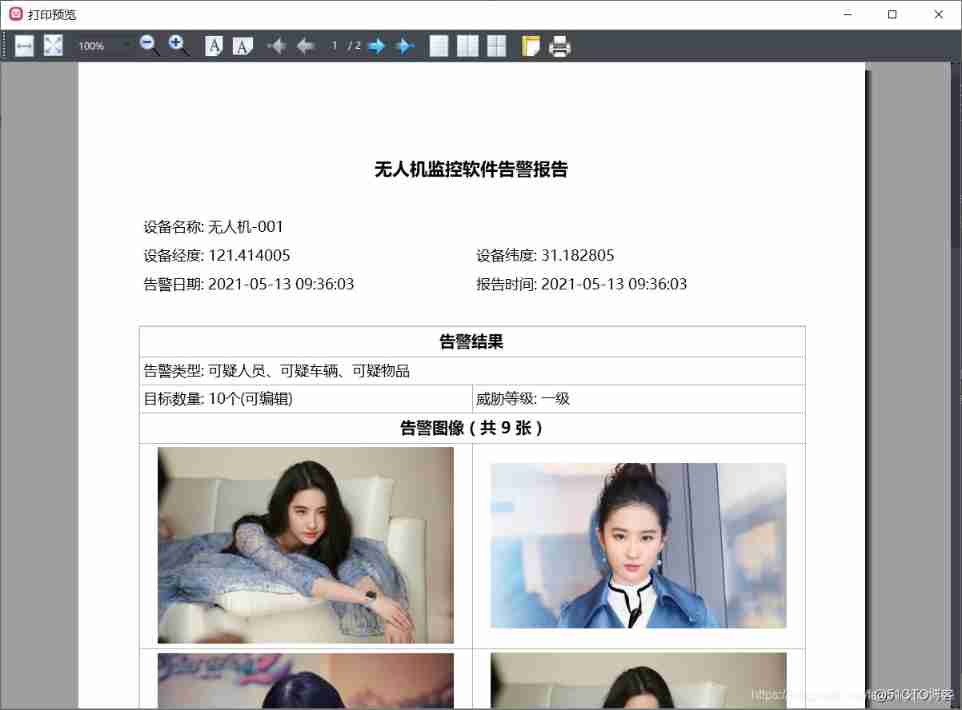
5、 ... and 、 Core code
        #include "datacreat.h"


void DataCreat::creatUavsReportHead(QStringList &list, const UavsReportData &reportData)

{

    // Form start

    list << "<table border='0.0' cellspacing='0' cellpadding='6'>";


    // title

    list << "<tr>";

    list << QString("<td width='100%' align='center' style='font-size:22px;font-weight:bold;' colspan='%1'>%2</td>").arg(2).arg(reportData.title);

    list << "</tr>";


    // Horizontal lines or line breaks

    list << "<hr>";

    //list << "<br>";


    // Current module common style

    QString style = "style='font-size:18px;'";


    // Equipment name

    QString name = QString(" Equipment name : %1").arg(reportData.name);

    list << "<tr>";

    list << QString("<td colspan='%1' %2>%3</td>").arg(2).arg(style).arg(name);

    list << "</tr>";


    // Latitude and longitude

    QString lng = QString(" Equipment longitude : %1").arg(reportData.lng);

    QString lat = QString(" Equipment latitude : %1").arg(reportData.lat);

    list << "<tr>";

    list << QString("<td %1>%2</td>").arg(style).arg(lng);

    list << QString("<td %1>%2</td>").arg(style).arg(lat);

    list << "</tr>";


    // Alarm date + Reporting time

    QString timeAlarm = QString(" Alarm date : %1").arg(reportData.timeAlarm);

    QString timeReport = QString(" Reporting time : %1").arg(reportData.timeReport);

    list << "<tr>";

    list << QString("<td %1>%2</td>").arg(style).arg(timeAlarm);

    list << QString("<td %1>%2</td>").arg(style).arg(timeReport);

    list << "</tr>";


    // End of form

    list << "</table>";

}


void DataCreat::creatUavsReportBody(QStringList &list, const UavsReportData &reportData, int imageWidth)

{

    // Line break

    list << "<br><br>";


    // Form start

    list << "<table border='0.5' cellspacing='0' cellpadding='5'>";


    // title

    list << "<tr>";

    list << QString("<td width='100%' align='center' style='font-size:20px;font-weight:bold;' colspan='%1'>%2</td>").arg(2).arg(reportData.subTitle);

    list << "</tr>";


    // Current module common style

    QString style = "style='font-size:18px;'";


    // Alarm type

    QString type = QString(" Alarm type : %1").arg(reportData.type);

    list << "<tr>";

    list << QString("<td width='100%' colspan='%1' %2>%3</td>").arg(2).arg(style).arg(type);

    list << "</tr>";


    // Target number + Threat level

    QString textCount = QString(" Target number : %1").arg(reportData.textCount);

    QString textLevel = QString(" Threat level : %1").arg(reportData.textLevel);

    list << "<tr>";

    list << QString("<td %1>%2</td>").arg(style).arg(textCount);

    list << QString("<td %1>%2</td>").arg(style).arg(textLevel);

    list << "</tr>";


    // Image queue

    QStringList listImage = reportData.images;

    int count = listImage.count();


    // Alarm image

    QString text = QString(" Alarm image  (  common  %1  Zhang  )").arg(count);

    list << "<tr>";

    list << QString("<td width='100%' align='center' style='font-size:20px;font-weight:bold;' colspan='%1'>%2</td>").arg(2).arg(text);

    list << "</tr>";


    // Calculate the drawing area size , First zoom the image to the appropriate size and save it locally

    QString path = qApp->applicationDirPath() + "/snap/";

    for (int i = 0; i < count; ++i) {

        QImage image(listImage.at(i));

        if (image.width() > imageWidth) {

            QString name = path + QString("%1.jpg").arg(i + 1);

            image = image.scaled(imageWidth, image.height(), Qt::KeepAspectRatio, Qt::SmoothTransformation);

            image.save(name, "jpg");

            listImage[i] = name;

        }

    }


    //qDebug() << listImage;

    // Vertical center

    style = "style='vertical-align:middle;'";

    for (int i = 0; i < count; i = i + 2) {

        list << "<tr>";

        list << QString("<td align='center' %1><img src='%2'></td>").arg(style).arg(listImage.at(i));

        // Need to filter and judge , It is likely that the odd number will exceed the next

        if (i < count - 1) {

            list << QString("<td align='center' %1><img src='%2'></td>").arg(style).arg(listImage.at(i + 1));

        }

        list << "</tr>";

    }


    // End of form

    list << "</table>";

}
- 1.
- 2.
- 3.
- 4.
- 5.
- 6.
- 7.
- 8.
- 9.
- 10.
- 11.
- 12.
- 13.
- 14.
- 15.
- 16.
- 17.
- 18.
- 19.
- 20.
- 21.
- 22.
- 23.
- 24.
- 25.
- 26.
- 27.
- 28.
- 29.
- 30.
- 31.
- 32.
- 33.
- 34.
- 35.
- 36.
- 37.
- 38.
- 39.
- 40.
- 41.
- 42.
- 43.
- 44.
- 45.
- 46.
- 47.
- 48.
- 49.
- 50.
- 51.
- 52.
- 53.
- 54.
- 55.
- 56.
- 57.
- 58.
- 59.
- 60.
- 61.
- 62.
- 63.
- 64.
- 65.
- 66.
- 67.
- 68.
- 69.
- 70.
- 71.
- 72.
- 73.
- 74.
- 75.
- 76.
- 77.
- 78.
- 79.
- 80.
- 81.
- 82.
- 83.
- 84.
- 85.
- 86.
- 87.
- 88.
- 89.
- 90.
- 91.
- 92.
- 93.
- 94.
- 95.
- 96.
- 97.
- 98.
- 99.
- 100.
- 101.
- 102.
- 103.
- 104.
- 105.
- 106.
- 107.
- 108.
- 109.
- 110.
- 111.
- 112.
- 113.
边栏推荐
- Work report of epidemic data analysis platform [42] codenet
- R语言plotly可视化:plotly可视化基础二维直方图、自定义设置二维直方图的颜色、二维直方图是二元分布的直方图可视化(Basic 2D Histogram)
- R language plot visualization: plot visualization of basic 2D histogram, custom setting of color of 2D histogram, and histogram visualization of binary distribution (basic 2D histogram)
- Absolute positioning three ways to center the box
- C# TaskFactory. Startnew method
- LINQ group by and select series - LINQ group by and select collection
- 如何制作数据集并基于yolov5训练成模型并部署
- Enterprise Architect v16
- Illustrating the use of Apache skywalking UI
- [Clickhouse column] user initialization of new library role
猜你喜欢
![[software tool] [original] tutorial on using VOC dataset class alias batch modification tool](/img/25/31d771c9770bb7f455f35e38672170.png)
[software tool] [original] tutorial on using VOC dataset class alias batch modification tool

疫情数据分析平台工作报告【6】可视化绘图
电商中台系统架构

Network tester operation manual renix rack management
Mongodb essence summary

Notes on relevant knowledge points such as original code / inverse code / complement code, size end, etc
Enterprise Architect v16

Implementation of fitness club management system based on SSH
![Work report on epidemic data analysis platform [7] Alibaba cloud related](/img/e2/acc79256f8f90ca730c39ffb941dab.png)
Work report on epidemic data analysis platform [7] Alibaba cloud related

Goodbye to excel and PPT, I found a better visual fool software
随机推荐
如何制作数据集并基于yolov5训练成模型并部署
[软件工具][原创]voc数据集类别名批量修改工具使用教程
1. Mx6ull learning notes (III) - busybox creates root file system
19.tornado项目之优化数据库查询
How do I extract files from the software?
疫情数据分析平台工作报告【2】接口API
Tasks in C #
疫情数据分析平台工作报告【1】数据采集
What does kotlin collaboration scope and coroutinescope mainscope globalscope viewmodelscope lifecyclescope represent respectively
疫情数据分析平台工作报告【6.5】疫情地图
R语言plotly可视化:plotly可视化基础二维直方图、自定义设置二维直方图的颜色、二维直方图是二元分布的直方图可视化(Basic 2D Histogram)
Yyds dry inventory MySQL learning - how transactions are isolated
Epidemic data analysis platform work report [2] interface API
Successfully solved: warning: there was an error checking the latest version of pip
Solution to missing in unity script
Implementation of fitness club management system based on SSH
Pat class B 1067 trial password (20 points)
WPF data binding (IV)
Oracle's instr()
Kotlin协程协程作用域,CoroutineScope MainScope GlobalScope viewModelScope lifecycleScope 分别代表什么