当前位置:网站首页>Complete solution instance of Oracle shrink table space
Complete solution instance of Oracle shrink table space
2022-07-05 17:21:00 【1024 questions】
remarks :
One . demand
Two . Solution
2.1 Clean up expired data
2.2 Shrink the table space
2.3 Clean up table fragments
2.4 Directly put the relevant table drop fall
2.5 Move other tables under this table space out of this table space
summary
remarks :Oracle 11.2.0.4
One . demandThere is a log library recently , It takes up a lot of space , Need to clean up history , Then shrink the space .
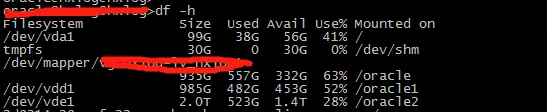
As shown in the figure below ,4T We've almost run out of space .

The first thought is to clean up the data for more than half a year , then resize Table space .
2.1 Clean up expired dataBecause the table of business is tablename_yearmonth Format , for example log_202204, A watch every month , So go straight to truncate that will do .
Large table found :
select t.segment_name,t.BYTES/1024/1024/1024 GB,t.segment_typefrom user_segments twhere t.segment_type in ('TABLE','TABLE PARTITION')order by nvl(t.BYTES/1024/1024/1024,0) desc;
truncate The big table :
select 'truncate table '|| t.TABLE_NAME ||';' from user_tables t where t.TABLE_NAME like 'LOG%';2.2 Shrink the table space select a.tablespace_name,a.file_name,a.totalsize as totalsize_MB,b.freesize as freesize_MB,'ALTER DATABASE DATAFILE ''' || a.file_name || ''' RESIZE ' ||round((a.totalsize - b.freesize) + 200) || 'M;' as "alter datafile"from (select a.file_name,a.file_id,a.tablespace_name,a.bytes / 1024 / 1024 as totalsizefrom dba_data_files a) a,(select b.tablespace_name,b.file_id,sum(b.bytes / 1024 / 1024) as freesizefrom dba_free_space bgroup by b.tablespace_name, b.file_id) bwhere a.file_id = b.file_idand b.freesize > 100and a.tablespace_name in ('TBS_LOG_DATA')order by a.tablespace_name
Take the next step alter datafile Copy the statement and execute :
Some report errors :
ORA-03297: file contains used data beyond requested RESIZE value

Because I use truncate, Theoretically, it will not be affected by high water level , I found several blogs on the Internet , It also means to lower the high water level of the meter , Clean up table fragments .
select 'alter table '||t.TABLE_NAME||' enable row movement;', 'alter table '||t.TABLE_NAME||' shrink space cascade;' from user_tables t where t.TABLE_NAME like 'LOG%';After cleaning up the debris , Re execution , Is still an error .
2.4 Directly put the relevant table drop fallselect 'drop table '|| t.TABLE_NAME ||'purge;' from user_tables t where t.TABLE_NAME like 'LOG%';drop After dropping the meter , Re execution , Is still an error .
2.5 Move other tables under this table space out of this table spaceOmnipotent itpub There is a blog on :
Truncate table perhaps drop table Shrink data files , I often meet ORA-03297: file contains used data beyond requested RESIZE value Inquire about dba_free_space There is also free space . After inquiry MOS(Doc ID 1029252.6) hear
If you have a large extent in the middle of a datafile, and some object taking up room at the end of the datafile, you can use the query FINDEXT.SQL below to find this object. If you export this object, then drop it, you should then free up contiguous space at the end of your datafile so you will be able to resize it smaller.
Make sure you leave enough room in the datafile for importing the object back into the tablespace.
It means if you are free extent If it's in the middle of the file , Cannot proceed at this time resize , The tail must be object drop Then rebuild Again resize datafile. The following is my test ;
[[email protected] ~]$ sqlplus / as sysdbaSQL*Plus: Release 10.2.0.1.0 - Production on Wed Jul 31 11:10:41 2013Copyright (c) 1982, 2005, Oracle. All rights reserved.Connected to:Oracle Database 10g Enterprise Edition Release 10.2.0.1.0 - 64bit ProductionWith the Partitioning, OLAP and Data Mining optionsSQL> create tablespace test2 datafile '/u01/app/oracle/oradata/orcl/test2.dbf' size 10M autoextend on next 1M;Tablespace created.SQL> create table tab1 tablespace test2 as select * from dba_objects;Table created.SQL> select file#,name,bytes/1024/1024 bytes from v$datafile where name like '%test2%';FILE# NAME BYTES----- ------------------------------------------------------------ ----- 23 /u01/app/oracle/oradata/orcl/test2.dbf 11SQL> create table tab2 tablespace test2 as select * from dba_objects;Table created.SQL> select file#,name,bytes/1024/1024 bytes from v$datafile where name like '%test2%';FILE# NAME BYTES----- ------------------------------------------------------------ ----- 23 /u01/app/oracle/oradata/orcl/test2.dbf 21SQL> select SEGMENT_NAME,FILE_ID,EXTENT_ID,BLOCK_ID,blocks from dba_extents where file_id=23 order by BLOCK_ID;SEGMENT_NA FILE_ID EXTENT_ID BLOCK_ID BLOCKS---------- ---------- ---------- ---------- ----------TAB1 23 0 9 8TAB1 23 1 17 8TAB1 23 2 25 8TAB1 23 3 33 8TAB1 23 4 41 8TAB1 23 5 49 8TAB1 23 6 57 8TAB1 23 7 65 8TAB1 23 8 73 8TAB1 23 9 81 8TAB1 23 10 89 8SEGMENT_NA FILE_ID EXTENT_ID BLOCK_ID BLOCKS---------- ---------- ---------- ---------- ----------TAB1 23 11 97 8TAB1 23 12 105 8TAB1 23 13 113 8TAB1 23 14 121 8TAB1 23 15 129 8TAB1 23 16 137 128TAB1 23 17 265 128TAB1 23 18 393 128TAB1 23 19 521 128TAB1 23 20 649 128TAB1 23 21 777 128SEGMENT_NA FILE_ID EXTENT_ID BLOCK_ID BLOCKS---------- ---------- ---------- ---------- ----------TAB1 23 22 905 128TAB1 23 23 1033 128TAB1 23 24 1161 128TAB2 23 0 1289 8TAB2 23 1 1297 8TAB2 23 2 1305 8TAB2 23 3 1313 8TAB2 23 4 1321 8TAB2 23 5 1329 8TAB2 23 6 1337 8TAB2 23 7 1345 8SEGMENT_NA FILE_ID EXTENT_ID BLOCK_ID BLOCKS---------- ---------- ---------- ---------- ----------TAB2 23 8 1353 8TAB2 23 9 1361 8TAB2 23 10 1369 8TAB2 23 11 1377 8TAB2 23 12 1385 8TAB2 23 13 1393 8TAB2 23 14 1401 8TAB2 23 15 1409 8TAB2 23 16 1417 128TAB2 23 17 1545 128TAB2 23 18 1673 128SEGMENT_NA FILE_ID EXTENT_ID BLOCK_ID BLOCKS---------- ---------- ---------- ---------- ----------TAB2 23 19 1801 128TAB2 23 20 1929 128TAB2 23 21 2057 128TAB2 23 22 2185 128TAB2 23 23 2313 128TAB2 23 24 2441 12850 rows selected.
Block_id Is a continuous
SQL> truncate table tab1 2 ;Table truncated.SQL> select * from dba_free_space where file_id=23;TABLESPACE_NAME FILE_ID BLOCK_ID BYTES BLOCKS RELATIVE_FNO-------------------- ---------- ---------- ---------- ---------- ------------TEST2 23 17 ########## 1272 23TEST2 23 2569 ########## 120 23Have original tab1 Of free blocks 1272
SQL> alter database datafile '/u01/app/oracle/oradata/orcl/test2.dbf' resize 12M;alter database datafile '/u01/app/oracle/oradata/orcl/test2.dbf' resize 12M*ERROR at line 1:ORA-03297: file contains used data beyond requested RESIZE valueUnable to proceed resize
The following tab1 drop Retest
SQL> drop table tab1 purge;Table dropped.SQL> alter database datafile '/u01/app/oracle/oradata/orcl/test2.dbf' resize 12M;alter database datafile '/u01/app/oracle/oradata/orcl/test2.dbf' resize 12M*ERROR at line 1:ORA-03297: file contains used data beyond requested RESIZE valueStill wrong
then truncate tab2 Retest
SQL> truncate table tab2;Table truncated.SQL> select * from dba_free_space where file_id=23;TABLESPACE_NAME FILE_ID BLOCK_ID BYTES BLOCKS RELATIVE_FNO-------------------- ---------- ---------- ---------- ---------- ------------TEST2 23 9 ########## 1280 23TEST2 23 1297 ########## 1392 23SQL> alter database datafile '/u01/app/oracle/oradata/orcl/test2.dbf' resize 12M;Database altered.SQL> alter database datafile '/u01/app/oracle/oradata/orcl/test2.dbf' resize 6M;alter database datafile '/u01/app/oracle/oradata/orcl/test2.dbf' resize 6M*ERROR at line 1:ORA-03297: file contains used data beyond requested RESIZE valueAt this time, it can only shrink tab2 Space But not shrink tab1 Space
And then again drop tab2
SQL> drop table tab2 purge 2 ;Table dropped.SQL> alter database datafile '/u01/app/oracle/oradata/orcl/test2.dbf' resize 6M;Database altered.SQL> alter database datafile '/u01/app/oracle/oradata/orcl/test2.dbf' resize 1M;Database altered.Can shrink tab1 Space
note:
Shrinking data files is related to two factors
1 Lower the high water level
2 free extent stay datafile Tail of
This article directly explains the second
If you are free extent If it's in the middle of the file , Cannot proceed at this time resize , The tail must be object drop Then rebuild Again resize datafile.
That is to say, the user writes other tables in the same period , Also under this data file , Then you can't resize.
Move other tables to users Table space :
select 'alter index '||index_NAME||' rebuild tablespace users;' from user_indexes where TABLE_NAME not like 'LOG_%';select 'alter table '||TABLE_NAME||' move tablespace users;' from user_tables where TABLE_NAME not like 'LOG_%';Run compressed space again , success

2.6 View compressed space
You can see that there are more 2.1T Space

Shrinking space, running speed is good ,50 Multiple data files , Compress in a few minutes .
summaryThis is about Oracle This is the end of the article on shrinking table space , More about Oracle Please search the previous articles of SDN or continue to browse the relevant articles below. I hope you will support SDN more in the future !
边栏推荐
- [7.7 live broadcast preview] the lecturer of "typical architecture of SaaS cloud native applications" teaches you to easily build cloud native SaaS applications. Once the problem is solved, Huawei's s
- Error in compiling libssh2. OpenSSL cannot be found
- 2022 年 Q2 加密市场投融资报告:GameFi 成为投资关键词
- [Jianzhi offer] 62 The last remaining number in the circle
- 叩富网开期货账户安全可靠吗?怎么分辨平台是否安全?
- 精准防疫有“利器”| 芯讯通助力数字哨兵护航复市
- 33:第三章:开发通行证服务:16:使用Redis缓存用户信息;(以减轻数据库的压力)
- 【剑指 Offer】61. 扑克牌中的顺子
- The second day of learning C language for Asian people
- stirring! 2022 open atom global open source summit registration is hot!
猜你喜欢

精准防疫有“利器”| 芯讯通助力数字哨兵护航复市
Machine learning 01: Introduction
Use JDBC technology and MySQL database management system to realize the function of course management, including adding, modifying, querying and deleting course information.
7.Scala类
Oracle缩表空间的完整解决实例
Embedded-c Language-2
Rider 设置选中单词侧边高亮,去除警告建议高亮
【性能测试】jmeter+Grafana+influxdb部署实战

IDC报告:腾讯云数据库稳居关系型数据库市场TOP 2!
干货!半监督预训练对话模型 SPACE
随机推荐
[Jianzhi offer] 63 Maximum profit of stock
浏览器渲染原理以及重排与重绘
Embedded UC (UNIX System Advanced Programming) -1
Little knowledge about C language (array and string)
调查显示传统数据安全工具面对勒索软件攻击的失败率高达 60%
Matery主题自定义(一)黑夜模式
How to write a full score project document | acquisition technology
In depth understanding of redis memory obsolescence strategy
Embedded-c Language-1
深耕5G,芯讯通持续推动5G应用百花齐放
Browser rendering principle and rearrangement and redrawing
国内首家 EMQ 加入亚马逊云科技「初创加速-全球合作伙伴网络计划」
网上办理期货开户安全吗?网上会不会骗子比较多?感觉不太靠谱?
The survey shows that the failure rate of traditional data security tools in the face of blackmail software attacks is as high as 60%
微信公众号网页授权登录实现起来如此简单
【剑指 Offer】66. 构建乘积数组
The first EMQ in China joined Amazon cloud technology's "startup acceleration - global partner network program"
PHP talent recruitment system development source code recruitment website source code secondary development
7. Scala class
Embedded -arm (bare board development) -2