当前位置:网站首页>【OpenCV 例程200篇】218. 多行倾斜文字水印
【OpenCV 例程200篇】218. 多行倾斜文字水印
2022-07-04 09:35:00 【小白YouCans】
【youcans 的 OpenCV 例程200篇】218. 多行倾斜文字水印
8.1 添加多行倾斜文字水印
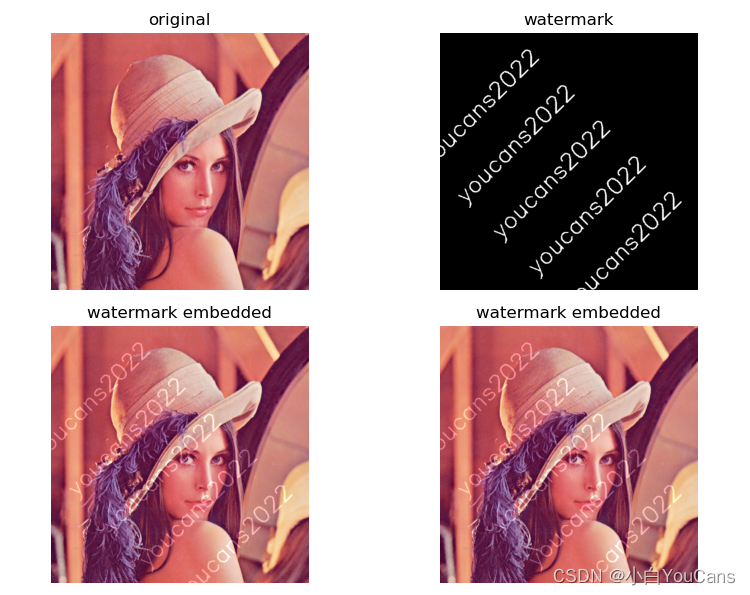
水印是叠加在图像上的标志、签名、文本或图案,用于保护图像的版权。
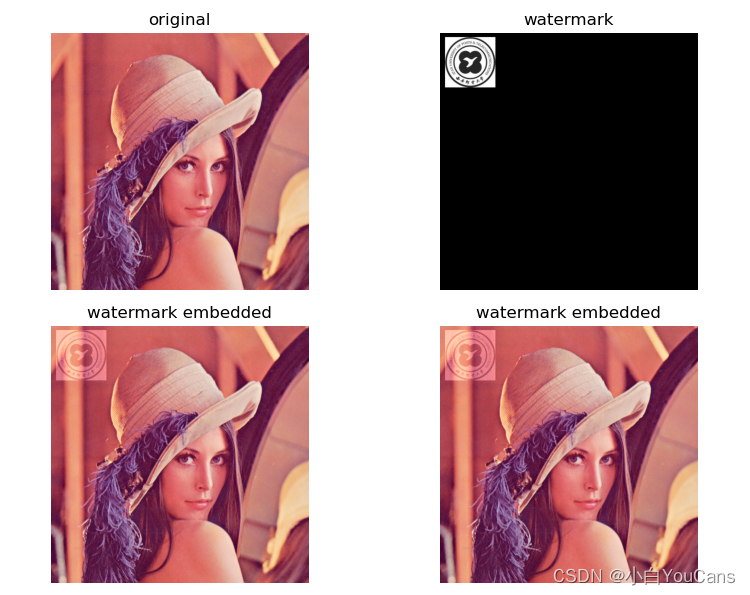
先在黑色背景上添加图像或文字制作水印,再使用 cv.addWeight 函数,通过重叠混合把水印添加到原始图像上。
也可以以水印图案或文字区域作为掩模,使用 cv.add 函数修改掩模区域的像素值,实现把水印添加到原始图像上。
例程 A4.10:为图像添加水印
    # A4.10 为图像添加水印
    img = cv.imread("../images/imgLena.tif", 1)  # 加载原始图片
    h, w = img.shape[0], img.shape[1]

    # # 生成水印图案
    # logo = cv.imread("../images/logoXupt.png", 0) # 加载 Logo
    # logoResize = cv.resize(logo, (100,100)) # 调整图片尺寸
    # grayMark = np.zeros(img.shape[:2], np.uint8) # 水印黑色背景
    # grayMark[10:110,10:110] = logoResize # 生成水印图案

    # 生成文字水印
    mark = np.zeros(img.shape[:2], np.uint8)  # 黑色背景
    for i in range(h//100):
        cv.putText(mark, "youcans2022", (50,70+100*i), cv.FONT_HERSHEY_SIMPLEX, 1.5, 255, 2)
    MAR = cv.getRotationMatrix2D((w//2,h//2), 45, 1.0)  # 旋转 45 度
    grayMark = cv.warpAffine(mark, MAR, (w,h))  # 旋转变换,默认为黑色填充

    # 为图像添加水印 1
    markC3 = cv.merge([grayMark, grayMark, grayMark])
    imgMark1 = cv.addWeighted(img, 1, markC3, 0.25, 0)  # 加权加法图像融合

    # 为图像添加水印2
    imgMark2 = cv.add(img, 64, mask=grayMark)  # 以水印图案作为掩模

    plt.figure(figsize=(9, 6))
    plt.subplot(221), plt.title("original"), plt.axis('off')
    plt.imshow(cv.cvtColor(img, cv.COLOR_BGR2RGB))
    plt.subplot(222), plt.title("watermark"), plt.axis('off')
    plt.imshow(cv.cvtColor(markC3, cv.COLOR_BGR2RGB))
    plt.subplot(223), plt.title("watermark embedded"), plt.axis('off')
    plt.imshow(cv.cvtColor(imgMark1, cv.COLOR_BGR2RGB))
    plt.subplot(224), plt.title("watermark embedded"), plt.axis('off')
    plt.imshow(cv.cvtColor(imgMark1, cv.COLOR_BGR2RGB))
    plt.tight_layout()
    plt.show()
【本节完】
版权声明:
[email protected] 原创作品,转载必须标注原文链接:(https://blog.csdn.net/youcans/article/details/125506829)
Copyright 2022 youcans, XUPT
Crated:2022-6-28
217. 鼠标交互获取多边形区域
218. 多行倾斜文字水印
边栏推荐
- 2022-2028 global strain gauge pressure sensor industry research and trend analysis report
- Hands on deep learning (36) -- language model and data set
- The child container margin top acts on the parent container
- Lauchpad x | MODE
- Summary of reasons for web side automation test failure
- PHP is used to add, modify and delete movie information, which is divided into foreground management and background management. Foreground users can browse information and post messages, and backgroun
- C language pointer classic interview question - the first bullet
- Upgrading Xcode 12 caused Carthage to build cartfile containing only rxswift to fail
- Go context 基本介绍
- Basic data types in golang
猜你喜欢
Hands on deep learning (46) -- attention mechanism
Dynamic memory management
C # use gdi+ to add text with center rotation (arbitrary angle)
Hands on deep learning (33) -- style transfer

2022-2028 global edible probiotic raw material industry research and trend analysis report
MySQL foundation 02 - installing MySQL in non docker version
Sort out the power node, Mr. Wang he's SSM integration steps
Application of safety monitoring in zhizhilu Denggan reservoir area
How does idea withdraw code from remote push
C # use gdi+ to add text to the picture and make the text adaptive to the rectangular area
随机推荐
Launpad | 基礎知識
C # use gdi+ to add text to the picture and make the text adaptive to the rectangular area
System.currentTimeMillis() 和 System.nanoTime() 哪个更快?别用错了!
C language pointer interview question - the second bullet
Hands on deep learning (35) -- text preprocessing (NLP)
Leetcode (Sword finger offer) - 35 Replication of complex linked list
Write a jison parser from scratch (4/10): detailed explanation of the syntax format of the jison parser generator
2022-2028 global industrial gasket plate heat exchanger industry research and trend analysis report
Launpad | Basics
Flutter 小技巧之 ListView 和 PageView 的各種花式嵌套
pcl::fromROSMsg报警告Failed to find match for field ‘intensity‘.
Global and Chinese markets of thrombography hemostasis analyzer (TEG) 2022-2028: Research Report on technology, participants, trends, market size and share
Write a jison parser from scratch (3/10): a good beginning is half the success -- "politics" (Aristotle)
Lauchpad X | 模式
Application of safety monitoring in zhizhilu Denggan reservoir area
Golang type comparison
Hands on deep learning (39) -- gating cycle unit Gru
Pcl:: fromrosmsg alarm failed to find match for field 'intensity'
`Example of mask ` tool use
5g/4g wireless networking scheme for brand chain stores