当前位置:网站首页>GEE(四):计算两个变量(影像)之间的相关性并绘制散点图
GEE(四):计算两个变量(影像)之间的相关性并绘制散点图
2022-07-07 21:50:00 【BetterQ.】
最近使用Google Earth Engine(GEE)分析了一下高程和NDVI的相关性,并绘制二者的散点图,计算其决定系数。
计算时主要用到了GEE中的图表 ui.Chart.image.byRegion(),将研究区域内的高程和NDVI的散点图先绘制出来,再添加趋势线,计算决定系数,就可以知道二者之间的相关性有多高。
NDVI-高程散点图及决定系数计算实现代码如下:
//研究区域,可自己绘制或导入
var roi = /* color: #d63000 */ee.Geometry.Polygon(
        [[[104.34385678174718, 27.233899188878446],
          [114.80284115674718, 28.477166904461537],
          [117.52745053174718, 34.61402019968164],
          [111.99034115674718, 40.99546927185892],
          [95.11534115674718, 37.87379212761336]]]);

//导入 DEM
var DEM=ee.Image("CGIAR/SRTM90_V4").reproject('SR-ORG:6974',null,500);
//从DEM中抽取样本点,这里选取500个
var rroi = DEM.sample(
    {
    region: roi, scale: 30, numPixels: 500, geometries: true});

//导入NDVI数据
var ndvi=ee.ImageCollection('MODIS/006/MOD13A1')
                     .filter(ee.Filter.date('2020-01-01', '2020-02-01'))
                     .first()
                     .multiply(0.0001);

// 设置图表属性,包括样式颜色等
var chartStyle = {

  title: 'NDVI-DEM',
  hAxis: {

    title: 'elevation',
    titleTextStyle: {
    italic: false, bold: true},
    gridlines: {
    color: 'FFFFFF'}
  },
  vAxis: {

    title: 'NDVI',
    titleTextStyle: {
    italic: false, bold: true},
    gridlines: {
    color: 'FFFFFF'},
  },
  pointSize: 4,
  dataOpacity: 0.6,

  chartArea: {
    backgroundColor: 'EBEBEB'},

  //添加趋势线
  trendlines: {

    0: {
      // add a trend line to the 1st series
      type: 'polynomial',  // or 'polynomial', 'exponential'
      color: 'green',
      showR2:'true', //show R2 cofficient
      lineWidth: 5,
      opacity: 0.2,
      visibleInLegend: true,
    }
  }
};

//绘制散点图
var charten=ui.Chart.image.byRegion({

  image:ndvi.select('NDVI'),
  regions:rroi,
  reducer:ee.Reducer.mean(),
  scale:500,
  xProperty: 'elevation'
  });
charten.setChartType('ScatterChart').setOptions(chartStyle);
print(charten)
结果如图所示: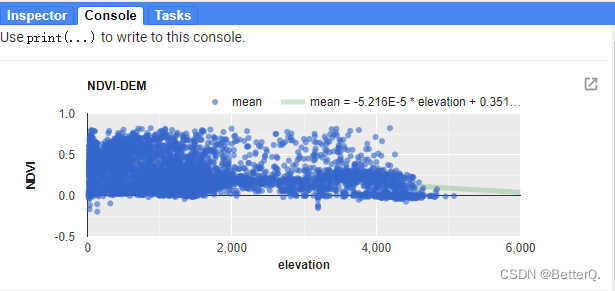
.
.
.
.
这里还做了温度和高程之间的关系,实现代码:
// Load SRTM elevation data.
var elev = ee.Image('CGIAR/SRTM90_V4').select('elevation');

// Subset Colorado from the TIGER States feature collection.
var colorado = ee.FeatureCollection('TIGER/2018/States')
                   .filter(ee.Filter.eq('NAME', 'Colorado'));

// Draw a random sample of elevation points from within Colorado.
var samp = elev.sample(
    {
    region: colorado, scale: 30, numPixels: 500, geometries: true});

// Load PRISM climate normals image collection; convert images to bands.
var normClim = ee.ImageCollection('OREGONSTATE/PRISM/Norm81m').toBands();

// Define the chart and print it to the console.
var chartte = ui.Chart.image
                .byRegion({

                  image: normClim.select(['01_tmean', '07_tmean']),
                  regions: samp,
                  reducer: ee.Reducer.mean(),
                  scale: 500,
                  xProperty: 'elevation'
                })
                .setSeriesNames(['Jan', 'Jul'])
                .setChartType('ScatterChart')
                .setOptions({

                  title: 'Average Monthly Colorado Temperature by Elevation',
                  hAxis: {

                    title: 'Elevation (m)',
                    titleTextStyle: {
    italic: false, bold: true}
                  },
                  vAxis: {

                    title: 'Temperature (°C)',
                    titleTextStyle: {
    italic: false, bold: true}
                  },
                  pointSize: 4,
                  dataOpacity: 0.6,
                  colors: ['1d6b99', 'cf513e'],
                  trendlines: {

                    0: {
      // add a trend line to the 1st series
                    type: 'linear',  // or 'polynomial', 'exponential'
                    color: 'green',
                    showR2:'true', //R2 cofficient
                    lineWidth: 5,
                    opacity: 0.2,
                    visibleInLegend: true,
                    },
                    1: {
      // add a trend line to the 1st series
                    type: 'linear',  // or 'polynomial', 'exponential'
                    color: 'green',
                    showR2:'true', //R2 cofficient
                    lineWidth: 5,
                    opacity: 0.2,
                    visibleInLegend: true,
                    }
                  }});
print(chartte);
.
结果如图: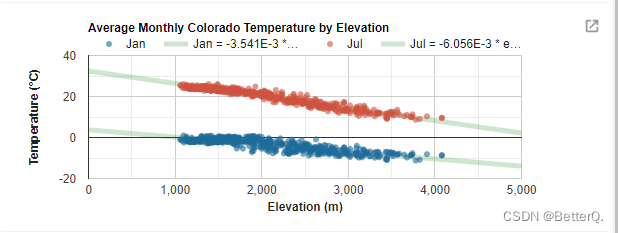
.
.
.
.
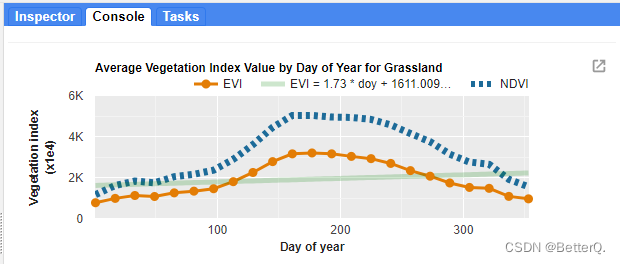
以及绘制植被指数随时间变化的曲线图:
// Import the example feature collection and subset the glassland feature.
var grassland = ee.FeatureCollection('projects/google/charts_feature_example')
                    .filter(ee.Filter.eq('label', 'Grassland'));

// Load MODIS vegetation indices data and subset a decade of images.
var vegIndices = ee.ImageCollection('MODIS/006/MOD13A1')
                     .filter(ee.Filter.date('2010-01-01', '2020-01-01'))
                     .select(['NDVI', 'EVI']);

// Set chart style properties.
var chartStyle = {

  title: 'Average Vegetation Index Value by Day of Year for Grassland',
  hAxis: {

    title: 'Day of year',
    titleTextStyle: {
    italic: false, bold: true},
    gridlines: {
    color: 'FFFFFF'}
  },
  vAxis: {

    title: 'Vegetation index (x1e4)',
    titleTextStyle: {
    italic: false, bold: true},
    gridlines: {
    color: 'FFFFFF'},
    format: 'short',
    baselineColor: 'FFFFFF'
  },
  series: {

    0: {
    lineWidth: 3, color: 'E37D05', pointSize: 7},
    1: {
    lineWidth: 7, color: '1D6B99', lineDashStyle: [4, 4]}
  },
  chartArea: {
    backgroundColor: 'EBEBEB'},
  trendlines: {

    0: {
      // add a trend line to the 1st series
      type: 'linear',  // or 'polynomial', 'exponential'
      color: 'green',
      showR2:'true',
      lineWidth: 5,
      opacity: 0.2,
      visibleInLegend: true,
    }
  }
};

// Define the chart.
var chart =
    ui.Chart.image
        .doySeries({

          imageCollection: vegIndices,
          region: grassland,
          regionReducer: ee.Reducer.mean(),
          scale: 500,
          yearReducer: ee.Reducer.mean(),
          startDay: 1,
          endDay: 365
        })
        .setSeriesNames(['EVI', 'NDVI']);

// Apply custom style properties to the chart.
chart.setOptions(chartStyle);

// Print the chart to the console.
print(chart);
边栏推荐
- Interview questions: how to test app performance?
- 数据库每日一题---第22天:最后一次登录
- 全面掌控!打造智慧城市建设的“领导驾驶舱”
- 软件测评中心▏自动化测试有哪些基本流程和注意事项?
- What is fake sharing after filling the previous hole?
- Leetcode19. Delete the penultimate node of the linked list [double pointer]
- Cases of agile innovation and transformation of consumer goods enterprises
- Sword finger offer 63 Maximum profit of stock
- Unity technical notes (II) basic functions of scriptableobject
- 微生物健康网,如何恢复微生物群落
猜你喜欢
Unity与WebGL的相爱相杀
PCL .vtk文件与.pcd的相互转换

Talk about DART's null safety feature
Unity and webgl love each other

Microbial health network, how to restore microbial communities
Line measurement - graphic reasoning -9- line problem class

Understand the session, cookie and token at one time, and the interview questions are all finalized
LeetCode144. Preorder traversal of binary tree
【测试面试题】页面很卡的原因分析及解决方案

行测-图形推理-6-相似图形类
随机推荐
Early childhood education industry of "screwing bar": trillion market, difficult to be a giant
定位到最底部[通俗易懂]
肠道里的微生物和皮肤上的一样吗?
行测-图形推理-4-字母类
线上面试,该如何更好的表现自己?这样做,提高50%通过率~
OC variable parameter transfer
消费品企业敏捷创新转型案例
Txt file virus
Debezium系列之:支持 mysql8 的 set role 語句
Gbu1510-asemi power supply special 15A rectifier bridge gbu1510
不夸张地说,这是我见过最通俗易懂的,pytest入门基础教程
Talk about DART's null safety feature
Debezium系列之:支持 mysql8 的 set role 语句
Debezium series: source code reading snapshot reader
Ligne - raisonnement graphique - 4 - classe de lettres
Txt file virus
Line test - graphic reasoning - 3 - symmetric graphic class
行测-图形推理-2-黑白格类
Use JfreeChart to generate curves, histograms, pie charts, and distribution charts and display them to JSP-1
一次搞明白 Session、Cookie、Token,面试问题全稿定