当前位置:网站首页>MySQL advanced Chapter 1 (installing MySQL under Linux) [i]
MySQL advanced Chapter 1 (installing MySQL under Linux) [i]
2022-06-10 19:10:00 【Fate friend I】
To be honest, there is no need to write another blog like this , But to record the passing of the morning , Summarize your own learning achievements .
Or simply write . I hope to witness the growth of byte and plant trees for later generations !List of articles
- One MySQL Of Linux Version installation
- 1.1 Download the installation package
- 1.2 . Summary Linux Installation under system MySQL In several ways
- 1.3 CentOs Lower inspection MySQL rely on 【 No problem with normal conditions 】
- 1.3.1 Check /tmp Temporary directory permissions ( Absolutely necessary !!!)
- 1.3.2 Before the installation , Checking depends on
- 1.3.3.0 CentOS7 Next MySQL Preparation for offline installation during installation
- 1.3.3 CentOS7 Next MySQL setup script
- 1.3.4 see MySQL edition
- 1.3.5 Initialization of services
- 1.3.6 start-up MySQL, Check the status
- 1.3.7 see MySQL Whether the service starts automatically 【 Don't move under normal conditions 】
- 1.4 MySQL Sign in
One MySQL Of Linux Version installation
1.1 Download the installation package
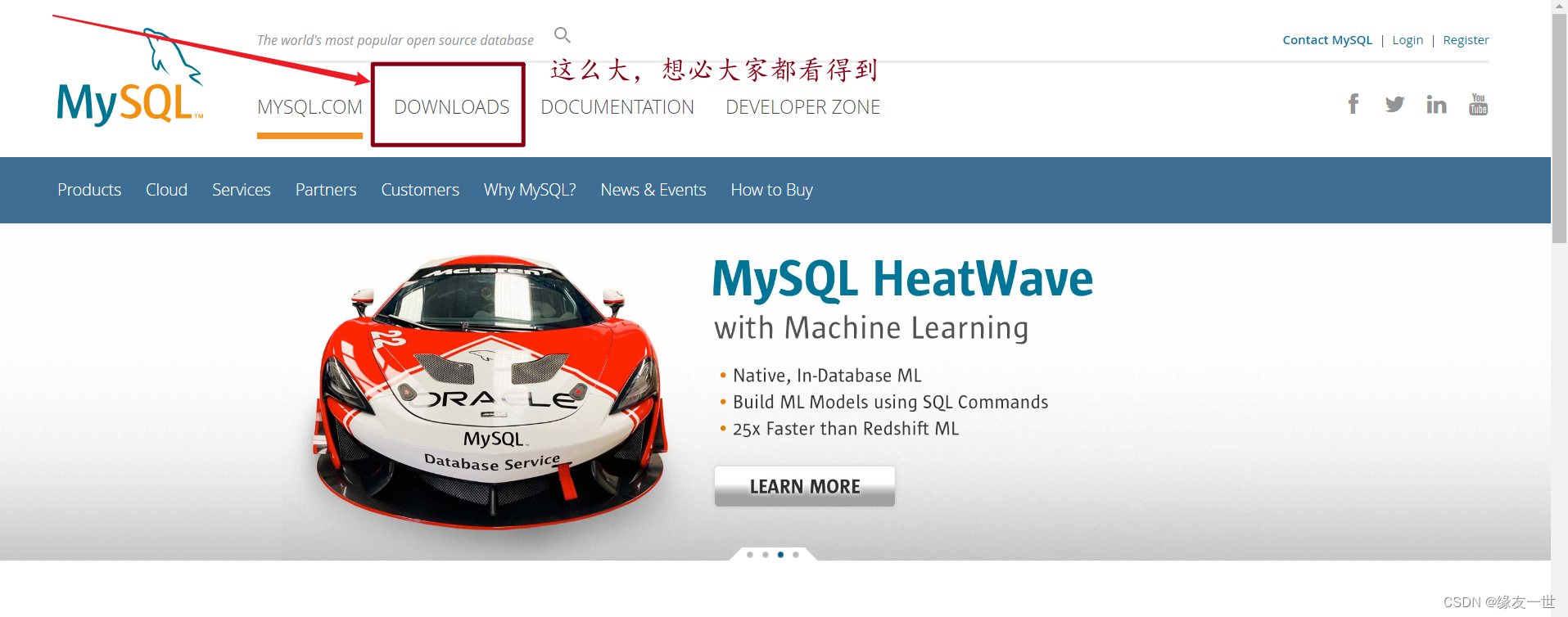


- There is no direct choice here centosos 7 The version of the system , The reason for choosing the corresponding Red Hat Enterprise Linux

Don't ask why , Because we don't know , ha-ha 
- In order not to waste traffic , After all, the place where Xiaobian recently sat was not free WiFi, Only use flow
Just use the pictures in the learning courseware , The version is a little old , I hope readers will forgive me !!!
So far we MySQL Installation package download completed 🥳
1.2 . Summary Linux Installation under system MySQL In several ways
| Installation mode | characteristic |
|---|---|
| rpm | Simple installation , Poor flexibility , Unable to flexibly select the version 、 upgrade |
| rpm repository | The installation package is very small , Version installation is simple and flexible , Easy upgrade , Need to connected to the Internet |
| General binary package | Installation is more complicated , High flexibility , The platform has good universality |
| Source package | Complicated installation , Long time , The parameter setting is flexible , Good performance |
1.3 CentOs Lower inspection MySQL rely on 【 No problem with normal conditions 】
Please note that : Is in CentOs Terminal check for

1.3.1 Check /tmp Temporary directory permissions ( Absolutely necessary !!!)
- because mysql During installation , Will pass mysql The user is in /tmp New under the directory tmp_db file , So please give /tmp Greater authority . Of board
That's ok :
chmod -R 777 /tmp
1.3.2 Before the installation , Checking depends on
rpm -qa|grep libaio
- If there is libaio The package is as follows :

rpm -qa|grep net-tools
- If there is libaio Bao Ju :
1.3.3.0 CentOS7 Next MySQL Preparation for offline installation during installation
Secure terminal emulation Software | Remote management server tools
What's that? ?
Xshell It is a powerful security terminal simulation software , It supports SSH1, SSH2, as well as Microsoft Windows Platform TELNET agreement .Xshell Through the Internet to remote host security connection and its innovative design and features to help users enjoy their work in a complex network environment .
What's the role ?
Xshell yes Windows The next very powerful security terminal simulation software , Support Telnet、Rlogin、SSH、SFTP、Serial Such agreement , It's very convenient to linux Host for remote management .
- We need to use the Xshell and Xftp, The official website provides a free version, but it can only be used for a few months , But it's also good , It's very fragrant , Some friends can go to a certain place to find a cracked version , But be careful not to let your computer become An advertising device Of Rogue software farm , Don't trust some High speed farrowing device
And then we put our centos And Windows Connect
1.3.3.0.1 see centos Of ip Address
It is recommended to set centos Of ip It's static , Dynamic is too troublesome
This demonstration , Use dynamic address
- see CentOs Of IP Address
Input under terminal :
ip addr

open Xftp–> newly build –> routine 


Empathy : We can be together Xshell Connect to CentOsc View operation 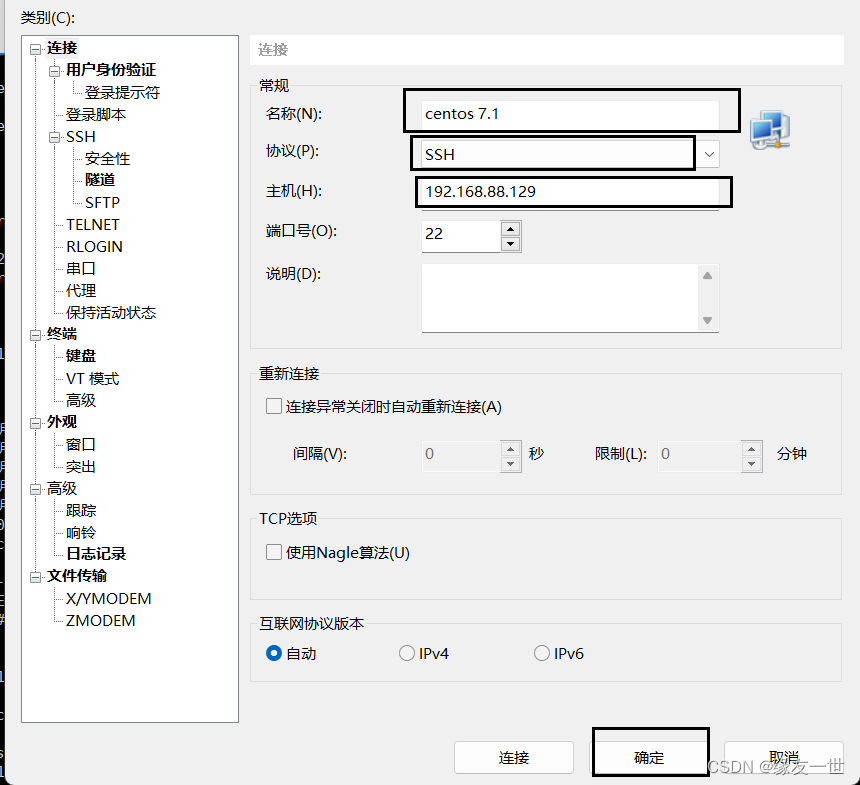
cd /opt
ll

1.3.3 CentOS7 Next MySQL setup script
- stay mysql The installation file directory of :( Must be executed sentence by sentence ) Don't make it easy to paste at one time
- Paste the shortcut key in Xshell neutralize , It is recommended to right-click to paste
rpm -ivh mysql-community-common-8.0.25-1.el7.x86_64.rpm

rpm -ivh mysql-community-client-plugins-8.0.25-1.el7.x86_64.rpm

rpm -ivh mysql-community-libs-8.0.25-1.el7.x86_64.rpm

rpm -ivh mysql-community-client-8.0.25-1.el7.x86_64.rpm

rpm -ivh mysql-community-server-8.0.25-1.el7.x86_64.rpm
- Be careful : For example, when checking the work , No inspection mysql Environment dependent installation mysql-community-server Will report a mistake
Kangge : The class is beginning
rpm yes Redhat Package Manage abbreviation , adopt RPM Management of , Users can wrap the source code as rpm For extension
File form , Easy to install .
-i , --install Install package
-v , --verbose Provide more detailed information output
-h , --hash The hash mark is listed when the package is installed ( and -v The effect is better when used together ), Show the progress bar

resolvent :
error :
mariadb-libs By mysql-community-libs-8.0.25-1.el7.x86_64 replace
Method 1 :
yum remove mysql-libs
#  solve , Clear the previously installed dependencies

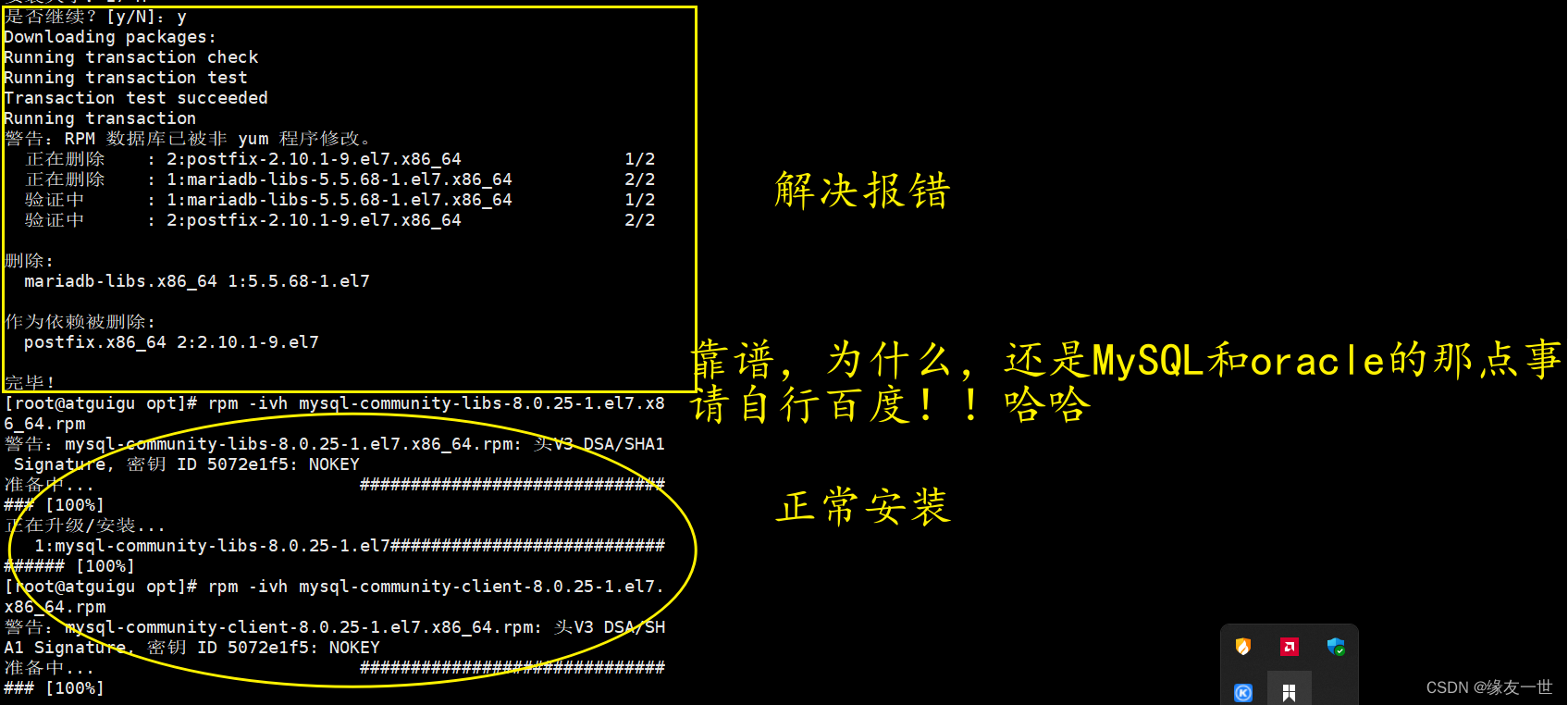
But the author is installing MySQL5.7 At version time , Executed statements , Still reporting a mistake
At last I found
Supplementary version of method 1
Wrong show :
rpm -ivh mysql-community-common-5.7.28-1.el7.x86_64.rpm
rpm -ivh mysql-community-client-5.7.30-1.el7.x86_64.rpm --nodeps --force
rpm -ivh mysql-community-client-5.7.28-1.el7.x86_64.rpm --nodeps --force
rpm -ivh mysql-community-server-5.7.28-1.el7.x86_64.rpm --nodeps --force
Kangge review tips : Where there is a pit, there is brother Kang
Dependency checking :MySQL5.7 The version still needs to be checked before installation 1.3.1 Check /tmp Temporary directory permissions and 1.3.2 Before the installation , Checking depends on
Number of packages installed : It's just MySQL5.7 The file of only 4 individual
Installation sequence : If you use Mr. songhongkang of shangsilicon Valley MySQL Course , After reaching the installation package resources , It is suggested to paste my sentence directly —— Save trouble , Take a rest
1.3.4 see MySQL edition
mysql --version
# or
mysqladmin --version
 Execute the following command , Check whether the installation is successful . Need to increase the -i Don't be case sensitive , Otherwise we can't find .
rpm -qa|grep -i mysql

1.3.5 Initialization of services
In order to ensure that the owner of database directories and files is mysql The logged in user , If you are root Identity running mysql service , Need to hold on to
Line the following command to initialize :
mysqld --initialize --user=mysql
explain : --initialize Options default to “ Security ” Mode to initialize , Will be root The user generates a password and will The password is marked as too
period , After logging in, you need to set a new password . Generated Temporary password Will record a copy in the log
Check the password :
cat /var/log/mysqld.log
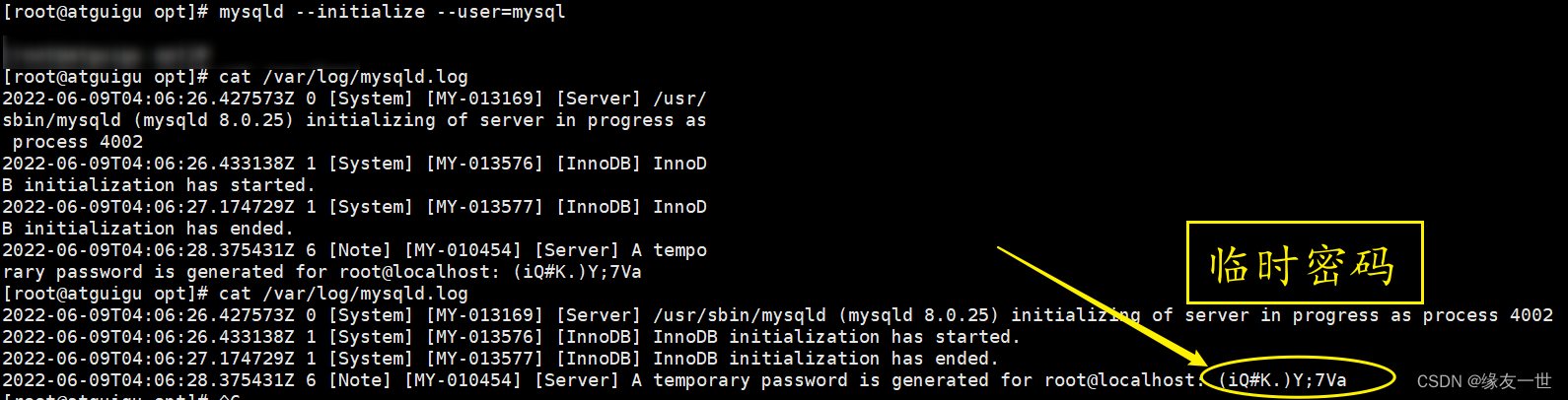
1.3.6 start-up MySQL, Check the status
# Add do not add .service Suffixes are OK

 start-up :systemctl start mysqld.service

 close :systemctl stop mysqld.service

 restart :systemctl restart mysqld.service

 Check the status :systemctl status mysqld.service
mysqld This executable represents MySQL Server program , Running this executable file can directly start a
Server process .
Check the process :

ps -ef | grep -i mysql
1.3.7 see MySQL Whether the service starts automatically 【 Don't move under normal conditions 】
systemctl list-unit-files|grep mysqld.service
If not enabled You can run the following command to set the auto start
systemctl enable mysqld.service
If you want to avoid self starting , Run the following command
systemctl disable mysqld.service
1.4 MySQL Sign in
1.4.1 First landing
adopt mysql -uroot -p Log in , stay Enter password: Enter the initialization password 
1.4.2 Change Password
- Because the initialization password expires by default , So checking the database will report an error
- More complicated , If it is not too simple, an error will be reported
ALTER USER 'root'@'localhost' IDENTIFIED BY 'new_password';

边栏推荐
- MySQL高级篇第一章(linux下安装MySQL)【上】
- [kuangbin] topic 22 interval DP
- Detailed explanation of Lora module wireless transceiver communication technology
- 数据库防火墙技术展望【终章】
- [database language SPL] a simple and fast database language SPL
- vim常用快捷键
- Leecode27977 double finger needling
- c指针(面试经典题目练习)
- [kuangbin]专题二十二 区间DP
- 第四章 数据类型(三)
猜你喜欢
Adobe Premiere基础(轨道相关)(五)

Array signal processing simulation part IV -- Z-transform analysis array polynomial

Some summary about YUV format

基于JSP的医院预约挂号平台设计与开发.zip(论文+项目源码)

Request header field xxxx is not allowed by Access-Control-Allow-Headers in preflight response问题

Upgrade the playing method of snatching singing, integrate the climax clips of genuine music and real-time scoring ability~

基于SSM流量计量云系统的设计与实现.rar(论文+项目源码)

Pits encountered during the use of ETL (ETL Chinese garbled)
![[Agency] 10 minutes to master the essential difference between forward agency and reverse agency](/img/67/5f30f36aa60cf605cbc32399a9d9a0.png)
[Agency] 10 minutes to master the essential difference between forward agency and reverse agency
Request header field XXXX is not allowed by access control allow headers in preflight response
随机推荐
C知识练习
Adobe Premiere foundation - time remapping (10)
JS Touch
Adobe Premiere basic special effects (card point and transition) (IV)
MySQL index invalidation scenario
SPSS入门笔记记录
2022.05.29(LC_6078_重排字符形成目标字符串)
第三章 数据类型(二)
WordPress 6.0 "Arturo Arturo" release
[kuangbin]专题二十二 区间DP
数据库防火墙的性能和高可用性分析
Openssl1.1.1 vs2013 compilation tutorial
基于谱加权的波束方向图分析
Adobe Premiere基础(视频的最后一步字幕添加)(六)
MySQL高级篇第一章(linux下安装MySQL)【上】
Analysis of optical storage direct flexible power distribution system
第6章 关系数据理论练习
【Vulnhub靶场】JANGOW: 1.0.1
lingo12软件下载及lingo语言入门资源
Libcurl 7.61.0 vs2013 compilation tutorial