当前位置:网站首页>RNote108---Display the running progress of the R program
RNote108---Display the running progress of the R program
2022-08-05 07:04:00 【51CTO】
I was looking for a displayshinyThe method of the program running progress,However, I only see the progress of the loop execution~Whatever,记录下吧
一、tcltk包
案例:
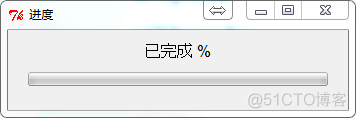
参数说明:
函数 | 说明 |
tkProgressBar | Displays widgets with labels and progress bars |
setTkProgessBar | Used to update values and labels |
具体参数设置 | |
title, label | 字符串,The title and label of the dialog window are given respectively |
min, max | 数值型,进度条的范围 |
initial, value | The initial value of the progress bar |
width | Pixels of the progress bar |
pb, con | tkProgressBar 的对象 |
二、progress包
A progress bar can be configured,显示百分比、经过时间、Estimated completion time.
案例:
默认参数

Estimated completion time
显示下载百分比,and the remaining time to complete


Calculate the execution time

参数说明:
A function to create a progress bar
函数 | 说明 |
progress_bar$new() | 创建进度条 |
参数设置 | |
format | Can be formatted as a progress bar,默认是百分比"[:bar] :percent".The progress bar is in parentheses on the left,Percentages are printed on the right |
total | total progress,默认100 |
width | 进度条宽度,The default is the width of the current terminal page-2 |
stream | The output method of the progress bar,默认stderr(),但是在Rstudio下有bug,Standard output is used in this casestdout .If not in terminal eitherRstudio中输出,Then no progress bar is printed |
complete | 完成的标识,默认为"=" |
incomplete | Unfinished logo,默认为"-" |
callback | 进度条结束时,调用回调函数. The progress bar object itself is passed as a single parameter to the callback function |
clear | 进度条结束时,是否清除.默认清除 |
show_after | A progress bar is displayed on the screen after a few seconds,For very short processes,Probably not worth showing at all.默认1/10秒 |
force | Whether to force the progress bar to be displayed,即使给定的(或默认的)Streams don't seem to support it |
Functions that use progress bars
There are two functions that update the progress bar:
progress_bar$tick() 按照1or other specified number to increase the progress of the progress bar
progress_bar$update 按照比例
The progress bar is in the first onetick命令后显示,This may not be desirable for long computations,Because nothing is displayed before the first run.Set at the time of calculation or downloadtick(0)A progress bar can be displayed instantly.
函数 | 说明 |
:bar | The progress bar itself |
:current | 当前进度数 |
:total | 总进度数 |
:elapsed | Elapsed time in seconds |
:eta | Estimated completion time |
:percent | 完成百分比 |
:rate | 下载速率,每秒字节数 |
:bytes | 显示字节.If you don't know the file size in advance,Can be useful for downloading or file reading |
:spin | Displays a spinner,even if the process is there0will also be updated |
REF
Package文档即可
边栏推荐
猜你喜欢


随机推荐
MyCat安装
TCP的粘包拆包问题+解决方案
(JLK105D)中山爆款LED恒流电源芯片方案
Redis进阶
h5页面回退到微信小程序并携带参数
MySQL:连接查询 | 内连接,外连接
软件测试必问面试题(附答案和解析)
2022 Fusion Welding and Thermal Cutting Operation Certificate Exam Questions and Mock Exams
Rapid Medical超小体积且唯一可调的取栓器获得FDA核准
lingo入门——河北省第三届研究生建模竞赛B题
今天虚竹哥又发现了一款好用的国产化API工具
【工具配置篇】VSCode 常用使用总结
PCI Pharma Services Announces Multi-Million Dollar Expansion of UK Manufacturing Facility to Meet Growing Demand for Global High Potency Drug Manufacturing Services to Support Oncology Treatment
技术分析模式(十)头肩图案
腾讯实习总结
开启防火墙iptable规则后,系统网络变慢
Promise (3) async/await
(2022杭电多校六)1010-Planar graph(最小生成树)
文本样式这一篇文章就够了
How to avoid online memory leaks