当前位置:网站首页>【工控老马】西门子PLC Siemens PLC TCP协议详解
【工控老马】西门子PLC Siemens PLC TCP协议详解
2022-07-02 09:42:00 【工控老马】
Siemens PLC TCP 协议详解
说明:蓝色文字表示已经破解部分,[红色文字] 表示对破解部分数字的说明,黑色文字表示对破解部分的进一步说明,黑色斜体加粗文字表示未破解部分,高亮文字部分表示驱动需要处理的部分,未标高亮部分驱动处理保持默认即可。
1.初始化连接
1.1 S7-200

[PLC -> PC]
03 00 00 16 11 d0 00 01 53 38 00 c0 01 09 c1 02 4d 57 c2 02 4d 57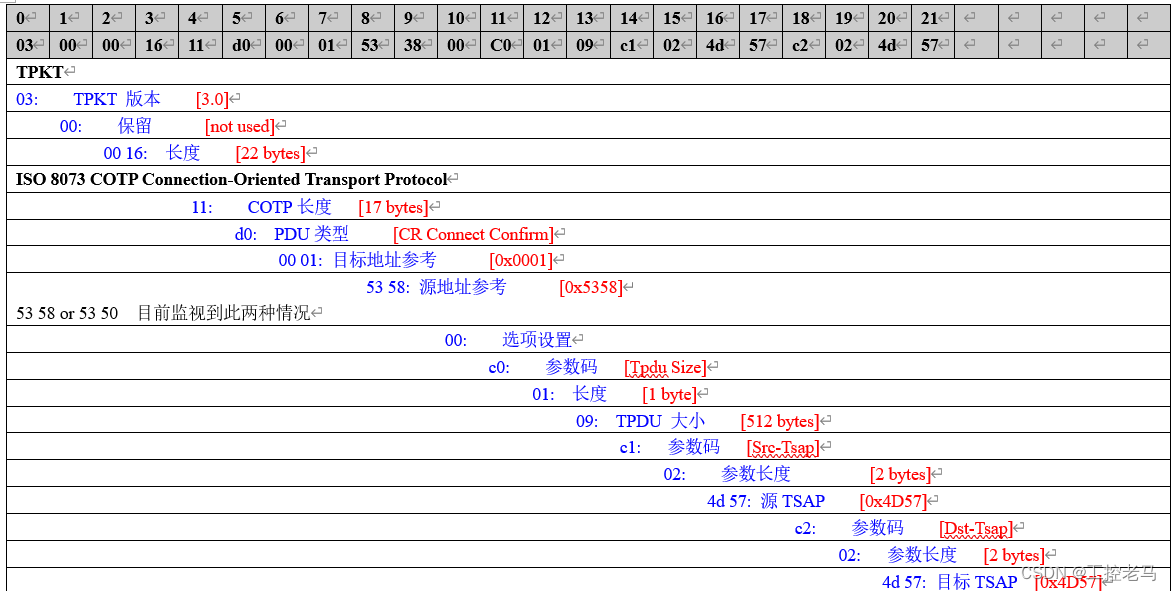
1.2 S7-300
//--------------------------------------------------------------------------------
[PC -> PLC]
03 00 00 16 11 e0 00 00 00 00 00 c1 02 01 00 c2 02 01 02 c0 01 09

//--------------------------------------------------------------------------------
[PLC -> PC]
03 00 00 16 11 d0 00 00 44 31 00 c0 01 09 c1 02 01 00 c2 02 01 02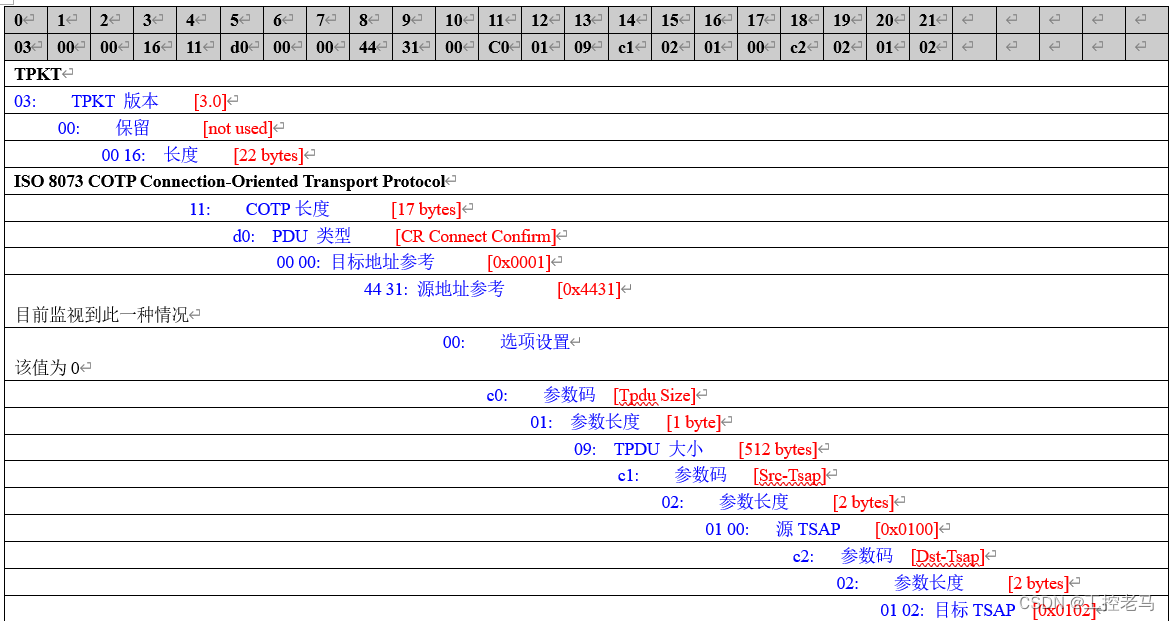
1.3 S7-400
//--------------------------------------------------------------------------------
[PC -> PLC]
03 00 00 16 11 e0 00 00 00 01 00 c1 02 02 00 c2 02 02 23 c0 01 09
//--------------------------------------------------------------------------------
[PLC -> PC]
03 00 00 16 11 d0 00 00 44 31 00 c0 01 0ac1 02 01 00 c2 02 01 02
2 初始化通讯
//--------------------------------------------------------------------------------
[PC -> PLC]
03 00 00 19 02 f0 80 32 01 00 00 cc c1 00 08 00 00 f0 00 00 01 00 01 03 c0
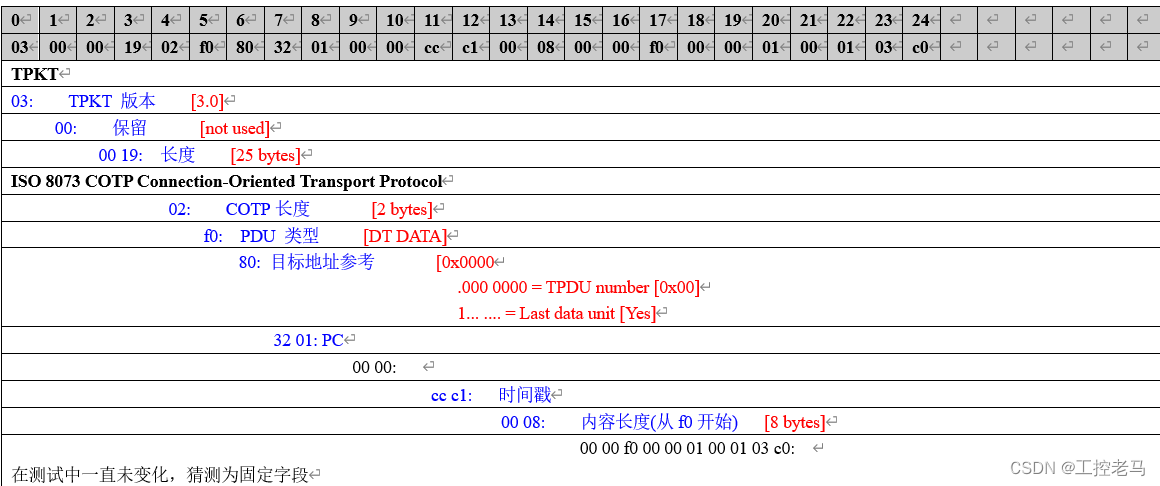
//--------------------------------------------------------------------------------
[PLC -> PC]
03 00 00 1b 02 f0 80 32 03 00 00 cc c1 00 08 00 00 00 00 f0 01 00 01 00 01 00 f0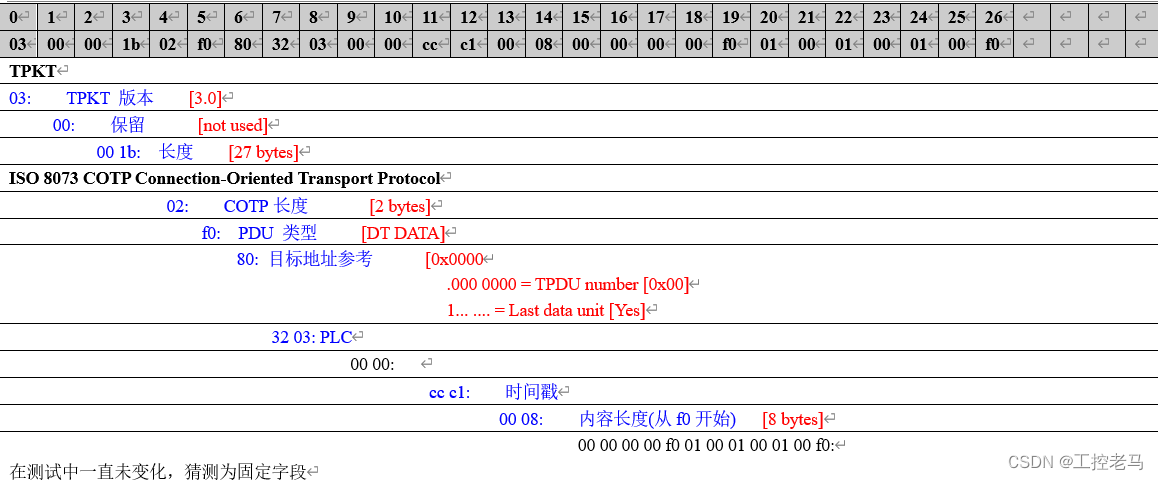
3.读数据
3.1 典型示例 [M0]
//--------------------------------------------------------------------------------
[PC -> PLC]
03 00 00 1f 02 f0 80 32 01 00 00 00 00 00 0e 00 00 04 01 12 0a 10 02 00 01 00 00 83 00 00 00

//--------------------------------------------------------------------------------
[PLC -> PC]
03 00 00 1a 02 f0 80 32 03 00 00 00 00 00 02 00 05 00 00 04 01 ff 04 00 08 ec
3.2 参考示例[VB0 VB254 VB255]
//--------------------------------------------------------------------------------
[PC -> PLC]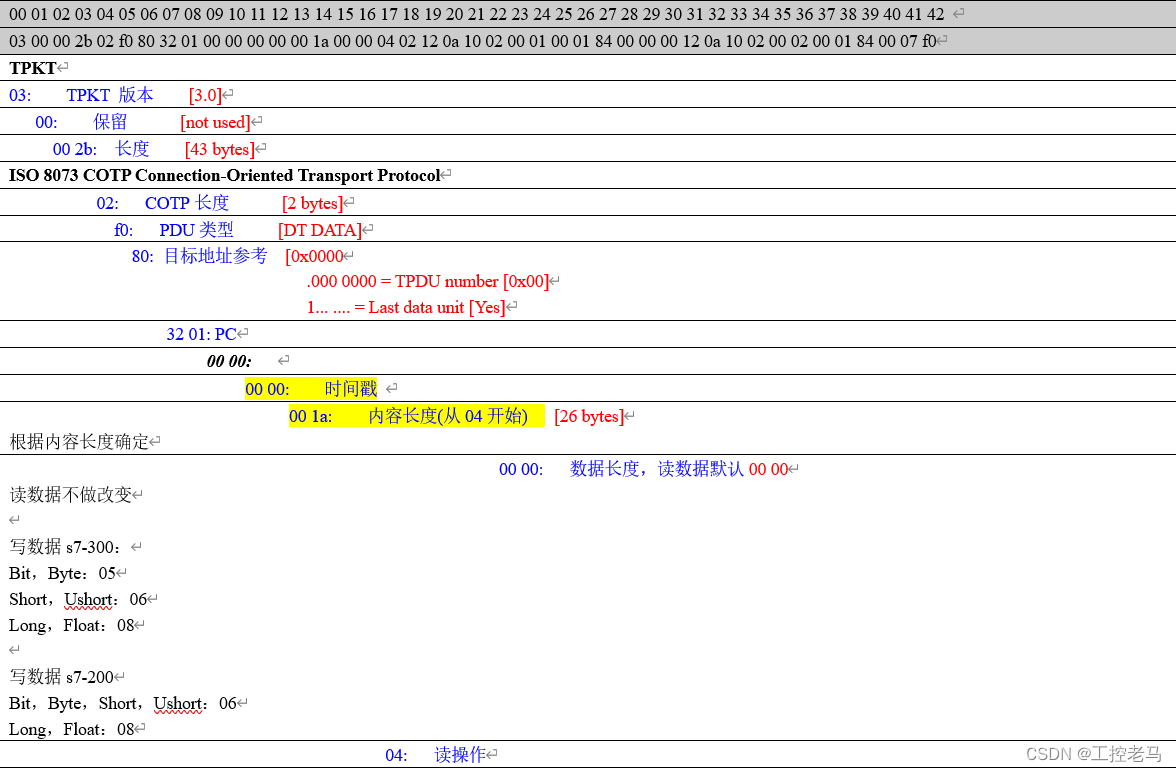


//--------------------------------------------------------------------------------
[PLC -> PC]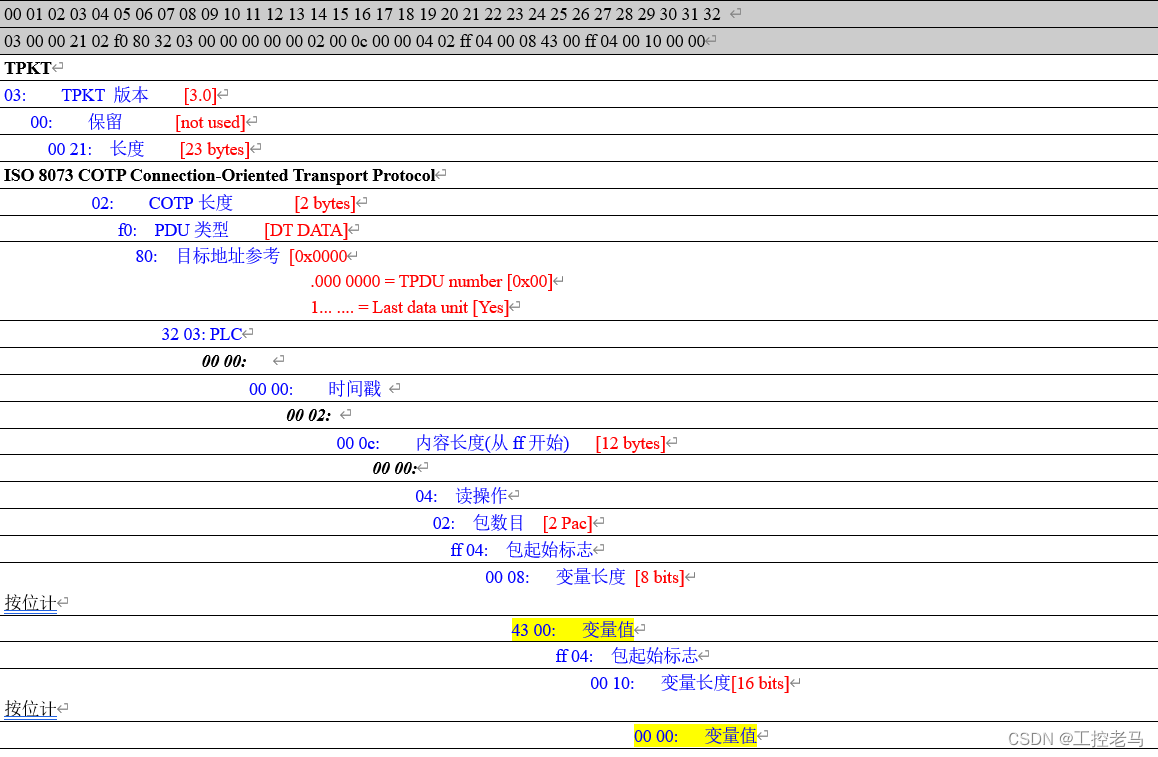
4 写数据
4.1 S7-200
4.1.1 典型示例 [MB0]
//--------------------------------------------------------------------------------
[PC -> PLC]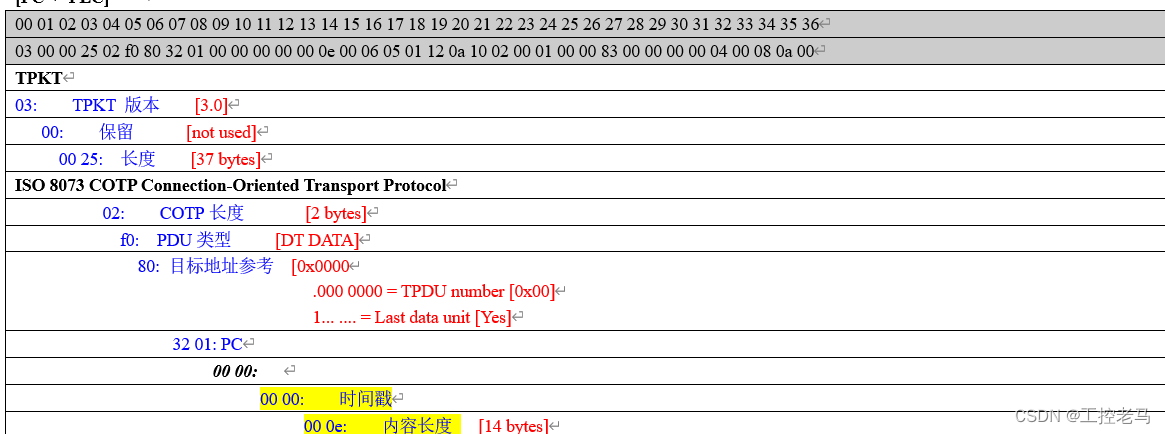


//--------------------------------------------------------------------------------
[PLC -> PC]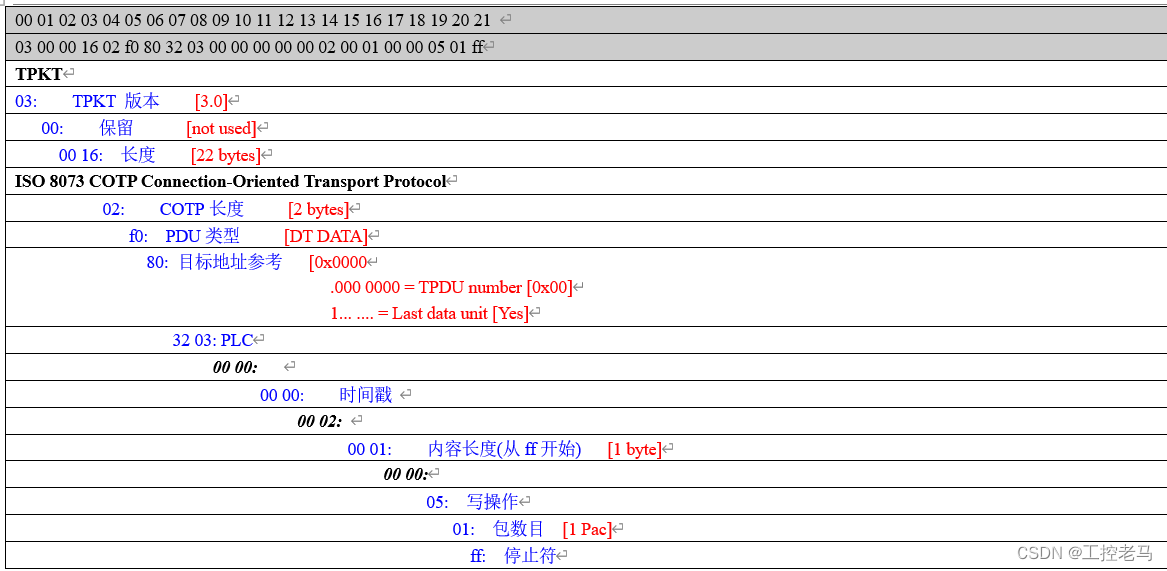
4.1.2 参考示例 [Q0.0]
//--------------------------------------------------------------------------------
[PC -> PLC]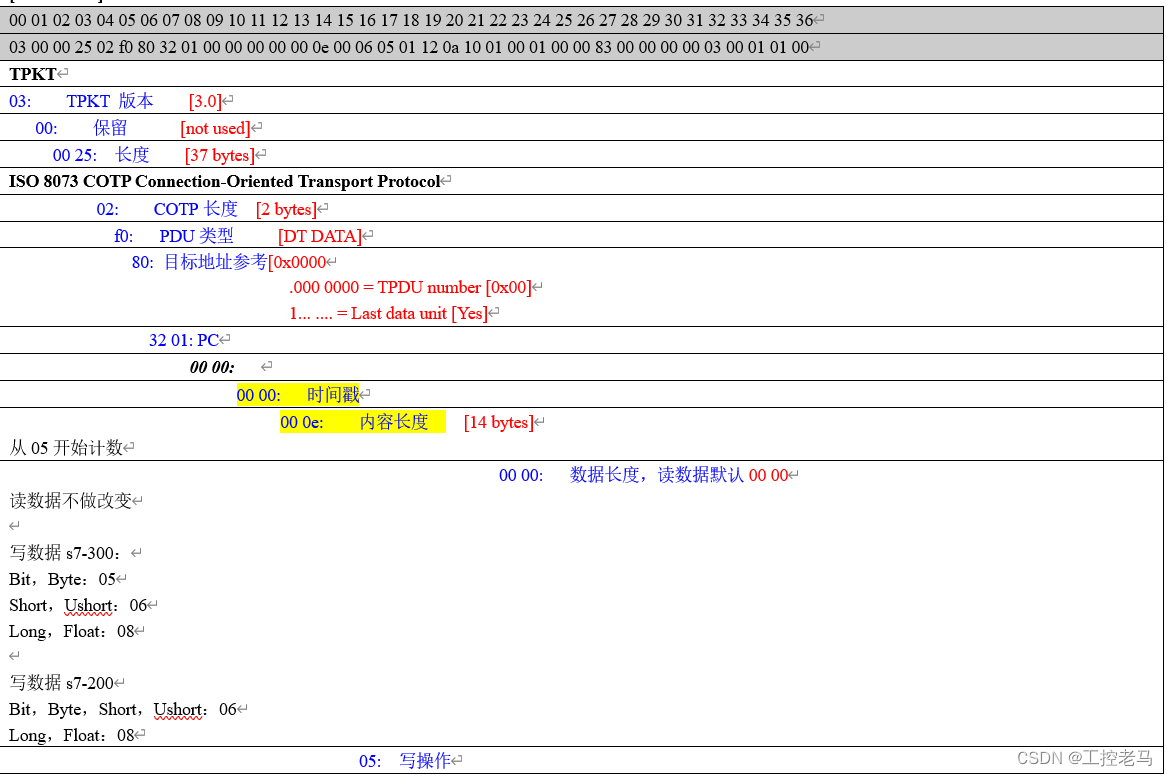

//--------------------------------------------------------------------------------
[PLC -> PC]
4.2 S7-300
4.2.1 Typical Example [MB0]
//--------------------------------------------------------------------------------
[PC -> PLC]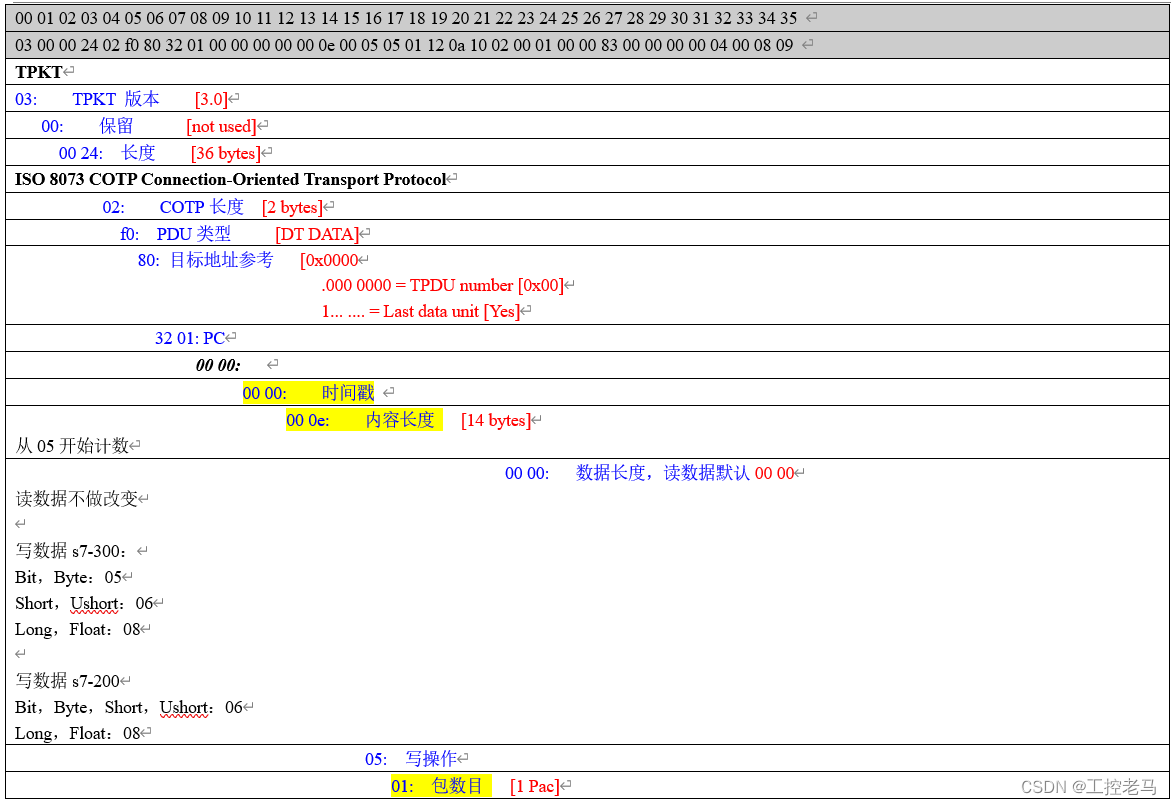

//--------------------------------------------------------------------------------
[PLC -> PC]
4.2.2 Typical Example [M0.3]
//--------------------------------------------------------------------------------
[PC -> PLC]
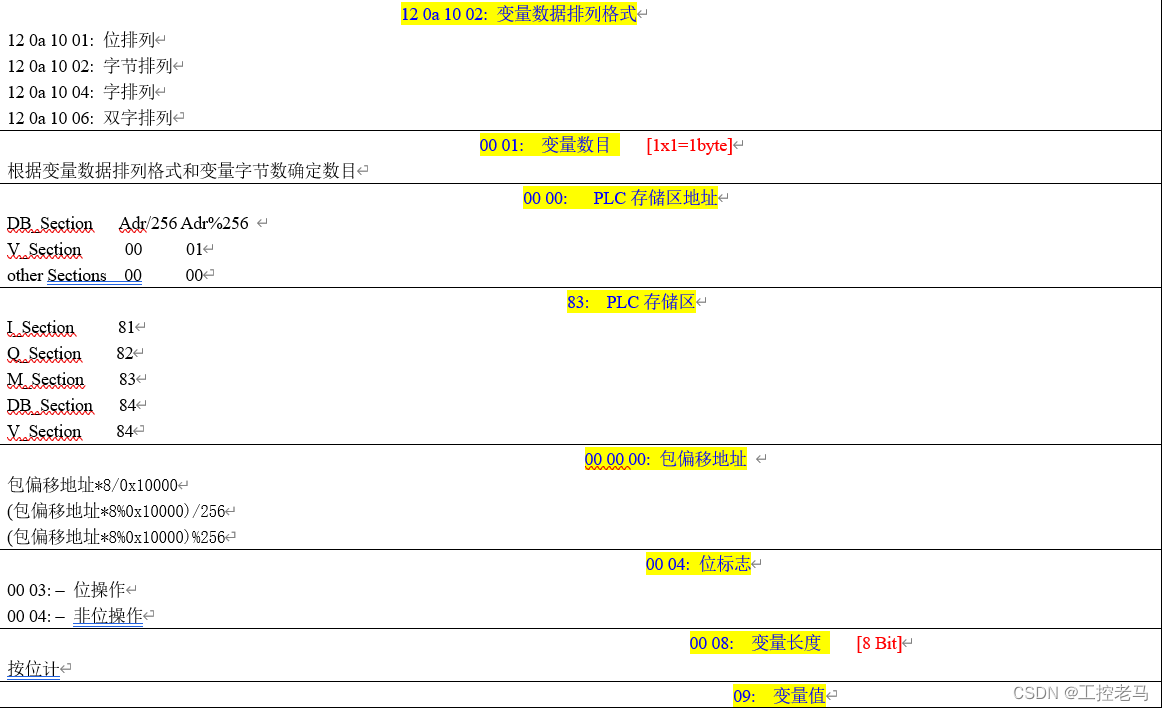
//--------------------------------------------------------------------------------
[PLC -> PC]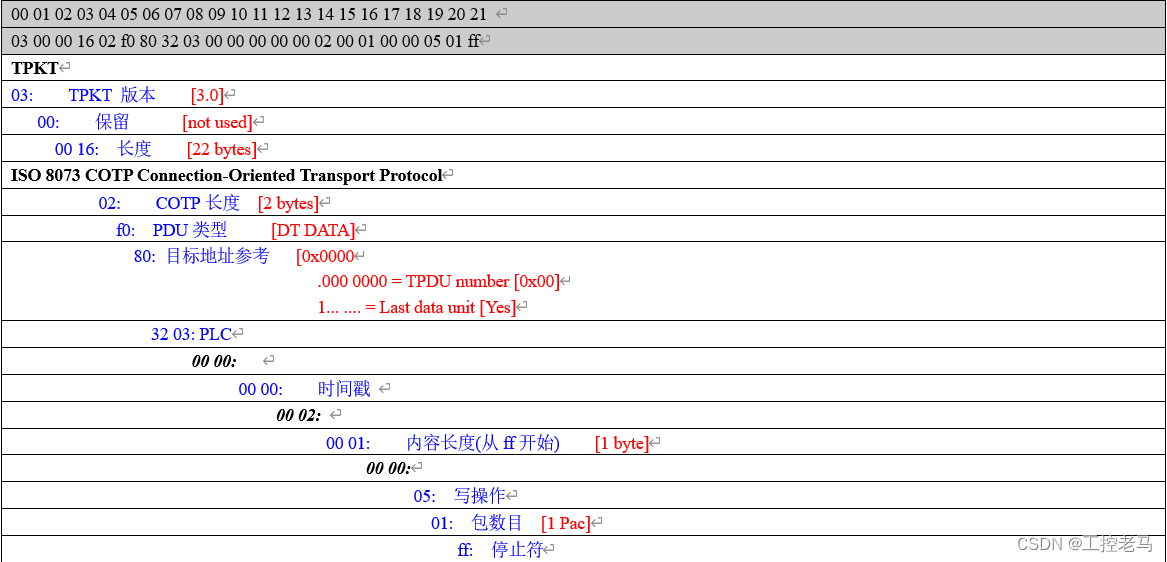
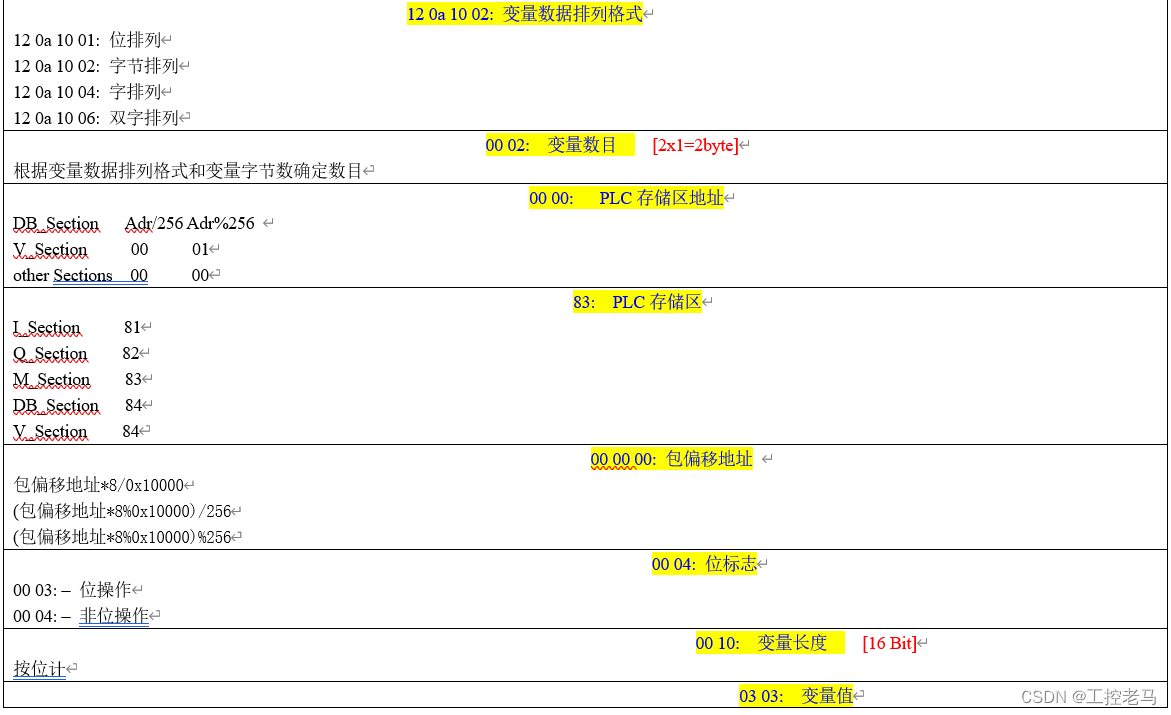
4.2.3 Typical Example [MW0]
//--------------------------------------------------------------------------------
[PC -> PLC]
//--------------------------------------------------------------------------------
[PLC -> PC]
4.2.4 Typical Example [MW0] 另一种协议帧,区别在变量数据排列格式和变量数目
//--------------------------------------------------------------------------------
[PC -> PLC]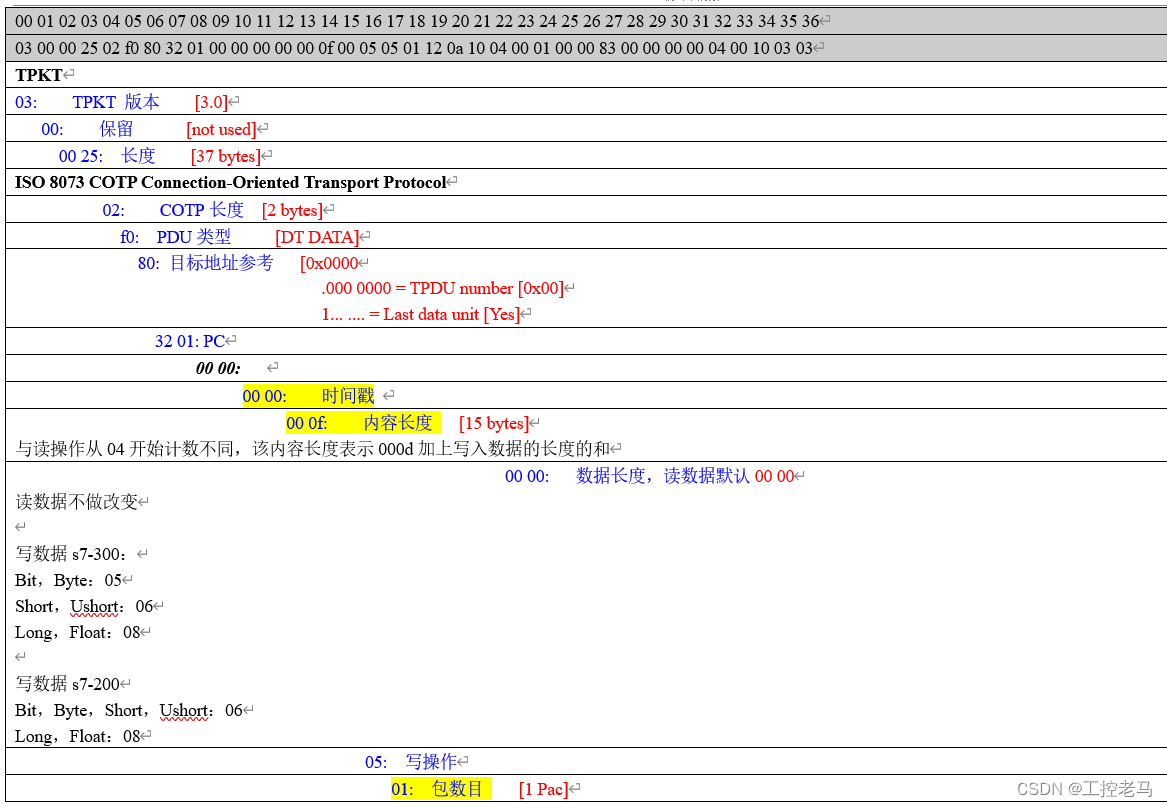

//--------------------------------------------------------------------------------
[PLC -> PC]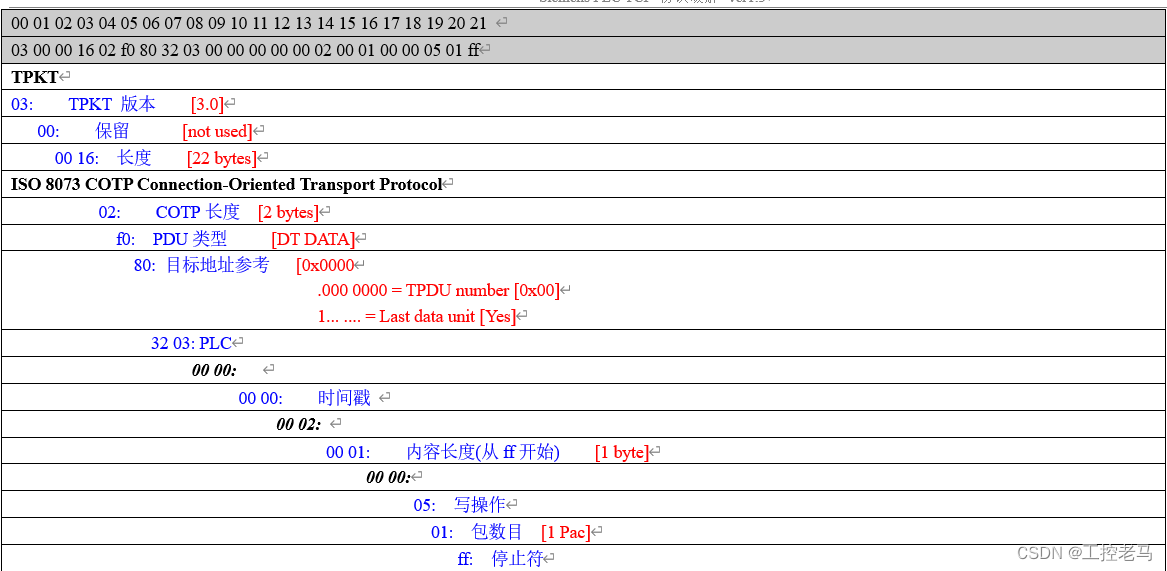
边栏推荐
猜你喜欢
HOW TO EASILY CREATE BARPLOTS WITH ERROR BARS IN R
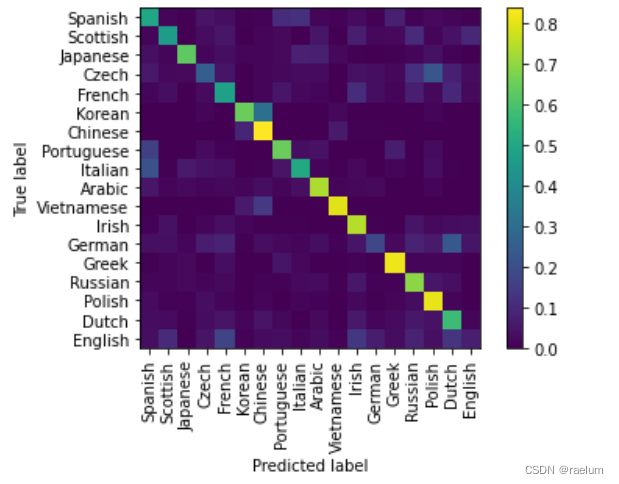
Natural language processing series (II) -- building character level language model using RNN

Deep understanding of NN in pytorch Embedding

How to Create a Beautiful Plots in R with Summary Statistics Labels

Take you ten days to easily finish the finale of go micro services (distributed transactions)

From scratch, develop a web office suite (3): mouse events
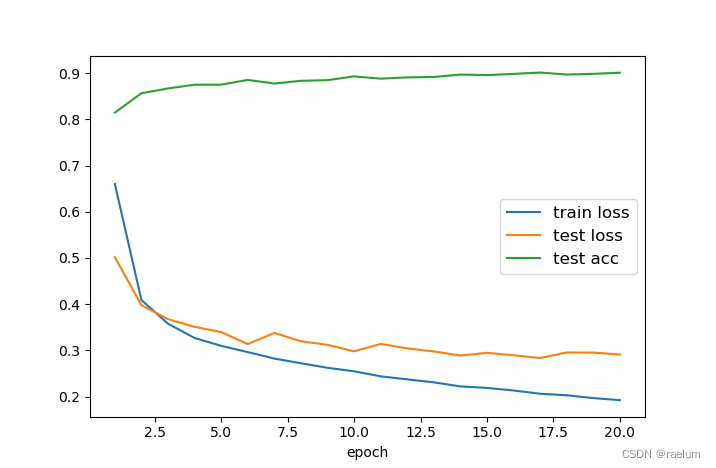
PyTorch搭建LSTM实现服装分类(FashionMNIST)
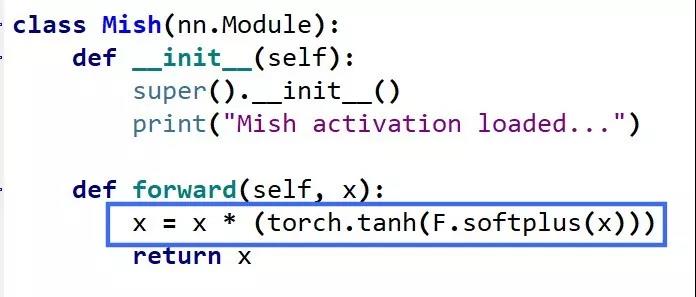
Mish-撼动深度学习ReLU激活函数的新继任者
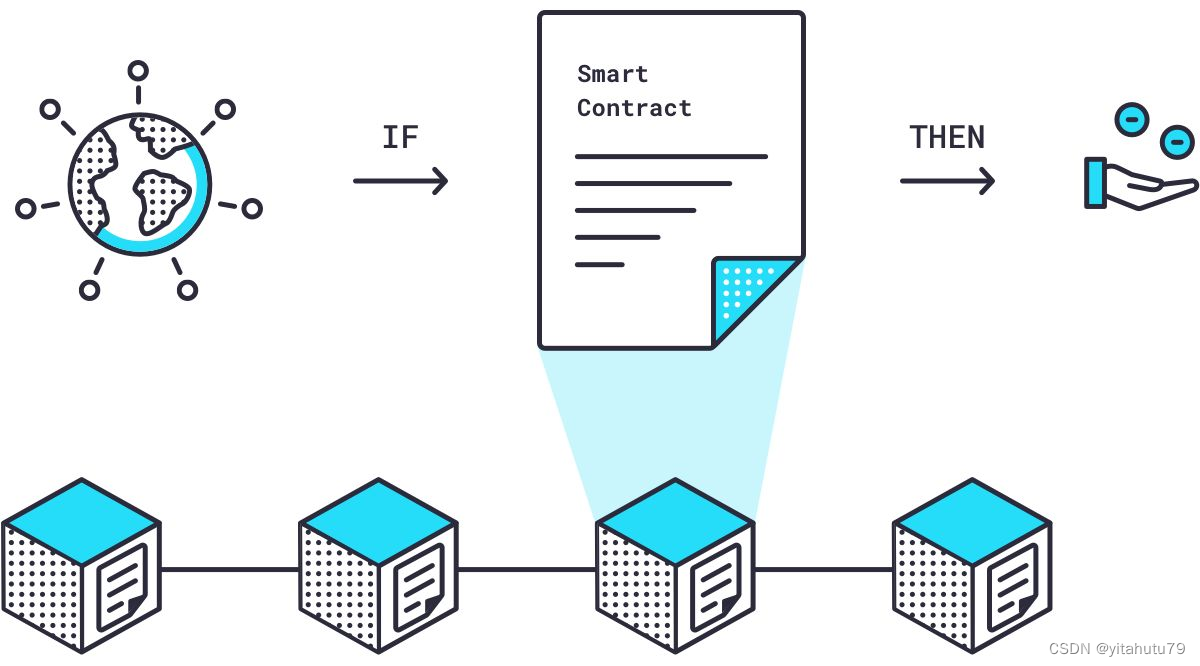
Research on and off the Oracle chain
Esp32 audio frame esp-adf add key peripheral process code tracking
随机推荐
通讯录的实现(文件版本)
Power Spectral Density Estimates Using FFT---MATLAB
求16以内正整数的阶乘,也就是n的阶层(0=<n<=16)。输入1111退出。
Pyqt5+opencv project practice: microcirculator pictures, video recording and manual comparison software (with source code)
YYGH-9-预约下单
Mish-撼动深度学习ReLU激活函数的新继任者
动态内存(进阶四)
HOW TO ADD P-VALUES TO GGPLOT FACETS
深入理解PyTorch中的nn.Embedding
SCM power supply
行業的分析
Take you ten days to easily finish the finale of go micro services (distributed transactions)
Orb-slam2 data sharing and transmission between different threads
行业的分析
Dynamic debugging of multi file program x32dbg
高德地图测试用例
【2022 ACTF-wp】
HOW TO CREATE AN INTERACTIVE CORRELATION MATRIX HEATMAP IN R
Time format display
HOW TO ADD P-VALUES TO GGPLOT FACETS