当前位置:网站首页>uniapp 除了数字,其他输入无效
uniapp 除了数字,其他输入无效
2022-07-04 23:03:00 【你的美,让我痴迷】
<template>
	<view>

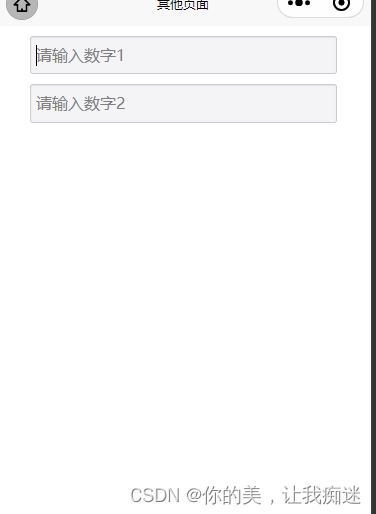
		<input type="number"class="tl-price-input" placeholder="请输入数字1"  v-model="number"  >
		<input type="number" class="tl-price-input" placeholder="请输入数字2"  v-model="data.number"  >
	</view>
</template>

<script>
	export default {

		data() {

			return {

				number:'',
				data:{

					number:'',
				}
			};
		},
		computed:{

			newFun(){

				console.log(this.data.number,this.number,"数据");
				 if(!Number(this.number)){

					 this.number=parseFloat(this.number);
				 }
				 if(!Number(this.data.number)){

				   this.data.number=parseFloat(this.data.number);
				 }
			}
		},
		onLoad() {


		}

	}
</script>

<style lang="scss">
 /*价格搜索input框*/
 input, button {

             border: none;
             outline: none;
         }
 .tl-price-input{


	 margin:10px auto;
     width: 80%;
     border: 1px solid #ccc;
     padding: 7px 0;
     background: #F4F4F7;
     border-radius: 3px;
     padding-left:5px;
     -webkit-box-shadow: inset 0 1px 1px rgba(0,0,0,.075);
     box-shadow: inset 0 1px 1px rgba(0,0,0,.075);
     -webkit-transition: border-color ease-in-out .15s,-webkit-box-shadow ease-in-out .15s;
     -o-transition: border-color ease-in-out .15s,box-shadow ease-in-out .15s;
     transition: border-color ease-in-out .15s,box-shadow ease-in-out .15s
 }
 .tl-price-input:focus{

     border-color: #66afe9;
     outline: 0;
     -webkit-box-shadow: inset 0 1px 1px rgba(0,0,0,.075),0 0 8px rgba(102,175,233,.6);
     box-shadow: inset 0 1px 1px rgba(0,0,0,.075),0 0 8px rgba(102,175,233,.6)
 }

 .ant-btn {

     line-height: 1.499;
     position: relative;
     display: inline-block;
     font-weight: 400;
     white-space: nowrap;
     text-align: center;
     background-image: none;
     border: 1px solid transparent;
     -webkit-box-shadow: 0 2px 0 rgba(0,0,0,0.015);
     box-shadow: 0 2px 0 rgba(0,0,0,0.015);
     cursor: pointer;
     -webkit-transition: all .3s cubic-bezier(.645, .045, .355, 1);
     transition: all .3s cubic-bezier(.645, .045, .355, 1);
     -webkit-user-select: none;
     -moz-user-select: none;
     -ms-user-select: none;
     user-select: none;
     -ms-touch-action: manipulation;
     touch-action: manipulation;
     height: 32px;
     padding: 0 15px;
     font-size: 14px;
     border-radius: 4px;
     color: rgba(0,0,0,0.65);
     background-color: #fff;
     border-color: #d9d9d9;
 }

 .ant-btn-primary {

     color: #fff;
     background-color: #1890ff;
     border-color: #1890ff;
     text-shadow: 0 -1px 0 rgba(0,0,0,0.12);
     -webkit-box-shadow: 0 2px 0 rgba(0,0,0,0.045);
     box-shadow: 0 2px 0 rgba(0,0,0,0.045);
 }
 .ant-btn-red {

     color: #fff;
     background-color: #FF5A44;
     border-color: #FF5A44;
     text-shadow: 0 -1px 0 rgba(0,0,0,0.12);
     -webkit-box-shadow: 0 2px 0 rgba(0,0,0,0.045);
     box-shadow: 0 2px 0 rgba(0,0,0,0.045);
 }
</style>
边栏推荐
- Stm32 Reverse Introduction to CTF Competition Interpretation
- phpcms付费阅读功能支付宝支付
- Basic use and upgrade of Android native database
- Redis introduction complete tutorial: Collection details
- VIM editor knowledge summary
- 壁仞科技研究院前沿技术文章精选
- Pict generate orthogonal test cases tutorial
- The solution to the lack of pcntl extension under MAMP, fatal error: call to undefined function pcntl_ signal()
- MariaDB的Galera集群-双主双活安装设置
- Recommended collection: build a cross cloud data warehouse environment, which is particularly dry!
猜你喜欢
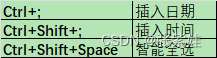
Excel shortcut keys - always add

壁仞科技研究院前沿技术文章精选
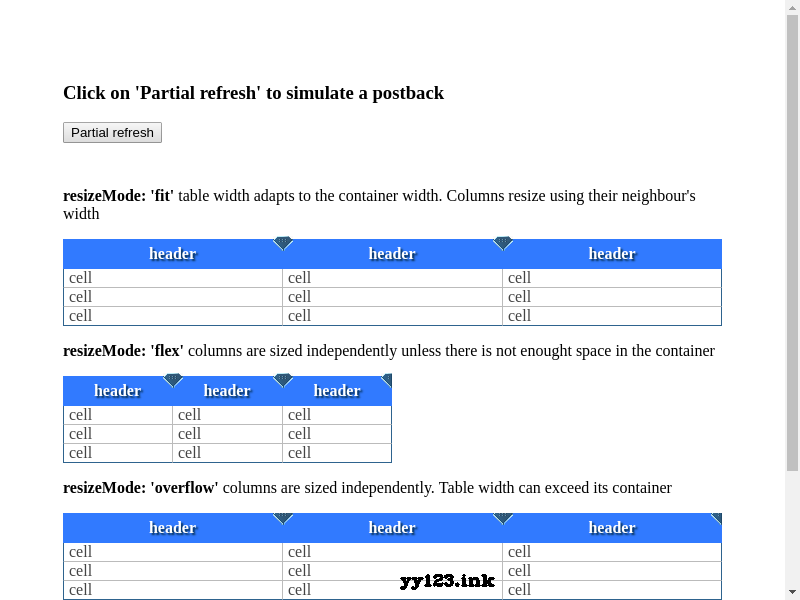
colResizable. JS auto adjust table width plug-in
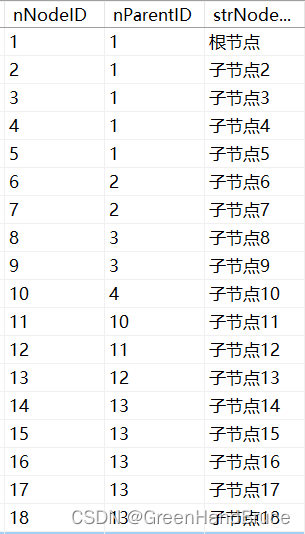
QT drawing network topology diagram (connecting database, recursive function, infinite drawing, dragging nodes)
Redis:Redis的事务
一次edu证书站的挖掘

Galera cluster of MariaDB - dual active and dual active installation settings
A mining of edu certificate station
蓝天NH55系列笔记本内存读写速度奇慢解决过程记录

Redis: redis configuration file related configuration and redis persistence
随机推荐
微信小程序显示样式知识点总结
One of the commonly used technical indicators, reading boll Bollinger line indicators
Excel shortcut keys - always add
华泰证券低佣金的开户链接安全吗?
【js】-【动态规划】-笔记
Docker镜像的缓存特性和Dockerfile
Basic knowledge of database
Wechat official account solves the cache problem of entering from the customized menu
UML图记忆技巧
UML diagram memory skills
The difference between debug and release
小程序vant tab组件解决文字过多显示不全的问题
数据库基础知识
高通WLAN框架学习(30)-- 支持双STA的组件
How to choose a securities company? Is it safe to open an account on your mobile phone
解决无法通过ssh服务远程连接虚拟机
Complete tutorial for getting started with redis: bitmaps
Redis introduction complete tutorial: slow query analysis
Phpcms paid reading function Alipay payment
Question brushing guide public