当前位置:网站首页>MySQL JDBC programming
MySQL JDBC programming
2022-07-04 04:37:00 【Lockey-s】
Blog home page :Lockey-s Welcome to thumb up Collection Leaving a message. Welcome to discuss ! This paper is written by 【Lockey-s】 original ! First appeared in CSDN Because the blogger is learning Xiaobai one , There are bound to be mistakes , If you have any questions, please leave a message in the comment area to point out , Thank you no all ! Boutique column ( Update from time to time )
JDBC Programming
Concept
JDBC Is a kind and method , It's a kind of execution SQL Of the statement Java API, It can realize unified access to a variety of databases , It's like the monitor agreeing on the statistical format of the data . The advantage is that the portability of the program is greatly enhanced , Not limited to specific database vendors API.
Use
Introduce dependencies
Introducing dependencies requires MySQL Driver package ( hold MySQL Self api To convert into JDBC style ).
Download the driver package
The best way is to MySQL Official website , however MySQL By Oracle After the acquisition , It's hard to find , So you can go maven The central warehouse To install , And then the search MySQL, The first result is :
Then click in to choose 5.1.x Series is OK , Because of my MySQL yes 5.7 Series of , So it uses 5 Series of , If MySQL yes 8 Series of , Then use 8 Series of , Be sure to communicate with your MySQL Version match , If it doesn't match , May lead to bug :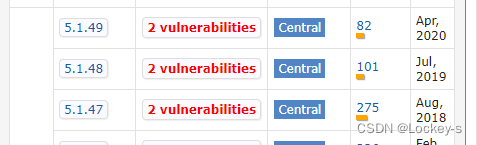
Then click the previous version number , Then enter the page :
Then order that jar Button , Will download the driver package ,jar It's written by others class file .
Import into project
- After entering the project , You can create a directory , What's created here is lib

- Just download jar Copy the file to the directory just now , Directly copy the file and click lib, Then paste it

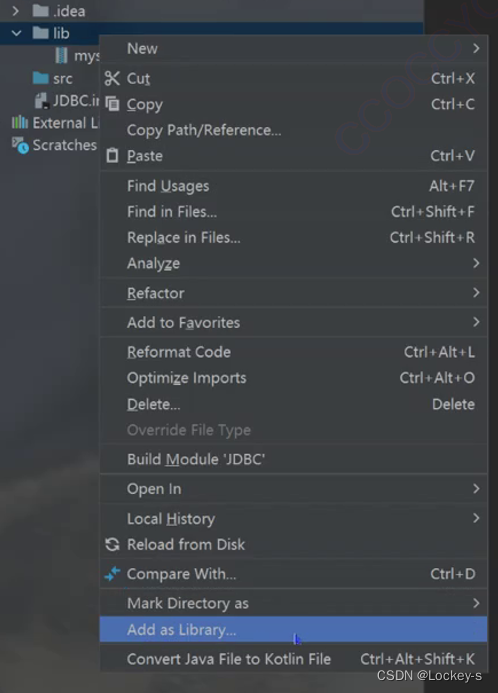
- Right click the directory just now , There is one add as library Then click this option , That's what makes jar The package is introduced into the project , Items will be read jar Inside .class file . Otherwise the code will not find jar There are some classes .
Write code
JDBC Basic process of insertion
establish DataSource object
This object describes where the database server is . The code is as follows :
DataSource dataSource = new MysqlDataSource();
among DataSource yes JDBC The interface with , hinder MysqlDataSource From previously downloaded jar package , It is an upward transformation .
Set the database address : The database address here can be copied directly ,127.0.0.1 Indicating the machine IP ,3306 It's the port number ,user It's the database name , Followed by the character set ,SSL Is whether the transmission process is encrypted .
((MysqlDataSource) dataSource).setURL("jdbc:mysql://127.0.0.1:3306/user?characterEncoding=utf8&useSSL=false");
Set the database user name :
((MysqlDataSource) dataSource).setUser();
Set the password of the database :
((MysqlDataSource) dataSource).setPassword();
It can also be written like this , In this way, there is no transformation :
MysqlDataSource dataSource = new MysqlDataSource();
dataSource.setURL();
dataSource.setUser();
dataSource.setPassword();
Because the instance held in our code is DataSource type , If other codes need to be used later DataSource , Relevant parameters are also DataSource, The code hardly needs to be changed , Namely “ Low coupling ”.
Establish a connection with the database server
adopt dataSource.Connection To establish a connection :
Connection connection = dataSource.getConnection();
It should be noted that , It uses java.sql Inside Connection: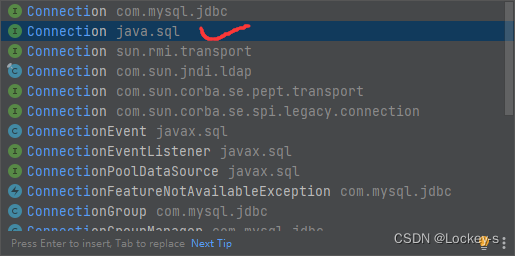
Operating the database
- When operating the database , The key is to construct a SQL sentence , structure String Class , Don't write a semicolon :
String sql = "insert into student values(1,' Zhang San ')";
- And then through Connection Inside prepareStatement Method , hold String Style sql The sentence is translated into JDBC The object in it :
PreparedStatement statement = connection.prepareStatement(sql);
- perform sql , If it is inserted , Namely executeUpdate, If you choose , Namely executeQuery:
int line = statement.executeUpdate();
there line Is the return value , Just a few lines were affected .
- Release resources , Create first and release later , After the creation of the first release .
statement.close();
connection.close();
Execute code , The return value is 1, It means that one line has been affected :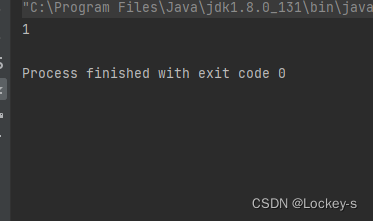
After three executions , Return to the database to view the contents , Found three more records :
The user enters the content to insert
adopt Scanner To let users input :
int id = scanner.nextInt();
String name = scanner.next();
After user input , hold id, and name Replace the sql Statement inside , stay sql sentence Of values In the middle ? Instead of :
String sql1 = "insert into student values(?,?)";
these two items. ? It means that the value of the current field has not been determined , Take a seat first , Reuse PreparedStatement Of setXXX Replace with a series of methods :
PreparedStatement statement1 = connection.prepareStatement(sql1);
statement1.setInt(1,id);
statement1.setString(2,name);
there 1,2 It's the subscript , from 1 Start calculating , Take the first one. ? Replace with id Value , Put the second one ? Replace with name Value . Then print the replacement object :
System.out.println("statement1" + statement1);
Assembled SQL The output value of is below :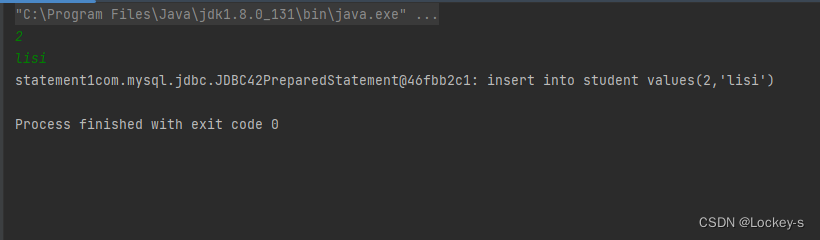

In the database lisi Also successfully inserted .
JDBC Basic process of deletion
- create data source :
DataSource dataSource = new MysqlDataSource();
((MysqlDataSource)dataSource).setURL("jdbc:mysql://127.0.0.1:3306/user?characterEncoding=utf8&useSSL=false");
((MysqlDataSource)dataSource).setUser("root");
((MysqlDataSource)dataSource).setPassword("");
- Establishing a connection :
Connection connection = dataSource.getConnection();
- User input id:
Scanner scanner = new Scanner(System.in);
int id = scanner.nextInt();
- assemble sql sentence :
String sql = "delete from student where id = ?";
PreparedStatement statement = connection.prepareStatement(sql);
statement.setInt(1, id);
- perform sql :
int line = statement.executeUpdate();
System.out.println(line);
- Recycle resources :
statement.close();
connection.close();
The operation results are as follows :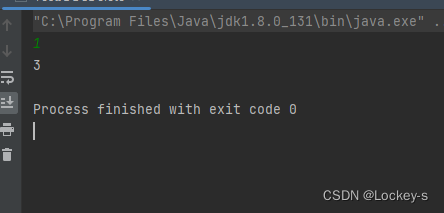
The database data is as follows :
You can see id by 1 All of them have been deleted .
JDBC The basic process of updating
- create data source :
DataSource dataSource = new MysqlDataSource();
((MysqlDataSource)dataSource).setURL("jdbc:mysql://127.0.0.1:3306/user?characterEncoding=utf8&useSSL=false");
((MysqlDataSource)dataSource).setUser("root");
((MysqlDataSource)dataSource).setPassword("");
- Establishing a connection
Connection connection = dataSource.getConnection();
- User input id
Scanner scanner = new Scanner(System.in);
int id = scanner.nextInt();
String name = scanner.next();
- assemble sql sentence
String sql = "update student set name = ? where id = ?";
PreparedStatement statement = connection.prepareStatement(sql);
statement.setString(1, name);
statement.setInt(2, id);
System.out.println("statement" + statement);
- perform sql
int line = statement.executeUpdate();
System.out.println("line" + line);
- Recycle resources
statement.close();
connection.close();
In the database id be equal to 2 The name of is :lisi
The results are as follows :
You can see that the data in the database has also been modified :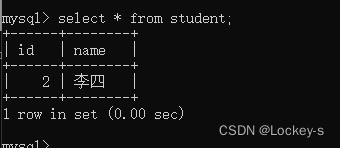
JDBC Basic process of searching
- create data source :
DataSource dataSource = new MysqlDataSource();
((MysqlDataSource)dataSource).setURL("jdbc:mysql://127.0.0.1:3306/user?characterEncoding=utf8&useSSL=false");
((MysqlDataSource)dataSource).setUser("root");
((MysqlDataSource)dataSource).setPassword("");
- Establishing a connection
Connection connection = dataSource.getConnection();
- assemble sql sentence
String sql = "select * from student order by id";
PreparedStatement statement = connection.prepareStatement(sql);
- perform sql, Because the query operation returns a temporary table , So use executeQuery, The returned temporary table is used ResultSet To express .
ResultSet resultSet = statement.executeQuery();
- Traverse the result set , That is, traverse the returned temporary table , Get each returned row first , Then get every column of this result .
while (resultSet.next()) {

    // First, get the columns for one row
    int id = resultSet.getInt("id");
    String name = resultSet.getString("name");
    System.out.println("id= " + id + " ,name= " + name);
}
- close resource
resultSet.close();
statement.close();
connection.close();
The database resources are as follows :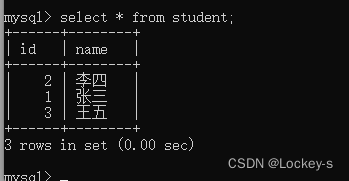
Code execution result ( Press id Sequential arrangement ) as follows :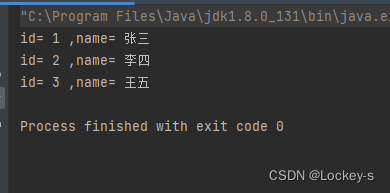
边栏推荐
- 十字路口通行优先权,十字路口通行规则图解
- 浅谈一篇优质的小红书文案需要具备什么
- How to view installed r packages in R language
- The "functional art" jointly created by Bolang and Virgil abloh in 2021 to commemorate the 100th anniversary of Bolang brand will debut during the exhibition of abloh's works in the museum
- RPC Technology
- leetcode:1314. 矩阵区域和【二维前缀和模板】
- Emlog user registration plug-in is worth 80 yuan
- 微信公众号无限回调授权系统源码
- 西部数据绿盘、蓝盘、黑盘、红盘和紫盘有什么区别
- 一个漂亮的API文档生成工具
猜你喜欢

【安全攻防】序列化与反序列,你了解多少?
Rhcsa 04 - process management
![leetcode:1314. Matrix area and [2D prefix and template]](/img/b4/2c9e66c8eafe1db2a3d07e861494e0.png)
leetcode:1314. Matrix area and [2D prefix and template]

Exploration and practice of eventbridge in the field of SaaS enterprise integration
浅谈JVM的那些事

Redis:有序集合zset类型数据操作命令

精品网址导航主题整站源码 wordpress模板 自适应手机端
【微信小程序】好看的轮播图组件
ModStartBlog 现代化个人博客系统 v5.2.0 源码下载
EventBridge 在 SaaS 企业集成领域的探索与实践
随机推荐
Dry goods | detailed explanation of webshell Foundation
Redis:集合Set类型数据的操作命令
苹果CMS仿西瓜视频大气响应式视频模板源码
最长递增子序列问题(你真的会了吗)
[microservices openfeign] two degradation methods of feign | fallback | fallbackfactory
【愚公系列】2022年7月 Go教学课程 002-Go语言环境安装
MIN_RTO 对话
一个漂亮的API文档生成工具
Talking about what a high-quality little red book copy needs to have
rac删除损坏的磁盘组
RHCSA 01 - 创建分区与文件系统
Imitation of "game bird" source code, mobile game issue evaluation, open service, open test collection, game download website template
Rhcsa 08 - automount configuration
2020 Bioinformatics | TransformerCPI
Instructions for LPC interrupt binding under ft2000+
A beautiful API document generation tool
深入解析结构化异常处理(SEH) - by Matt Pietrek
Emlog用户注册插件 价值80元
Y55. Chapter III kubernetes from entry to proficiency -- HPA controller and metrics server (28)
Virtual commodity account trading platform source code_ Support personal QR code collection