当前位置:网站首页>Easyexcel exports according to the filter column (not empty in the middle, the order can be adjusted)
Easyexcel exports according to the filter column (not empty in the middle, the order can be adjusted)
2020-11-09 16:11:00 【T bean sprouts】
Use EasyExel According to the way the filter column is exported, there is one in the official document “ Export only the specified columns according to the parameters ” Example , But in this case, I tested the derived Excel That's true .
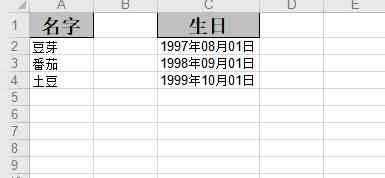
EasyExcel Official documents :https://www.yuque.com/easyexcel/doc
“ name ” and “ Birthday ” In the middle, there's a column , But if you need to export according to which fields are displayed on the front end , And the order should be as shown on the front end ( The front end implements drag and drop as well as filter to specify which fields to display , Therefore, the export format should be consistent ...), The example given in this official document does not seem to satisfy , So I wrote an example that uses no object creation + An example of how reflection works .
This is one I wrote Person Test object
public class Person {

    @ExcelIgnore
    private Long id;

    @ExcelProperty(" name ")
    private String name;

    @ExcelProperty(" Age ")
    private int age;

    @ExcelProperty(" Birthday ")
    @DateTimeFormat("yyyy year MM month dd Japan ")
    private Date birthday;

    public Long getId() {
        return id;
    }

    public void setId(Long id) {
        this.id = id;
    }

    public String getName() {
        return name;
    }

    public void setName(String name) {
        this.name = name;
    }

    public int getAge() {
        return age;
    }

    public void setAge(int age) {
        this.age = age;
    }

    public Date getBirthday() {
        return birthday;
    }

    public void setBirthday(Date birthday) {
        this.birthday = birthday;
    }
}
Using official documents “ Do not create write for objects ” Example , Encapsulate the , Use reflection to return the fields to be filtered
package com.example.demo.utils;

import com.alibaba.excel.EasyExcel;
import org.slf4j.Logger;
import org.slf4j.LoggerFactory;
import java.lang.reflect.Method;
import java.util.ArrayList;
import java.util.List;

/**
 * @author  Bean sprouts
 * @version 1.0
 * @Date 2020-11-09 09:13
 */
public class EasyExcelUtils {
    private static final Logger logger = LoggerFactory.getLogger(EasyExcelUtils.class);

    /**
     * @param fileName   File pathname
     * @param sheetName sheet name
     * @param data       The data from the query
     * @param headList   Incoming Excel head ( for example : full name , Birthday )
     * @param fileList   Pass in the fields to be displayed ( for example : The field corresponding to the name is name, The corresponding field of birthday is birthday)
     */
    public static void noModelWrite(String fileName, String sheetName, List data, List<String> headList, List<String> fileList){
        EasyExcel.write(fileName).head(head(headList)).sheet(sheetName).doWrite(dataList(data,fileList));
    }

    /**
     *  Set up Excel head
     * @param headList  Excel Header information
     * @return
     */
    private static List<List<String>> head(List<String> headList) {
        List<List<String>> list = new ArrayList<>();

        for (String value : headList) {
            List<String> head = new ArrayList<>();
            head.add(value);
            list.add(head);
        }
        return list;
    }

    /**
     *  Set table information
     * @param dataList   The data found
     * @param fileList   Fields to display
     * @return
     */
    private static List<List<Object>> dataList(List<Object> dataList, List<String> fileList) {
        List<List<Object>> list = new ArrayList<>();
        for (Object person : dataList) {
            List<Object> data = new ArrayList<>();
            for (String fieldName : fileList) {
                /** By reflecting the fields that are displayed as needed , Get the corresponding property value */
                data.add(getFieldValue(fieldName, person));
            }
            list.add(data);
        }
        return list;
    }

    /**
     *  According to the field passed in, get the corresponding get Method , Such as name, Corresponding getName Method
     * @param fieldName   Field name
     * @param person     object
     * @return
     */
    private static Object getFieldValue(String fieldName, Object person) {
        try {

            String firstLetter = fieldName.substring(0, 1).toUpperCase();
            String getter = "get" + firstLetter + fieldName.substring(1);
            Method method = person.getClass().getMethod(getter);
            return method.invoke(person);
        } catch (Exception e) {
            logger.error(" Failed to get object property value using reflection ", e);
            return null;
        }

    }


}
controller Layer uses this tool class to write Excel.
@RequestMapping(value = "/auth/downloadList",method = {RequestMethod.GET, RequestMethod.POST})
    public void downloadList(String filedNames,String filedCodes){
        List<Person> list = personServiceImpl.findPersonAll();

        /**Excel head , Parameter format : full name , Birthday */
        String[] head = filedNames.split(",");
        List<String> headList = new ArrayList<>(Arrays.asList(head));

        /**Excel Form and content , Parameter format :name,birthday*/
        String[] file = filedCodes.split(",");
        List<String> fileList = new ArrayList<>(Arrays.asList(file));

        EasyExcelUtils.noModelWrite("E:/data/ Test example .xls"," Test example ",list,headList,fileList);
    }
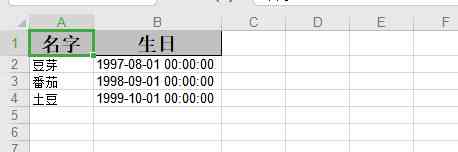
test 1 The incoming parameter is :
filedNames : name , Birthday
filedCodes : name,birthday
The effect is as follows :
test 2 The incoming parameter is :
filedNames : Birthday , name
filedCodes : birthday,name
The effect is as follows :
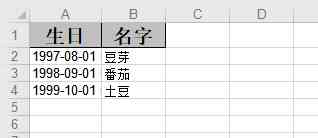
Through the code above , Use EasyExcel Does not create object write for + Reflection technology can be implemented without leaving one or more columns empty Excel, The dynamic column display can be realized according to the order of the front-end input parameters .
Be careful :
1. To use this method, you need to pass in Excel Header information and corresponding field information ;
2. Because we use reflection to call the corresponding property name get Method to get the value , You need to check the properties corresponding to get Whether the method is named canonically , If not, it needs to be dealt with separately .
版权声明
本文为[T bean sprouts]所创,转载请带上原文链接,感谢
边栏推荐
- cad教程 cad2016安装教程
- Using art template to obtain weather forecast information
- In depth analysis of the multi-user shopping mall system from search to create a profit point
- A quick start to Shell Scripting
- 自定义室内地图在线工具
- Cad2016 download autocad2016 download installation detailed tutorial CAD Download
- 拉线式位移传感器在边坡裂缝中的作用
- Knowledge mapping 1.1 -- starting from NER
- The internal network penetration of raspberry is built and maintained. No server is required for intranet penetration
- Avoid pitfall guide for cloud integration - Android push
猜你喜欢
一款基于.NET Core的认证授权解决方案-葫芦藤1.0开源啦

AE(After Effects)的简单使用——记一次模板套用的过程

从一次需求改良漫谈php文件分片上传
解决微信小程序使用switchTab跳转后页面不刷新的问题
Data consistency of cache
树莓派内网穿透建站与维护,使用内网穿透无需服务器
第三阶段 Day16 用户模块跳转 SSO单点登录 JSONP/cors跨域方式 用户登录校检
超大折扣力度,云服务器 88 元秒杀
轻松构建高颜值应用界面,这些内置图标多重要!
A certification and authorization solution based on. Net core - hulutong 1.0 open source
随机推荐
Mobile security reinforcement helps app achieve comprehensive and effective security protection
Restart the heap_ uaf_ hacknote
SEO solution development, how to break away from the shadow of the bow?
Gesture switch background, let live with goods more immersive
【云小课】版本管理发展史之Git+——代码托管
Kubernetes v1.19.3 kubeadm deployment notes (2)
Chrome浏览器 js 关闭窗口失效解决方法
MES system plays an important role in the factory production management
jackson、fastjson、kryo、protostuff等序列化工具性能对比
CAD2016下载AutoCAD2016下载安装详细教程CAD下载
使用Fastai开发和部署图像分类器应用
同事笔记-小程序入坑点
5 minutes get I use GitHub's 5-year summary of these operations!
Autocad2020 full version installation text course, registration activation cracking method
MES system is different from traditional management in industry application
Kubernetes V1.19.3 kubeadm 部署笔记(中)
Toolkit Pro助力界面开发:缩短项目开发周期,快速实现具有现代功能区样式的GUI
浮点数之间的等值判断
腾讯云AMD云服务器怎么样好不好?
Do programmers pay too much to work overtime? Should programmer's salary be reduced? Netizen: let go of other hard pressed programmers