当前位置:网站首页>利用LNMP实现wordpress站点搭建
利用LNMP实现wordpress站点搭建
2022-07-05 22:44:00 【wwzroom】
利用LNMP实现wordpress站点搭建
1.准备资源
[[email protected]:~]#
cd /usr/local/src
#然后利用lrzsz实现windows上传对应的文件
[[email protected]:/usr/local/src]#
ll
-rw-r--r--  1 root root 661718255 Sep  1  2021 mysql-5.7.33-linux-glibc2.12-x86_64.tar.gz
-rw-r--r--  1 root root   1039530 Sep  1  2021 nginx-1.18.0.tar.gz
-rw-r--r--  1 root root  16866582 Jun  6 17:38 php-7.4.29.tar.gz
-rw-r--r--  1 root root  21861227 May 31 14:22 wordpress-6.0-zh_CN.tar.gz
2.编写脚本
[[email protected]:/usr/local/src]#
vim install_lnmpcentos7.sh
#!/bin/bash

SRC_DIR=/usr/local/src
NGINX='nginx-1.18.0.tar.gz'
MYSQL='mysql-5.7.33-linux-glibc2.12-x86_64.tar.gz'
PHP='php-7.4.29.tar.gz'
APP='wordpress-6.0-zh_CN.tar.gz'
COLOR="echo -e \\033[01;31m"
END='\033[0m'
MYSQL_ROOT_PASSWORD=laowang
MYSQL_WORDPRESS_PASSWORD=laowang
CPU=`lscpu| awk '/^CPU\(s\):/{print $NF}'`

${COLOR}'开始安装基于LNMP的wordpress'$END
sleep 3

check_file (){

cd  $SRC_DIR
$COLOR"请将相关软件放在${SRC_DIR}目录下"$END
if [ ! -e $NGINX ];then
    $COLOR"缺少${NGINX}文件"$END
        exit
elif [ !  -e $MYSQL ];then
        $COLOR"缺少${MYSQL}文件"$END
        exit
elif [ ! -e $PHP ];then
        $COLOR"缺少${PHP}文件"$END
        exit
elif [ ! -e $APP ];then
        $COLOR"缺少${APP}文件"$END
        exit
else
    $COLOR"相关文件已准备好"$END
fi
}
install_mysql(){

    $COLOR"开始安装MySQL数据库"$END
    cd $SRC_DIR
    tar xf $MYSQL -C /usr/local/
    if [ -e /usr/local/mysql ];then
        $COLOR"数据库已存在,安装失败"$END
        exit
    fi
    MYSQL_DIR=`echo $MYSQL| sed -nr 's/^(.*[0-9]).*/\1/p'`
    ln -s  /usr/local/$MYSQL_DIR /usr/local/mysql
    chown -R  root.root /usr/local/mysql/
    id mysql &> /dev/null || {
     useradd -s /sbin/nologin -r  mysql ; $COLOR"创建mysql用户"$END; }
    yum  -y -q install numactl-libs   libaio &> /dev/null

    echo 'PATH=/usr/local/mysql/bin/:$PATH' > /etc/profile.d/lamp.sh
    .  /etc/profile.d/lamp.sh
    cat > /etc/my.cnf <<-EOF [mysqld] server-id=1 log-bin datadir=/data/mysql socket=/data/mysql/mysql.sock log-error=/data/mysql/mysql.log pid-file=/data/mysql/mysql.pid [client] socket=/data/mysql/mysql.sock EOF
    [ -d /data ] || mkdir /data
    [ -d /data ] || mkdir /data
    mysqld --initialize --user=mysql --datadir=/data/mysql
    cp /usr/local/mysql/support-files/mysql.server  /etc/init.d/mysqld
    chkconfig --add mysqld
    chkconfig mysqld on
    service mysqld start
    [ $? -ne 0 ] && {
     $COLOR"数据库启动失败,退出!"$END;exit; }
    MYSQL_OLDPASSWORD=`awk '/A temporary password/{print $NF}' /data/mysql/mysql.log`
    mysqladmin  -uroot -p$MYSQL_OLDPASSWORD password $MYSQL_ROOT_PASSWORD &>/dev/null
    $COLOR"数据库安装完成"$END
}

install_nginx(){

   ${COLOR}"开始安装NGINX"$END
   id nginx  &> /dev/null || {
     useradd -s /sbin/nologin -r  nginx; $COLOR"创建nginx用户"$END; }
   $COLOR"安装nginx相关包"$END
   yum -q -y install gcc pcre-devel openssl-devel zlib-devel perl-ExtUtils-Embed git &> /dev/null
   cd $SRC_DIR
   tar xf $NGINX
# git clone https://github.com/openresty/echo-nginx-module.git || { $COLOR"下载NGINX第三方模块失败,退出!"$END;exit; }
   NGINX_DIR=`echo $NGINX| sed -nr 's/^(.*[0-9]).*/\1/p'`
   cd $NGINX_DIR
   ./configure --prefix=/apps/nginx --user=nginx --group=nginx --with-http_ssl_module --with-http_v2_module --with-http_realip_module --with-http_stub_status_module --with-http_gzip_static_module --with-http_perl_module --with-pcre --with-stream --with-stream_ssl_module --with-stream_realip_module
   make -j $CPU && make install
   [ $? -eq 0 ] && $COLOR"NGINX编译安装成功"$END ||  {
     $COLOR"NGINX编译安装失败,退出!"$END;exit; }
   [ -d /data/www ] || mkdir -pv /data/www/
   cat > /apps/nginx/conf/nginx.conf <<EOF worker_processes auto; events { worker_connections 10240; } http { include mime.types; default_type application/octet-stream; server_tokens off; log_format main '\$remote_addr - \$remote_user [\$time_local] "\$request" ' sendfile on; client_max_body_size 100m; keepalive_timeout 65; server { listen 80 default_server; server_name localhost ; root /data/www ; access_log logs/nginx.access.log main; location / { root /data/www/; index index.php index.html index.htm; } error_page 500 502 503 504 /50x.html; location = /50x.html { root html; } location ~ \.php$ { root /data/www; fastcgi_pass 127.0.0.1:9000; fastcgi_index index.php; fastcgi_param SCRIPT_FILENAME \$document_root\$fastcgi_script_name; include fastcgi_params; } } } EOF
    echo  'PATH=/apps/nginx/sbin:$PATH' >> /etc/profile.d/lamp.sh
    cat > /usr/lib/systemd/system/nginx.service <<EOF [Unit] After=network.target remote-fs.target nss-lookup.target [Service] Type=forking ExecStart=/apps/nginx/sbin/nginx ExecReload=/apps/nginx/sbin/nginx -s reload ExecStop=/apps/nginx/sbin/nginx -s stop [Install] WantedBy=multi-user.target EOF

    systemctl daemon-reload
    systemctl start nginx
    systemctl is-active nginx &> /dev/null ||  {
     $COLOR"NGINX 启动失败,退出!"$END ; exit; }
    $COLOR"NGINX安装完成"
}
install_php (){

    ${COLOR}"开始安装PHP"$END
    yum -y -q  install gcc make libxml2-devel bzip2-devel libmcrypt-devel libsqlite3x-devel oniguruma-devel &>/dev/null
    cd $SRC_DIR
    tar xf $PHP
    PHP_DIR=`echo $PHP| sed -nr 's/^(.*[0-9]).*/\1/p'`
    cd $PHP_DIR
     ./configure --prefix=/apps/php74 --enable-mysqlnd --with-mysqli=mysqlnd --with-pdo-mysql=mysqlnd --with-openssl    --with-zlib  --with-config-file-path=/etc --with-config-file-scan-dir=/etc/php.d --enable-mbstring --enable-xml --enable-sockets --enable-fpm --enable-maintainer-zts --disable-fileinfo
    make -j $CPU && make install
    [ $? -eq 0 ] && $COLOR"PHP编译安装成功"$END ||  {
     $COLOR"PHP编译安装失败,退出!"$END;exit; }
    cp php.ini-production  /etc/php.ini
    mkdir /etc/php.d/
    cat > /etc/php.d/opcache.ini <<EOF [opcache] zend_extension=opcache.so opcache.enable=1 EOF

    cp  sapi/fpm/php-fpm.service /usr/lib/systemd/system/
    cd /apps/php74/etc
    cp  php-fpm.conf.default  php-fpm.conf
    cd  php-fpm.d/
    cp www.conf.default www.conf
    id nginx  &> /dev/null || {
     useradd -s /sbin/nologin -r  nginx; $COLOR"创建nginx用户"$END; }
    sed -i.bak  -e  's/^user.*/user = nginx/' -e 's/^group.*/group = nginx/' /apps/php74/etc/php-fpm.d/www.conf
    systemctl daemon-reload
    systemctl start php-fpm
    systemctl is-active  php-fpm &> /dev/null ||  {
     $COLOR"PHP-FPM 启动失败,退出!"$END ; exit; }
    $COLOR"PHP安装完成"

}
install_wordpress(){

    cd $SRC_DIR
    tar xf $APP
    [ -d /data/www ] || mkdir -pv /data/www
    mv wordpress/* /data/www/
    chown -R nginx.nginx /data/www/wp-content/
    cd /data/www/
    mv wp-config-sample.php wp-config.php
    mysql -uroot -p"$MYSQL_ROOT_PASSWORD" -e "create database wordpress;grant all on wordpress.* to [email protected]'127.0.0.1' identified by '$MYSQL_WORDPRESS_PASSWORD'" &>/dev/null
    sed -i.bak -e 's/database_name_here/wordpress/' -e 's/username_here/wordpress/' -e 's/password_here/'''$MYSQL_WORDPRESS_PASSWORD'''/' -e 's/localhost/127.0.0.1/'  wp-config.php
    $COLOR"WORDPRESS安装完成"
}

check_file

install_mysql

install_nginx

install_php

install_wordpress
3.执行脚本一键部署
[[email protected]:/usr/local/src]#
bash install_lnmpcentos7.sh
4.主机hosts文件添加dns解析地址
C:\Windows\System32\drivers\etc\hosts 内添加10.0.0.17 blog.wwzroom.org,
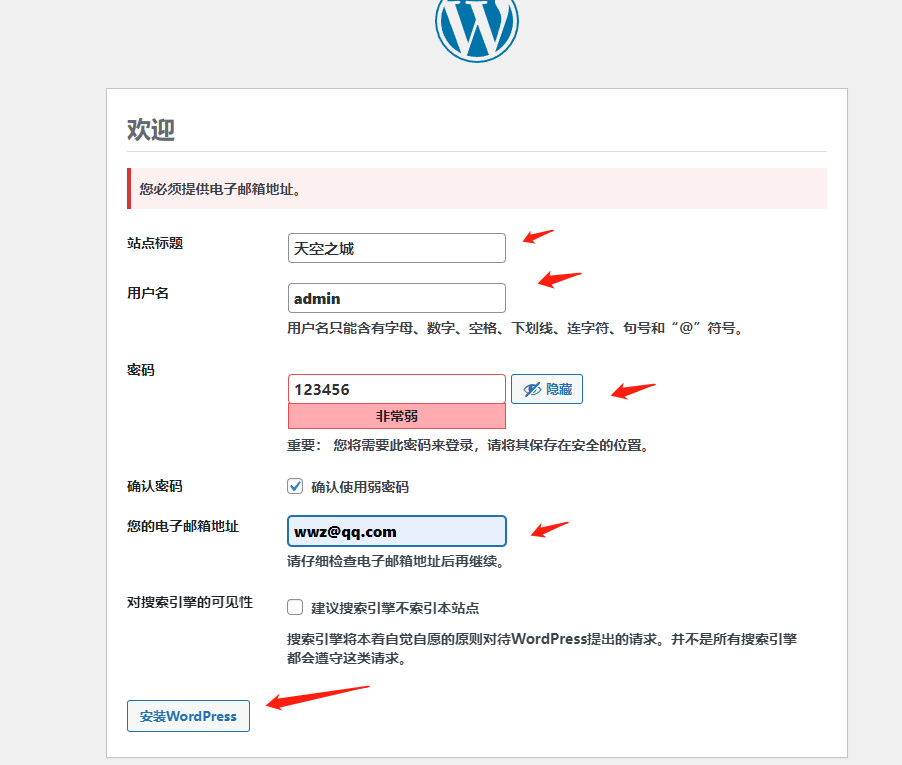
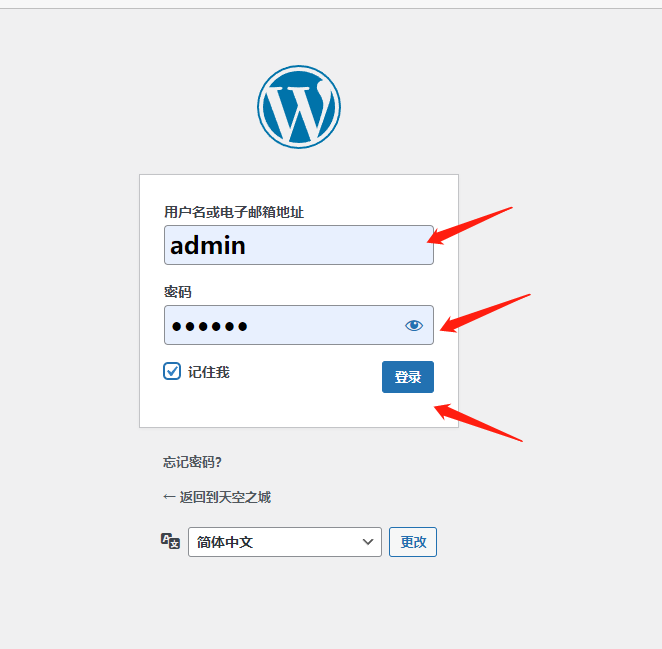
5.访问注册登录http://blog.wwzroom.org
详见下图


6.小技巧
1.隐藏PHP版本
[[email protected]:/usr/local/src]#
vim /etc/php.ini
expose_php = off #这只为off
[[email protected]:/usr/local/src]#
systemctl restart php-fpm

2.上传大图片实现
1)修改php-fpm配置文件,调整允许图片大小。
[[email protected]:/usr/local/src]#
vim /etc/php.ini
post_max_size = 20M
upload_max_filesize = 20M
[[email protected]:/usr/local/src]#
systemctl restart php-fpm

2)修改nginx配置文件(脚本中已经设置,可以不用再设置了)
[[email protected]:/usr/local/src]#
vim /apps/nginx/conf/nginx.conf
client_max_body_size 100m;
边栏推荐
- Go language learning tutorial (XV)
- 鏈錶之雙指針(快慢指針,先後指針,首尾指針)
- 关于MySQL的30条优化技巧,超实用
- fibonacci search
- [digital signal denoising] improved wavelet modulus maxima digital signal denoising based on MATLAB [including Matlab source code 1710]
- 3 find the greatest common divisor and the least common multiple
- opencv 判断点在多边形内外
- Roman numeral to integer
- 344. Reverse String. Sol
- Character conversion PTA
猜你喜欢

Metaverse ape received $3.5 million in seed round financing from negentropy capital
EasyCVR集群部署如何解决项目中的海量视频接入与大并发需求?
Practice: fabric user certificate revocation operation process
Arduino 测量交流电流
Usage Summary of scriptable object in unity
Metasploit(msf)利用ms17_010(永恒之蓝)出现Encoding::UndefinedConversionError问题
Starting from 1.5, build a micro Service Framework -- log tracking traceid
终于搞懂什么是动态规划的

Nangou Gili hard Kai font TTF Download with installation tutorial
SPSS analysis of employment problems of college graduates
随机推荐
Arduino 测量交流电流
二叉树(二)——堆的代码实现
Why does the C# compiler allow an explicit cast between IEnumerable&lt; T&gt; and TAlmostAnything?
Binary tree (II) -- code implementation of heap
Distributed resource management and task scheduling framework yarn
Metaverse ape ape community was invited to attend the 2022 Guangdong Hong Kong Macao Great Bay metauniverse and Web3.0 theme summit to share the evolution of ape community civilization from technology
Assign the output of a command to a variable [repeat] - assigning the output of a command to a variable [duplicate]
Character conversion PTA
Double pointer of linked list (fast and slow pointer, sequential pointer, head and tail pointer)
Record several frequently asked questions (202207)
Metaverse Ape获Negentropy Capital种子轮融资350万美元
How to reverse a string fromCharCode? - How to reverse String. fromCharCode?
Postman核心功能解析-参数化和测试报告
90后测试员:“入职阿里,这一次,我决定不在跳槽了”
谷歌地图案例
Post-90s tester: "after joining Ali, this time, I decided not to change jobs."
All expansion and collapse of a-tree
点到直线的距离直线的交点及夹角
Qtquick3d real time reflection
Metasploit(msf)利用ms17_010(永恒之蓝)出现Encoding::UndefinedConversionError问题