当前位置:网站首页>Record of problems in the construction process of IOD and detectron2
Record of problems in the construction process of IOD and detectron2
2022-07-02 07:34:00 【chenf0】
The paper
Incremental Object Detection via Meta-Learning (TPAMI 2021)
Incremental target detection based on meta learning
paper: https://arxiv.org/abs/2003.08798
code: https://github.com/JosephKJ/iOD
- be based on Faster R-CNN Built incremental target detector
- frame :Detectron2

Code
One 、 Set up process
conda create -n iod python=3.7 -y
conda activate iod
pip install torch==1.8.1+cu101 torchvision==0.9.1+cu101 torchaudio==0.8.1 -f https://download.pytorch.org/whl/torch_stable.html
pip install opencv-python
pip install fvcore
pip install cython; pip install 'git+https://github.com/cocodataset/cocoapi.git#subdirectory=PythonAPI'
install pytorch According to cuda Choose the appropriate version https://pytorch.org/get-started/previous-versions/
I don't know if this step is necessary , But I did
git clone https://github.com/facebookresearch/detectron2.git
python -m pip install -e detectron2
download iod, And compile
git clone https://github.com/JosephKJ/iOD.git
cd iOD
pip install -v -e .
Two 、 Have a problem
1.error: ‘AT_CHECK’ was not declared in this scope
Report errors RuntimeError: Error compiling objects for extension, Look forward to the cause of the error , Many documents appear error: ‘AT_CHECK’ was not declared in this scope
The reason for the error :AT_CHECK is deprecated in torch 1.5
The high version of the pytorch No longer use AT_CHECK, But use TORCH_CHECK.
resolvent : Find the wrong file , The inside ‘AT_CHECK’ Replace all with ‘TORCH_CHECK’.
Reference resources :https://blog.csdn.net/qq_21388689/article/details/117129404
2.linux How to start .sh file ,Linux Here's how to run .sh file
Reference resources : https://blog.csdn.net/weixin_32149339/article/details/116583758
3.AssertionError: Checkpoint detectron2://ImageNetPretrained/MSRA/R-50.pkl not found!
download R-50.pkl To the folder , take iOD/detectron2/engine/defaults.py in 312 Change the line loading path to self download pkl Path to file
https://github.com/Majiker/BalancedMetaSoftmax-InstanceSeg/issues/3
There's another way of saying that force Version of the problem , Run it again
pip install fvcore==0.1.1.dev200512
For more solutions, please refer to :
https://github.com/Majiker/BalancedMetaSoftmax-InstanceSeg/issues/3
4.RuntimeError: CUDA out of memory. Tried to allocate 1.53 GiB
nvidia-smi, Will be displayed GPU Usage situation , And occupy GPU Applications for
Input taskkill -PID Process number -F End the process of occupation , such as taskkill -PID 7392 -F
Input again nvidia-smi see GPU usage , Will find GPU The occupied space is greatly reduced , In this way, we can use GPU Run the program
My problem solving :
Before typing –num-gpus 1 Use one gpu
In the service area 8 individual gpu Not used ,
5.RuntimeError: Address already in use
Port occupied
Reference resources many GPU Training appears RUNTIMEERROR: ADDRESS ALREADY IN USE solve https://www.freesion.com/article/77681373376/
CUDA_VISIBLE_DEVICES='0,1,2,3' python tools/train_net.py --dist-url tcp://127.0.0.1:50001 --num-gpus 4 --config-file ./configs/PascalVOC-Detection/iOD/base_19.yaml SOLVER.IMS_PER_BATCH 8 SOLVER.BASE_LR 0.005
a key : --dist-url tcp://127.0.0.1:50001 Should be placed in num-gpus front , Putting it at the back has never been successful , Or report the original error , Just put it in front
Or turn off the occupied port number
Release port , Three steps are needed :
- Find all current ports of the system netstat -tln
- Find the process of the corresponding port in the system ID(PID) lsof -i : Port number
- Use kill -9 [PID] Command end process kill -9 [PID]
Reference resources Linux Release the occupied port https://cloud.tencent.com/developer/article/1340493
3、 ... and 、pycharm Connect to remote server
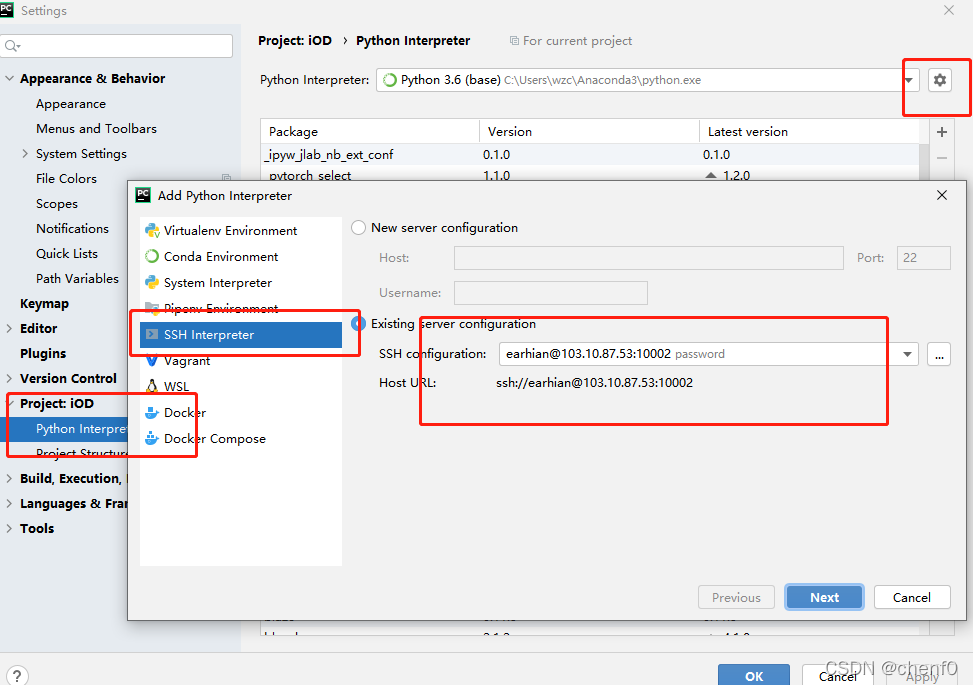
Select the corresponding virtual environment and the corresponding file path


边栏推荐
- JSP智能小区物业管理系统
- 优化方法:常用数学符号的含义
- MySQL composite index with or without ID
- PointNet理解(PointNet实现第4步)
- 实现接口 Interface Iterable<T>
- The first quickapp demo
- parser.parse_args 布尔值类型将False解析为True
- 离线数仓和bi开发的实践和思考
- @Transitional step pit
- Oracle general ledger balance table GL for foreign currency bookkeeping_ Balance change (Part 1)
猜你喜欢

Ding Dong, here comes the redis om object mapping framework

SSM student achievement information management system

Analysis of MapReduce and yarn principles

【信息检索导论】第七章搜索系统中的评分计算
常见的机器学习相关评价指标

Oracle EBS ADI development steps

@Transational踩坑

腾讯机试题

SSM supermarket order management system

Alpha Beta Pruning in Adversarial Search
随机推荐
How to efficiently develop a wechat applet
sparksql数据倾斜那些事儿
【模型蒸馏】TinyBERT: Distilling BERT for Natural Language Understanding
Oracle 11g uses ords+pljson to implement JSON_ Table effect
DNS attack details
PHP returns the abbreviation of the month according to the numerical month
中年人的认知科普
常见的机器学习相关评价指标
RMAN incremental recovery example (1) - without unbacked archive logs
使用MAME32K进行联机游戏
Get the uppercase initials of Chinese Pinyin in PHP
【信息检索导论】第一章 布尔检索
PointNet原理证明与理解
SSM personnel management system
Huawei machine test questions
One field in thinkphp5 corresponds to multiple fuzzy queries
Pyspark build temporary report error
SSM second hand trading website
[paper introduction] r-drop: regulated dropout for neural networks
CRP implementation methodology