当前位置:网站首页>Ogre introduction
Ogre introduction
2022-07-07 13:28:00 【MirrorYuChen】
1.Ogre Library compilation
1.1 Download and install DIrectX SDK
Download and install from the link below DirectX SDK:
Download address :DirectX SDK
1.2 from git Pull the latest code
>> git clone --recursive [email protected]:OGRECave/ogre.git
>> git checkout v13.4.1
1.3 Use CMake compile Ogre
It is recommended to use cmake-gui, According to my experience , You can compile it once , Finally, a sdk Folder , It contains all the compiled files .
2.Ogre To configure
2.1 take sdk Under subdirectories bin Directory added to path route
2.2 Create a new one vs engineering , To configure sdk The next path include and lib
include The path is added as follows :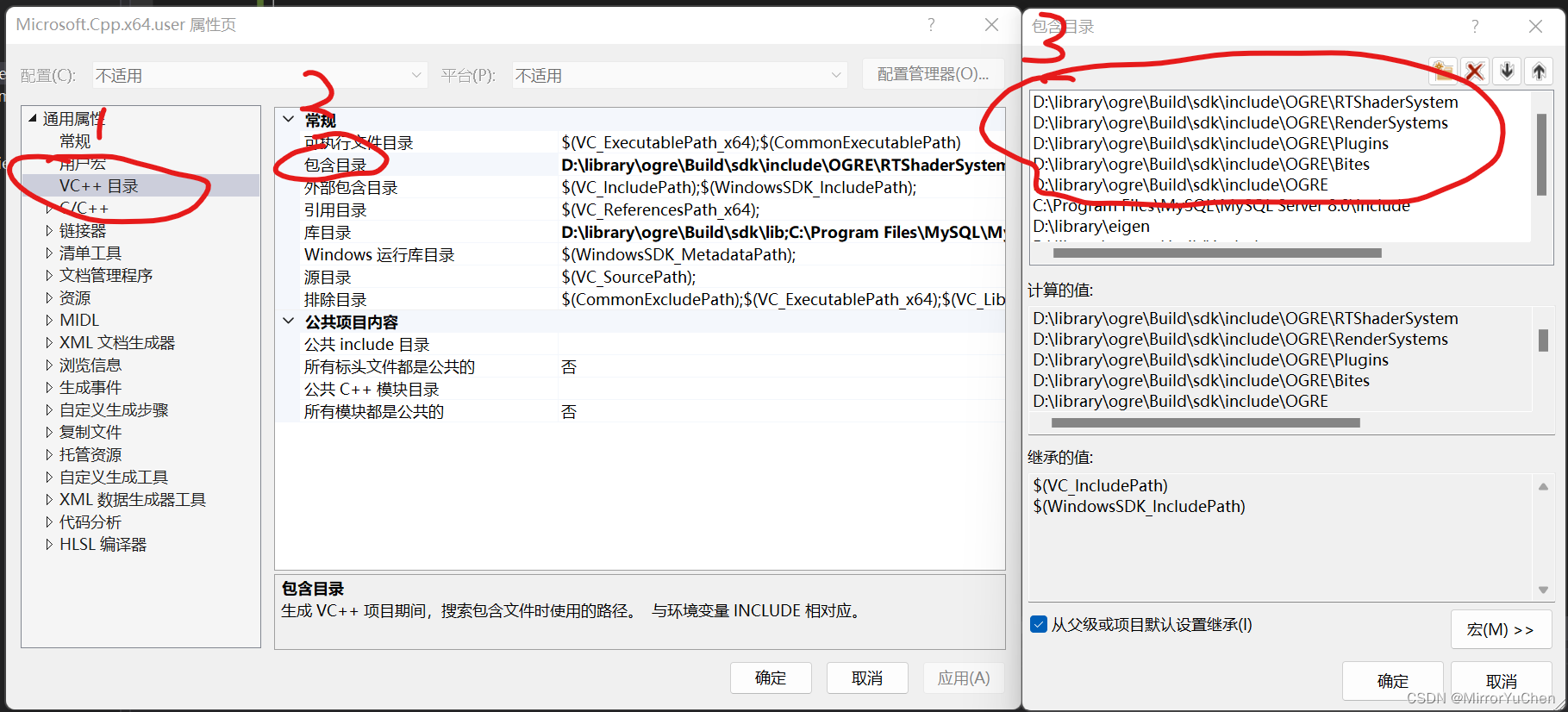
lib The path is added as follows :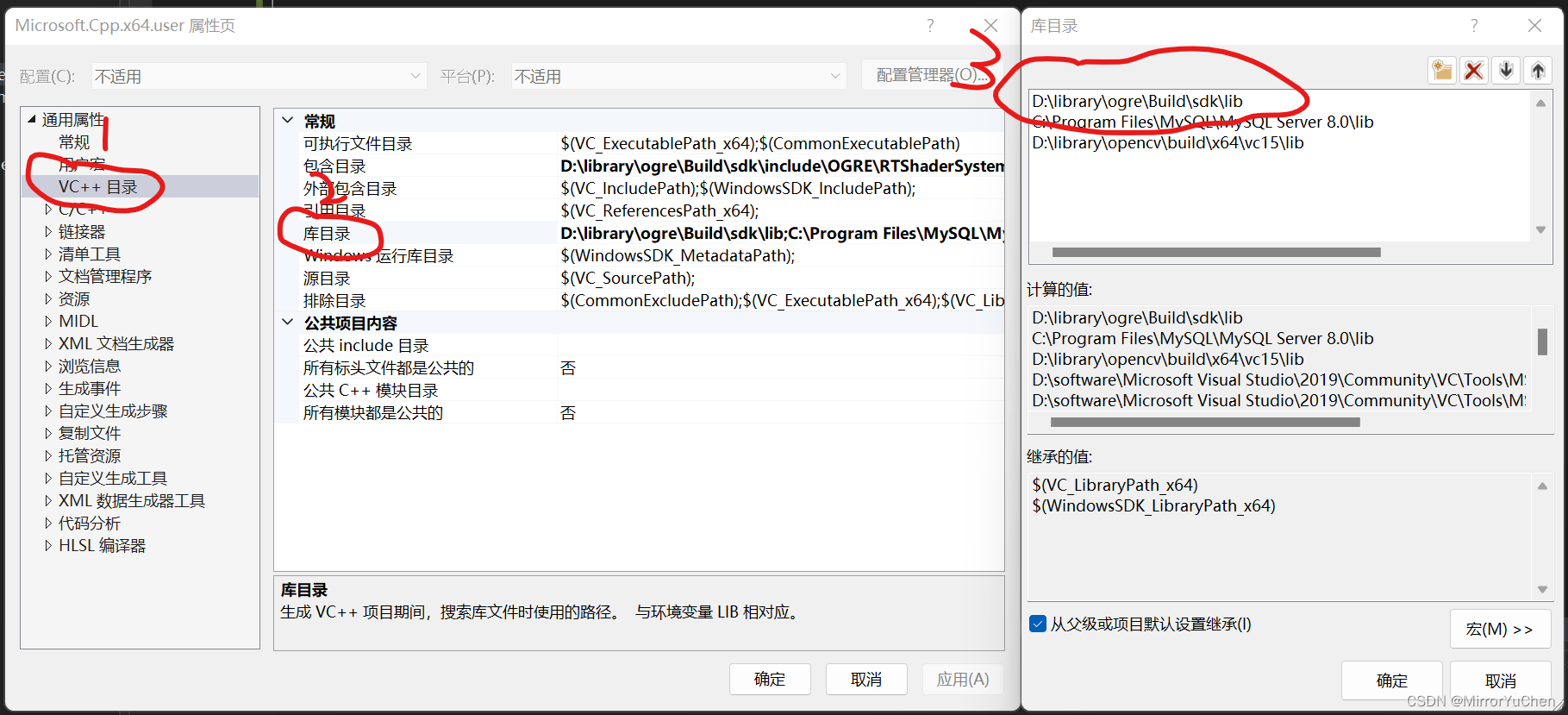
Add additional dependencies :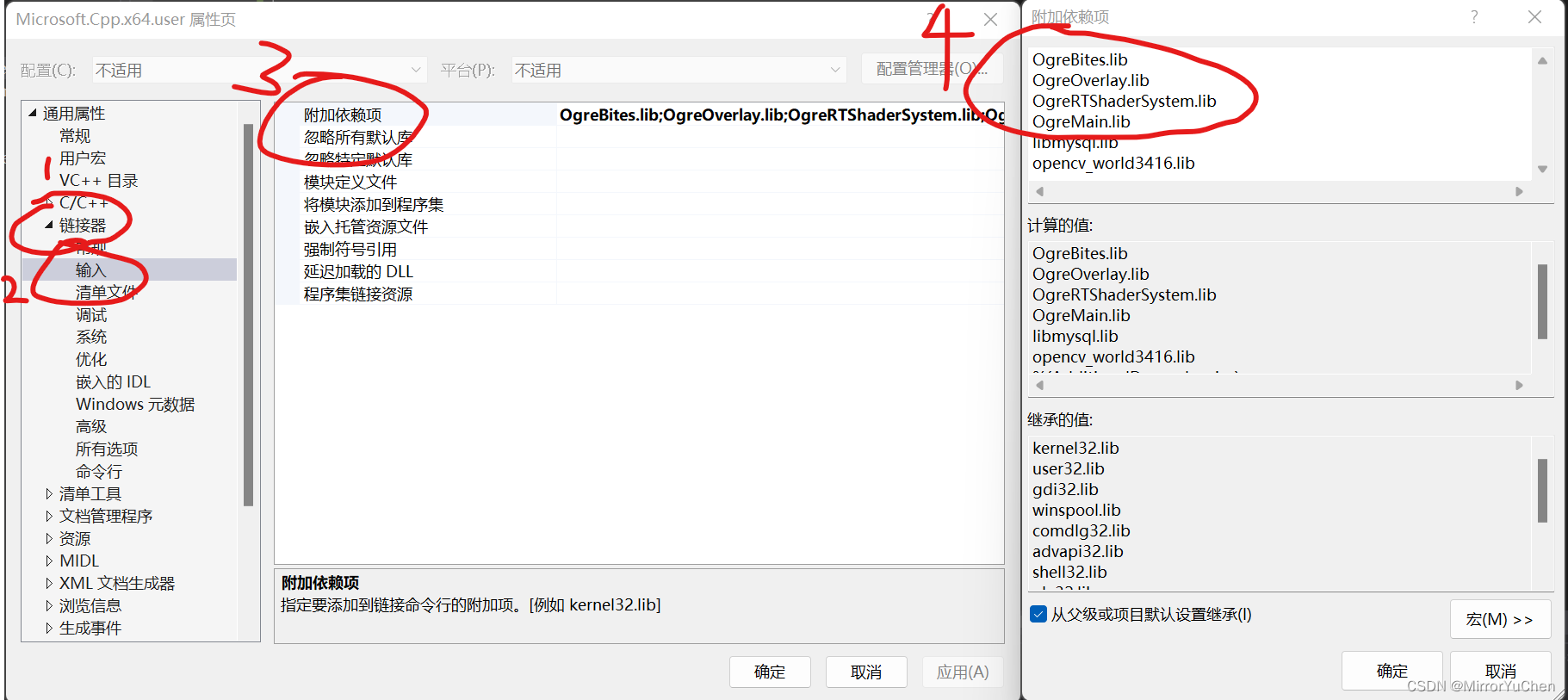
3. Add test code
#include <iostream>

#include "Ogre.h"
#include "OgreApplicationContext.h"
#include "OgreInput.h"
#include "OgreRTShaderSystem.h"

using namespace Ogre;
using namespace OgreBites;

class Basic :
	public ApplicationContext,
	public InputListener {
public:
	Basic();
	virtual ~Basic() {}

	void setup();
	bool keyPressed(const KeyboardEvent& evt);
};

Basic::Basic() : ApplicationContext("Ogre") {}

void Basic::setup() {
	// 1. Call the parent class
	ApplicationContext::setup();
	addInputListener(this);

	// 2. Get a pointer to the created root
	Root* root = getRoot();
	SceneManager* scnMgr = root->createSceneManager();

	// 3. Register our scene
	RTShader::ShaderGenerator* shadergen = RTShader::ShaderGenerator::getSingletonPtr();
	shadergen->addSceneManager(scnMgr);

	// 4. Adjust the light
	scnMgr->setAmbientLight(ColourValue(0.5, 0.5, 0.5));

	// 5. New light
	Light* light = scnMgr->createLight("MainLight");
	SceneNode* lightNode = scnMgr->getRootSceneNode()->createChildSceneNode();
	lightNode->attachObject(light);

	// 6. Light location
	lightNode->setPosition(20, 80, 50);

	// 7. The camera
	SceneNode* camNode = scnMgr->getRootSceneNode()->createChildSceneNode();
	Camera* cam = scnMgr->createCamera("myCam");
	cam->setNearClipDistance(5);
	cam->setAutoAspectRatio(true);
	camNode->attachObject(cam);
	camNode->setPosition(0, 0, 140);

	// 8. Tell him to render to the main window
	getRenderWindow()->addViewport(cam);

	// 9.Entity
	Entity* ogreEntity = scnMgr->createEntity("ogrehead.mesh");
	SceneNode* ogreNode = scnMgr->getRootSceneNode()->createChildSceneNode();
	ogreNode->attachObject(ogreEntity);
	// 10. Mobile camera
	camNode->setPosition(0, 47, 222);

	// 11.Entity2
	Entity* ogreEntity2 = scnMgr->createEntity("ogrehead.mesh");
	SceneNode* ogreNode2 = scnMgr->getRootSceneNode()->createChildSceneNode(Vector3(84, 48, 0));
	ogreNode2->attachObject(ogreEntity2);

	// 12.Entity3
	Entity* ogreEntity3 = scnMgr->createEntity("ogrehead.mesh");
	SceneNode* ogreNode3 = scnMgr->getRootSceneNode()->createChildSceneNode();
	ogreNode3->setPosition(0, 104, 0);
	ogreNode3->setScale(2, 1.2, 1);
	ogreNode3->attachObject(ogreEntity3);

	// 13.Entity4
	Entity* ogreEntity4 = scnMgr->createEntity("ogrehead.mesh");
	SceneNode* ogreNode4 = scnMgr->getRootSceneNode()->createChildSceneNode();
	ogreNode4->setPosition(-84, 48, 0);
	ogreNode4->roll(Degree(-90));
	ogreNode4->attachObject(ogreEntity4);
}

bool Basic::keyPressed(const KeyboardEvent& evt) {
	if (evt.keysym.sym == SDLK_ESCAPE) {
		getRoot()->queueEndRendering();
	}
	return true;
}

int main(int argc, char** argv) {
	try {
		Basic app;
		app.initApp();
		app.getRoot()->startRendering();
		app.closeApp();
	}
	catch (const std::exception& e) {
		std::cerr << "Error occurred during execution: " << e.what() << '\n';
		return 1;
	}

	return 0;
}
4. Deal with resource loading
4.1 take sdk Of bin All under the folder .dll Document and .cfg Copy the file to the project generated .exe Under the folder
>> E:\vs_project\OgreTest\x64\Release
4.2 modify resources.cfg file , Set the resource loading path
# Ogre Core Resources
[OgreInternal]
FileSystem=../../Media/Main
FileSystem=../../Media/RTShaderLib/GLSL
FileSystem=../../Media/Terrain/

# Resources required by the sample browser and most samples.
[Essential]
Zip=../../Media/packs/SdkTrays.zip
Zip=../../Media/packs/profiler.zip
FileSystem=../../Media/thumbnails

# Common sample resources needed by many of the samples.
# Rarely used resources should be separately loaded by the
# samples which require them.
[General]
# PBR media must come before the scripts that reference it
FileSystem=../../Media/PBR
FileSystem=../../Media/PBR/filament
FileSystem=../../Media/materials/textures/PBR

FileSystem=../../Media/materials/programs/GLSL
FileSystem=../../Media/materials/programs/GLSL120
FileSystem=../../Media/materials/programs/GLSL150
FileSystem=../../Media/materials/programs/GLSL400
FileSystem=../../Media/materials/programs/GLSLES
FileSystem=../../Media/materials/programs/SPIRV
FileSystem=../../Media/materials/programs/Cg
FileSystem=../../Media/materials/programs/HLSL
FileSystem=../../Media/materials/programs/HLSL_Cg
FileSystem=../../Media/materials/scripts
FileSystem=../../Media/materials/textures
FileSystem=../../Media/materials/textures/terrain
FileSystem=../../Media/models
FileSystem=../../Media/particle
FileSystem=../../Media/DeferredShadingMedia
FileSystem=../../Media/DeferredShadingMedia/DeferredShading/post
FileSystem=../../Media/PCZAppMedia
FileSystem=../../Media/materials/scripts/SSAO
FileSystem=../../Media/materials/textures/SSAO
FileSystem=../../Media/volumeTerrain
FileSystem=../../Media/CSMShadows
Zip=../../Media/packs/cubemap.zip
Zip=../../Media/packs/cubemapsJS.zip
Zip=../../Media/packs/dragon.zip
Zip=../../Media/packs/fresneldemo.zip
Zip=../../Media/packs/ogredance.zip
Zip=../../Media/packs/Sinbad.zip
Zip=../../Media/packs/skybox.zip
Zip=../../Media/volumeTerrain/volumeTerrainBig.zip

Zip=../../Media/packs/DamagedHelmet.zip
Zip=../../Media/packs/filament_shaders.zip

[BSPWorld]
Zip=../../Media/packs/oa_rpg3dm2.pk3
Zip=../../Media/packs/ogretestmap.zip

# Materials for visual tests
[Tests]
FileSystem=../Tests/Media
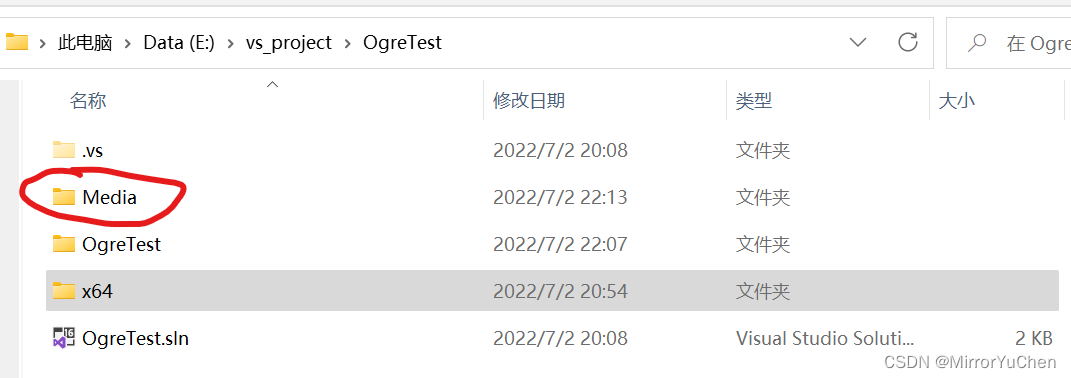
4.3 take sdk Next resource file Media Folder copy to the set path
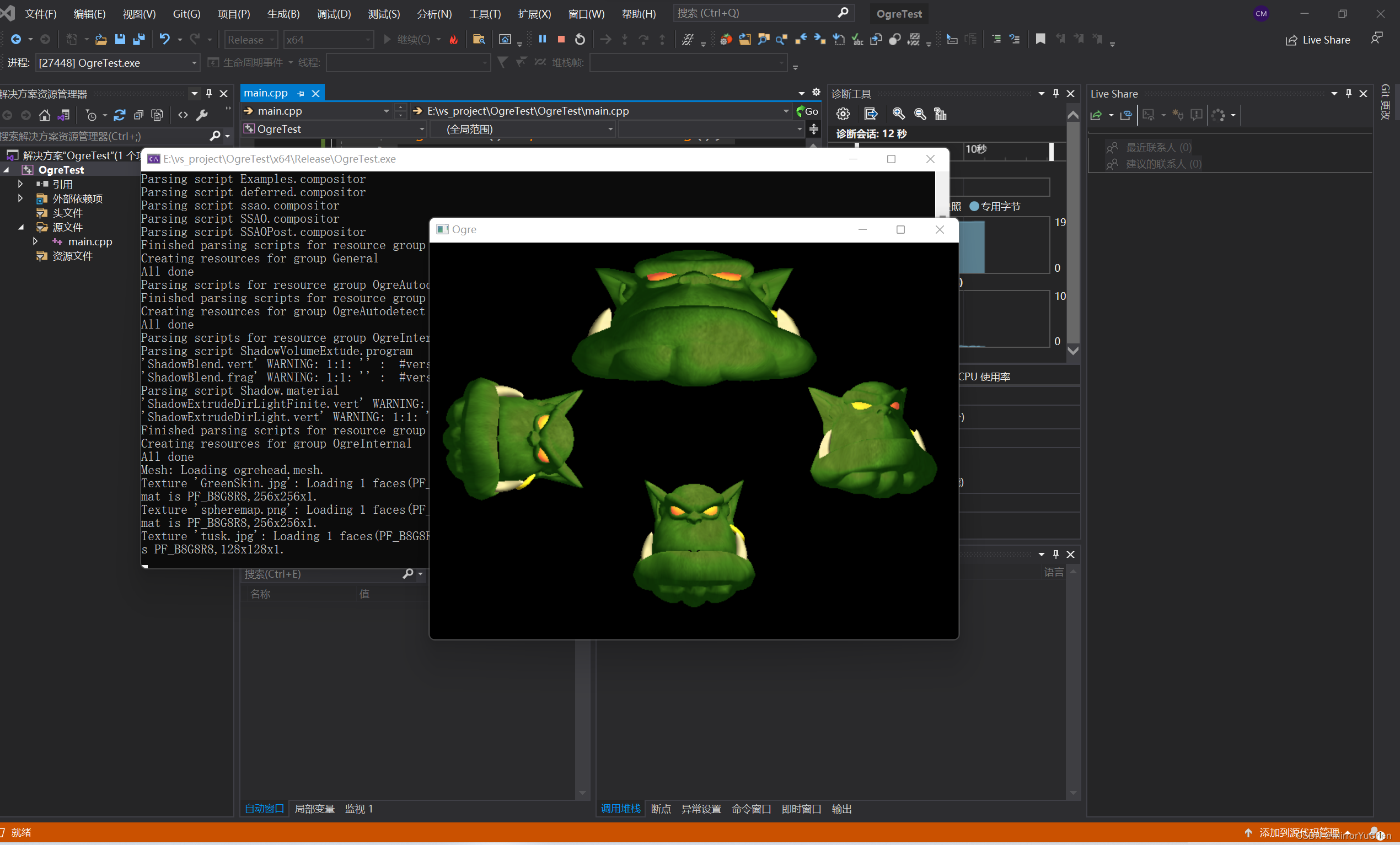
4.4 Run the test example again
Reference material
- [1] Ogre course
边栏推荐
- JNA学习笔记一:概念
- Some principles of mongodb optimization
- PAcP learning note 3: pcap method description
- 聊聊伪共享
- ORACLE进阶(五)SCHEMA解惑
- 单片机学习笔记之点亮led 灯
- JS determines whether an object is empty
- Initialization script
- How did Guotai Junan Securities open an account? Is it safe to open an account?
- [QNX Hypervisor 2.2用户手册]6.3.4 虚拟寄存器(guest_shm.h)
猜你喜欢

靠卖概念上市,认养一头牛能走多远?
MongoDB内部的存储原理
Cinnamon 任务栏网速
Per capita Swiss number series, Swiss number 4 generation JS reverse analysis
基于鲲鹏原生安全,打造安全可信的计算平台
JS slow motion animation principle teaching (super detail)
![[learning notes] zkw segment tree](/img/18/21f455a06e8629243fc5cf4df0044c.png)
[learning notes] zkw segment tree
Isprs2021/ remote sensing image cloud detection: a geographic information driven method and a new large-scale remote sensing cloud / snow detection data set

为租客提供帮助
MySQL入门尝鲜
随机推荐
PHP - laravel cache
共创软硬件协同生态:Graphcore IPU与百度飞桨的“联合提交”亮相MLPerf
自定义线程池拒绝策略
Esp32 ① compilation environment
我那“不好惹”的00后下属:不差钱,怼领导,抵制加班
MySQL master-slave replication
Practical case: using MYCAT to realize read-write separation of MySQL
1. Deep copy 2. Call apply bind 3. For of in differences
xshell连接服务器把密钥登陆改为密码登陆
MySQL入门尝鲜
简单好用的代码规范
Initialization script
Mongodb replication (replica set) summary
【学习笔记】线段树选做
DHCP 动态主机设置协议 分析
Mongodb meets spark (for integration)
Cookie and session comparison
基于鲲鹏原生安全,打造安全可信的计算平台
《开源圆桌派》第十一期“冰与火之歌”——如何平衡开源与安全间的天然矛盾?
线程池拒绝策略最佳实践