当前位置:网站首页>[PaddleSeg 源码阅读] PaddleSeg 自定义数据类
[PaddleSeg 源码阅读] PaddleSeg 自定义数据类
2022-07-04 03:32:00 【氵文大师】
先感受一下怎么改:
Config 文件中的item与类的 __init__.py 参数一一对应
在 PaddleSeg 的 Config 文件中:
val_dataset:
  type: Dataset
  dataset_root: /root/share/program/save/data/portraint
  val_path: /root/share/program/save/data/portraint/txtfiles/test.txt
  num_classes: 2
  transforms:
    - type: Resize
      target_size: [224, 224]
    - type: Normalize
  mode: val
上边的 Config 参数就是传入 Dataset 类的 __init__ 中的参数
    def __init__(self,
                 transforms,
                 dataset_root,
                 num_classes,
                 mode='train',
                 train_path=None,
                 val_path=None,
                 test_path=None,
                 separator=' ',
                 ignore_index=255,
                 edge=False):
        self.dataset_root = dataset_root
        self.transforms = Compose(transforms)
        self.file_list = list()
        self.mode = mode.lower()
        self.num_classes = num_classes
        self.ignore_index = ignore_index
        self.edge = edge

		......
如果这个 Dataset 不符合你的需求,则可以自定义一类,如 XXDataset
则将 Config 文件中的 Dataset type 部分改成 你自定义的类 XXDataset
该类需要在 paddleseg/datasets/__init__.py 中导入,可以直接在 __init__.py 中定义,也可以新建一个文件,然后在 __init__.py 中导入即可.
注意,在自定义数据类的开始,要放上这个装饰器,(要这样注册一下?)
@manager.DATASETS.add_component
(啊这,我我记得之前不用啊,或者说之前 PaddleClas 不用?
举个例子:
paddleseg/datasets/dataset.py 中:
config 文件: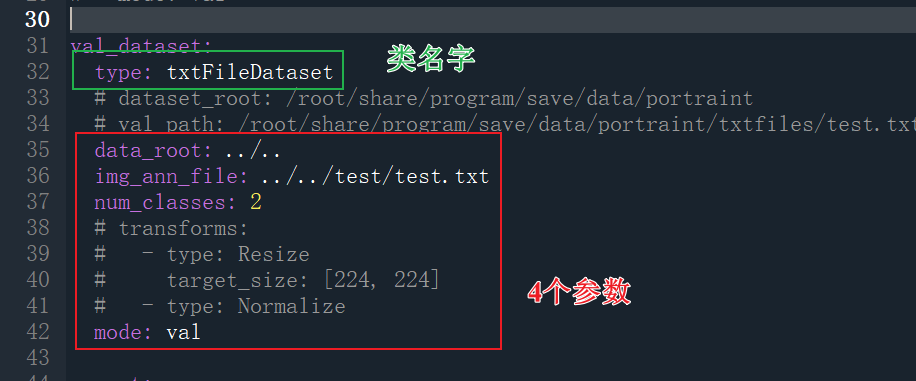
__init__.py 中导入: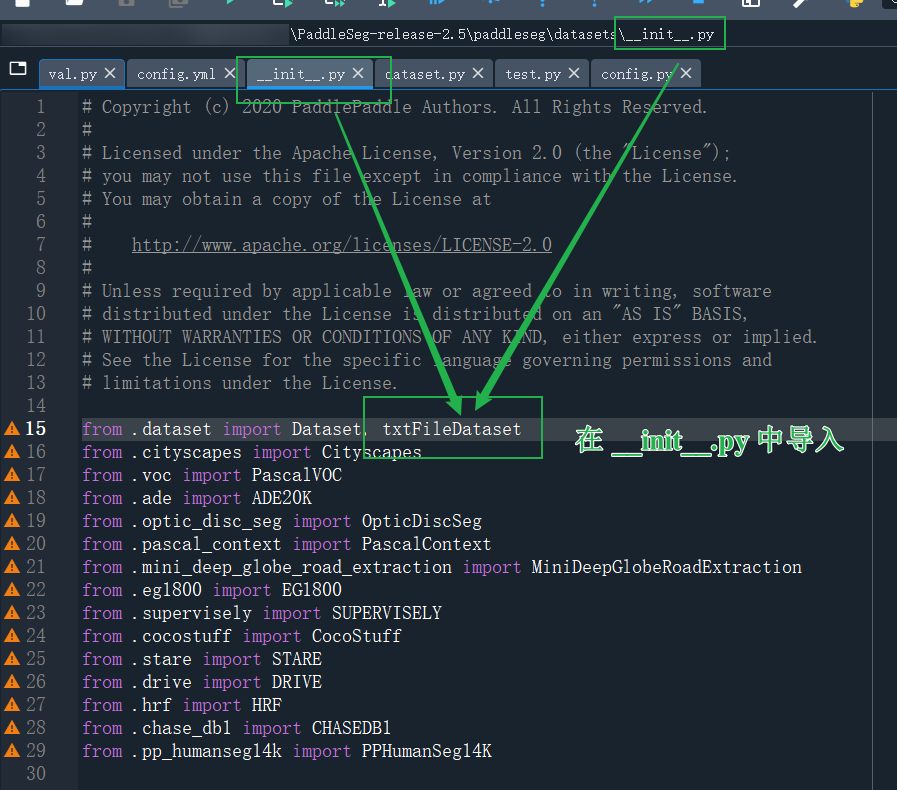
然后这里要注意一下:
如果不定义这两个属性,这里会报错,transforms 属性,按理说应该是参数传进来的,但是我这里是直接预处理的图片,所以给了 None 一般来说要传入的
所以我这里还得改一个地方,反正哪里报错,就改哪里就行
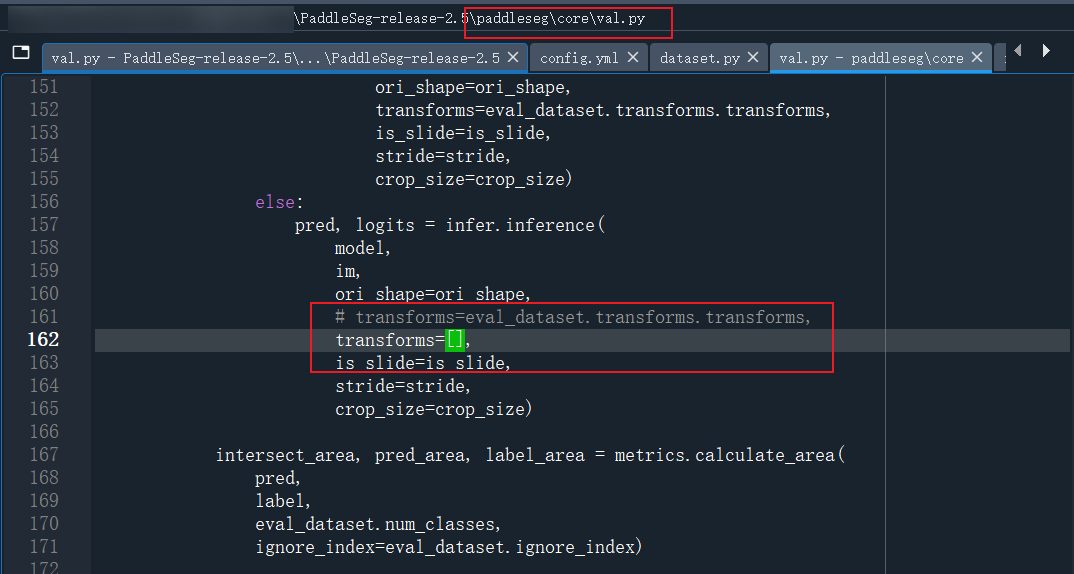
这里再补充一下,一般情况下,用传进来的 Transform 参数做预处理,不要像我这样:
class myDataset(Dataset):
    def __init__(self, data_root,
                        img_name="images",
                        ann_name="annotations"):

        self.img_path = os.path.join(data_root, img_name)
        self.ann_path = os.path.join(data_root, ann_name)

        # 务必传入相对路径,绝对路径 OpenCV 读不了
        self.imgs = [os.path.join(self.img_path, img) for img in os.listdir(self.img_path)]

        self.anns = [img.replace(".jpg", ".png") for img in self.imgs]
        self.anns = [img.replace(img_name, ann_name) for img in self.anns]


    def __len__(self):
        return len(self.anns)

    def __getitem__(self, idx):
        img = cv2.imread(self.imgs[idx])
        ann = cv2.imread(self.anns[idx], 0)

        img = self.img_preprocess(img)
        ann = self.ann_preprocess(ann)

        return img, ann

    @staticmethod
    def img_preprocess(img):
        img = cv2.resize(img, (224, 224)).astype(np.float32)
        img = img.transpose(2, 0, 1)
        img = img[None]
        img /= 255
        return img

    @staticmethod
    def ann_preprocess(ann):
        ann = cv2.resize(ann, (224, 224))
        return ann
我这里专门定义了 self.img_preprocess 和 self.ann_preprocess 去读取图片,并做预处理.
所以我上边的代码,会把 self.transform 给 None,然后传入的参数给 []
这样也行,反正也懒得在 transforms 中注册一个新的 transform
但是,PaddleSeg 在 transforms 中做了一点儿偷懒的工作,会帮咱自动读入图片和Label
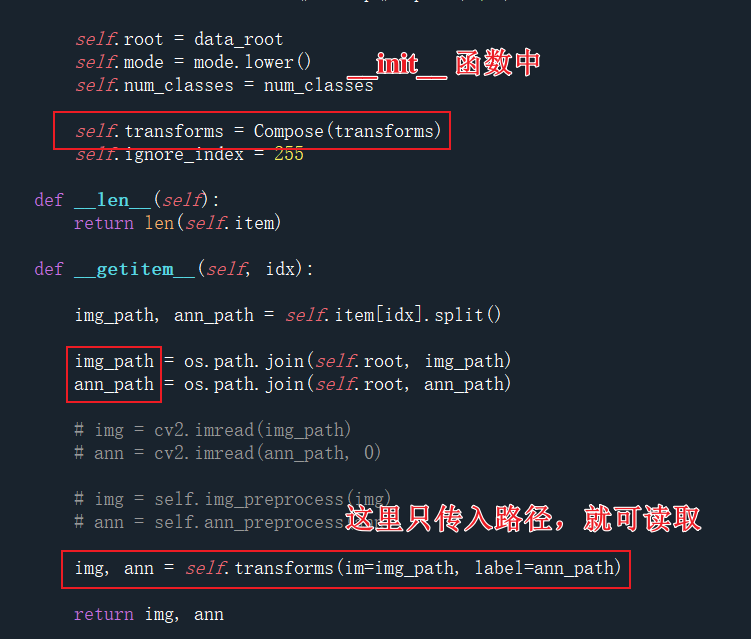
来看一下,到底是 transforms 中哪个类会读取图片:
在 Compose 的 __call__ 函数中:
如果传入的参数是 str 则其会读入对应的图
(注意,这里读进来的图片是 0-255 的,是uint8的)
(注意,for循环下的操作,是将所有的Transform做完,然后才进行的 Transpose)
也就是说,在所有的 Transform 之后,其输出的是 CHW, 也就是通道数在最前面
另外,最后一步的转置是 np 的操作,也就是说 PaddleSeg 的 Transform 大部分是基于 numpy 实现的(只有读取图片时,会用到 PIL.Image 类)
最后看看到底有哪些装饰器: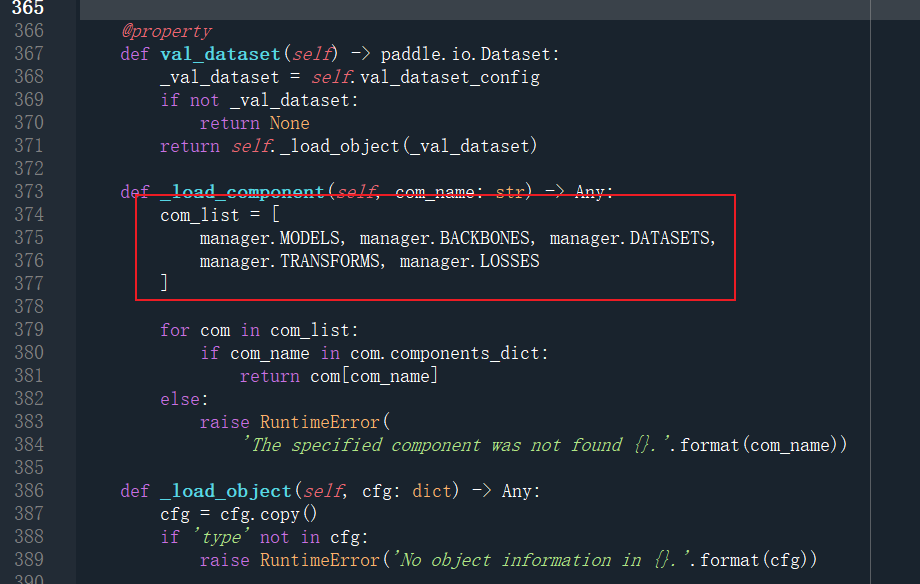
manager.MODELS
manager.BACKBONES
manager.DATASETS
manager.TRANSFORMS
manager.LOSSES
大概,后边加上 .add_component 后即可添加新对象
边栏推荐
- Audio and video technology development weekly | 232
- System integration meets the three business needs of enterprises
- system information
- The 37 year old programmer was laid off, and he didn't find a job for 120 days. He had no choice but to go to a small company. As a result, he was confused
- There is no need to authorize the automatic dream weaving collection plug-in for dream weaving collection
- Lichuang EDA learning notes 14: PCB board canvas settings
- The "message withdrawal" of a push message push, one click traceless message withdrawal makes the operation no longer difficult
- Solve the problems encountered by the laravel framework using mongodb
- CSCI 2134
- Summary of Chinese remainder theorem
猜你喜欢
Zblog collection plug-in does not need authorization to stay away from the cracked version of zblog

Want to do something in production? Then try these redis commands

Lichuang EDA learning notes 14: PCB board canvas settings

Zhihu million hot discussion: why can we only rely on job hopping for salary increase? Bosses would rather hire outsiders with a high salary than get a raise?
Li Chuang EDA learning notes 13: electrical network for drawing schematic diagram

1day vulnerability pushback skills practice (3)

96% of the collected traffic is prevented by bubble mart of cloud hosting
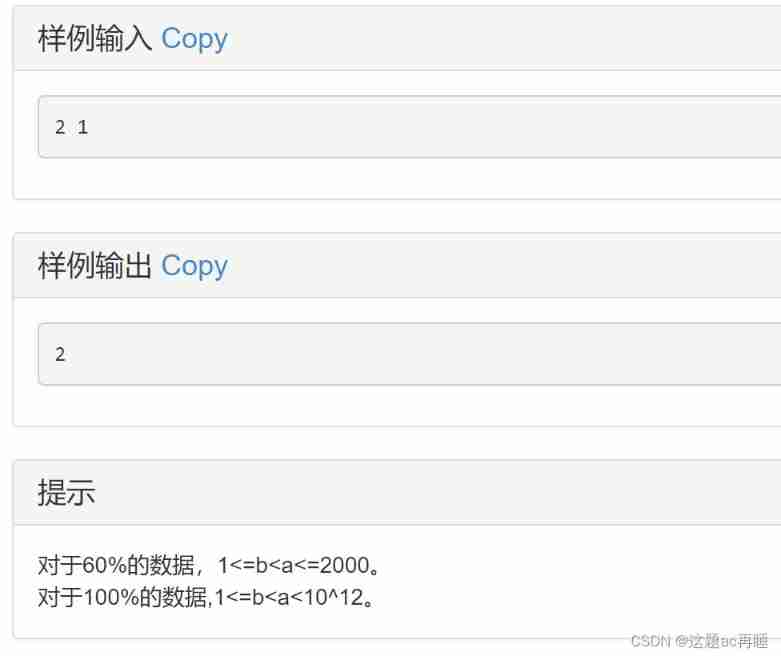
Contest3145 - the 37th game of 2021 freshman individual training match_ 1: Origami

Ningde times and BYD have refuted rumors one after another. Why does someone always want to harm domestic brands?

What is cloud primordial?
随机推荐
Rhcsa day 3
Solve the problem that the tabbar navigation at the bottom of vantui does not correspond to the page (window.loading.hash)
MySQL data query optimization -- data structure of index
Jenkins configures IP address access
Optimization theory: definition of convex function + generalized convex function
National standard gb28181 protocol platform easygbs fails to start after replacing MySQL database. How to deal with it?
[UE4] parse JSON string
JS object definition
No clue about the data analysis report? After reading this introduction of smartbi, you will understand!
2022 registration examination for safety production management personnel of fireworks and firecracker production units and examination skills for safety production management personnel of fireworks an
Cache general management class + cache httpcontext Current. Cache and httpruntime Differences between caches
Www 2022 | taxoenrich: self supervised taxonomy complemented by Structural Semantics
The "message withdrawal" of a push message push, one click traceless message withdrawal makes the operation no longer difficult
Résumé des outils communs et des points techniques de l'examen PMP
MySQL is dirty
Stm32bug [stlink forced update prompt appears in keilmdk, but it cannot be updated]
Eh, the log time of MySQL server is less than 8h?
CSCI 2134
Why is it recommended that technologists write blogs?
[latex] production of complex tables: excel2latex and detail adjustment