当前位置:网站首页>进行交互或动画时如何选择Visibility, Display, and Opacity
进行交互或动画时如何选择Visibility, Display, and Opacity
2022-08-01 20:32:00 【南飞雁】
创建淡入/淡出效果
例如,创建淡入/淡出效果
在 Web 前端开发中,我们可以使用display, opacity,visibility和其他 CSS 属性来显示和隐藏元素。
这些属性有何不同?如果我们想在显示和隐藏时设置动画怎么办?本文将为您介绍。
我们先来看看他们的区别:
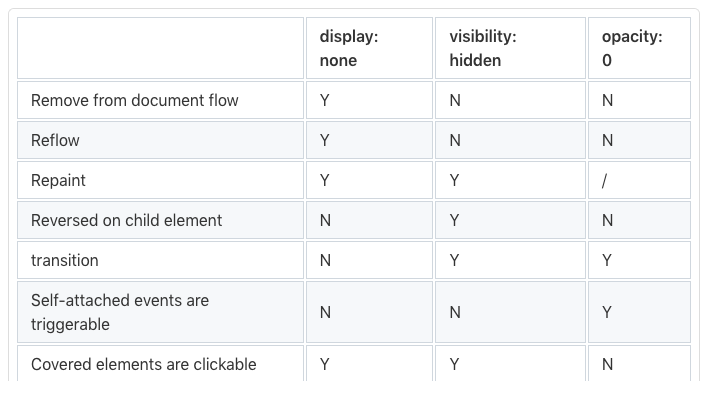
可以看出,它们之间还是有一些区别的,我们需要根据具体情况来选择属性。
比如鼠标悬停淡入淡出效果,我们就不能用display。因为它不是可过渡动画的 CSS 属性。换句话说,它不能在给定时间内更改。
visibility 和 opactiy 两个是可以设置过渡动画的
<style>
  div {
    border: 1px solid #000;
    color: red;
    font-size: 36px;
    width: 150px;
    height: 150px;
  }
  div > span {
    opacity: 0;
    transition: opacity 1s linear;
  }
  div:hover > span {
    visibility: visible;
    opacity: 1;
  }
</style>
<div>
  <span>content</span>
</div>

看起来很棒。但是如果我们给使用opacity隐藏元素绑定了点击事件, 当opacity: 0时还是可以被点击的, 那么此时我又想有过渡效果, 又想他在隐藏的时候不能被点击, 只有在显示的时候,才能被点击
<style>
  #upper {
    position: absolute;
    width: 150px;
    height: 150px;
    opacity: 1;
    visibility: visible;
    background-color: beige;
    transition-property: opacity, visibility;
    transition-duration: 0.6s;
  }
  #lower {
    background-color: aquamarine;
    width: 200px;
    height: 200px;
  }
</style>
<div id="upper"></div>
<div id="lower"></div>
<script>
  const [upper, lower] = ["upper", "lower"].map((i) =>
    document.getElementById(i)
  );

  upper.addEventListener("click", () => {
    upper.style.opacity = 0;
    // Toggle comments here to see the difference
    upper.style.visibility = "hidden";
  });

  const randomColor = () => `#${(~~(Math.random() * (1 << 24))).toString(16)}`;
  lower.addEventListener("click", () => {
    lower.style.backgroundColor = randomColor();
  });
</script>
这样我们就让隐藏的时候有了过渡的效果, 同时隐藏之后就没有了点击事件
边栏推荐
- 基于FPGA的任意字节数(单字节、多字节)的串口(UART)发送(含源码工程)
- 面试突击70:什么是粘包和半包?怎么解决?
- 【Untitled】
- 终于有人把AB实验讲明白了
- 【kali-信息收集】(1.2)SNMP枚举:Snmpwalk、Snmpcheck;SMTP枚举:smtp-user-enum
- 为什么限制了Oracle的SGA和PGA,OS仍然会用到SWAP?
- [Personal Work] Remember - Serial Logging Tool
- Acrel-5010重点用能单位能耗在线监测系统在湖南三立集团的应用
- 密码学的基础:X.690和对应的BER CER DER编码
- Qt设置应用程序开机自启 解决设置失败原因
猜你喜欢

实用新型专利和发明专利的区别?秒懂!
MySQL语法基础

【节能学院】安科瑞餐饮油烟监测云平台助力大气污染攻坚战

因斯布鲁克大学团队量子计算硬件突破了二进制
【Dart】dart之mixin探究

【kali-信息收集】(1.5)系统指纹识别:Nmap、p0f
To promote energy conservation institute 】 【 the opinions of the agricultural water price reform
![[Personal Work] Remember - Serial Logging Tool](/img/8c/56639e234ec3472f4133342eec96d6.png)
[Personal Work] Remember - Serial Logging Tool
"Torch" tensor multiplication: matmul, einsum

【nn.Parameter()】生成和为什么要初始化
随机推荐
通配符 SSL/TLS 证书
】 【 nn. The Parameter () to generate and why do you want to initialize
【nn.Parameter()】生成和为什么要初始化
Use WeChat official account to send information to designated WeChat users
Little data on how to learn?Jida latest small learning data review, 26 PDF page covers the 269 - page document small data learning theory, method and application are expounded
30-day question brushing plan (5)
为什么限制了Oracle的SGA和PGA,OS仍然会用到SWAP?
小数据如何学习?吉大最新《小数据学习》综述,26页pdf涵盖269页文献阐述小数据学习理论、方法与应用
The graphic details Eureka's caching mechanism/level 3 cache
Determine a binary tree given inorder traversal and another traversal method
Intranet penetration lanproxy deployment
第59章 ApplicationPart内置依赖注入中间件
Arthas 常用命令
[Personal Work] Remember - Serial Logging Tool
SIPp installation and use
【七夕特别篇】七夕已至,让爱闪耀
模板特例化和常用用法
如何记录分析你的炼丹流程—可视化神器Wandb使用笔记【1】
密码学的基础:X.690和对应的BER CER DER编码
【Untitled】