当前位置:网站首页>【kali-信息收集】(1.6)服务的指纹识别:Nmap、Amap
【kali-信息收集】(1.6)服务的指纹识别:Nmap、Amap
2022-08-01 19:38:00 【黑色地带(崛起)】
目录
一、简介
1.1、概述:
为了确保有一个成功的渗透测试 , 必须需要知道目标系统中服务的指纹信息。 服务指 纹信息包括服务端口 、 服务名和版本等
二、工具
2.1、Nmap(识别服务指纹信息)
使用:
【端口扫描工具】nmap核心使用方法
https://blog.csdn.net/qq_53079406/article/details/125263917?ops_request_misc=%257B%2522request%255Fid%2522%253A%2522165932934416781432923359%2522%252C%2522scm%2522%253A%252220140713.130102334.pc%255Fblog.%2522%257D&request_id=165932934416781432923359&biz_id=0&utm_medium=distribute.pc_search_result.none-task-blog-2~blog~first_rank_ecpm_v1~rank_v31_ecpm-1-125263917-null-null.nonecase&utm_term=nmap&spm=1018.2226.3001.4450nmap“扫描基础”“端口扫描技术”“服务和版本探测”“操作系统探测”“时间和性能”“防火墙/IDS躲避和哄骗”相关参考指南
测试:
用Nmap工具查看39.106.226.142服务上正在运行的端口
nmap -sV 39.106.226.142
可以查看到目标服务器上运行的端口号、各个端口对应的服务及版本信息
 https://blog.csdn.net/qq_53079406/article/details/125263917?ops_request_misc=%257B%2522request%255Fid%2522%253A%2522165932934416781432923359%2522%252C%2522scm%2522%253A%252220140713.130102334.pc%255Fblog.%2522%257D&request_id=165932934416781432923359&biz_id=0&utm_medium=distribute.pc_search_result.none-task-blog-2~blog~first_rank_ecpm_v1~rank_v31_ecpm-1-125263917-null-null.nonecase&utm_term=nmap&spm=1018.2226.3001.4450
2.2、Amap(服务枚举工具)
简介:
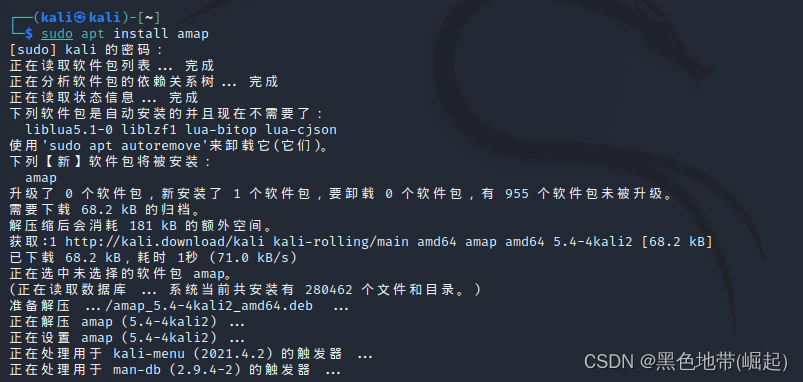
Amap是一个服务枚举工具。 使用该工具能识别正运行在 一 ·个指定端口或一个范围端
口上的应用程序安装:
sudo apt install amap
命令:
Syntax: amap [-A|-B|-P|-W] [-1buSRHUdqv] [[-m] -o <file>] [-D <file>] [-t/-T sec] [-c cons] [-C retries] [-p proto] [-i <file>] [target port [port] ...]
Modes:
  -A         Map applications: send triggers and analyse responses (default)
  -B         Just grab banners, do not send triggers
  -P         No banner or application stuff - be a (full connect) port scanner
Options:
  -1         Only send triggers to a port until 1st identification. Speeeeed!
  -6         Use IPv6 instead of IPv4
  -b         Print ascii banner of responses
  -i FILE    Nmap machine readable outputfile to read ports from
  -u         Ports specified on commandline are UDP (default is TCP)
  -R         Do NOT identify RPC service
  -H         Do NOT send application triggers marked as potentially harmful
  -U         Do NOT dump unrecognised responses (better for scripting)
  -d         Dump all responses
  -v         Verbose mode, use twice (or more!) for debug (not recommended :-)
  -q         Do not report closed ports, and do not print them as unidentified
  -o FILE [-m] Write output to file FILE, -m creates machine readable output
  -c CONS    Amount of parallel connections to make (default 32, max 256)
  -C RETRIES Number of reconnects on connect timeouts (see -T) (default 3)
  -T SEC     Connect timeout on connection attempts in seconds (default 5)
  -t SEC     Response wait timeout in seconds (default 5)
  -p PROTO   Only send triggers for this protocol (e.g. ftp)
  TARGET PORT   The target address and port(s) to scan (additional to -i)
amap is a tool to identify application protocols on target ports.
Note: this version was NOT compiled with SSL support!
Usage hint: Options "-bqv" are recommended, add "-1" for fast/rush checks.
使用:
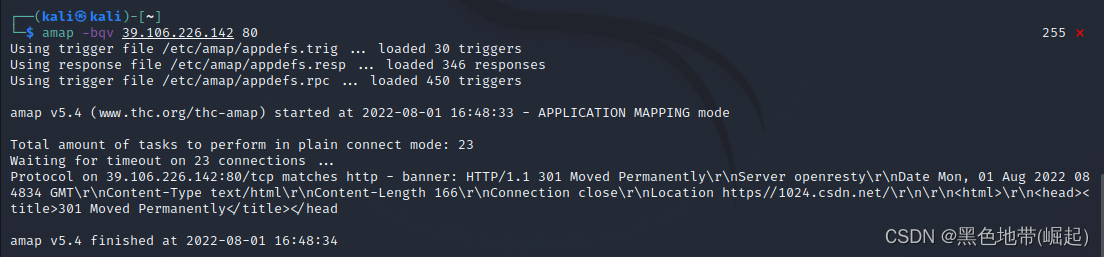
用Amap 工具在指定的端口(或一段范围), 测试目标主机39.106.226.142上正在运行的应用程序
amap -bqv 39.106.226.142 80
边栏推荐
- Gradle系列——Gradle文件操作,Gradle依赖(基于Gradle文档7.5)day3-1
- TestNG multiple xml for automated testing
- 【周赛复盘】LeetCode第304场单周赛
- 有点奇怪!访问目的网址,主机能容器却不行
- PHP 安全最佳实践
- 重保特辑|筑牢第一道防线,云防火墙攻防演练最佳实践
- When installing the GBase 8c database, the error message "Resource: gbase8c already in use" is displayed. How to deal with this?
- 力扣刷题之合并两个有序数组
- 常用命令备查
- C#/VB.NET Extract table from PDF
猜你喜欢

哈哈!一个 print 函数,还挺会玩啊!

小白系统初始化配置资源失败怎么办
![57: Chapter 5: Develop admin management services: 10: Develop [get files from MongoDB's GridFS, interface]; (from GridFS, get the SOP of files) (Do not use MongoDB's service, you can exclude its autom](/img/e1/2fa8dcc9c246bbbc2494326a83cda1.png)
57: Chapter 5: Develop admin management services: 10: Develop [get files from MongoDB's GridFS, interface]; (from GridFS, get the SOP of files) (Do not use MongoDB's service, you can exclude its autom

regular expression

58:第五章:开发admin管理服务:11:开发【管理员人脸登录,接口】;(未实测)(使用了阿里AI人脸识别)(演示了,使用RestTemplate实现接口调用接口;)

Combining two ordered arrays

Mobile Zero of Likou Brush Questions

【七夕特别篇】七夕已至,让爱闪耀
如何记录分析你的炼丹流程—可视化神器Wandb使用笔记【1】

1个小时!从零制作一个! AI图片识别WEB应用!
随机推荐
MySQL开发技巧——并发控制
Database Plus 的云上之旅:SphereEx 正式开源 ShardingSphere on Cloud 解决方案
不要再使用MySQL online DDL了
如何写一个vim插件?
OSPO 五阶段成熟度模型解析
Website construction process
nacos installation and configuration
Heavy cover special | intercept 99% malicious traffic, reveal WAF offensive and defensive drills best practices
Greenplum Database Source Code Analysis - Analysis of Standby Master Operation Tools
正则表达式
When installing the GBase 8c database, the error message "Resource: gbase8c already in use" is displayed. How to deal with this?
即时通讯开发移动端弱网络优化方法总结
Win10, the middle mouse button cannot zoom in and out in proe/creo
Ruijie switch basic configuration
在全志V853开发板试编译QT测试
【七夕特别篇】七夕已至,让爱闪耀
Keras deep learning practice - traffic sign recognition
网站建设流程
Pytorch模型训练实用教程学习笔记:一、数据加载和transforms方法总结
突破边界,华为存储的破壁之旅