当前位置:网站首页>服务应用 ClockService安卓实现闹钟
服务应用 ClockService安卓实现闹钟
2020-11-09 12:12:00 【osc_35cfk3ig】
ClockService安卓服务应用实现闹钟
创建ClockActivity,可输入一个时间(使用Time文本框),再创建一个ClockService在用于计时,到时间后,以在Activity中发出通知(在下方的TextView中显示“时间到”)。
注意:这里涉及到了Service操作Activity
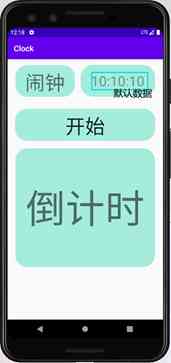
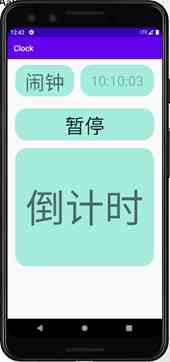
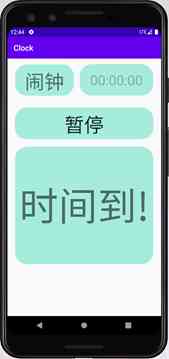
实验步骤:使用BoundService方式开启服务
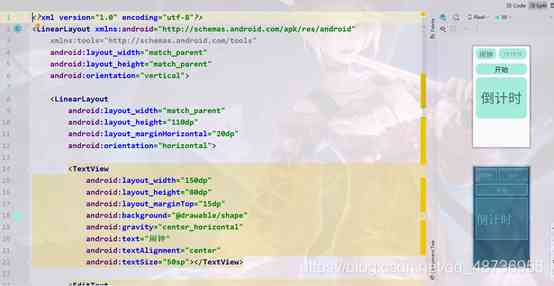
1、首先定义布局文件,这里不做过多赘述
3、 定义一个Service服务类,然后在类里面定义一个MyBinder的内部类,用于获取Service对象与Service对象状态。在内部类中必须要实现的方法onBind方法返回MyBinder服务对象。在内部类中定义一个getHandler方法获取Handler对象用于MainActivity和MyService之间的消息传递。
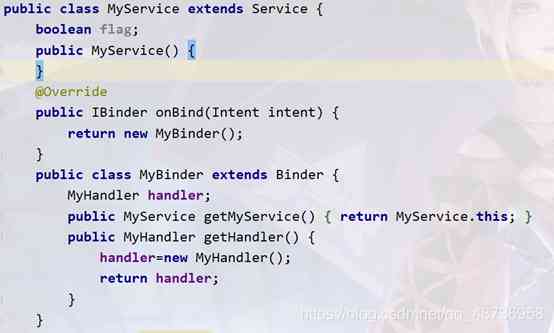
Handler消息传递关键代码如下:
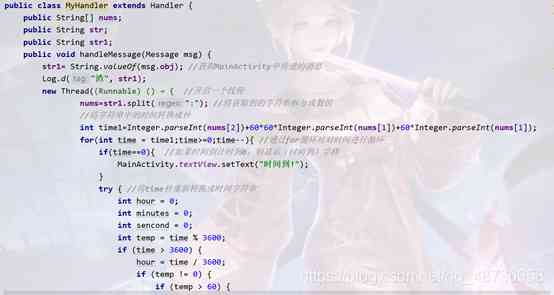
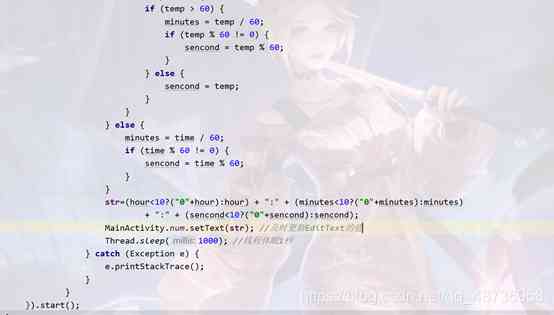
4、 创建MainActivity中的单击事件,
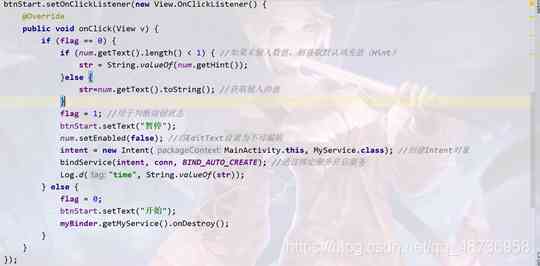
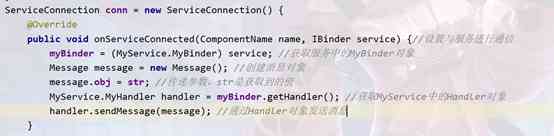
5、服务的绑定需要创建ServiceConnection对象并实现相应的方法,然后在重写的onServiceConnected方法中获取后台Service,代码如下:
- Activity_main.xml代码:
<?xml version="1.0" encoding="utf-8"?>
<LinearLayout xmlns:android="http://schemas.android.com/apk/res/android"
    xmlns:tools="http://schemas.android.com/tools"
    android:layout_width="match_parent"
    android:layout_height="match_parent"
    android:orientation="vertical">

    <LinearLayout
        android:layout_width="match_parent"
        android:layout_height="110dp"
        android:layout_marginHorizontal="20dp"
        android:orientation="horizontal">

        <TextView
            android:layout_width="150dp"
            android:layout_height="80dp"
            android:layout_marginTop="15dp"
            android:background="@drawable/shape"
            android:gravity="center_horizontal"
            android:text="闹钟"
            android:textAlignment="center"
            android:textSize="50sp"></TextView>

        <EditText
            android:autofillHints="true"
            android:hint="10:10:10"
            android:id="@+id/num"
            android:layout_width="match_parent"
            android:layout_height="80dp"
            android:layout_marginLeft="15dp"
            android:layout_marginTop="5dp"
            android:background="@drawable/shape"
            android:gravity="center"
            android:inputType="time"
            android:textSize="35sp"></EditText>
    </LinearLayout>

    <Button
        android:id="@+id/btnStart"
        android:layout_width="match_parent"
        android:layout_height="80dp"
        android:layout_marginHorizontal="20dp"
        android:layout_marginTop="15dp"
        android:background="@drawable/shape"
        android:text="开始"
        android:textSize="50sp"></Button>

    <TextView
        android:id="@+id/text1"
        android:layout_width="match_parent"
        android:layout_height="300dp"
        android:layout_margin="20dp"
        android:background="@drawable/shape"
        android:gravity="center"
        android:text="倒计时"
        android:textSize="100sp"></TextView>
</LinearLayout>
- MyService.java代码
package com.example.clock;
import android.app.Service;
import android.content.Intent;
import android.os.Binder;
import android.os.Handler;
import android.os.IBinder;
import android.os.Message;
import android.util.Log;
import android.widget.EditText;
public class MyService extends Service {


    public MyService() {


    }
    @Override
    public IBinder onBind(Intent intent) {


        return new MyBinder(); //必须实现的方法,用于活动与服务之间的绑定
    }
    public class MyBinder extends Binder {


        MyHandler handler;
        public MyService getMyService() {


            return MyService.this;
        }
        public MyHandler getHandler() {


            handler=new MyHandler();//初始化一个消息对象
            return handler; //返回该消息对象
        }
    }
    public class MyHandler extends Handler {


        public String[] nums;
        public String str;
        public String str1;
        public void handleMessage(Message msg) {


            str1= String.valueOf(msg.obj); //获取MainActivity中传递的消息
            Log.d("渣", str1);
            new Thread(new Runnable() {


                @Override
                public void run() {

     //开启一个线程
                    nums=str1.split(":"); //将获取到的字符串拆分成数组
                    //将字符串中的时间转换成秒
                    int time1=Integer.parseInt(nums[2])+60*60*Integer.parseInt(nums[1])+60*Integer.parseInt(nums[1]);
                    for(int time = time1;time>=0;time--){

    //通过for循环对对时间进行循环
                        if(time==0){

     //如果时间倒计时到0,则显示(时间到)字样
                            MainActivity.textView.setText("时间到!");
                        }
                        try {

    //将time秒重新转换成时间字符串
                            int hour = 0;
                            int minutes = 0;
                            int sencond = 0;
                            int temp = time % 3600;
                            if (time > 3600) {


                                hour = time / 3600;
                                if (temp != 0) {


                                    if (temp > 60) {


                                        minutes = temp / 60;
                                        if (temp % 60 != 0) {


                                            sencond = temp % 60;
                                        }
                                    } else {


                                        sencond = temp;
                                    }
                                }
                            } else {


                                minutes = time / 60;
                                if (time % 60 != 0) {


                                    sencond = time % 60;
                                }
                            }
                            str=(hour<10?("0"+hour):hour) + ":" + (minutes<10?("0"+minutes):minutes)
                                    + ":" + (sencond<10?("0"+sencond):sencond);
                            MainActivity.num.setText(str); //及时更新EditText的值
                            Thread.sleep(1000); //线程休眠1秒
                        } catch (Exception e) {


                            e.printStackTrace();
                        }
                    }
                }
            }).start();
        }
    }

    @Override
    public void onDestroy() {


        super.onDestroy();
    }
}
- MainAcivity.java
package com.example.clock;

import androidx.appcompat.app.AppCompatActivity;

import android.content.ComponentName;
import android.content.Intent;
import android.content.ServiceConnection;
import android.os.Binder;
import android.os.Bundle;
import android.os.Handler;
import android.os.IBinder;
import android.os.Message;
import android.util.Log;
import android.view.View;
import android.widget.Button;
import android.widget.EditText;
import android.widget.TextView;

public class MainActivity extends AppCompatActivity {


    MyService.MyBinder myBinder;
    public static EditText num;
    int flag = 0;
    String str;
    Intent intent;
   public static TextView textView;
    @Override
    protected void onCreate(Bundle savedInstanceState) {


        super.onCreate(savedInstanceState);
        setContentView(R.layout.activity_main);
        textView=findViewById(R.id.text1);
        final Button btnStart = (Button) findViewById(R.id.btnStart);
        num = (EditText) findViewById(R.id.num);
        btnStart.setOnClickListener(new View.OnClickListener() {


            @Override
            public void onClick(View v) {


                if (flag == 0) {


                    if (num.getText().length() < 1) {

    //如果未输入数值,则获取默认填充值(Hint)
                        str = String.valueOf(num.getHint());
                    }else {


                        str=num.getText().toString(); //获取输入的值
                    }
                    flag = 1; //用于判断按钮状态
                    btnStart.setText("暂停");
                    num.setEnabled(false); //将EditText设置为不可编辑
                    intent = new Intent(MainActivity.this, MyService.class); //创建启动Service的Intent对象
                    bindService(intent, conn, BIND_AUTO_CREATE); //绑定指定Service
                    Log.d("time", String.valueOf(str));
                } else {


                    flag = 0;
                    btnStart.setText("开始");
                    myBinder.getMyService().onDestroy();
                }
            }
        });
    }
    ServiceConnection conn = new ServiceConnection() {


        @Override
        public void onServiceConnected(ComponentName name, IBinder service) {

   //设置与服务进行通信
            myBinder = (MyService.MyBinder) service; //获取服务中的MyBinder对象
            Message message = new Message(); //创建消息对象
            message.obj = str; //传递参数,str是获取到的值
            MyService.MyHandler handler = myBinder.getHandler(); //获取MyService中的Handler对象
            handler.sendMessage(message); //通过Handler对象发送消息
        }

        @Override
        public void onServiceDisconnected(ComponentName name) {


        }
    };
}
版权声明
本文为[osc_35cfk3ig]所创,转载请带上原文链接,感谢
https://my.oschina.net/u/4354530/blog/4709340
边栏推荐
- 从编码、网络传输、架构设计揭秘腾讯云高质量、高可用实时音视频技术实践...
- Learning notes of nodejs
- 再读《重构》
- What really drags you down is sunk costs
- 程序人生|从网瘾少年到微软、BAT、字节offer收割机逆袭之路
- Android rights
- 2020.11.07面试总结(面试12k)
- Understanding data structures starts with this article~
- In the future, China Telecom will make cloud computing service the main business of China Telecom
- Chrome browser engine blink & V8
猜你喜欢

The choice of domain name of foreign trade self built website
The history of C1 research in Shenzhen
深圳C1考证历程

真正拖垮你的,是沉没成本
Understanding runloop in OC
After SQL group query, get the first n records of each group
What really drags you down is sunk costs
嘉宾专访|2020 PostgreSQL亚洲大会阿里云数据库专场:樊文凯
List of wechat video Number broadcasters October 2020
Android rights
随机推荐
[design pattern] Chapter 4: Builder mode is not so difficult
git 删除iml文件
Looking for better dynamic getter and setter solutions
From coding, network transmission, architecture design, Tencent cloud high quality, high availability real-time audio and video technology practice
Recommended tools for Mac
Chrome浏览器引擎 Blink & V8
解决IDEA快捷键 Alt+Insert 失效的问题
寻找性能更优秀的动态 Getter 和 Setter 方案
从编码、网络传输、架构设计揭秘腾讯云高质量、高可用实时音视频技术实践...
Review of hot spots of last week (11.2-11.8)
Pay attention to the request forwarding problem of. Net core
050_ object-oriented
Reading design patterns adapter patterns
“微服务”技术另一个可能更合适的名字
嗯,查询滑动窗口最大值的这4种方法不错....
抢球鞋?预测股市走势?淘宝秒杀?Python表示要啥有啥
Git delete IML file
SQL statement to achieve the number of daffodils
Interview summary on November 7, 2020 (interview 12K)
Method of creating flat panel simulator by Android studio