当前位置:网站首页>CEF下载,编译工程
CEF下载,编译工程
2022-07-03 09:05:00 【L-Super】
若要使用CEF,需要下载CEF。一般有两种方式:
- 编译源代码:需要使用svn或者git下载Chromium和CEF的源码。
- 自动构建版本:使用编译好内核的半成品,该版本提供了大部分已经编译完成的动态库及资源,只需要开发者手动编译一个wrapper静态库就可以了。
这里为了简化操作,更方便地体验CEF,而不是把大量时间浪费在编译源代码上,采用第二种方法。
下载CEF
官方下载网址:https://cef-builds.spotifycdn.com/index.html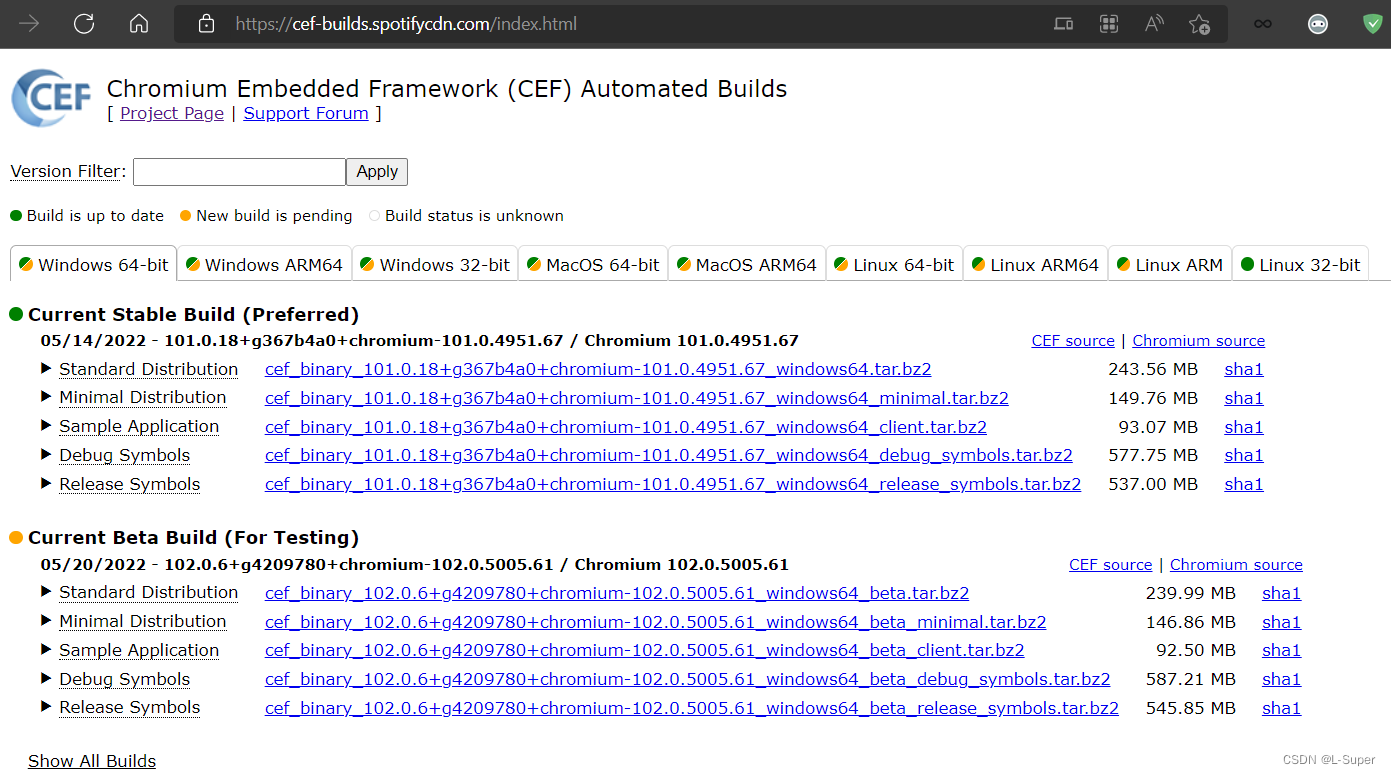
CEF自动构建了多个平台多个版本,这里选择Windows 64位平台的Standard Distribution文件。(国内环境下载有点慢,可使用特殊手段加快下载速度。)
不同平台拥有共同的结构,介绍一下Standard Distribution版本的文件夹结构:
- cmake:包含所有目标共享的CMake配置文件。
- Debug:包含 libcef.dll、 libcef.lib 和构建运行基于 CEF 的应用程序所需的其他组件的调试版本。默认情况下,这些文件应该放在与可执行文件相同的目录中,并作为构建过程的一部分复制到那里。CEF动态库(libcef.dll on Windows, libcef.so on Linux, “Chromium Embedded Framework.framework” on OS X)
- include:包含所有必需的CEF头文件。
- libcef_dll:包含libcef_dll_wrapper静态库的源代码,所有使用CEF C++API的应用程序都必须链接该库。
- Release:同Debug。包含 libcef.dll、 libcef.lib 和其他需要构建并运行基于CEF 的应用程序的发布版本
- Resources:包含 libcef.dll 所需的资源
- tests:演示CEF的用法demo及测试用例等。
每个二进制压缩包里包含一个README.txt文件和一个LICENSE.txt文件,README.txt用以描述平台相关的细节,而LICENSE.txt包含CEF的BSD版权说明。如果你发布了基于CEF的应用,则应该在应用程序的某个地方包含该版权声明。
请参阅二进制发行版中包含的 README.txt 文件,了解哪些文件是必需的,哪些可以安全地省略。
CMake构建
使用CMake进行CEF的项目构建,在Where is the source code框中选择下载并解压后的cef文件夹,在cef文件夹中创建一个文件夹“build”,在Where to build binaries框中选择这个build文件夹
![[外链图片转存失败,源站可能有防盗链机制,建议将图片保存下来直接上传(img-RPWZ2TrV-1653552385185)(C:\Users\Listening\AppData\Roaming\Typora\typora-user-images\image-20220526153048501.png)]](/img/d5/a06b8ee55e599e908a5b71eb323ce3.png)
依次点击CMake下方的Configure按钮,Generate按钮生成文件,我这里使用的是VS2022,同时,把CMAKE_INSTALL_PERFIX路径改了一下(随意)
![[外链图片转存失败,源站可能有防盗链机制,建议将图片保存下来直接上传(img-yncQBHpA-1653552336862)(C:\Users\Listening\AppData\Roaming\Typora\typora-user-images\image-20220526153251307.png)]](/img/dc/da283d4ad4348b18801af38d95feda.png)
![[外链图片转存失败,源站可能有防盗链机制,建议将图片保存下来直接上传(img-SnmEbCXB-1653552336863)(C:\Users\Listening\AppData\Roaming\Typora\typora-user-images\image-20220526153711810.png)]](/img/cb/5f77477bf1cc313a9db33b535b6fc4.png)
然后点击Open Project就会使用VS打开工程![[外链图片转存失败,源站可能有防盗链机制,建议将图片保存下来直接上传(img-htf4sLWQ-1653552336863)(C:\Users\Listening\AppData\Roaming\Typora\typora-user-images\image-20220526154016868.png)]](/img/43/d3406e87ba4274833a416af3d2a6e6.png)
- ALL_BUILD与ZERO_CHECK:是cmake自动生成的辅助工程。
- cef_gtest和ceftests:都是测试模块
- cefclient:一个包含CEF各种API演示的浏览器程序Demo。
- cefsimple:一个简单的CEF浏览器程序Demo。
- libcef_dll_wrapper:对libcef库的C++代码封装。上述cefclient与cefsimple都会用它。
这里可以直接对cefclient右键设置为启动项,Ctrl + F5开始执行程序。![[外链图片转存失败,源站可能有防盗链机制,建议将图片保存下来直接上传(img-GPBKZr8D-1653552336864)(C:\Users\Listening\AppData\Roaming\Typora\typora-user-images\image-20220526154731184.png)]](/img/12/e494c681a13e98d92f3898b5676f24.png)
等待一会儿,然后程序就执行起来了,默认打开的是谷歌首页,如果打开的空白,是因为无法访问谷歌导致的。![[外链图片转存失败,源站可能有防盗链机制,建议将图片保存下来直接上传(img-VxriQKGZ-1653552336864)(C:\Users\Listening\AppData\Roaming\Typora\typora-user-images\image-20220526154904965.png)]](/img/5d/fde546ccc41f177aa0309b919615c0.png)
可以直接在VS中搜索www.google.com去更改代码,发现它在cefclient-browser-main_context_impl.cc文件里,把它改为www.baidu.com再运行就正常了。![[外链图片转存失败,源站可能有防盗链机制,建议将图片保存下来直接上传(img-Xz9DeEI9-1653552336865)(C:\Users\Listening\AppData\Roaming\Typora\typora-user-images\image-20220526155643031.png)]](/img/03/10ac5199085b2c80ba0e6e56a47c27.png)
![[外链图片转存失败,源站可能有防盗链机制,建议将图片保存下来直接上传(img-eHKJEn6p-1653552336866)(C:\Users\Listening\AppData\Roaming\Typora\typora-user-images\image-20220526155928039.png)]](/img/4d/7156d19a5e6e890e686e4bbcdfcde7.png)
cefsimple同理,在cefsimple->simpleapp.cc里
  url = command_line->GetSwitchValue("url");
  if (url.empty())
    url = "http://www.google.com";//改为其他网址即可
);
编译libcef_dll_wrapper
其实最重要的libcef_dll_wrapper是不是发现还没编译,当然不是,我们在编译cefclient的时候,就顺带编译了。
生成路径
build\libcef_dll_wrapper\Debug\libcef_dll_wrapper.lib
我们也可以查看项目,会发现这个库早已经在项目属性里设置好了。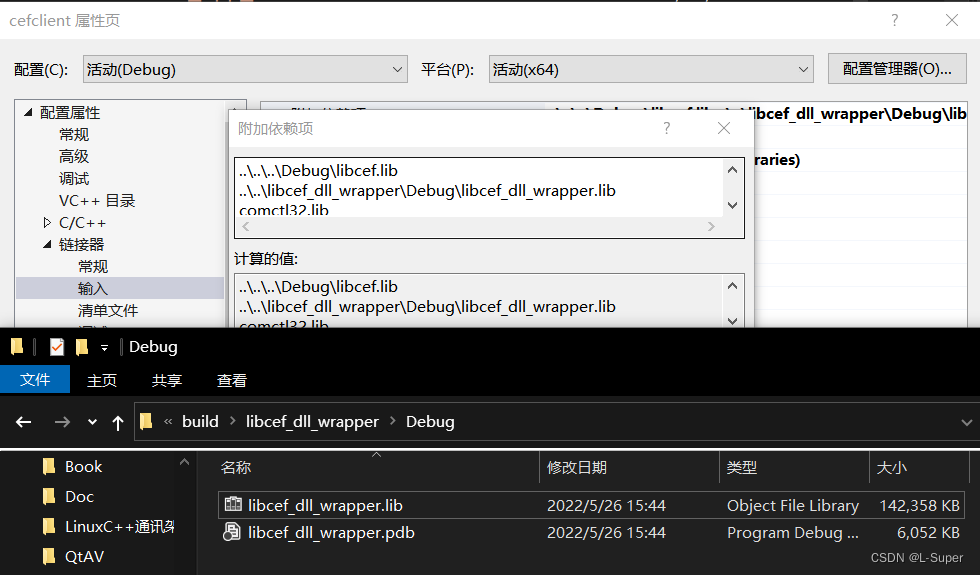
边栏推荐
- Desktop icon recognition based on OpenCV
- Process communication - semaphore
- Install database -linux-5.7
- Leetcode daily question (1856. maximum subarray min product)
- Alibaba cloud notes for the first time
- Run flash demo on ECS
- UCI and data multiplexing are transmitted on Pusch (Part 4) --small block lengths
- Spark overview
- 全球KYC服务商ADVANCE.AI 活体检测产品通过ISO国际安全认证 产品能力再上一新台阶
- Make the most basic root file system of Jetson nano and mount NFS file system on the server
猜你喜欢
![[csdn] C1 analyse des questions de formation Partie III Bar _ JS Foundation](/img/b2/68d53ad09688f7fc922ac65e104f15.png)
[csdn] C1 analyse des questions de formation Partie III Bar _ JS Foundation

小王叔叔的博客目录【持续更新中】
Hudi quick experience (including detailed operation steps and screenshots)

Leetcode daily question (2090. K radius subarray averages)

Error output redirection
Matlab reads hexadecimal numbers and converts them into signed short
Modify idea code
顺利毕业[2]-学生健康管理系统 功能开发中。。。
Vscode Arduino installation Library

UCI and data multiplexing are transmitted on Pusch (Part V) -- polar coding
随机推荐
Nodemcu-esp8266 development (vscode+platformio+arduino framework): Part 2 --blinker_ Hello_ WiFi (lighting technology - Mobile App control routine)
Flink学习笔记(八)多流转换
Solve the problem of disordered code in vscode development, output Chinese and open source code
CATIA automation object architecture - detailed explanation of application objects (III) systemservice
Learning C language from scratch -- installation and configuration of 01 MinGW
numpy. Reshape() and resize() functions
LeetCode每日一题(1996. The Number of Weak Characters in the Game)
Quickly use markdown to edit articles
Leetcode daily question (1362. closest divisors)
Development of fire evacuation system
Flink-CDC实践(含实操步骤与截图)
【順利畢業】[1]-遊覽 [學生管理信息系統]
专利查询网站
Shell logic case
Implementing distributed lock with redis
Leetcode daily question (745. prefix and suffix search)
Modify idea code
307. Range Sum Query - Mutable
Leetcode daily question (1856. maximum subarray min product)
Apply for domain name binding IP to open port 80 record