当前位置:网站首页>PolyWorks script development learning notes (4) - data import and alignment using file import
PolyWorks script development learning notes (4) - data import and alignment using file import
2022-07-03 09:25:00 【zeng31403】
Polyworks Script development learning notes ( Four )- utilize FILE IMPORT Import and align data
Import reference and data
- FILE IMPORT_REFERENCE Import referenced CAD Documents such as igs Format
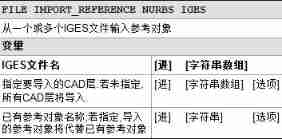
The parameters in brackets are ( Import file path ,CAD layer -, Original file path )
FILE IMPORT_REFERENCE NURBS IGES ( “D:\CAD\11.igs”, , ) Import CAD file D:\CAD\11.igs
FILE IMPORT_REFERENCE NURBS IGES ( “D:\CAD\11.igs”,“aa” , ) Import CAD file D:\CAD\11.igs Of "aa" layer
FILE IMPORT_REFERENCE NURBS IGES ( {“D:\CAD\11.igs”,“D:\CAD\22.igs”}, , )
Import two... As a string array CAD file D:\CAD\11.igs and D:\CAD\22.igs
FILE IMPORT_REFERENCE NURBS IGES ( “D:\CAD\11.igs”, “D:\CAD\22.igs”)
Import "D:\CAD\11.igs" replace "D:\CAD\22.igs"
Of course , It is also possible to import triangulated models as reference data , as follows :
FILE IMPORT_REFERENCE POLYGONAL_MODEL ( “D:\PtCloud\111.stl”, “stl”, )
- FILE IMPORT_DATA Import the compared data
There are many formats for importing triangulated data, as follows , The most commonly used is stl Format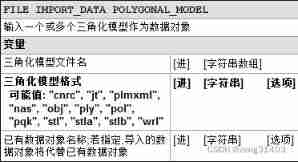 FILE IMPORT_DATA POLYGONAL_MODEL( “D:\PtCloud\111.stl”, “stl”, ) Import “D:\PtCloud\111.stl” As comparison data
FILE IMPORT_DATA POLYGONAL_MODEL( {“D:\PtCloud\111.stl”,“D:\PtCloud\222.stl”}, “stl”, )
Import “D:\PtCloud\111.stl” “D:\PtCloud\222.stl" Multiple triangulated data are used as comparison data
FILE IMPORT_DATA POLYGONAL_MODEL( “D:\PtCloud\111.stl”, “stl”,“D:\PtCloud\222.stl” )
Import “D:\PtCloud\111.stl” replace "D:\PtCloud\222.stl”
Set best fit alignment
Best fit alignment , Is to compare the data DATA And reference data REFERENCE A simple method of alignment using best fit
Using scripts requires setting alignment parameters first , Then the alignment method is realized .
For example, using best fit will 111.stl And 11.igs alignment 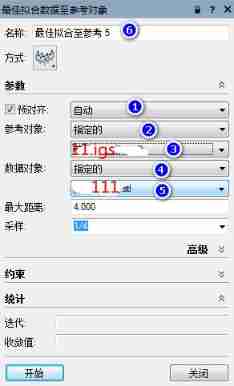
Set specified ( step 2) Reference objects for 11.igs( step 3)
Set specified ( step 4) Data objects for 111.stl( step 5)
Use pre alignment ( step 1) Align the best fit of the above data object to the reference object , Name it " Best fit to reference 5"( step 6)
ALIGN BEST_FIT DATA_TO_REFERENCE OPTIONS CREATE REFERENCE_OBJECTS ( “Specific” ) step 2
ALIGN BEST_FIT DATA_TO_REFERENCE OPTIONS CREATE REFERENCE_OBJECTS SPECIFIC ( “11.igs” ) step 3
ALIGN BEST_FIT DATA_TO_REFERENCE OPTIONS CREATE DATA_OBJECTS ( “Specific” ) step 4
ALIGN BEST_FIT DATA_TO_REFERENCE OPTIONS CREATE DATA_OBJECTS SPECIFIC ( “111.stl” ) step 5
ALIGN BEST_FIT DATA_TO_REFERENCE CREATE FIT_TO_REFERENCE_OBJECT_SURFACES USING_PRE_ALIGNMENT AUTOMATIC ( “ Best fit to reference 5” ) step 1+ step 6
边栏推荐
- Move anaconda, pycharm and jupyter notebook to mobile hard disk
- Explanation of the answers to the three questions
- Go language - JSON processing
- 【Kotlin学习】运算符重载及其他约定——重载算术运算符、比较运算符、集合与区间的约定
- About the configuration of vs2008+rade CATIA v5r22
- Just graduate student reading thesis
- Hudi 数据管理和存储概述
- [point cloud processing paper crazy reading cutting-edge version 12] - adaptive graph revolution for point cloud analysis
- Word segmentation in full-text indexing
- [point cloud processing paper crazy reading frontier version 10] - mvtn: multi view transformation network for 3D shape recognition
猜你喜欢
![[point cloud processing paper crazy reading frontier edition 13] - gapnet: graph attention based point neural network for exploring local feature](/img/66/2e7668cfed1ef4ddad26deed44a33a.png)
[point cloud processing paper crazy reading frontier edition 13] - gapnet: graph attention based point neural network for exploring local feature

Hudi 集成 Spark 数据分析示例(含代码流程与测试结果)
![[point cloud processing paper crazy reading classic version 14] - dynamic graph CNN for learning on point clouds](/img/7d/b66545284d6baea2763fd8d8555e1d.png)
[point cloud processing paper crazy reading classic version 14] - dynamic graph CNN for learning on point clouds
![[point cloud processing paper crazy reading frontier version 11] - unsupervised point cloud pre training via occlusion completion](/img/76/b92fe4549cacba15c113993a07abb8.png)
[point cloud processing paper crazy reading frontier version 11] - unsupervised point cloud pre training via occlusion completion

IDEA 中使用 Hudi
![[point cloud processing paper crazy reading frontier version 8] - pointview gcn: 3D shape classification with multi view point clouds](/img/ee/3286e76797a75c0f999c728fd2b555.png)
[point cloud processing paper crazy reading frontier version 8] - pointview gcn: 3D shape classification with multi view point clouds
Solve POM in idea Comment top line problem in XML file

npm install安装依赖包报错解决方法
[graduation season | advanced technology Er] another graduation season, I change my career as soon as I graduate, from animal science to programmer. Programmers have something to say in 10 years
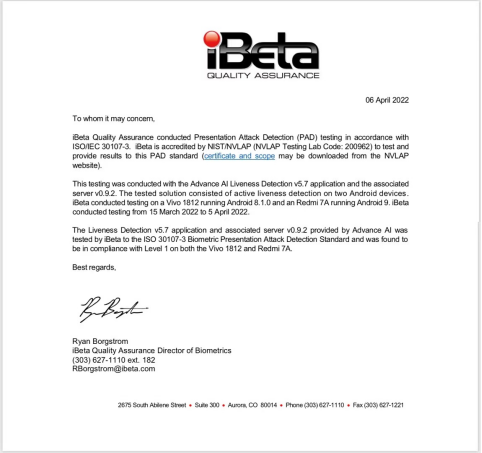
全球KYC服务商ADVANCE.AI 活体检测产品通过ISO国际安全认证 产品能力再上一新台阶
![[graduation season | advanced technology Er] another graduation season, I change my career as soon as I graduate, from animal science to programmer. Programmers have something to say in 10 years](/img/7d/f69ef6805c38fcef6fef2df9ed0d70)
随机推荐
Introduction to the basic application and skills of QT
Construction of simple database learning environment
Hudi integrated spark data analysis example (including code flow and test results)
【点云处理之论文狂读前沿版13】—— GAPNet: Graph Attention based Point Neural Network for Exploiting Local Feature
The idea of compiling VBA Encyclopedia
【点云处理之论文狂读前沿版8】—— Pointview-GCN: 3D Shape Classification With Multi-View Point Clouds
Flask+supervisor installation realizes background process resident
Flink学习笔记(十一)Table API 和 SQL
CSDN markdown editor help document
On February 14, 2022, learn the imitation Niuke project - develop the registration function
全球KYC服务商ADVANCE.AI 活体检测产品通过ISO国际安全认证 产品能力再上一新台阶
2022-2-14 learning xiangniuke project - Session Management
Hudi 数据管理和存储概述
Modify idea code
LeetCode每日一题(931. Minimum Falling Path Sum)
Hudi quick experience (including detailed operation steps and screenshots)
Temper cattle ranking problem
[set theory] order relation (eight special elements in partial order relation | ① maximum element | ② minimum element | ③ maximum element | ④ minimum element | ⑤ upper bound | ⑥ lower bound | ⑦ minimu
【Kotlin学习】运算符重载及其他约定——重载算术运算符、比较运算符、集合与区间的约定
The server denied password root remote connection access