当前位置:网站首页>Shell_ 00_ First meeting shell
Shell_ 00_ First meeting shell
2022-07-06 16:50:00 【Coke loving w】
Shell_00_ First time to know Shell
Shell Basics
CLI(Command Line Interface): Command line interface
1)CLI Only accept text input , And only output text and basic graphics ;
2)Linux After system startup , Create by default in the system memory 5~6 individual CLI Terminal session running
// It can be done by Ctrl+Alt+(F2~F7) Switch ,F1 For graphical interface
Shell: Users and Linux Kernel interactive program ( be based on C Language writing )
| Shell species | explain |
|---|---|
| csh (C Shell) | Grammatical similarity C Language , Internal orders 52 individual At present, it is not used much , Has been /bin/tcsh replaced |
| Ksh (Korn Shell) | Grammatical similarity Bourne Shell, Internal orders 42 individual Have csh Easy to use features , be relative to bash A little restrictive |
| tcsh | Belong to csh Enhanced Edition , And csh Fully compatible with |
| sh | It belongs to shortcut Has been /bin/bash replaced |
| zch | Linux The largest in Shell, Internal orders 84 individual More complex to use , Rarely use this Shell |
| bash | CentOS By default, the system uses Shell |
1)bash The path of is :/bin/bash;
2) stay /etc/passwd The last field in each row is the user's default shell
Bash Shell
Bash(GNU Bourne-Again Shell): A number of Linux The default in the distribution Shell Interpreter
1) The following is from Shell Name instead of Bash Shell name ;
2)Bash Shell The essence is a program ( When running , It becomes a process )
Shell function
(1) Record historical orders (history)
1)“~/.bash_histroy” Record all commands executed by login ( Default 1000 individual );
2) The command executed by login is stored in memory , After logging off the system, the memory records it to ~/.bash_history file ;
3) The number of recorded commands can be modified HISTFILESIZE To increase / Reduce
history command : operation Shell The historical order in the book
Command format 1:histroy n
1)N Is the number , According to recent N Historical orders
2) If there is no N, Then all historical commands are displayed by default
Command format 2:history Options // Operate on historical commands
| Options | meaning |
|---|---|
| -c | Will the current Shell All in history Content removal |
| -a | Will add history Cache is written to ~/.bash_history In file |
| -r | take ~/.bash_history The contents of the document read history In cache |
| -w | The current history Cache is written to ~/.bash_history In file |
! command : Carry out section N History commands
Command format :!N
//!! Is to execute the last command
(2) command / File completion function (Tab)
1) Command only / Prefix of file name , adopt Tab Key can automatically complete ;
2) If there are multiple commands / The prefix of the file name is the same , Then list all specific names
(3) Command alias settings (alias)
1) To configure “~/.bashrc” File implementation command alias
alias command : Set alias command ( Temporary settings )
Command format :alias The alias command =‘ command Options ’
1) Direct input alias Then all alias commands are displayed
unalias command : Cancel command alias
Command format :unalias The alias command
(4) Programming script (shell scripts)
(5) task management 、 The front desk 、 Backstage control (job control、foreground、background)
(6) wildcard (Wilecard)
Father / Son Shell
Father Shell: Sign in CLI or GUI When running the terminal emulator in , Interaction started by default Shell
Son Shell: In the father Shell Under the environment of , New created by invoking the command Shell Program
1) Son Shell Only the father can inherit Shell The global environment variable of ;
bash command : establish / Callers Shell
Command format :bash Options
| Options | meaning |
|---|---|
| -c command | Callers Shell After executing the specified command , And return to the parent Shell |
| -i | Create a child Shell, And enter the sub Shell |
| -l | With login shell Form creation sub Shell, And enter the sub Shell |
| -r | Create a child Shell, And enter the sub Shell Dan Zi Shell Cannot switch directories |
exit command : sign out Shell
Command format :exit
1) if Shell Itself is a child Shell, Will return to the relative child Shell The father of Shell;
2) if Shell Itself is the highest level Shell, It will close Shell;
Such as : Callers Shell Execute the specified command 
Such as : Create a child Shell, And enter the sub Shell Then return to the father Shell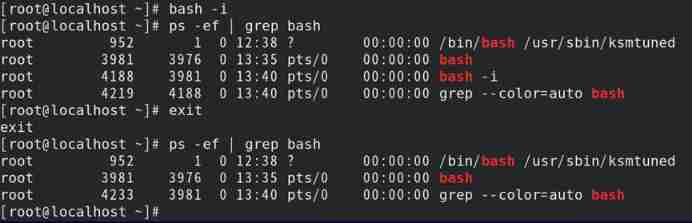
Such as : Create restricted child Shell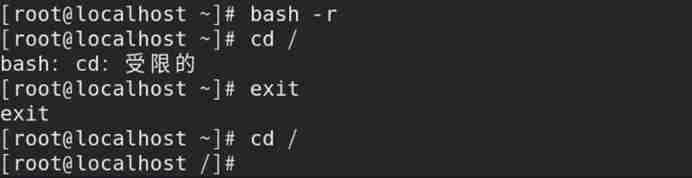
Built in command
External command ( File system commands ):Bash Shell Outside the program
1) Usually located in /bin、/usr/bin、/sbin or /usr/sbin in ;
3) Call external command , You need to specify the absolute path of the external command ;
2) When invoking an external command , By default, create a child Shell Run external commands ;
which command : Query the full path of the command according to the command name
Command format :which Options Command name
| Options | meaning |
|---|---|
| -a | Put all PATH The commands found in the directory are listed |
| -v | Display the version information of the command |
1) The essence is based on environmental variables (PATH) The path specified , Go to query the file name
2) There are no options , The first full path found is displayed by default
Such as : Inquire about ls The full path of the command 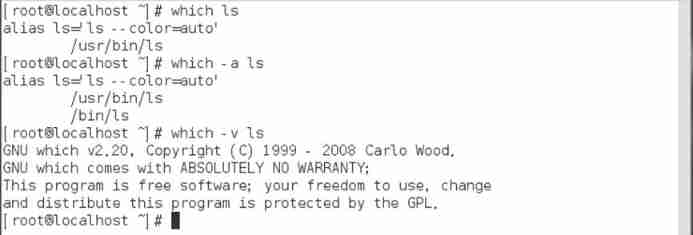
Internal key command :Bash Shell Component part ( Compile into one )
1) The internal key command defaults to the parent Shell Run in ;
type command : Query whether the command is Bash shell Built in commands
Command format :type Options Command name
| Options | meaning |
|---|---|
| -a | take PATH In the path of variable definition All file paths containing the command name are listed ( Include alias) |
| -p | The command is an external command , Will display the full file path If it were not for external orders , Then no data is displayed |
| -t | Command attributes are represented by special fields |
1)type Commands are similar in nature which command : Find the execution file
2) The special field is :file( External command )、alias( Command alias )、builtin( Internal key command )
Common internal key commands are as follows :
| command | function |
|---|---|
| : | Extended parameter list , Perform the redirection operation |
| . | Read and execute the command in the specified file |
| alias | Specify the command definition alias |
| bg | Run the task in background mode |
| bind | Bind the keyboard sequence to a readline Function or macro |
| break | Exit loop |
| builtin | Execute specified Shell Built in command |
| caller | Returns the context of the active subfunction call |
| cd | Toggle directory |
| command | Execute the specified command , Don't make Shell lookup |
| compgen | Specify word generation possible completion matches |
| complete | Display the specified word completion process |
| compopt | Modify the completion options for the specified word |
| continue | Skip this cycle , So let's do the next loop |
| declare | Declare variables or variable types |
| dirs | List the current storage directory |
| disown | Delete the task specified in the task column |
| echo | Output the specified text to stdout |
| enable | Enable / Disable the specified built-in command |
| eval | Splice the specified parameters into one command , And implement |
| exec | Specify command substitution Shell process |
| exit | mandatory Shell Exit with the specified exit status code |
| export | Specify the variable as the environment variable |
| fc | Select a command from the history |
| fg | Transfer the task to the foreground to run |
| getopts | Analyze the specified positional parameters |
| hash | Query and record the full pathname of the specified command |
| help | List the help documents |
| history | Display the history of the command |
| jobs | Make a list of tasks |
| kill | To specify the PID The process signals |
| let | Calculates each parameter in a mathematical expression |
| local | Create a variable with limited scope in the function |
| logout | sign out Shell |
| mapfile | from stdin Read data row , And join the index data group |
| popd | Delete record from directory stack |
| printf | Displays text using a formatted string |
| pushd | Add a directory to the directory stack |
| pwd | Displays the path of the current working directory |
| read | from stdin Read a row of data , And assign it to the specified variable |
| readarray | from stdin Read data row , And put it into the index data group |
| readonly | from stdin Read a row of data , And assign it to a read-only variable |
| return | Force the function to exit with the specified value |
| set | Sets and displays the values and values of environment variables Shell attribute |
| shift | Move the position parameters in turn |
| shopt | open / Close control Shell Variable value for optional behavior |
| source | Read and execute the command in the specified file |
| suspend | Pause Shell Implementation , Until receipt SIGCONT The signal |
| test | Returns the exit status code based on the specified condition 0 or 1 |
| times | Displays the accumulated user and system time |
| trap | If the specified system signal is received , Then execute the specified command |
| type | Detect whether it is a built-in command |
| typeset | Declare variables or variable types |
| ulimit | Set the specified resource limit for system users |
| umask | Specify the default mask for document permissions |
| unalias | Delete the specified alias |
| unset | Delete the specified environment variable or Shell attribute |
| wait | Wait for the specified process to complete , And return the exit status code |
边栏推荐
- Chapter 6 datanode
- ~69 other ways to use icon fonts
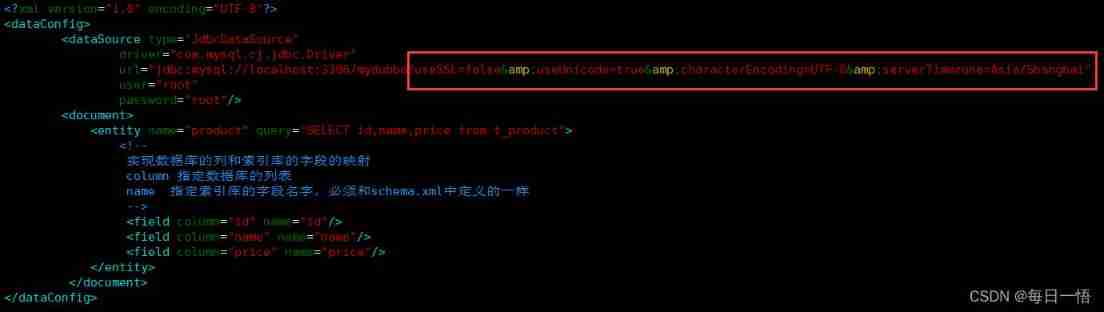
- Data config problem: the reference to entity 'useunicode' must end with ';' delimiter.
- LeetCode 1560. The sector with the most passes on the circular track
- 音视频开发面试题
- 第一章 MapReduce概述
- Summary of game theory
- Tert butyl hydroquinone (TBHQ) Industry Research Report - market status analysis and development prospect forecast
- Solr word segmentation analysis
- Soft music -js find the number of times that character appears in the string - Feng Hao's blog
猜你喜欢
第5章 消费者组详解
字节跳动开源GAN模型压缩框架,算力最高节省97.8%丨ICCV 2021
~81 long table
解决Intel12代酷睿CPU单线程调度问题(二)
JS encapsulates the method of array inversion -- Feng Hao's blog

I'm "fixing movies" in ByteDance
Data config problem: the reference to entity 'useunicode' must end with ';' delimiter.

~87 animation
~74 JD top navigation bar exercise
~79 Movie card exercise
随机推荐
~79 Movie card exercise
LeetCode 1638. Count the number of substrings with only one character difference
Introduction to microservices
Spark independent cluster dynamic online and offline worker node
Bisphenol based CE Resin Industry Research Report - market status analysis and development prospect forecast
~84 form supplement
Research Report on market supply and demand and strategy of double drum magnetic separator industry in China
LeetCode 1584. Minimum cost of connecting all points
Chapter III principles of MapReduce framework
7-4 harmonic average
Simple records of business system migration from Oracle to opengauss database
亮相Google I/O,字节跳动是这样应用Flutter的
Chapter 5 namenode and secondarynamenode
Cmake error: could not create named generator visual studio 16 2019 solution
Solr new core
Chapter 5 detailed explanation of consumer groups
I'm "fixing movies" in ByteDance
Research Report on market supply and demand and strategy of China's four seasons tent industry
Market trend report, technological innovation and market forecast of China's double sided flexible printed circuit board (FPC)
Market trend report, technological innovation and market forecast of double door and multi door refrigerators in China