当前位置:网站首页>Wechat applet basic learning (wxss)
Wechat applet basic learning (wxss)
2022-07-02 23:32:00 【Jenny_ Ghost】
WXSS (WeiXin Style Sheets) It's a style language , Used to describe WXML Component style .
WXSS Used to decide WXML How should components of .
And CSS comparison ,WXSS The extended features are : Unit size and style import
One 、 Writing position
1.1 inline style
<text style="background-color: aqua;font-size: 20px;"> inline style </text>
1.2 Page style
Written in .wxss In file
.wxsstest01{
    height: 30px;
    width: 200px;
    background-color: rgba(146, 146, 236, 0.692);
    font-size: 30px;
}
1.3 Global style
Global style is written in app.wxss in , The style is global On the page They can be used directly , But it cannot be applied to components
1.4 priority
inline > On page > overall situation ;
Can pass !important To increase priorities
1.5wxss Import of
Use @import You can import other wxss The style file
Two 、wxss Unit of size of
rpx(responsive pixel): You can adapt to the width of the screen . Set the screen width to 750rpx. If in iPhone6 On , The screen width is 375px, share 750 Individual physical pixels , be 750rpx = 375px = 750 Physical pixel ,1rpx = 0.5px = 1 Physical pixel .
3、 ... and 、 Selectors

Four 、flex Layout
wxss Medium flex Layout and css Of flex The layout is the same , You can look forward CSS Medium flex Layout to learn
5、 ... and 、 Style base library
When using the style base library , You need to change the page structure 、 Page style (style in )、 Copy the page logic
Application components should be in .json Declare the component path in the file .
6、 ... and 、 Components
You can see more detailed component contents in the official documents of wechat
6.1view Components
view A component is a block level element , The default effect is arranged vertically
view Some properties of the component 
hover-stop-propagation You need to use double braces to write true and false
<view hover-class="tap" hover-start-time="0" hover-stay-time="0" hover-stop-propagation="{
   {true}}">111</view>
6.2text Components
text Components can only be nested inside text Components , You can't change the size freely without exclusive row , But it can go through display Property to modify
text Some properties of

decode Combined with space escape character
<text space="emsp" selectable="{
{true}}">1 1 1</text>
<text space="ensp">1 1 1</text>
<text space="nbsp">1 1 1</text>
<text decode="{
{true}}">1 1</text> The blue part is selected
6.3image Components

mode The legal value of 
Use it directly src To import local pictures
6.4icon Components
 type The valid values of can only be :
success, success_no_circle, info, warn, waiting, cancel, download, search, clear
 adopt color You can directly change the color of the icon
6.5button Components
button Components are generally used to receive user clicks to perform different logic
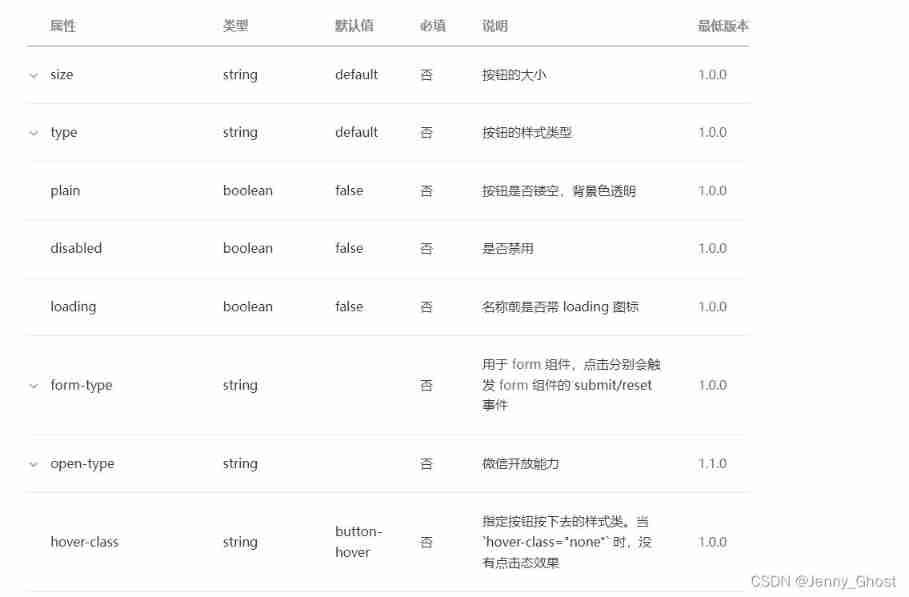
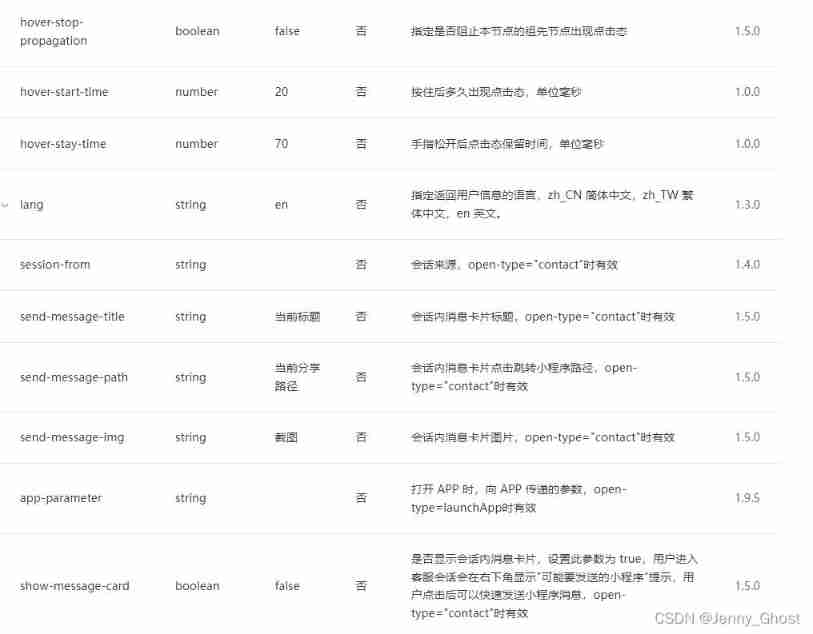
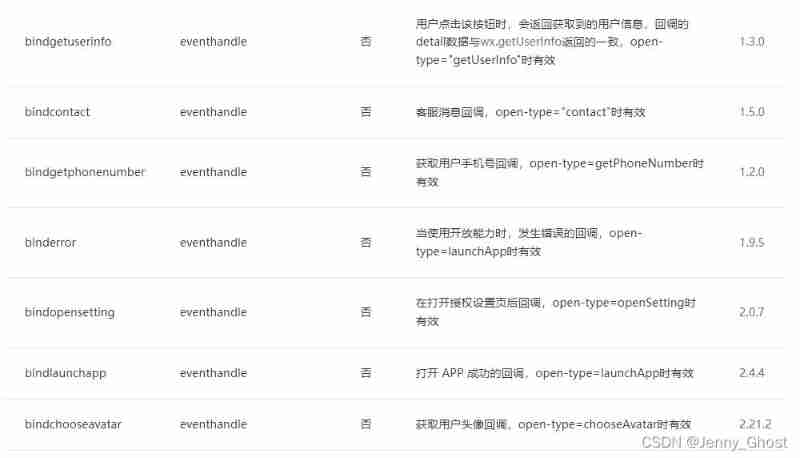
button Properties of :
①size The property value is default Default size and mini Small size
②type Attribute is the style of the button , The property value is default white ,primary green ,warn Three colors of red 3
③plain Attribute indicates hollowed out effect , The following figure shows the hollowed out effect

④loading Attribute will display the icon of loading style in front of the button 
⑤from-type be used for from Components , Clicking on the respective will trigger form Component's submit( Submit Form )/reset( Reset form ) event
6.6swiper+swiper-item
swiper Refers to the slider trying to container , Only place swiper-item Components , Otherwise, it will lead to undefined behavior , It is often used in the carousel .
swiper Not used alone , Only in swiper Nested in tags swiper-item The content will be displayed after the label .

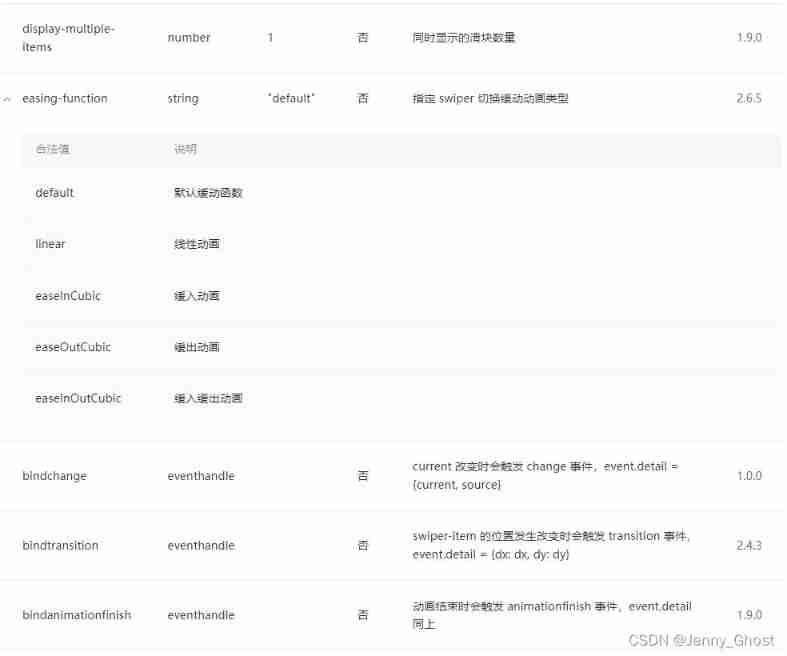
The following code is a simple rotation diagram ,WXSS The code is not released separately , Using the following code directly, the image will be stretched , The default value of the property is true when , Don't write { {true}}.
Through to image The label binding click event can realize the jump effect when clicking on the image
<swiper class="lbt"
indicator-dots="{
   {true}}"
indicator-color="white"
indicator-active-color="blue"
autoplay="{
   {true}}"
interval="3000"
circular>
    <swiper-item>
    <image src="https://i0.hdslb.com/bfs/archive/[email protected]_378h_1c.webp" class="image"></image>
    </swiper-item>
    <swiper-item>
    <image src="https://i2.hdslb.com/bfs/archive/[email protected]_378h_1c.webp" class="image"></image>
    </swiper-item>
</swiper>
The effect of the rotation map
6.6.1 Jump effect :
stay .js Use... In the document wx.navigateTo({url:'UUURRRLLL'}) Realize page Jump , After the jump , In the jump page, you can get the attribute value of the object clicked during the jump .
    _handleTap:function(){
        wx.navigateTo({
          url: '/page/1-view/1-view',
        })
},边栏推荐
- Convolution和Batch normalization的融合
- Strictly abide by the construction period and ensure the quality, this AI data annotation company has done it!
- 实现BottomNavigationView和Navigation联动
- Why does RTOS system use MPU?
- ping域名报错unknown host,nslookup/systemd-resolve可以正常解析,ping公网地址通怎么解决?
- Arduino - character judgment function
- Prometheus deployment
- RuntimeError: no valid convolution algorithms available in CuDNN
- 阿里云有奖体验:如何使用 PolarDB-X
- 采用VNC Viewer方式远程连接树莓派
猜你喜欢

基于FPGA的VGA协议实现

第三方支付功能测试点【杭州多测师_王sir】【杭州多测师】
What if win11 can't turn off the sticky key? The sticky key is cancelled but it doesn't work. How to solve it

MarkDown基本语法
Data set - fault diagnosis: various data and data description of bearings of Western Reserve University

程序员版本的八荣八耻~
Detailed explanation of 'viewpager' in compose | developer said · dtalk
采用VNC Viewer方式遠程連接樹莓派
Load balancing cluster (LBC)
密码技术---分组密码的模式
随机推荐
高数有多难?AI 卷到数学圈,高数考试正确率 81%!
How difficult is it to be high? AI rolls into the mathematics circle, and the accuracy rate of advanced mathematics examination is 81%!
C#中Linq用法汇集
Redis expiration policy +conf record
Use of recyclerview with viewbinding
密码技术---分组密码的模式
20220524_ Database process_ Statement retention
YOLOX加强特征提取网络Panet分析
Which common ports should the server open
Ideal car × Oceanbase: when the new forces of car building meet the new forces of database
Temperature measurement and display of 51 single chip microcomputer [simulation]
数据集-故障诊断:西储大学轴承的各项数据以及数据说明
潘多拉 IOT 开发板学习(HAL 库)—— 实验3 按键输入实验(学习笔记)
海思 VI接入视频流程
Prometheus deployment
Use the scroll bar of souI when using the real window in souI
[proteus simulation] 51 MCU +lcd12864 push box game
Win11启用粘滞键关闭不了怎么办?粘滞键取消了但不管用怎么解决
[error record] the flutter reports an error (could not resolve io.flutter:flutter_embedding_debug:1.0.0.)
PHP get real IP